

Acquire XAS Spectra
Prepare a Dataset from a measurement file.
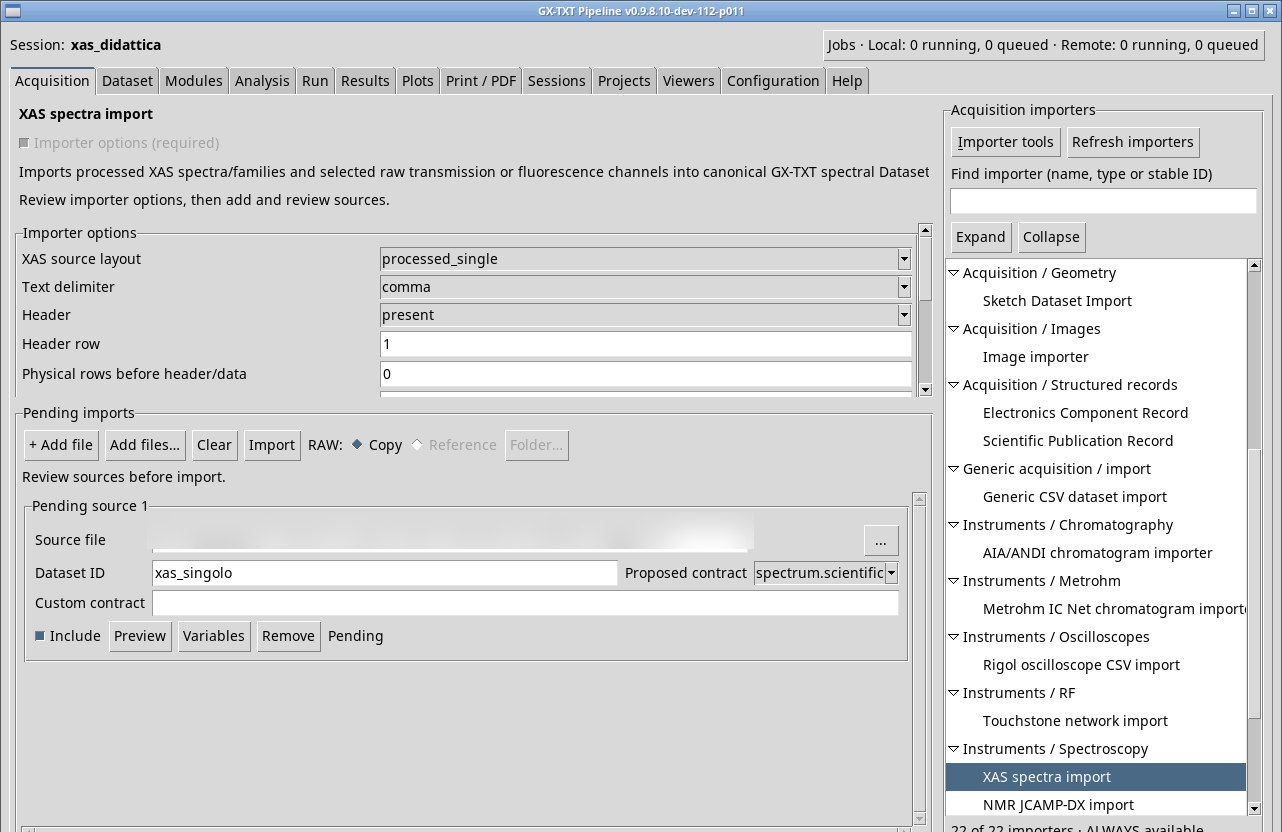
Add file to Acquisition
- Open the destination Session. In Acquisition, find
XASor expand Instruments / Spectroscopy and select XAS spectra import. - Configure Importer options (required). The importer applies those options to the group of queued files. Import files with different layouts separately, as in the examples.
- Press + Add file or Add files…. If the picker filter hides a tab-separated .tsv file, enter its filename. Leave the row checked to include it and choose a unique Dataset ID. Check Proposed contract, using
spectrum.familyfor a family orspectrum.scientificfor a single curve. - Preview and Variables open Dataset for the queued source. The first view lets you check the text and the second lets you inspect variables. To select XAS columns, return to Acquisition → Importer options and use the importer fields. Remove removes a row and Clear clears the queue. Import acquires checked rows into the Session. Wait for the Dataset to appear in Dataset.
Choose the physical layout
- processed_family
- The initial layout. It uses one shared energy column and several precomputed absorption columns. Use First processed spectrum column and Last processed spectrum column (0 = final column) to choose the inclusive range, such as 2–5. Use 0 to include through the last column. The conversion creates a family in column order.
- processed_single
- For a single precomputed absorption column. Set Processed mu(E) column, which defaults to 2. This produces a single spectrum.
- raw_transmission
- Derives μ(E) from transmitted signals. In Raw numerator columns (semicolon separated), enter the incident intensity columns, such as
2. In Raw denominator columns (semicolon separated), enter the transmitted intensity columns, such as3. The returned quantity isln(abs(sum(numeratore)/sum(denominatore))). - raw_fluorescence
- Divides the sum of fluorescence channels by the sum of reference channels. With channels
If1,If2andIf3in columns 3–5 andI0in column 2, set numerator3;4;5and denominator2.;separates column numbers even when the source file uses tabs, commas or spaces. - raw_ratio
- Returns the ratio of the selected channel sums. Choose columns appropriate to the experiment and check the denominator. As with fluorescence, the ratio uses no logarithm.
Set separator, header and coordinates
- Text delimiter
autoattempts to detect the delimiter. If known, selectcomma(comma),semicolon(semicolon),tab(tab) orwhitespace(whitespace).- Header
- Use
absentfor a file without column names andpresentfor a file with a header. Header row is the one-based header row among the lines left after the initial skip. Physical rows before header/data skips the specified number of physical lines before that block. The defaults are 1 and 0. In the transmission example, skip the introductory line and use the next line as the header. - Energy column
- One-based position of the energy column. The three position settings for processed spectra and the raw-signal columns use the same numbering.
- Energy unit
- Choose
eVorkeVif the unit is documented.autois the default parser inference, based on the order of magnitude of the first value in an increasing scan. Check the unit in Dataset or on the plot axis. Acquisition preserves the source scale. Use Plots → Axes… to change the displayed unit. - Parser rows per block
- Number of rows read per parser block. The default is 2048 and the minimum is 1. This setting controls parsing. Instrument sampling rate and sample count are separate.
Handle nonfinite values
In Invalid/non-finite samples, omit_samples leaves out invalid pairs without substituting zeros. error stops acquisition on an invalid pair. Compare the final count and source metadata with expectations. The ratio example has a zero denominator at 7120 eV. omit_samples leaves 250 of the 251 points.
Check what has been acquired
In Dataset, find the ID and read the contract, columns, units and provenance. The source name, RAW fingerprint, column choices and invalid-value handling let you reproduce the workflow. For a measured family without timing documentation, use the member index. Time, period, frequency, edge energy E0 and detector identity require independent metadata.