

Find and Read a Spectrum
Entities, search, multiple selection and numeric metadata.
Choose a library and entity
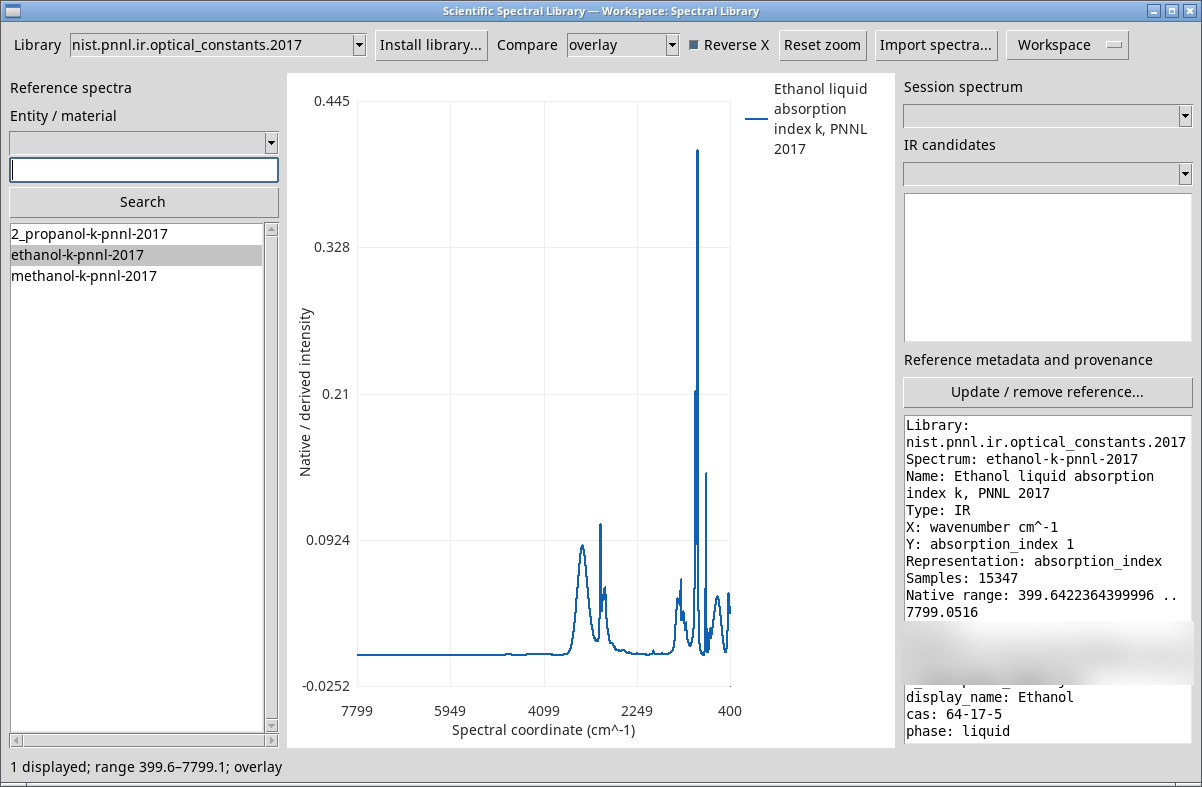
In Library, select an installed library ID. Changing it updates Entity / material and clears the search and previous selection. In Entity / material, choose the blank entry for all entities or select a specific ID. The NIST/PNNL package offers 2_propanol, ethanol and methanol. The filter limits the results to the selected entity.
Search by identity or metadata
Enter text in the field above Search and press the button or Enter. Try ethanol or a CAS number such as 67-56-1. If you selected an entity, the search stays within it. The status line shows the result count. Clear the text and press Search again to restore the current filtered list. Use the scrollbars if rows or IDs extend beyond the visible area.
Select numeric spectra and read their metadata
Click a row. Use Shift-click to select a range or Ctrl-click for nonadjacent rows. The plot uses up to four selected IDs in list order. The right pane shows the first selected reference’s metadata. To read another reference’s record, select that reference alone.
Check Library, Spectrum, Name and Type for identity. X, Y and Representation describe quantities, units and representation. Samples and Native range show the sample count and native range. The record can also show Source, CAS, formula, phase, URL, citation, license and the original header. The tested NIST/PNNL references use wavenumber in cm⁻¹ and a dimensionless optical absorption index k. k is the imaginary component of the refractive index.
When you change libraries, the right pane may retain metadata from the previous row even if the plot is blank. Select a row from the current library and check that Library and Spectrum match your selection before using the metadata.