
Lesson 01 — Your First GNU Octave Script in GX-TXT
Course: GNU Octave and scientific programming with GX-TXT public APIs.
Verified reference and reproducibility
| Field | Reference |
|---|---|
| Official repository | giuxlab-hub/GX-TXT |
| GX-TXT version | 0.9.8.10-dev-103 |
| GitHub branch consulted | main |
| Fixed reference commit | e07376e0a62e0eecf1737da33c87bbbb41273f4b |
| Source verification date | October 17, 2026 |
| Programming language | GNU Octave (.m) |
| Framework API | OCTAVE_SCRIPT_BRIDGE_API_v1 |
| Scientific provider | math.numeric, NUMERIC_API_v1 |
| Script license | GNU GPL-3.0-or-later |
| Practical test | The original Italian-language script passed its GX-TXT Session test on October 17, 2026. The English translation has the same calculations but has not yet been tested as a separate source snapshot. |
Primary sources, pinned to the specified commit:
- Octave Script Bridge API v1
- NUMERIC_API_v1 public API manual
- NUMERIC_API_v1 Script Bridge registration
- Public Octave numerical implementation
- Official Octave Script Bridge example
Course rule. GitHub public sources at the cited commit are authoritative. Local development builds are excluded. Pinning the commit makes the article reproducible; it is not a promise that later or different GX-TXT installations behave identically.
1. Learning objectives
This lesson introduces Octave syntax and a real GX-TXT Script Bridge workflow: define input values → check public APIs → calculate with the public numeric provider → inspect the output. We will not need to create Datasets or plots yet.
By the end of this lesson you should be able to distinguish Octave language constructs from GX-TXT public services, write a short .m program, understand typed operands and cell arrays, run a script from Octave Script Workspace, and inspect the run log without accessing GX-TXT’s internal files.
Octave versus GX-TXT
x = [1; 2; 3]; is an Octave language statement. It does not depend on the framework. In contrast, gxtxt_api_call('NUMERIC_API_v1', 'array_reduce', {'sum', operand}) explicitly requests a scientific operation registered by GX-TXT. We still use normal Octave structures, if, for, struct, and fprintf to express the program; public GX-TXT APIs handle scientific services that the framework exposes.
2. The scientific example
We have five temperature readings in degrees Celsius:
\[ T_C = \begin{bmatrix} 18 & 20 & 22 & 21 & 19 \end{bmatrix}^{\mathsf T} \; ^\circ\mathrm{C} \]For an absolute temperature in kelvin, we apply the offset:
\[ \frac{T}{\mathrm{K}} = \frac{t}{^\circ\mathrm{C}} + 273{,}15 \]The five results are 291.15, 293.15, 295.15, 294.15, and 292.15 K, with an expected arithmetic mean of 293.15 K.
Physical-unit note: array_binary and array_reduce operate on numeric data. They do not automatically attach or convert physical units. We explicitly define the Celsius-to-kelvin transformation. Dataset Variable IDs, variable units, and metadata will be introduced later in the course.
3. Step-by-step: the Octave Script Workspace
These steps and five screenshots were recorded in the GX-TXT 0.9.8.10-dev-103 interface. The photographs show the original Italian-language test script, whereas the downloadable .m file in this article is the English translation. The interface workflow is the same; the English file name is GXTXT_Octave_L01_EN.m.
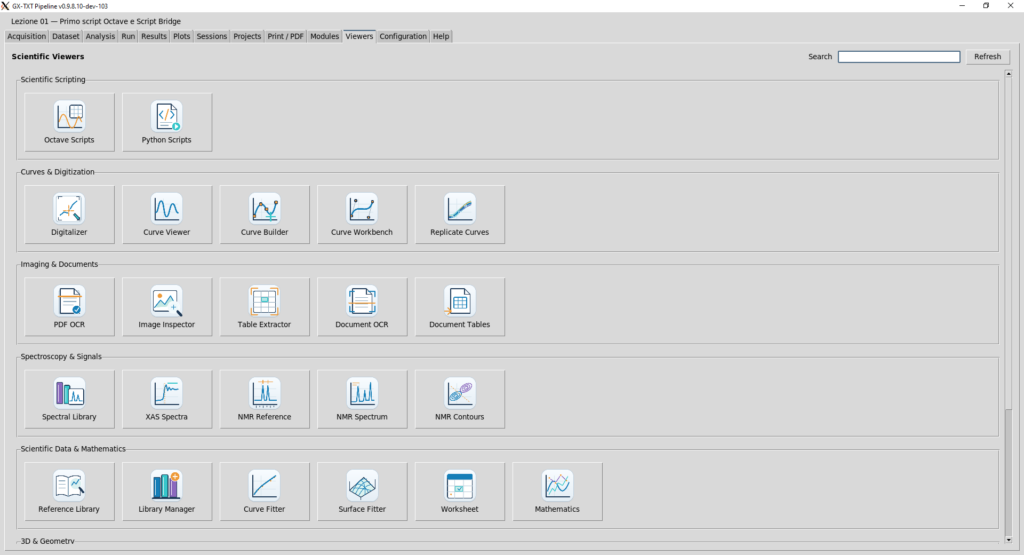
3.1 Open the Octave Scripts viewer
In the main GX-TXT window, choose the Viewers tab. Under Scientific Scripting, click Octave Scripts. The Octave Script Workspace window opens and lists the scripts registered in the current Session.
3.2 Import an existing .m file or write one manually
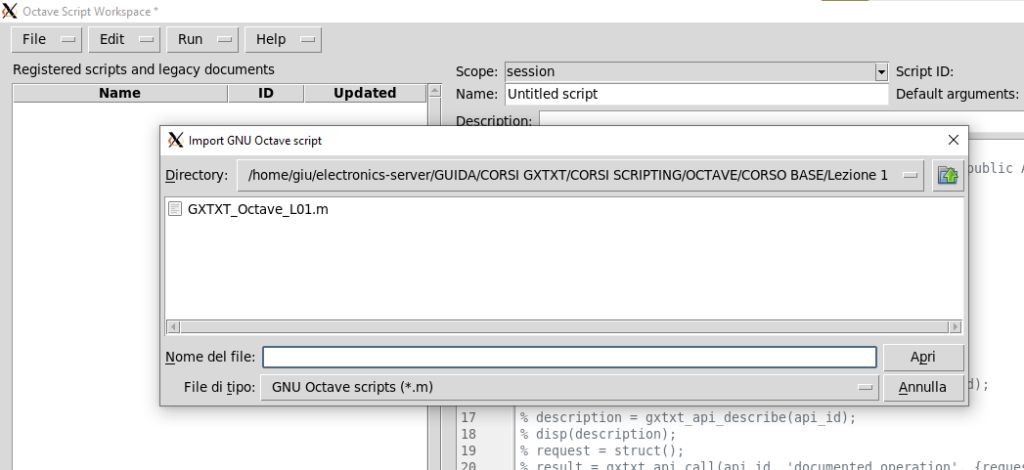
Import: in the Workspace File menu choose the GNU Octave script import command, select GXTXT_Octave_L01_EN.m, and click Open. Its contents appear in the editor. The registered script is independent of the source file from which it was imported; do not assume later edits to the original file automatically replace the registered version.
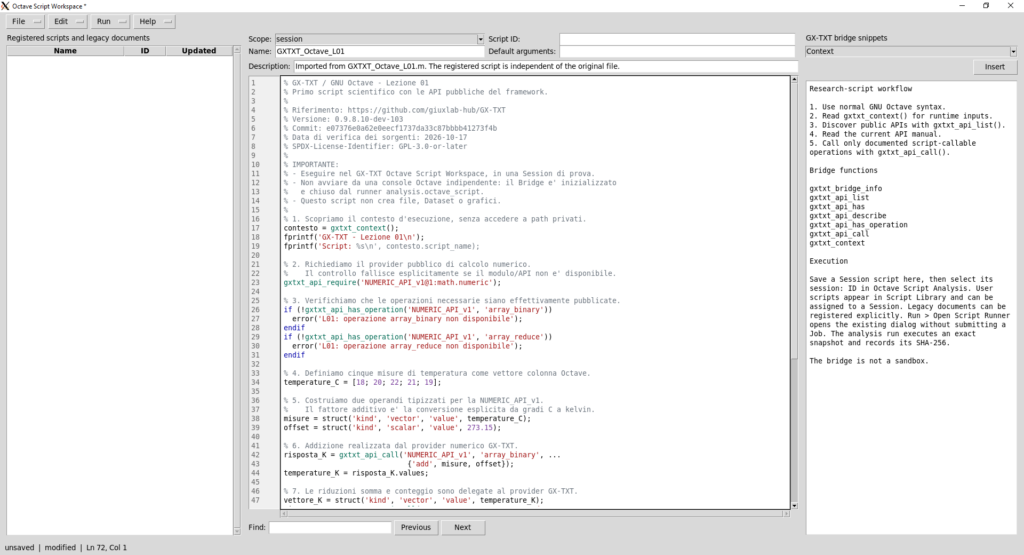
Manual entry: an external file is not required. You can create a new script in the Workspace and type or paste the source directly into the central editor.
3.3 Assign the script identity and save
At the top of the editor fill in these fields:
| Field | Purpose | Lesson value |
|---|---|---|
| Scope | Where the script is registered | session |
| Name | Human-readable display name | GXTXT_Octave_L01 |
| Script ID | Stable identifier within the selected scope | GXTXT_Octave_L01 |
| Description | Optional description of the program | Celsius-to-kelvin conversion and mean using NUMERIC_API_v1 |
The original test registered the script as session:GXTXT_Octave_L01. The Script ID identifies the stored script, whereas the Job ID identifies a particular run. Save the script before you launch it; unsaved / modified means changes have not yet been registered.
3.4 Launch the script directly from the editor
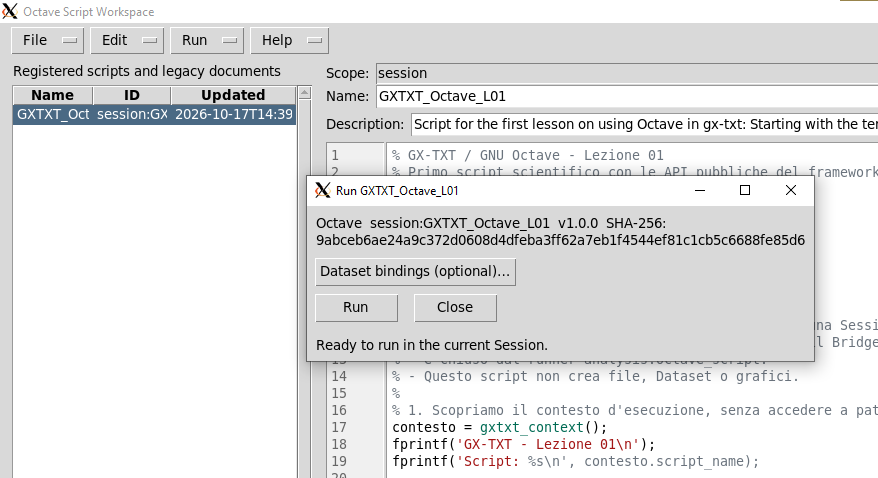
Use Run in the Workspace. The run dialog identifies the registered script and its source SHA-256. The Dataset bindings option can be left empty: this example defines all input data in the script itself. Click Run to submit the job to GX-TXT.
3.5 Inspect logs and output in Session files
Return to the main GX-TXT window. Under Session files, expand analysis/scripts. Double-click the script name or the corresponding execution to open the run results window. One pane shows the technical log (state, timestamps, exit code, resources, job identifiers), and the other shows the script’s textual output. This is where you compare the computed mean with 293.15 K.
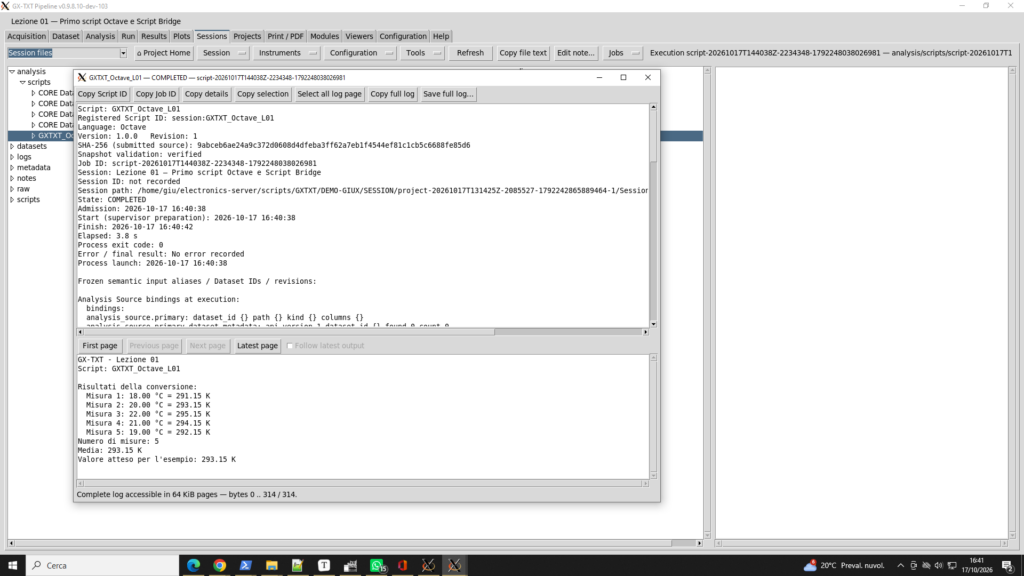
COMPLETED, with the expected result visible in the output pane.3.6 Scripts, runs, and framework-managed resources
A registered script has an ID, version, and revision. Each execution has its own Job ID, an immutable source snapshot, and an execution log. The directories displayed in the log are managed by GX-TXT, not locations into which an example script should write private Dataset files. This first lesson creates no Dataset, exported graph, or output file.
3.7 Declare the required numeric API
If the Workspace exposes a required APIs field, use NUMERIC_API_v1@1:math.numeric. The source also performs gxtxt_api_require and checks the public operations. Run the script inside the Workspace, not from an independent Octave console. GX-TXT manages the Script Bridge lifecycle automatically.
4. Essential GNU Octave syntax
| Syntax | Explanation | Example |
|---|---|---|
% | Non-executed comment | % Input readings |
= | Assignment | x = 273.15; |
; at statement end | Suppress automatic printing | x = 5; |
[...] | Construct a vector or matrix | [18;20;22] is a column vector |
struct(...) | Named fields | struct('kind','scalar','value',4) |
{...} | Cell array, including mixed types | {'add', a, b} |
object.field | Read a structure field | result.values |
if ... endif | Conditional execution | if (missing) error('...'); endif |
for ... endfor | Repetition | for i=1:5 ... endfor |
fprintf | Formatted standard output | fprintf('n = %d\\n', 5); |
numel | Number of array elements | numel([1;2;3]) is 3 |
Important distinction: [18; 20; 22] is a numeric column vector; {'sum', operand} is a cell array containing separate positional arguments for the Script Bridge.
5. Complete English-language script
File: GXTXT_Octave_L01_EN.m. All comments, identifiers, messages, and error texts are in English. The scientific calls remain those of the verified GX-TXT public API.
% GX-TXT / GNU Octave - Lesson 01
% First scientific script using the framework's public APIs.
%
% Official repository: https://github.com/giuxlab-hub/GX-TXT
% GX-TXT release: 0.9.8.10-dev-103
% Reference commit: e07376e0a62e0eecf1737da33c87bbbb41273f4b
% Source verification date: 2026-10-17
% SPDX-License-Identifier: GPL-3.0-or-later
%
% IMPORTANT:
% - Run this script in the GX-TXT Octave Script Workspace in a test Session.
% - Do not run it from a standalone Octave console. The analysis.octave_script
%   runner starts and stops the Script Bridge automatically.
% - This script creates no files, Datasets, or plots.
%
% 1. Read the public execution context without accessing private paths.
context = gxtxt_context();
fprintf('GX-TXT - Lesson 01\n');
fprintf('Script: %s\n', context.script_name);

% 2. Require the public numeric provider and its exact API version.
%    The script stops explicitly if the required provider is unavailable.
gxtxt_api_require('NUMERIC_API_v1@1:math.numeric');

% 3. Verify that the required public operations are registered.
if (!gxtxt_api_has_operation('NUMERIC_API_v1', 'array_binary'))
  error('L01: required array_binary operation is unavailable');
endif
if (!gxtxt_api_has_operation('NUMERIC_API_v1', 'array_reduce'))
  error('L01: required array_reduce operation is unavailable');
endif

% 4. Define five Celsius measurements as an Octave column vector.
temperatures_C = [18; 20; 22; 21; 19];

% 5. Build typed operands for NUMERIC_API_v1.
%    The offset explicitly converts Celsius readings to kelvin.
measurements = struct('kind', 'vector', 'value', temperatures_C);
offset = struct('kind', 'scalar', 'value', 273.15);

% 6. Perform the addition through the GX-TXT numeric provider.
kelvin_result = gxtxt_api_call('NUMERIC_API_v1', 'array_binary', ...
                              {'add', measurements, offset});
temperatures_K = kelvin_result.values;

% 7. Delegate summation and counting to the GX-TXT numeric provider.
kelvin_vector = struct('kind', 'vector', 'value', temperatures_K);
sum_result = gxtxt_api_call('NUMERIC_API_v1', 'array_reduce', ...
                            {'sum', kelvin_vector});
count_result = gxtxt_api_call('NUMERIC_API_v1', 'array_reduce', ...
                              {'count', kelvin_vector});

% 8. Compute the arithmetic mean using the provider, not Octave mean().
total_K = struct('kind', 'scalar', 'value', sum_result.values);
sample_count = struct('kind', 'scalar', 'value', count_result.values);
mean_result = gxtxt_api_call('NUMERIC_API_v1', 'array_binary', ...
                             {'divide', total_K, sample_count});
mean_K = mean_result.values;

% 9. Format textual output using the GNU Octave language.
%    fprintf writes to stdout captured by the GX-TXT runner, not to a file.
fprintf('\nTemperature conversion results:\n');
for i = 1:numel(temperatures_C)
  fprintf('  Measurement %d: %.2f °C = %.2f K\n', ...
          i, temperatures_C(i), temperatures_K(i));
endfor
fprintf('Number of measurements: %.0f\n', count_result.values);
fprintf('Mean: %.2f K\n', mean_K);
fprintf('Expected result for this example: 293.15 K\n');

% End: no direct disk writes or Dataset publications.
6. The public APIs, explained one by one
6.1 gxtxt_context() — execution identity
Purpose: obtain public information about the current GX-TXT script execution without inspecting private files.
Signature: context = gxtxt_context();
Parameters: none. Returns: an Octave struct containing public fields such as bridge_api_id, bridge_api_version, module_id, run_id, operation, script_name, script_sha256, arguments_raw, output_dir, and inputs. In this lesson, only context.script_name is used.
Behavior: requires an active Script Bridge. The optional output_dir field is a framework-owned directory for completed-file publication, not a license to access arbitrary internal GX-TXT storage.
Compared with native Octave: pwd describes the process working directory; it does not identify the script’s GX-TXT run or input bindings.
6.2 gxtxt_api_require(requirements) — declare dependencies
Purpose: fail explicitly if a required public API/version/provider is missing.
Signature: ok = gxtxt_api_require(requirements);
Parameter: a requirement string, cell array of declarations, or supported declaration structures. Example:
gxtxt_api_require('NUMERIC_API_v1@1:math.numeric');
This specifies API ID NUMERIC_API_v1, API version 1, and provider math.numeric. Result: a successful requirement check, or a raised error when the declaration is not satisfied. The positive return value may be ignored when used solely as a precondition.
Compared with native Octave: exist('function_name') checks available symbols but cannot establish that a GX-TXT public provider with the expected identity is registered.
6.3 gxtxt_api_has_operation(api_id, operation) — check availability
Purpose: verify that a particular operation is registered and callable, not merely that the parent API exists.
Signature: available = gxtxt_api_has_operation(api_id, operation);
Parameters: exact API ID and exact operation name. Returns: a logical value.
if (!gxtxt_api_has_operation('NUMERIC_API_v1', 'array_reduce'))
  error('Required operation is unavailable');
endif
Compared with native Octave: a similarly named built-in function does not establish public GX-TXT operation availability.
6.4 gxtxt_api_call(api_id, operation, args) — call a public provider
Purpose: invoke the exact registered operation through the public, typed Script Bridge.
Signature: result = gxtxt_api_call(api_id, operation, args);
Parameters: api_id, operation, and a cell array of positional arguments in the order specified by the provider manual. Returns: the operation-specific result; result.values is used in this lesson. Invalid requests or provider errors raise Octave errors rather than returning a misleading empty result.
Public boundary: the Bridge does not provide generic access to private Tcl procedures or arbitrary internal files. This API boundary is not a process sandbox.
Compared with native Octave: a + b executes a numeric expression in Octave, while a gxtxt_api_call explicitly requests a registered GX-TXT scientific service.
6.5 NUMERIC_API_v1 / array_binary — addition and division
Purpose: apply a named binary operation to typed real numeric operands, including a vector/scalar combination.
Bridge call:
result = gxtxt_api_call('NUMERIC_API_v1', 'array_binary', ...
                        {operation_name, left_operand, right_operand});
Operands: e.g. struct('kind','vector','value',vector) and struct('kind','scalar','value',number). The public operation names include add, subtract, multiply, divide, and power. Scalar expansion is supported. Non-scalar operand shapes must be compatible; inputs are finite real values by default. Return: a structured numeric result, including .values.
Example:
a = struct('kind', 'vector', 'value', [1; 2; 3]);
b = struct('kind', 'scalar', 'value', 4);
result = gxtxt_api_call('NUMERIC_API_v1', 'array_binary', ...
                        {'multiply', a, b});
% result.values is [4; 8; 12]
In the lesson, add produces kelvin readings and divide produces the mean. Neither operation automatically assigns physical units.
6.6 NUMERIC_API_v1 / array_reduce — sum and count
Purpose: aggregate an array through the public numeric provider.
Bridge call:
result = gxtxt_api_call('NUMERIC_API_v1', 'array_reduce', ...
                        {reduction_name, typed_operand});
An optional third positional argument is an options struct. By default, axis=0 reduces the entire array. The lesson uses sum and count. Return: an Octave struct containing .values and diagnostic information such as n_input, n_valid, axis, and requested_axis. count counts the input elements; a separate valid count may matter when dealing with non-finite data. Our input values are all finite.
Compared with native Octave: sum(x) and numel(x) may give the same numbers, but they bypass the specific public GX-TXT provider contract we are learning.
7. Walkthrough of the program
gxtxt_context()reads the logical identity of the current script.gxtxt_api_requiredemands the correct registered numeric provider.gxtxt_api_has_operationchecks the two exact operations.- The five measurements become an ordered Octave column vector.
structconstructs typed operands for the provider.array_binaryapplies the explicit273.15offset.array_reducecomputes the sum and the number of measurements.array_binarydivides the sum by the count to obtain the mean.- A
forloop withfprintfdisplays the results. The script writes no files.
8. Results, actual test, and verification
| Measurement | Celsius (°C) | Kelvin (K) |
|---|---|---|
| 1 | 18.00 | 291.15 |
| 2 | 20.00 | 293.15 |
| 3 | 22.00 | 295.15 |
| 4 | 21.00 | 294.15 |
| 5 | 19.00 | 292.15 |
| Mean | 20.00 | 293.15 |
Original test report — October 17, 2026
The user executed the original Italian-language version and provided both the output and GX-TXT Job log. It confirms that the computation and API calls worked in that Session. The SHA-256 below identifies that original tested source, not the newly translated English .m file.
| Log field | Observed value |
|---|---|
| GX-TXT interface version | 0.9.8.10-dev-103 |
| Registered Script ID | session:GXTXT_Octave_L01 |
| Script version / revision | 1.0.0 / 1 |
| Original source SHA-256 | 9abceb6ae24a9c372d0608d4dfeba3ff62a7eb1f4544ef81c1cb5c6688fe85d6 |
| Snapshot validation | verified |
| Job ID | script-20261017T144038Z-2234348-1792248038026981 |
| Final state | COMPLETED |
| Elapsed time | 3.8 s |
| Process exit code | 0 |
| Error result | No error recorded |
| Required API | NUMERIC_API_v1@1:math.numeric |
| Published Datasets | None (as designed) |
| Observed mean | 293.15 K |
The log also records publication_recovery: PASS, which is a successful execution lifecycle check; it does not mean a Dataset was published.
Expected output of the translated English script (not yet run):
GX-TXT - Lesson 01
Script: GXTXT_Octave_L01

Temperature conversion results:
  Measurement 1: 18.00 °C = 291.15 K
  Measurement 2: 20.00 °C = 293.15 K
  Measurement 3: 22.00 °C = 295.15 K
  Measurement 4: 21.00 °C = 294.15 K
  Measurement 5: 19.00 °C = 292.15 K
Number of measurements: 5
Mean: 293.15 K
Expected result for this example: 293.15 K
When rerunning the English source, GX-TXT should record a new source SHA-256; compare the observed numbers, not the historical source digest.
Practical checks and common mistakes
- If the numeric provider is missing, the script should stop at
gxtxt_api_requirewith an explicit error. - If an operation is not registered,
gxtxt_api_has_operationshould return false. GXTXT:ScriptBridge:NotActivetypically means the script was launched without GX-TXT’s managed Script Bridge lifecycle. Run it in the Workspace.- A cell array
{}is not the same thing as a numeric array[]; argument types and positions matter. array_binaryandarray_reducedo not infer the physical meaning or units of raw numbers.
9. Exercises
- Replace the input readings with
[10; 12; 14; 16]. Predict the mean first: 286.15 K. - Change
%.2fto%.3fin thefprintfcalls and observe the output precision. - Add an availability check for
array_unarywithout calling that operation yet. - Use the official API documentation to find
gxtxt_api_list()andgxtxt_api_describe(api_id). Explain the difference between describing an API and invoking an operation.
10. Why we do not publish a Dataset yet
The first lesson deliberately isolates basic programming and public Bridge usage. Proper Dataset publication involves Dataset IDs, Variable IDs, schema contracts, units, metadata, and provenance, which are covered later. Do not manually insert CSV files or plots into GX-TXT internal directories instead of using the public publication and plotting APIs.
11. Summary and next lesson
We have introduced the essential Octave statements and four Bridge functions: gxtxt_context, gxtxt_api_require, gxtxt_api_has_operation, and gxtxt_api_call. The two scientific operations are NUMERIC_API_v1/array_binary and NUMERIC_API_v1/array_reduce.
Next: Lesson 02 — Variables, Types, and Operators, with a closer look at Octave data types and how to build appropriate arguments for public GX-TXT APIs.