

Advanced Octave A01 — API contracts and explicit requirements
Advanced GNU Octave with GX-TXT · Module 01
The availability of an API is not enough to describe what a script can do. A contract also identifies the version, provider and operations that the latter makes available. In this lesson we compare two descriptors actually returned from the Octave Bridge of GX-TXT.
Before starting
This guide continues the basic course in 16 lessons: you already know the .m scripts, cell arrays, Sessions and first calls to APIs. Here we do not share from the syntax, but we learn to declare dependencies and to read the contract of the version in use.
We will use GX-TXT dev112-P011-bis and GNU Octave 9.4.0, in the corso_octave_avanzato Session. The available names and operations can change with installation, modules and version. The provider’s manual is always important for specific operations.
A requirement is more accurate than a name
CANONICAL_DATASET_API_v2 identifies the family of services for canonical datasets. The CANONICAL_DATASET_API_v2@2 declaration explicitly requires version 2. With gxtxt_api_require we can check a set of requirements at the beginning of the script before performing an analysis that requires them. An unsatisfied requirement causes an error: it must not turn silently into an incomplete scientific result.
The Bridge also provides gxtxt_api_describe : it returns a single API descriptor, with identity, version, provider, reference to documentation and descriptions of operations. The provider may belong to the CORE or a module. The identity of the API and that of the provider have different roles; when needed, a statement may also require providers and capabilities, following the contract of the installed version.
Example: compare two contracts
Download contracts_api.m (ZIP). In the Session’s Octave Script Workspace imports the file, assigns a unique identifier and save it; then select Run → Open Script Runner → Run Job.
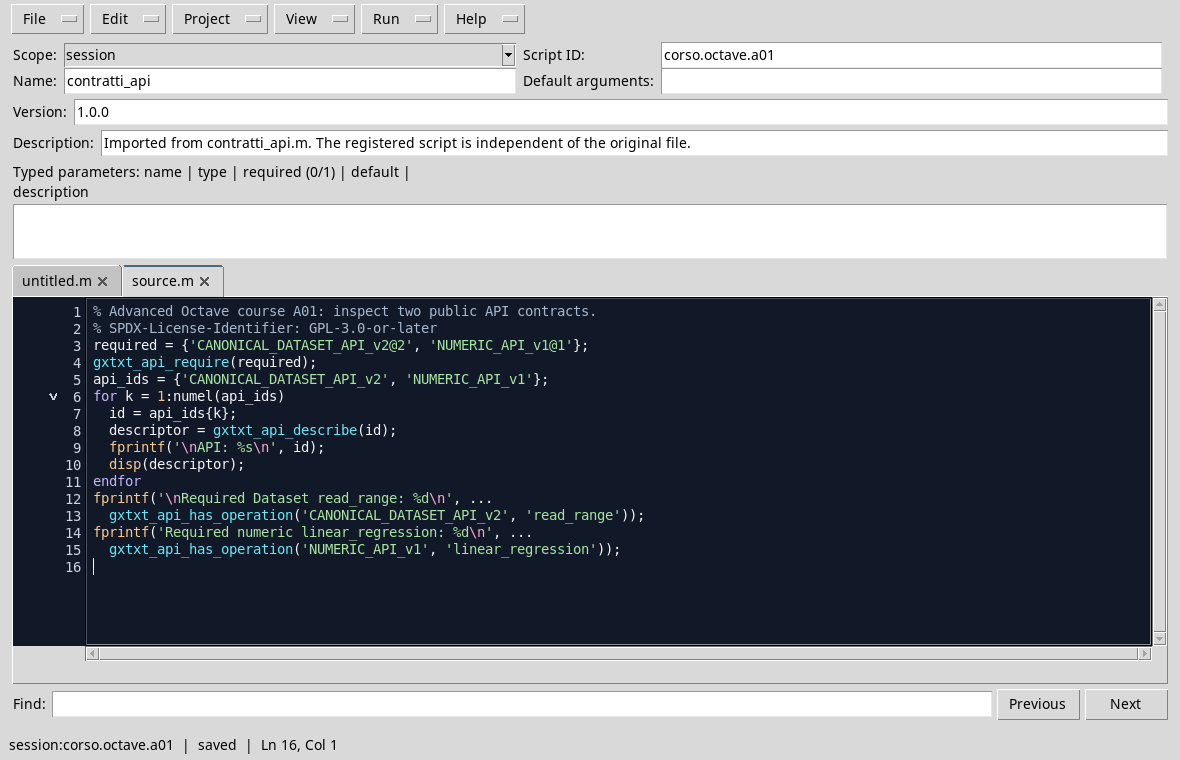
% Advanced Octave course A01: inspect two public API contracts.
% SPDX-License-Identifier: GPL-3.0-or-later
required = {'CANONICAL_DATASET_API_v2@2', 'NUMERIC_API_v1@1'};
gxtxt_api_require(required);
api_ids = {'CANONICAL_DATASET_API_v2', 'NUMERIC_API_v1'};
for k = 1:numel(api_ids)
  id = api_ids{k};
  descriptor = gxtxt_api_describe(id);
  fprintf('\nAPI: %s\n', id);
  disp(descriptor);
endfor
fprintf('\nRequired Dataset read_range: %d\n', ...
  gxtxt_api_has_operation('CANONICAL_DATASET_API_v2', 'read_range'));
fprintf('Required numeric linear_regression: %d\n', ...
  gxtxt_api_has_operation('NUMERIC_API_v1', 'linear_regression'));
The required cell array contains two statements. If the verification succeeds, the cycle asks separately the descriptors of the Dataset service and the numerical one. disp also shows nested structures: a rich catalog can produce many output pages. In practice you can explore individual fields instead of printing all the descriptor.
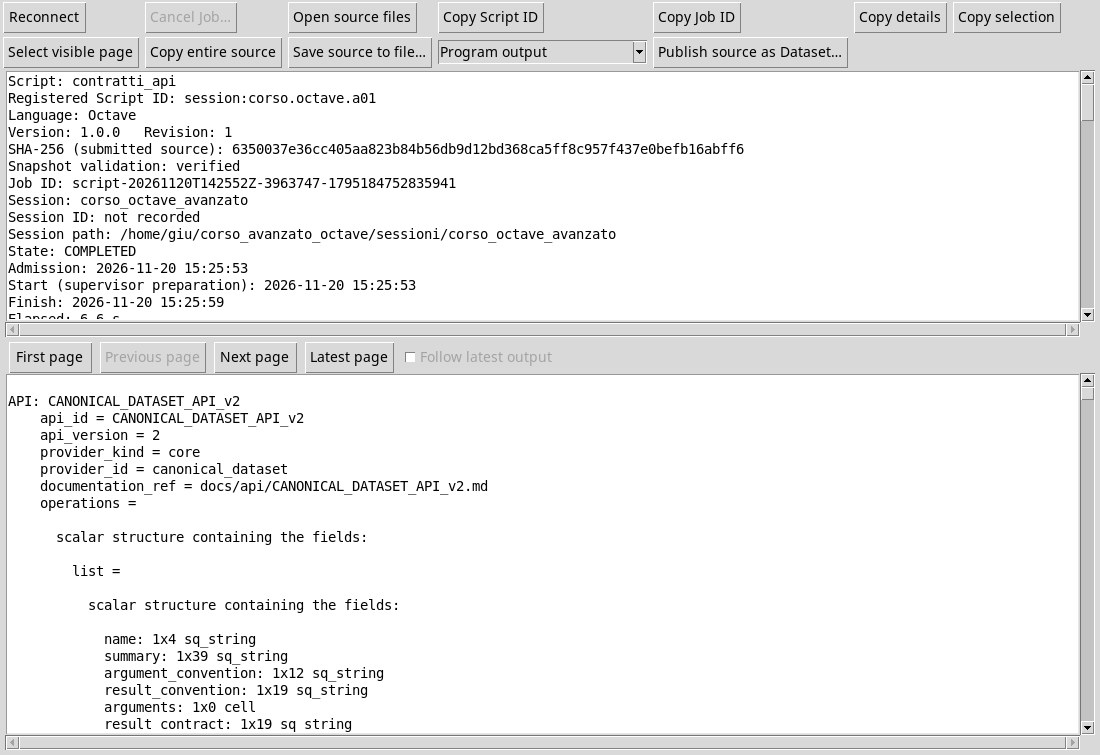
In the execution shown the Job is completed and the descriptor of the first API contains 2 version, core provider and canonical_dataset identifier. The fields of operations describe topics and results; however, it is necessary to read the specific documentation for the conventions of a concrete call.
Second control: the operation that really serves
The last two calls to gxtxt_api_has_operation ask if the providers display read_range and linear_regression respectively. A true logical value indicates that the operation is recorded for the Bridge; it does not show that any input is valid or that the result of an analysis is scientifically correct. For a real application, check every necessary operation and stop processing with a message that is understandable when missing.
The distinction is important: gxtxt_api_require verifies the stated requirements, while gxtxt_api_has_operation interrogates a specific operation. By choosing consistent requirements you can make a script transferable to different installations without attributing their capabilities that they do not have.
Exercise
- Edit a copy of the script to request a deliberately non-existent version. What happens before the descriptors print?
- Ask a non-existent operation name with
gxtxt_api_has_operation. Why is the result different from the success of a scientific call? - Why is it useful to keep the GX-TXT version together with the script?
Worked solution
- The requirements check must indicate that dependence is not satisfied: the next analysis does not start as if the version is available.
- The preacher checks the registration; it does not compute and does not validate the scientific data.
- To identify the context in which contracts, modules and results have actually been verified.
In the next lesson we will build a matrix of compatibility for a scientific flow.
Other steps of this project
- Advanced Octave A75 — Dynamical systems in phase space
- Advanced Octave A81 — Geography of the waves and a 3D surface
- Advanced Octave A82 — Age, sex and demographic inequalities
- Advanced Octave A83 — All-cause mortality, certified COVID deaths and surveillance
- Advanced Octave A84 — A reproducible public account
- Advanced Octave A73 — Optimization landscapes and 3D trajectories