

Methods and alignment
In the Scientific study panel, choose Method based on data geometry. All traces of the study use the same method and definition of the physical characteristic.
yx and the common domain
Choose yx for measurements with one Y value per X value. Each source requires at least three finite points. X must increase strictly in the effective source order after unit conversion. If the rows are unordered, set Point-order Variable (XY required) only to a column that represents the intended scientific order. Vertical segments, repeated X values and paths that double back are unsuitable for this method.
The service takes the greatest of the beginnings and the minor of the ends of the individual tracks. Linearly interpolate every Y on the common grid between these extremes. For example, with X from 0 to 12 mm and from 2 to 14 mm, the common profile ranges from 2 to 12 mm. If the intervals do not overlap with positive length, the Job ends without result. The original traces retain the points outside the common range.
xy_path and geometric correspondence
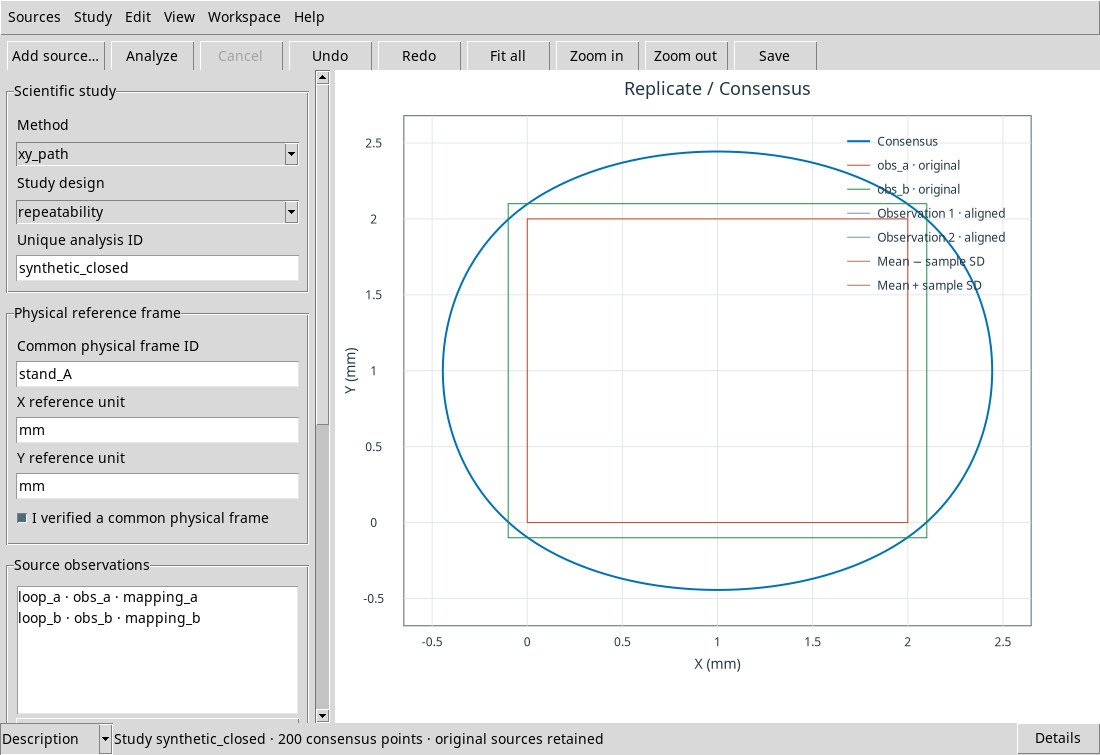
Choose xy_path for an ordered open path, a path that doubles back or a closed contour. X and Y must be expressible in the same physical unit. A parametric spline evaluates each source on its ordered original points. Its parameter is cumulative chord length normalized from 0 to 1. The service compares positions with the same normalized value after aligning each trace to its declared start and direction.
Use this matching only when it represents a physically plausible correspondence. For example, you can compare two scans of the same edge that start from the same corner and run in the same direction. Normalization redistributes relative positions along the entire curve. A much longer segment in one trace can shift the correspondence elsewhere. Validation checks both the original and resampled paths. Crossings, overlaps and degenerate geometry can cause the Job to fail.
Path fields in the source editor
- Point-order Variable (XY required)
- Select the order column ID before confirming the source. The order determines the sequence of points and the meaning of the starting index.
- Topology = open
- Initial setup. Choose it for a path with distinct ends, even if the X decreases in a part of the curve. The actual starting point is the first for forward and the last for reverse.
- Topology = closed
- Choose it for a closed contour. Any final exact copy of the first point is excluded from the calculation of the phase. The closure is geometrically treated by the spline. Use the same type of topology for all tracks.
- Corresponding physical start landmark
- The field offers
start. Name the same physical reference on each track, for examplesegno_sinistra. The label declares the correspondence, and must coincide for the whole study. For an open path select the direction so that the corresponding extreme becomes the beginning. - Direction = forward
- Initial value. Use the order column direction from the starting point.
- Direction = reverse
- Reverse the sequence. For open exchange extremes. For closed it retains the phase point and reverses the order of the next points around the ring.
- Closed start landmark source index (0-based)
- Enter the entire index of the starting point in the ordered sequence, using zero-based indexing. The initial value is 0. In closed it must fall between 0 and the last distinct vertex available. Take into account the final copy of the initial point, which does not enter the count. In the Digitizer module the field is called Closed start source index (0-based).
Grid and limits
A new study in the standard window uses 200 points. The tested interface has no grid-size field. The service accepts 3–2,048 grid points in recipes that already specify a count. In yx the parameter is X in its unit. In xy_path the parameter is a dimensionless fraction from 0 to 1, and published X and Y both use the X unit.
The service contract allows 1–64 traces and up to 65,536 canonical points per trace. Each trace must supply at least three usable finite points. Native xy_path geometry validation accepts up to 4,096 vertices. The verification receipt has a 32 MiB limit. If a source exceeds a limit, select a scientifically justified feature or segment before import and document that choice. The service processes the common domain or the correspondence declared by those inputs.
Limit in the tested version. A source with 1,000 actual rows was processed, while a source with 1,001 rows failed before geometry validation. The log displays Curve Source page count must be 1..1000. The threshold applies to each source after selection. If the scientific objective allows, prepare a smaller table or use a meaningful group within the limit while preserving order and provenance. Processing all rows above the threshold requires a service fix. Splitting one observation into several pieces does not make independent replicates.