

Set up the study and sources
Set up the study identity in the left panel and assign a frame before adding a source. Make each declaration of independence correspond to the way the data has actually been acquired.
Scientific study
- Unique analysis ID
- Identify study and basic name of the published Datasets. The proposed value begins with
study_. Use a new ID with initial ASCII letter, followed by letters, digits, points, dashes or underscores. For exampleprofilo_bordo_a. Internal spaces and characters outside this set are rejected in Analyze. The name of the Workspace is a separate field. - Method
- The initial yx compares a Y measure to the same X coordinate. xy_path compares ranked profiles in the plane. Set the method before preparing the sources. In the second case, the order of points must also be declared. See Methods and alignment.
- Study design
- Select repeatability, calibration_sensitivity or hierarchical based on how observations were acquired. To decide, compare Study designs and interpretation.
Analyze applies the panel settings to the scientific context after validation succeeds. In the tested version, Save can report success before that step while omitting settings you have just entered. Make a note of any settings you have yet to apply.
Physical reference frame
- Common physical frame ID
- Identifies origin, orientation, coordinate system and common physical reference, for example
banco_a_origine_riscontro. Fill it before adding the sources: the generic module associates each track to the frame at that time. If you change the frame after adding sources, check or recreate relevant associations. - X reference unit
- X reference unit, initially
mm. The service converts the coordinates from the compatible canonical units. Choose the unit you want to read in yx and the common work unit in xy_path. - Y reference unit
- Y reference unit, initially
mm. In yx can have a different physical dimension from X, if compatible with all Y. In xy_path it must be convertible to the X unit. Geometric alignment uses both coordinates in the X unit. - I verified a common physical frame
- Check the box after verifying correspondence between origin and axes and, if necessary, turning the data into the chosen frame. The checkbox starts unchecked. The conversion of units concerns the scale of coordinates. A different physical reference requires an explicit transformation upstream.
Add source… and Dataset fields
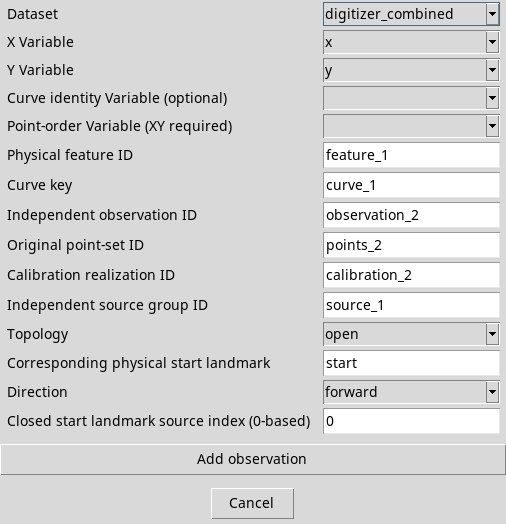
From the Sources menu, press Add source…. Opens Add exact scientific observation. To orientate yourself in the variable menu, look for the canonical identifier of the column. The window can reproduce the first compatible Dataset and axes based on available columns or their roles. Always check the two axes and selections when you change Dataset.
- Dataset
- A canonical table in the Session with a compatible schema. If you see No compatible canonical table source is available, add or import a table with at least two row-by-row variables and try again.
- X Variable
- A rank-one numeric or elapsed-time variable. It is the independent coordinate in yx and the first path coordinate in xy_path. Leaving the field blank makes the source incomplete.
- Y Variable
- A rank-one numeric or elapsed-time variable compatible with the Y unit. It supplies the measured value in yx and the second path coordinate.
- Curve identity Variable (optional)
- Use it when a table contains many curves, indicating the column that identifies them. If the selector is blank, the next field retains the declared identity without filtering the lines.
- Curve key
- Initial value
curve_1. With a variable identity, enter the exact canonical value of the group to use. Without that variable, write a descriptive identifier for the origin of the curve. The field must have a value for Analyze. - Point-order Variable (XY required)
- Choose a column that logs the real order of points, for example
order. It is required with xy_path. In yx you can omit it if the row order already produces X strictly growing. Check that the chosen order really represents the path and that the values are distinct.
Source identities
- Physical feature ID
- Start from
feature_1. Use the same value for the same edge, track or physical feature throughout the study. Different features require different studies, although they are stored in the same table. - Independent observation ID
- Identity of the single acquisition, proposed as
observation_N. It uses distinct values only for truly independent observations. If you recalibrate the same acquisition, reuse the value. - Original point-set ID
- Identity of the original points, proposed as
points_N. A resamping or recalibration does not create a new original set. Two independent repetitions require separate IDs both here and in Independent observation ID. - Calibration realization ID
- Identifies the calibration used for that trace. The suggested value is
calibration_N. Reuse the ID for a shared calibration realization. In a sensitivity study, give each realization a distinct ID while keeping the observation and point-set IDs the same. - Independent source group ID
- Identify the common source to multiple observations, for example a tool or preparation. Start from
source_1. In a hierarchical study, at least two groups and repetitions are needed within the source. Avoid inventing a group for each track only to overcome validation.
The suffixes proposed depend on the number of sources already present. Replace them with stable keys and check duplicates after removing or adding a row. For Topology, Direction, Corresponding physical start landmark and the closing index, see the options of the path.
Confirm, edit and remove sources
Add observation adds the source and closes the form. Each row in Source observations shows the Dataset, observation and calibration. A row in the list means its declaration was added. Analyze then checks all the study requirements. Cancel, Esc or closing the dialog discards any edits in the form.
Select a row and use Edit selected source…. The generic module reuses Add observation to confirm the change of the existing line. Confirm without changing fields keeps the recipe. A change of Dataset, axes, implicit filters, calibration or frame can be rejected when the source has already been prepared and has canonical ties to be preserved. In this case cancel, remove the row to be replaced and add it explicitly with new data. A known Digitizer source reopens the dedicated module.
Remove selected source, available in the inspector, in the Sources menu and in the context menu, removes the observation selected by the study. Check the list and refer to Analyze if you need an updated result. The Dataset remains at the Session. If the recipe changes, the current result can disappear because it belongs to the previous recipe.