

Variables, Scalar Types and Physical Measurements
Scientific Python in GX-TXT · Module 1 · Lesson 2
In the first lesson we wrote and started a script. Now we will use names to store values, we will distinguish whole numbers, decimal numbers and logical values, and we will apply these concepts to a small sequence of synthetic sampling.
Objectives: assign a value to a name; recognize int, float and bool; read the result of type; make explicit conversions; distinguish the numerical value from its measuring unit.
Prerequisites: having done the first lesson and knowing how to open a Session and the Python Script Workspace.
Assignment: give a name to a value
The statement
sample_count = 4associates the sample_count name with the entire 4 value. The = symbol here indicates assignment, not a mathematical equality to be solved. Python first evaluates the expression to the right and binds the result to the name on the left:
interval_s = 0.5
interval_ms = interval_s * 1000
The second instruction reads interval_s, multiplies its value by 1000 and associates the result to interval_ms. If you check another value at interval_s, the value already assigned to interval_ms is not updated on its own: you have to run the calculation again.
A Python name may contain letters, digits and underscores, but cannot begin with a figure or contain spaces. The capitals are significant: time_values and Tempo are distinct names. Prefer explicit names such as interval_s to vague names such as x; the suffix reminds the reader of the unit used, but it is not an automatic unit system.
Entire, decimal and logical values
A full value, int, represents a fractional number: 4, 0, -12. It is suitable for example to count the samples. Python manages wholes with arbitrary accuracy within the limits of available resources.
A floating point value, float, represents a number by means of an approximate finite precision representation. 0.5 and 4.0 are float, although the second has full mathematical value. The / division between wholes produces a float: 4 / 2 gives 2.0. In Python the decimal separator in the code is the point, not the comma.
A Boolean value, bool, is True or False, with the initial capital. It can describe a state, such as sampling_active = True. In Python bool is a subclass of int; this does not mean that it is a good idea to use a logical value as a physical measure.
The type function allows you to observe the type:
print(type(4))      # <class 'int'
print(type(0.5))    # <class 'float'>
print(type(True))   # <class 'bool' >
Expressions after # are comments for those who read: they are not executed as code. The type describes the Python value; it does not automatically add units, uncertainty or origin.
Explicit conversion and precision
float(4) produces 4.0, while int(4.9) produces 4: the full conversion eliminates the fractional part to zero, not rounded to the nearest. int(-4.9) also produces -4. int("4") reads the text 4, but int("4.9") raises ValueError, because that text is not a valid whole. Convert first with float and then with int it still truncates the fraction: it is advisable to do so only if it is the desired behavior.
Not all decimals have an exact binary representation in a float: for example 0.1 + 0.2 can be shown as 0.30000000000000004. This difference depends on the numerical representation, not on a physical measure. To compare approximate results you choose a tolerance motivated by the scale of the problem; print less digits change the presentation, does not correct the data.
Python numbers are unchangeable: an operation like x = x + 1 creates a new result and reassigns the name x; it does not change the old numerical object. The distinction will be even more useful when we meet lists and arrays, which have different rules.
A small synthetic experiment
Suppose we acquire four equidistant samples, with a range of 0.5 seconds. The first is instant 0 s, the others at 0.5 s, 1.0 s and 1.5 s. Among four samples there are three intervals, so the duration between first and last is \((4-1)\cdot0{.}5=1{.}5\,\mathrm{s}\). The range is 500 ms, since 1 s is 1000 ms.
These are data chosen for the exercise, not measures carried out. We do not attribute uncertainty to values: a real experiment would require an estimate, in addition to the description of the clock and the method of acquisition.
Full code
from gxtxt import gxtxt_context

sample_count = 4
interval_s = 0.5
sampling_active = True
interval_ms = interval_s * 1000

duration_s = (sample_count - 1) * interval_s
print("Number of samples:", sample_count, type(sample_count))
print("Intervallo (s):", interval_s, type(interval_s))
print("Intervallo (ms):", interval_ms)
print("Active sample:", sampling_active, type(sampling_active))
print("Duration between first and last sample (s):", duration_s)
print("GX-TXT Module:", gxtxt_context().get("module_id"))
The last line consults the context of the execution through the public function gxtxt_context already met. .get("module_id") requires the value associated with that key and returns None if the key is not present; dictionaries will be deepened in lesson 5. The read value identifies the module, not a measuring unit or a data property.
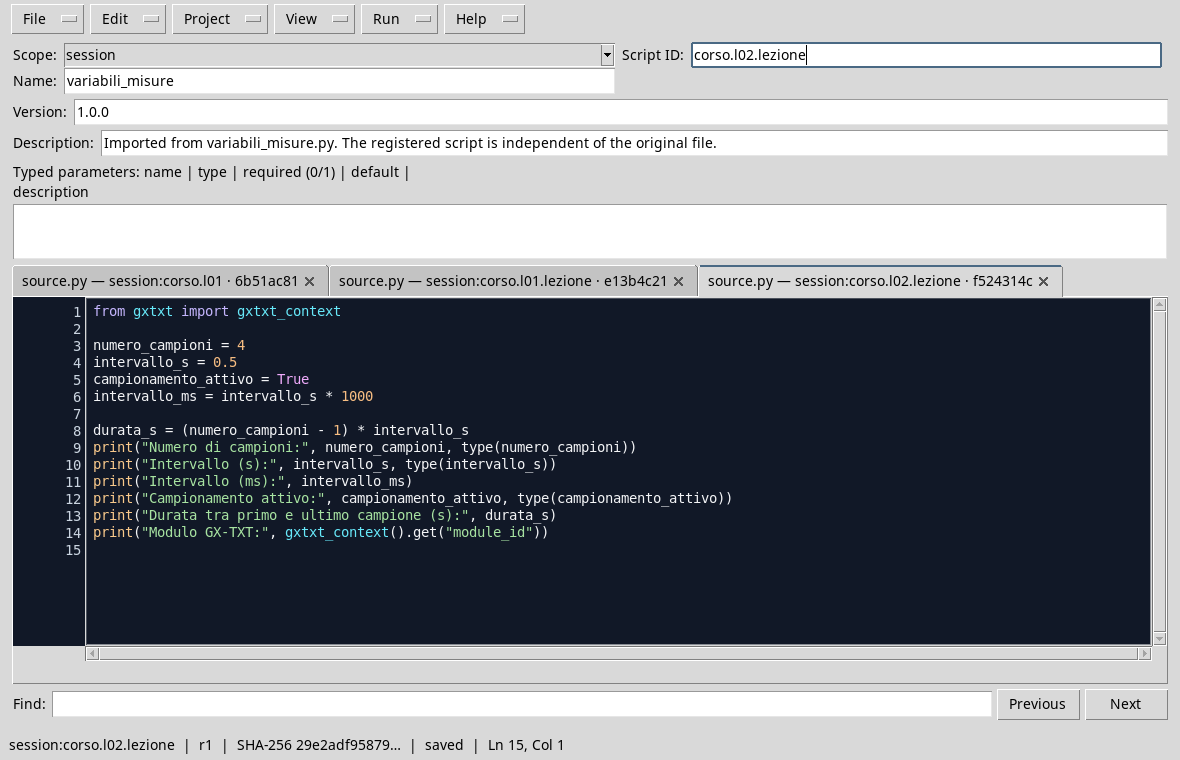
The code in the editor, with the Rich Dark theme and the hidden side panels.
Execution and control
- Open a Session in GX-TXT, then Viewers → Python Scripts.
- Import
variables_and_measurements.pywith File → Import .py… or enter the code into the editor. - Set the
sessionbroom, assign a name and Script ID, for examplecorso.l02.lezione, and save. - Open Run → Open Script Runner… and press Run Job. The example does not require Dataset incoming.
- Open the output of the finished execution. Check that the number of samples is
4, the range0.5s, the equivalent500.0ms and the duration1.5s.

The output distinguishes the value from its Python type. Labels in brackets indicate the units chosen in the script.
Common Error: Confuse Value and Unit
interval_s = 0.5 is only a Python number associated with a name. The language does not know, from that name, that it is seconds: writing interval_ms = interval_s does not convert the value. The correct conversion in the example is multiplication by 1000. In more articulate applications it is necessary to preserve the units together with metadata and to use appropriate tools, without relying only on names.
Another error is to calculate sample_count * interval_s for the distance between the first and last sample. This would describe four intervals; here we have three. Before applying a formula you should draw or list snapshots.
Exercise
Sets six synthetic samples at a distance of 0.2 s. What is the duration between the first and the last? How many milliseconds separate two samples? Predict the result, edit the script and compare the output.
Worked solution
Among six samples there are five ranges: duration_s = (6 - 1) * 0.2, i.e. about 1.0 s. The range is 0.2 * 1000, i.e. 200.0 ms. In other calculations with float, small representation differences can appear: evaluate the result with adequate tolerance, not blindly comparing the printed text.
In the next lesson we will see how to build readable messages with strings and formatting.