

Dictionaries, Structured Data and Introspection
Scientific Python in GX-TXT · Module 1 · Lesson 5
In the previous lesson we treated sequences ordered. A dictionary allows instead to associate a value to a key: it is useful when a data has fields with different meanings, such as the name, volume and uncertainty of a sample or the operations offered by an API.
Objectives: build a dict, access fields, use get and items, distinguish a field absent from a None value and read GX-TXT public descriptions.
Prerequisites: variables, strings, lists and slicing of lessons 1–4.
Key pairs–value
A dictionary is written in curly brackets. Each pair contains a key, two points and a value:
sample = {"nome": "synthetic solution", "volume_ml": 2.5}
print(sample["volume_ml"])
The output is 2.5. Example keys are strings; values can have different types. The keys to a dictionary must be unique and usable as keys: strings and numbers are common examples. A repeated key in a literal leaves the value associated with the last occurrence, so it should be avoided if it is not intentional.
The volume is a given invented to learn, not a measure. The suffix _ml and the documentation indicate milliliters: the number 2.5 alone does not incorporate the unit or uncertainty. For a real data it is also necessary to maintain appropriate origin, unity and uncertainty.
Access, add and edit
sample["display_name"] reads a mandatory field. If the key does not exist, Python lifts KeyError. For an optional field we can use sample.get("temperatura"): when the key is missing, it returns None by default. You can specify an alternative value, such as sample.get("temperatura", "non specificata").
A dictionary is mutable: sample["volume_ml"] = 3.0 updates the field, while sample["unit"] = "mL" adds one. As for the lists, altro = sample creates a second reference to the same object; sample.copy() creates a superficial copy. If the values contain lists or dictionaries, these can remain shared in the superficial copy.
Absent does not mean null
Consider:
sample = {"incertezza_ml": None}
print("incertezza_ml" in sample)  # True.
print("temperatura" in sample)    # False
The incertezza_ml key is present, but its value is None, which we use here to indicate that no value has been provided. The temperatura key is absent. get without alternative value would return None in both cases: to distinguish the situations use in or an appropriate sentinel value. None is not zero and does not certify that uncertainty is nothing.
Nested dictionaries and iteration
A value can in turn be a dictionary:
misura = {"volume": {"valore": 2.5, "unita": "mL"}}
print(misura["volume"]["unita"])
The first pair of brackets access the internal dictionary, the second to its unit key. Before using data from an external source you need to know the expected structure; not all fields must necessarily be present.
d.items() provides key pairs–value. The following example anticipates the for cycle, which we will deepen in the next module: each chiave and value pass receives a pair and the indented body is performed.
for chiave, value in sample.items():
    print(chiave, value)
Do not change the size of the same dictionary during this iteration. The order of insertion is preserved in the modern versions of Python, but when you consume answers of a service do not assume that that order has a scientific meaning.
Describe GX-TXT APIs
gxtxt_api_list() returns a list of descriptions published by the bridge; each observed item includes api_id. gxtxt_api_describe(api_id) takes an identifier and returns a structured descriptor with fields such as identification, version, provider and operations. The presence of an operation in the descriptor does not guarantee that each input data is suitable or that an external resource is configured.
In the script we choose up to two entries actually present with api[:2], we read their identifier and we ask for the respective descriptor. We print the available keys and the operations field when present. The number and content of the API depends on the Session and the version; do not use the identifiers displayed in the figure as a fixed list. If the list is empty, the cycle does not print descriptions, without inventing them.
Full code
from gxtxt import gxtxt_api_list, gxtxt_api_describe, gxtxt_context

sample = {"nome": "synthetic solution", "volume_ml": 2.5, "incertezza_ml": None}
print("Campione:", sample)
print("Volume (mL):", sample["volume_ml"])
print("Uncertainty declared:", sample.get("incertezza_ml"))
print("Current temperature:", "temperatura" in sample)
print("Modulo:", gxtxt_context().get("module_id"))

api = gxtxt_api_list()
for entry in api[:2]:
    identifier = entry["api_id"]
    description = gxtxt_api_describe(identifier)
    print("API:", identifier)
    print("Descriptor fields:", list(description.keys()))
    print("Operazioni:", description.get("operations", "not specified"))
list(description.keys()) creates a list of the descriptor keys to display them. The slice limits output to two descriptions; the content does not change. The api_id mandatory field is read with quad brackets, so a possible response without the field produces a visible error instead of hiding the problem.
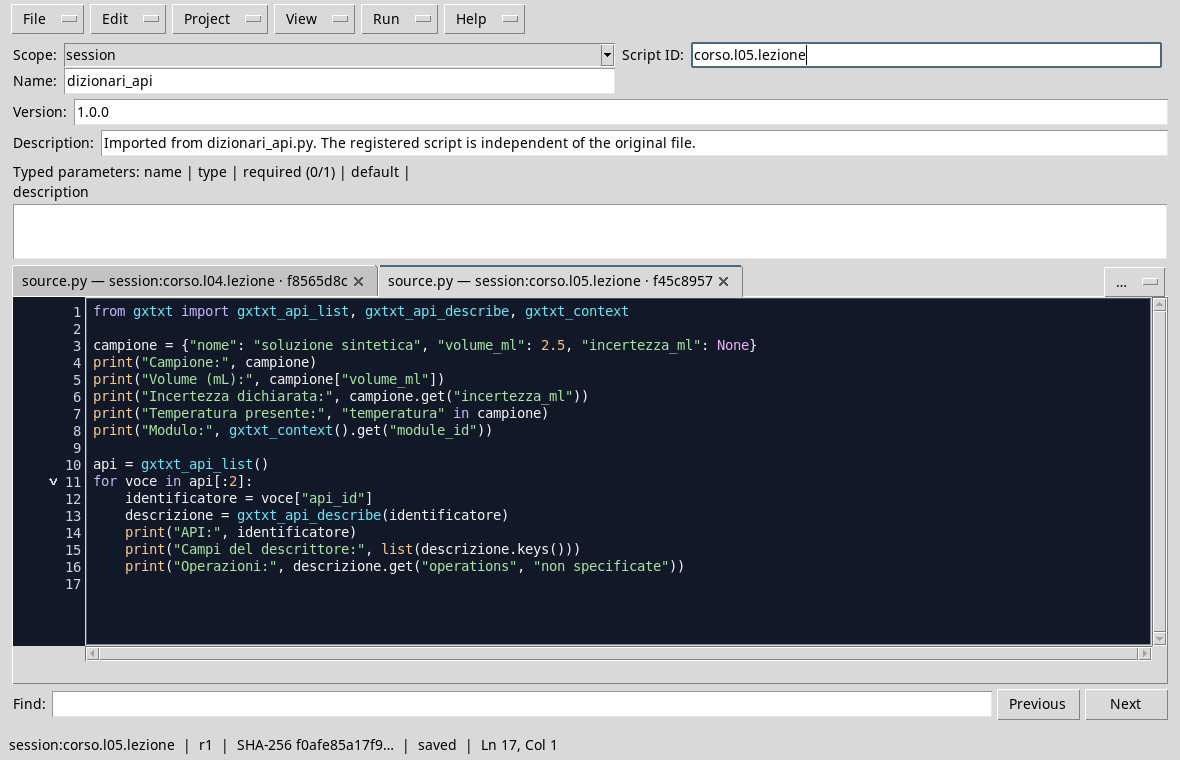
Synthetic dictionary and bridge calls in the editor.
Execution
- Open a Session, then Viewers → Python Scripts.
- Import
dictionaries_and_api.pywith File → Import .py…, assigns name and Script ID into thesessionbroom and saves. - Open Run → Open Script Runner…, press Run Job and read output at the end.
- Control
Volume (mL): 2.5,Incertezza dichiarata: NoneandTemperatura present: False. If at least two APIs are available, it also observes the two identifiers and fields of their descriptors.
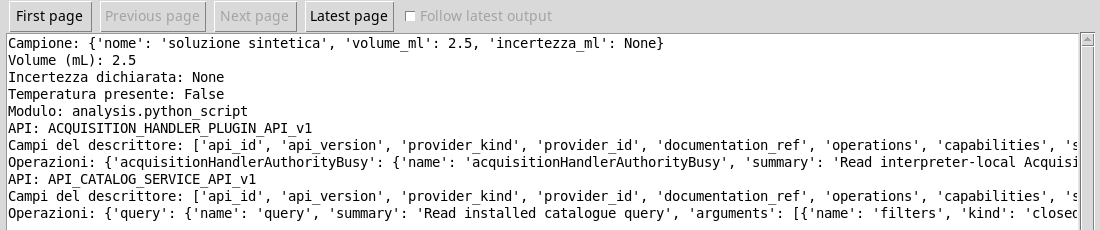
The synthetic sample and an extract of the descriptors actually available in the execution.
Frequent error
Write sample["temperatura"] when the field is absent lifts KeyError. If the temperature is optional, check the presence first or use get with a reserve value. If it is necessary for calculation, the absence should be reported: replacing it automatically with zero would change the scientific meaning of the data.
Exercise
Create misura = {"value": 12.0, "unit": "mV", "uncertainty": None}. Print the value with its unit; check if the uncertainty key is present and if the temperatura key is present. Explains why the first control is true even if uncertainty is None.
Worked solution
misura = {"valore": 12.0, "unita": "mV", "incertezza": None}
print(misura["valore"], misura["unita"])
print("incertezza" in misura)  # True.
print("temperatura" in misura)  # False
in controls keys, not if the associated value is known. The sample value is synthetic and does not constitute a real measure.
In the next lesson we will address the exceptions and controls before calls to the API.