

Exceptions and Safe API Calls
Scientific Python in GX-TXT · Module 1 · Lesson 6
A program encounters unexpected situations: a value does not have the expected type, a key or a request to an API is not valid. Python uses exceptions to report these conditions. We will learn to recognize and manage an intentional error of GX-TXT public bridge without making it pass through a valid scientific result.
Objectives: distinguish syntax and execution errors; include try, except, else and finally; verify an API and interpret a GXTXTBridgeError.
Prerequisites: functions, dictionaries and public clients met in classes 1–5.
What is an exception
An exception interrupts the normal flow of execution and transports information about the error. If no operator intercepts it, Python terminates the program and shows a traceback, that is, the sequence of calls that led to the problem. Read the message and the relevant line: they are not a scientific diagnosis, but help to find out where to start.
SyntaxError signals code that Python fails to interpret, as a missing bracket. TypeError can indicate an operation between incompatible types, for example "volume " + 2.5. KeyError can indicate a required but absent key, as we have seen in lesson 5. In general, a try in the same file cannot intercept an error that prevents Python from analyzing that file: first you have to correct the syntax.
try and except
try:
    value = int("quattro")
except ValueError as caught_error:
    print("Conversion not valid:", caught_error)
Python performs the indented block under try. The conversion fails with ValueError; the corresponding manager receives the exception in the name caught_error. If everything proceeds without exception, the except block is jumped. If an exception of another type occurs, this manager does not intercept it.
Capture the exception you can interpret and provide a useful message. Using except Exception indiscriminately to print “success” hides problems. If the data is indispensable for a calculation, stop the work or clearly signal the failure; do not silently replace the missing value with zero.
else and finally
A else block after except is executed if the try lock ends without exception. finally is performed when you leave the construct, either in the normal case or when a managed or propagated exception occurs; it is useful for a necessary closing operation. Do not use finally to erase or mask an error: in some external interruptions, such as forced termination of the process, Python may not have the opportunity to execute it.
try:
    number = int("4")
except ValueError:
    print("Text not convertible")
else:
    print("Bed value:", number)
finally:
    print("Ended Voltage")
Here the text is valid and the output includes Valore read_result_value: 4 and Tentativo terminato. The if conditions and the most articulated flows will be treated in the next module.
Check public APIs
gxtxt_api_has(api_id) asks if the API is registered in the current bridge and returns a logical value. gxtxt_api_require requires a statement, such as CANONICAL_DATASET_API_v2@2, which specifies the API and the required version. These controls concern the declared availability: they do not guarantee that the topics are scientifically valid or that an external resource is ready.
gxtxt_api_call(api_id, operation, argomenti) calls for a public operation. When the request to the bridge is rejected, the client can lift GXTXTBridgeError, with an identifier and a message. In the example, we intentionally request an operation that is non-existent on an API available, to observe the answer: we are not trying to calculate or modify data. The expected error is GXTXT:ScriptBridge:UnknownOperation; message and details can vary between versions.
Full code
from gxtxt import gxtxt_api_has, gxtxt_api_require, gxtxt_api_call, GXTXTBridgeError

api = "CANONICAL_DATASET_API_v2"
print("API available:", api, gxtxt_api_has(api))
gxtxt_api_require("CANONICAL_DATASET_API_v2@2")
print("Requisite satisfied")

operation = "operazione_inesistente"
try:
    gxtxt_api_call(api, operation, [])
except GXTXTBridgeError as caught_error:
    print("Intentional error intercepted:", caught_error)
else:
    print("The unexpected request has not generated an error")
finally:
    print("Final control")
The empty list [] is the list of arguments of the demonstration call; it does not represent a Dataset. The name of the operation is deliberately non-existent: the exception is shown and the program continues to finally. If the initial requirement of the API is not satisfied, the exercise should not be interpreted as successful.
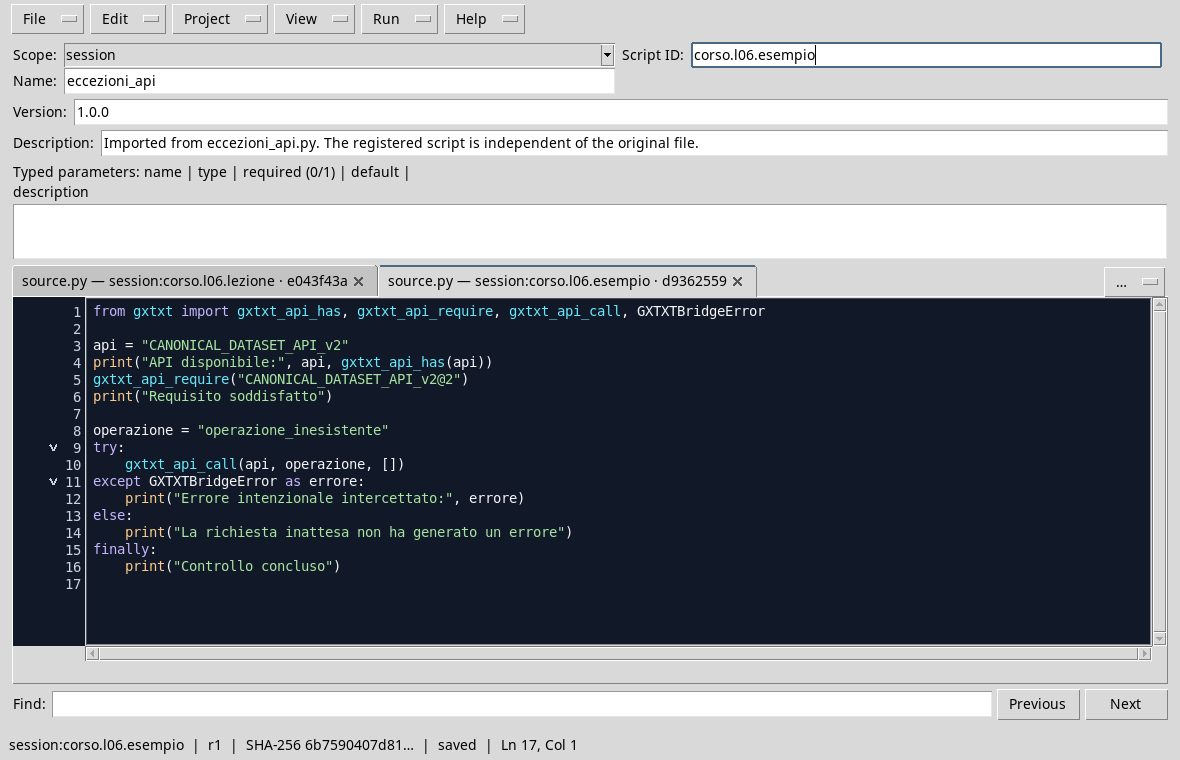
Checking availability and intentionally incorrect call in the editor.
Run and read output
- Open a Session and the Viewer Python Scripts.
- Import
exceptions_and_api.py, assigns a Script ID into thesessionbroom and saves. - Open Run → Open Script Runner…, press Run Job and wait for completion.
- In output,
Requisito soddisfatto, the intentional error andControllo concluso, is looking for the Boolean value of availability.

The bridge rejects the non-existent operation; the program shows the expected error and concludes control.
Distinguish problems
An unregistered API, non-existent operation, invalid arguments and an unavailable external resource are different conditions. The message and the identifier help distinguish them; consult the descriptor documentation before attempting a call. An intercepted exception means that the program has managed a condition, not that a scientific operation has been successfully performed.
Exercise
An operator inserts the "2.5" text as a synthetic volume in mL. Write a block that converts it with float and show a clear message if the text is not numerical. What happens with "due"?
Worked solution
testo = "2.5"
try:
    volume_ml = float(testo)
except ValueError as caught_error:
    print("Volume not convertible:", caught_error)
else:
    print("Synthetic volume (mL):", volume_ml)
"2.5" shows 2.5; with "due" the conversion raises ValueError and the message is shown. In a real acquisition, controls on intervals, units and uncertainty would also be needed: the conversion alone is not enough.
You have completed the basic concepts of the module. In the next module we will use conditions, cycles and functions to better organize scripts.