

While Loops, Counters and Chunked Reads
Scientific Python in GX-TXT · Module 2 · Lesson 10
A while cycle repeats a block until a condition remains true. It is useful when the number of repetitions depends on a state that changes during work, for example the position reached in reading a Dataset. We will use the synthetic series published in lesson 9.
Objectives: build a while that terms; use meters and block sizes; include break, continue and sentinels; read ranges with GX-TXT public API.
Prerequisites: conditions, lists and cycles for; Synthetic Dataset of lesson 9 in Session.
The while structure
counter = 0
while counter < 3:
    print(counter)
    counter += 1
The condition is evaluated before each passage. As long as it is true, Python performs the indented block; when it becomes false, it continues after the cycle. Printed here 0, 1 and 2. counter += 1 is equivalent to counter = counter + 1 for this use.
If the condition is false at first, the body is not executed. If you forget to update the meter, the condition can always remain true and the cycle may not end. Before performing a cycle, it identifies the exit condition and the education that advances the state.
break, continue and sentinels
break ends the inner cycle; continue skips the rest of the current strain and returns to the condition verification. With continue, make sure that the update required for termination has already happened: otherwise you can create an infinite cycle.
A sentinel is a chosen value to indicate the end of a sequence, for example an explicit end message from a source. Do not use a value that could be a valid measure as a sentinel without distinguishing the two cases: a zero can be a real scientific data.
Why read for blocks
Reading a big Dataset all together can take a lot of memory. A block reading only requires a limited range at a time; it also allows to process data progressively. In the example, the Dataset is small to make the procedure visible: four lines read in two requests of two lines.
The series is synthetic, published in lesson 9: signals 1.2; 1.5; 1.3; 1.6 mV at instants 0; 0.5; 1.0; 1.5 s. They are not experimental measures and do not have an assigned uncertainty. Make sure to use the Session and Dataset created in the previous lesson.
Reading API
CANONICAL_DATASET_API_v2/describe receives a Dataset identifier and returns metadata, including the number of rows. read_range receives dataset identifier, variable identifier list, starting index from zero and row number. Returns an indexed structure for variable ID, with values and metadata of form and type.
In order not to exceed the end, we calculate min(chunk_size, row_count - start). With four rows and blocks of two, we read the ranges starting at 0 and 2. After each reading, we increase start of the number of required rows. If the Dataset is empty, the cycle does not make readings and the list remains empty.
Full code
from gxtxt import gxtxt_api_call, gxtxt_api_require

gxtxt_api_require("CANONICAL_DATASET_API_v2@2")
dataset_id = "corso_python_serie_sintetica"
description = gxtxt_api_call("CANONICAL_DATASET_API_v2", "describe", [dataset_id])
row_count = int(description["row_count"])
start = 0
chunk_size = 2
values = []
while start < row_count:
    requested_count = min(chunk_size, row_count - start)
    chunk = gxtxt_api_call("CANONICAL_DATASET_API_v2", "read_range", [dataset_id, ["segnale"], start, requested_count])
    items = chunk["segnale"]["values"]
    values.extend(items)
    print("Damage from", start, "numero", requested_count, ":", items)
    start += requested_count
print("Rows read:", len(values), "su", row_count)
print("Recomposed signal (mV):", values)
extend adds to the list the items returned for the block. In the version shown, the numerical data comes as a column array: each row of the recomposed list appears as a small array, not as a Python climber. We will deepen shape and array in module 3. Here we control order and number of rows, without attributing to the format a different unit or precision.
For Dataset very large, accumulate all the blocks in values back to request proportional memory to the whole set. The actual progressive processing should calculate or save the result of each block without keeping them all, when the problem allows it.
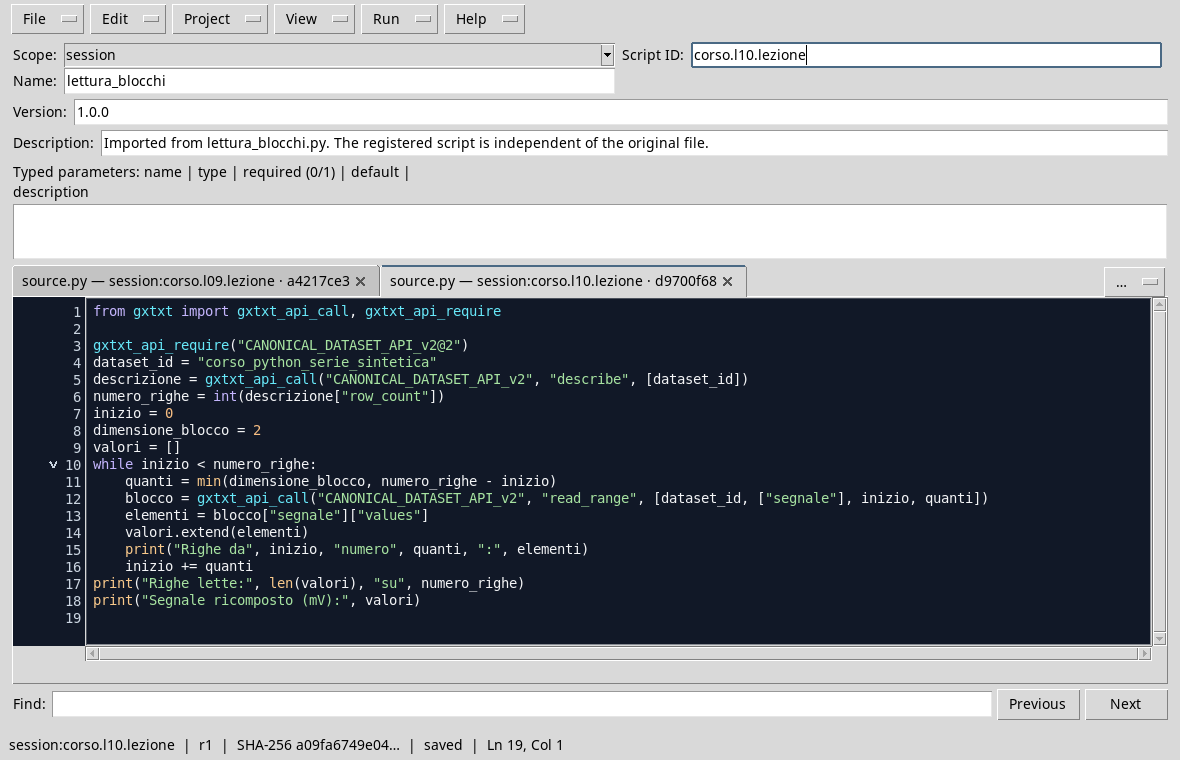
The cycle updates the initial index after each request.
Execution and control
- Open the Session where you performed lesson 9 and verify that it contains
corso_python_serie_sintetica. - In Viewers → Python Scripts, imports
chunked_reading.py, assigns name and Script ID into thesessionbroom and saves. - Open Run → Open Script Runner…, press Run Job and watch the output at the end.
- They must appear two blocks from two rows, starting at 0 and 2; the total must be 4 out of 4. Compare values in the order with the original series of lesson 9.

The lines read in the two blocks reconstruct the synthetic series without jumps or duplications.
Common error: a range of too
If the cycle used start <= row_count, after reading the last line, it would try a further request from position 4. With zero indices, four rows have positions from 0 to 3: the correct condition is start < row_count. Do not add 1 to the meter after you have already advanced requested_count, otherwise you would skip a row.
Exercise
For seven rows and blocks of three, what are the initial indices and the required dimensions? Apply the min(3, row_count - start) rule.
Worked solution
Requests start at 0, 3 and 6; the size is 3, 3 and 1. They cover rows 0–2, 3–5 and 6. Then start becomes 7 and the start < row_count condition is false.
In the next lesson we will collect repeated operations in reusable functions.