

Typed Parameters and the GX-TXT Runner
Scientific Python in GX-TXT · Module 2 · Lesson 12
A reusable script should not require a code modification for each execution. In GX-TXT we can declare parameters typed in the source: the Runner has appropriate controls and the script reads the values chosen by the Execution Session.
Objectives: declare literal parameters with gxtxt_parameter_declare; choose type, default and limits; change values in Runner; read parameters from context and distinguish technical validation from scientific validity.
Prerequisites: variables and types, conditions and functions of previous lessons.
Parameters of the script and parameters of a function
In lesson 11 we wrote parameters in the signature of a Python function. Here, instead, we declare script execution parameters: they are values that the Runner collects before starting the program and makes available in the GX-TXT context. The two concepts are connected by the idea of an input value, but are configured in different points.
A default (default) value is proposed when another one has not been chosen. A type indicates which form of data the Runner must accept: integer for a whole, double for a mobile comma number and boolean for true/false. The units remain a part of the scientific significance: the name interval_s and the description indicate seconds, but do not make automatic conversions.
Declaring three parameters
gxtxt_parameter_declare("campioni", "integer", default=4, min=1, max=100,
                        description="Number of synthetic samples")
The first two topics are the name and type; default, min, max and description respectively specify the proposed value, limits and help text. For static discovery GX-TXT requires public form and literal values in statements: it does not calculate arbitrary expressions to build the scheme. Non-literal, duplicate or conflicting statements with names defined elsewhere can be refused to rescue.
The example script states samples from 1 to 100, interval_s from 0 to 10 and active as a boolean. Runner uses these constraints to control input. The min=0.0 limit for the range is a didactic choice: for many real tools a zero interval would not be physically usable and would serve a more rigorous bond.
Read the selected values
gxtxt_context()["parameters"] returns the dictionary of actual execution parameters. The script reads the declared keys and uses the already typed values:
parameters = gxtxt_context()["parameters"]
samples = parameters["campioni"]
type(samples) allows you to observe that the value received is a whole. It is not necessary to interpret by hand the text typed in the control when the Runner has already supplied the typified value. Do not assume however that validation of the type demonstrates the correctness of the scientific model.
Example: Synthetic sampling
For six samples separated by 0.2 s, the duration between the first and the last is (6 − 1) × 0,2 = 1,0 s. The active boolean is printed to show a third type of parameter; in this example it does not control the acquisition and does not prevent the calculation of the duration. They are synthetic data chosen for the exercise, not measures carried out and without uncertainty assigned.
Full code
from gxtxt import gxtxt_context, gxtxt_parameter_declare

gxtxt_parameter_declare("campioni", "integer", default=4, min=1, max=100, description="Number of synthetic samples")
gxtxt_parameter_declare("intervallo_s", "double", default=0.5, min=0.0, max=10.0, description="Interval in seconds")
gxtxt_parameter_declare("attivo", "boolean", default=True, description="Active sampling")

parameters = gxtxt_context()["parameters"]
samples = parameters["campioni"]
interval_s = parameters["intervallo_s"]
active = parameters["attivo"]
print("Samples:", samples, type(samples))
print("Intervallo (s):", interval_s, type(interval_s))
print("Attivo:", active, type(active))
print("Synthetic duration (s):", (samples - 1) * interval_s)
Declarations are part of the saved source. Changing the values in the Runner changes the inputs of that execution, does not rewrite the defaults in the script. If you change a statement, save again and check the proposed fields before performing.
Runner performance
- Open a Session and the Viewer Python Scripts.
- Import
runner_parameters.py, assigns a name and a Script ID into thesessionbroom, then saves. - Open Run → Open Script Runner…. The three controls appear with the defaults stated.
- Set
samplesto6,interval_sto0.2and uncheckactive. - Press Run Job and open the output when the execution is finished.
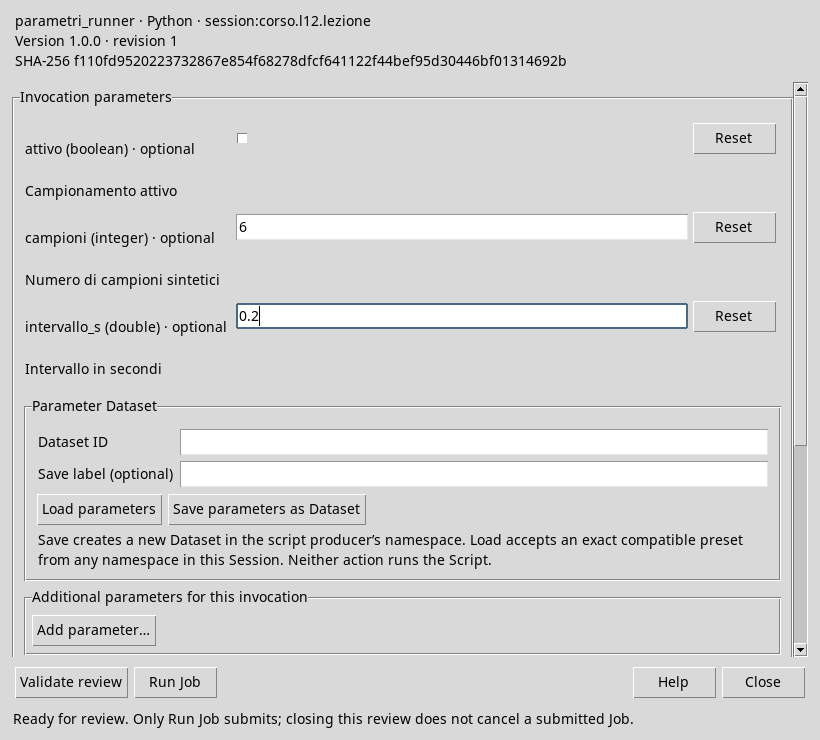
The values chosen in Runner: six samples, 0.2 s and Boolean deactivated.
6 such as int, 0.2 as float, False as bool and 1.0 s. Floating point decimal representations may require tolerances in other calculations.

The program receives the modified values and calculates the expected synthetic duration.
Errors and limits
If a value is out of the declared limits or is not compatible with the type, the Runner may refuse the execution and indicate the field to be corrected. Do not bypass control by converting any input in a silent way: for example, turning a fractional number into whole can truncate it and change the meaning of data.
Even a technically valid input can be scientifically inappropriate. Before applying the script to a real experiment, determine whether the number of samples, range, drive and uncertainty are appropriate to the tool and scientific question.
Exercise
Without changing the code, choose the samples = 5, interval_s = 0.5 and active = True Runner. Predict duration and types, then run the script.
Worked solution
The waiting time is (5 − 1) × 0.5 = 2.0 s. The expected types are int, float and bool; the boolean is shown but does not change the calculation. The result describes the proposed synthetic sequence, not an experimental measure.
In the next module we will pass from Python sequences to numerical arrays.