

Vectorization, Broadcasting and Units
Scientific Python in GX-TXT · Module 3 · Lesson 16
NumPy allows you to apply an operation to an entire array with a concise expression. In order to achieve scientifically interpretable results, however, it is necessary to check both the forms of the operands and the units. We will compare a vector conversion with the public register of GX-TXT units.
Objectives: to apply element by element operations; to understand broadcasting and allocations; to control compatibility and conversion of units; to distinguish a transformation of values from a change of label.
Prerequisites: Arrays, shapes and masks of lessons 13–15.
Operate on an array
import numpy as np
signal_mv = np.array([1.2, 1.5, 1.3, 1.6])
signal_v = signal_mv / 1000.0
The division is applied to each element and produces an array of values in volts. This form, often referred to as vectorized, explicitly avoids writing a Python cycle for each element. signal_mv is not modified by the expression: the result is a new array assigned to signal_v.
The four values are synthetic signalals in milleivolt, chosen for the exercise: they are not measures and have no uncertainty assigned. For 1 V = 1000 mV, 1,2 mV correspond to 0,0012 V. Changing only the label from mV to V without dividing by 1000 would give an incorrect result.
Universal NumPy, or ufunc functions, apply element-by-element operations: for example np.abs(signal_mv) calculates the absolute value of each element. Operations can allocate temporary arrays; concise expression does not automatically imply negligible memory consumption.
Broadcasting
In signal_mv / 1000.0 calculation, the 1000.0 scale is applied to all elements. NumPy uses broadcasting rules to combine compatible forms, without you having to explicitly build a full array of the same scale.
For two arrays, NumPy compares the size from the last axis: the same size, or a size of 1, are compatible for that axis. Missing axes behave as size of length 1. Incompatible forms generate an error; compatible forms can still produce an unexpected result. For example, combining (4,) with (4, 1) can produce a (4, 4) matrix, not four pairs: control shape before and after.
Broadcasting is a rule of form, not a verification of physical meaning. Two arrays can be compatible for NumPy but represent times and tensions that should not be added.
Compatible and conversion with GX-TXT
The public API UNIT_REGISTRY_API_v1 offers compatible to verify a pair of units and convert_values to request the conversion of values. In the script we verify mV and V, then we convert the synthetic vector from milleivolt to volt. The conversion of the provider is compared with the NumPy division for 1000.
The result returned from the bridge in the example has column form (4, 1), while the original NumPy array is (4,). We use reshape(-1) only to compare the same sequence of four values; this choice is justified here because we know it is a single column. For multidimensional data, do not flatten without checking the meaning of axes.
The maximum observed discard is very small, about 2.17e-19 V: it reflects representation or order differences of floating point operations. It is not an instrumental uncertainty. In general, choose a reasoned tolerance and do not require bit-to-bit equality when comparing equivalent numerical calculations.
Proportional and related conversion
The conversion mV → V is proportional: it is enough to multiply by a factor. Other coordinate conversions may also include a constant term, i.e. be related. Do not apply a generic proportional formula to a unit for which an offset is provided. Moreover the conversion of a difference or uncertainty should not be confused with the conversion of an absolute co-ordinate: it uses the appropriate relationship and the documented APIs.
Sums or compares quantities only when units and meaning are compatible. A dimensional control is necessary, but it does not replace the understanding of the physical model.
Full code
import numpy as np
from gxtxt import gxtxt_api_call, gxtxt_api_require

gxtxt_api_require("UNIT_REGISTRY_API_v1@1")
signal_mv = np.array([1.2, 1.5, 1.3, 1.6])
compatible = gxtxt_api_call("UNIT_REGISTRY_API_v1", "compatible", ["mV", "V"])
converted = gxtxt_api_call("UNIT_REGISTRY_API_v1", "convert_values", [signal_mv, "mV", "V"])
calculation = signal_mv / 1000.0
print("Synthetic signal (mV):", signal_mv)
print("Compatible unit:", compatible)
print("Conversion GX-TXT (V):", converted)
print("Calculation NumPy (V):", calculation)
print("Maximum deviation (V):", np.max(np.abs(np.asarray(converted).reshape(-1) - calculation)))
np.abs calculates the absolute deviation for each position and np.max shows the maximum. In this example, the two carriers contain four values; before a generic comparison, it controls the size and correspondence of the elements.
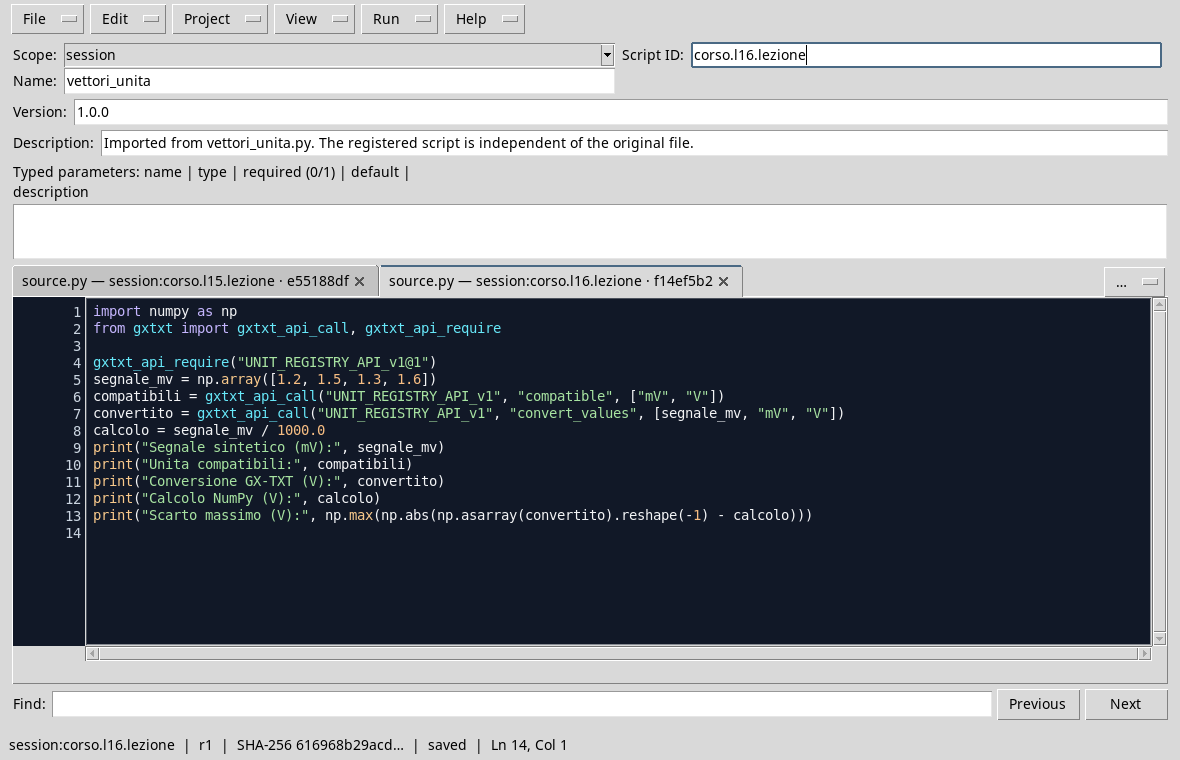
The script compares a NumPy conversion with that of the unit register.
Execution and control
- Open a Session and the Viewer Python Scripts.
- Import
vectors_and_units.py, assigns name and Script ID into thesessionbroom, then saves. - Open Run → Open Script Runner…, press Run Job and read the output.
- Check that
compatiblereturnsTrueand that the converted values are about[0.0012, 0.0015, 0.0013, 0.0016]V. The maximum deviation must be small compared to the scale of values.

The two representations agree within a small numerical deviation.
Common error
Summarizing an array of tensions to an array of times can be syntactically valid if the shapes are compatible, but it does not produce a physically sensible size. Always control units and meaning, in addition to form. For non-compatible units or undefined relationships, do not invent a conversion factor.
Exercise
Convert the synthetic values [2.0, 3.5] mV to volt with a NumPy operation. What values do you expect? Check the shape and unit of the result.
Worked solution
valori_mv = np.array([2.0, 3.5])
valori_v = valori_mv / 1000.0
print(valori_v)  # [0.002  0.0035]
The result is a (2,)-shaped array with V values. To use it as Dataset it is necessary to maintain metadata and consistent units; the variable name does not update only any GX-TXT metadata.
In the next lesson, we will address aggregations, precision and basic statistics.