

The Dataset Catalog and Stable Identity
Scientific Python in GX-TXT · Module 4 · Lesson 19
A readable name helps to recognize a Dataset, but to reliably request it a script needs an identifier. In this lesson, we explore the Session catalog and describe a Dataset through the GX-TXT public API.
Objectives: identifying and visible name; using list and describe; reading a nested descriptor without assuming that the catalogue order is fixed.
Prerequisites: dictionaries and catalogue Dataset of lessons 5 and 9; Session with the synthetic series of the course.
Identification, label and context
An identifier is a value used to refer to an object within a context. A visible label (display label) instead serves to present it to people and can be more descriptive. Two objects can have similar labels; relying on the location in the list or a name shown on the screen can lead to selecting the wrong object.
In our example, the ID is corso_python_serie_sintetica. We use it as a key to the bridge request. Identity should be interpreted in the context of the Session: an ID equal to another Session does not show that the data is the same. Even when an ID remains equal, a revision of the Dataset or its metadata can change the content; for reproducible comparisons you need to know which version of the data you are using.
Catalogue and description
CANONICAL_DATASET_API_v2/list lists the available IDs in the current session. describe, with an ID as a topic, returns a metadata dictionary. The structure may include contract, number of rows and descriptions of the variables. A Dataset may represent different types of content: a text document and a scientific table do not necessarily have the same variables or properties.
The public call is written:
catalog = gxtxt_api_call("CANONICAL_DATASET_API_v2", "list", [])
description = gxtxt_api_call("CANONICAL_DATASET_API_v2", "describe", [dataset_id])
The third argument is the list of the arguments of the operation. There is no ID for list; describe receives an ID. Do not assume that the first element of the catalogue is always the same: choose the appropriate identifier and verify its meaning.
The Dataset of the example
The series created in lesson 9 contains four synthetic pairs of time in seconds and signal in millivolt. They are not real measures and no uncertainty has been given. The description includes the table.generic contract, the number of rows and variables time_values and signal.
The variables have in turn identifiable and metadata. Do not confuse the Dataset ID with the ID of a variable: a reading like read_range requires both. We will analyze the pattern of variables in the next lesson.
Full code
from gxtxt import gxtxt_api_call, gxtxt_api_require

gxtxt_api_require("CANONICAL_DATASET_API_v2@2")
dataset_id = "corso_python_serie_sintetica"
catalog = gxtxt_api_call("CANONICAL_DATASET_API_v2", "list", [])
print("Dataset in the catalog:", len(catalog))
print("Requested ID present:", dataset_id in catalog)
description = gxtxt_api_call("CANONICAL_DATASET_API_v2", "describe", [dataset_id])
print("Described ID:", description.get("dataset_id"))
print("Contratto:", description.get("contract"))
print("Righe:", description.get("row_count"))
print("Variabili:", description.get("variables"))
len counts IDs, while in checks whether the required one is present. The get function reads dictionary fields and returns None when a field does not exist. The complete printing of variables can be long; do not assume that all versions return the same optional fields.
In a reusable application, you explicitly manage the absence of the Dataset before calling describe. Here the script assumes that lesson 9 was performed in the same session; if the ID is missing, stopped and verify the Session instead of inventing metadata.
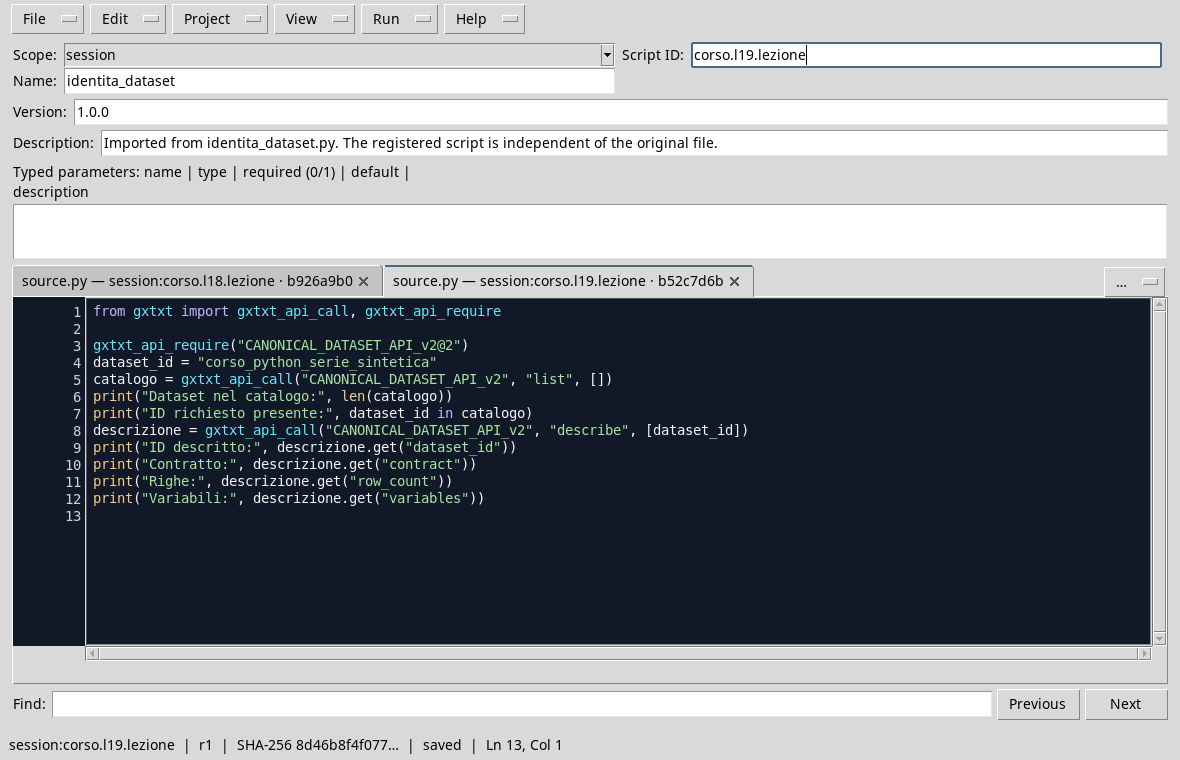
The script uses the identifier to request the descriptor.
Execution
- Open the Session containing
corso_python_serie_sinteticaand the Viewer Python Scripts. - Import
dataset_identity.py, assigns name and Script ID into thesessionbroom, then saves. - Open the Runner, press Run Job and watch the output.
- Check that the required ID is present and matches the one described. In the example, the rows are four; the total number of Dataset can differ in your Session.

The catalogue of the example contains two Datasets; the description required is that of the synthetic series.
Common error
Using catalog[0] as a synonym for “my series” is fragile: adding a Dataset or changing the catalogue order can point to another object. The index is useful for exploring a list; for a scientific request, use the expected ID and verify context and metadata.
Exercise
If catalog = ["series_a", "series_b"], what expression verifies the presence of "series_b" without hypotheses on the position? What does it mean if there is a Dataset in another Session with the same ID?
Worked solution
"series_b" in catalog returns True. The same ID in another Session identifies an object in a different context: alone it does not show that content, unity or revision are identical.
In the next lesson we will read diagrams, units and metadata of variables.