

GX-TXT Temporal Set API: Managing Time Segments and Windows with GNU Octave and Python
Scientific Datasets may contain observations along a time coordinate: concentrations, voltages, spectral intensities, temperatures, or signals acquired from an instrument. Many analyses, however, do not need the entire series: we may want to compare different stages of a reaction, examine only a transient, or repeat the same processing over successive, partially overlapping windows.
GX-TXT addresses this problem through the Temporal Set API v1. It allows temporal portions of a canonical Dataset to be defined, stored, and shared. The same resource can be created by a GNU Octave script, read by a Python script, and subsequently used by an analysis module, always through the public APIs and the Script Bridge.
An important principle
A Temporal Set is not a new Dataset: it does not copy measurements, concatenate intervals, create a scientific file for each window, or change the original sampling. It is a persistent definition that CORE resolves into row ranges and coordinates.
1. When should you use a Temporal Set?
A simple script can already read an entire Dataset through CANONICAL_DATASET_API_v2/read_range. If we only need to calculate one derivative over the entire curve, without splitting it or reusing any selection, a Temporal Set would add complexity without a practical benefit.
The situation changes when the intervals have scientific meaning or need to be reused. For example:
- a kinetic experiment divided into initial, transient, and final stages, including non-adjacent intervals;
- an instrumental measurement from which we want to exclude stabilization periods;
- a signal to be analyzed using windows with a fixed duration or sample count, including overlapping windows;
- windowed FFT, Welch, or cross-spectral analysis that must share the same input portions;
- separate Octave and Python scripts that must agree on the same intervals without redefining them independently.
The resource can be defined once and reused by other scripts within the same GX-TXT Session. In this way, the segmentation becomes part of the reproducible analysis context.
2. Two different resources: Segment Set and Window Set
The API distinguishes two complementary models.
| Type | How it is defined | Typical use |
|---|---|---|
segment_set | An ordered list of arbitrary intervals, with labels and stable IDs | Experimental phases, events, manually selected periods |
window_set | A compact window generator with a size, step, and final-window policy | Windowed FFT, Welch, repeated and overlapping analyses |
A Segment Set stores its segments, such as “startup,” “stabilization,” and “steady state,” even when they are noncontiguous. A Window Set instead stores the generation rule. Its members are resolved when needed rather than stored individually.
2.1 Intervals use half-open boundaries
The convention is [start, end): the lower boundary is included and the upper boundary excluded. The segment from 10 to 30 seconds therefore includes samples whose time satisfies 10 <= t < 30.
This makes it possible to place consecutive segments side by side without counting a boundary sample twice. Note that, when a selected series is numerically integrated, its last sampled value may be earlier than the segment’s upper boundary. We will return to this point with an example.
Coordinates, rows, and indices
A resolved member returns row_start and row_count. row_start is a zero-based offset, consistent with canonical Dataset reads. By contrast, the index parameter of resolve_member identifies a member starting from one. Confusing these two conventions can easily lead to incorrect selections.
3. A Dataset needs a genuine time axis
GX-TXT does not automatically infer temporal semantics from a variable named time or from the unit s. Those semantics should be declared in the Variable Schema when publishing the Dataset.
In our experiment, we will use 60 synthetic samples, one per second, with times from 0 to 59 s. The concentration of a hypothetical substance decreases according to
\[C(t)=4\,e^{-0.055t}\quad\mathrm{mmol/L}.\]
The following Octave code prepares the vectors:
time_s = (0:59)';
concentration_mmol_L = 4.0 * exp(-0.055 * time_s);
The declaration of the time coordinate is intentionally explicit:
x_variable = struct('variable_id', 'time_s', 'name', 'time_s', ...
  'display_label', 'Elapsed time', 'unit', 's', 'dtype', 'float64', ...
  'value_kind', 'number', 'semantic_role', 'elapsed_time', ...
  'time_reference', 'elapsed', 'semantic_source', 'generator');
value_kind=number is appropriate because the times are already numeric values in seconds; the elapsed_time role and time_reference=elapsed describe their physical interpretation. For data encoded as HH:MM:SS, there is also a specific elapsed-time conversion contract. This representation should not be confused with an absolute date or a plain number without temporal semantics.
The complete Temporal_00_Prepare.m script, included at the end of this article, publishes the temporal_demo_decay Dataset using DATASET_PUBLICATION_API_v2/publish_series_batch and reads it back using CANONICAL_DATASET_API_v2/read_range.
4. Public operations available through the Script Bridge
The service ID is TEMPORAL_SET_API_v1. The same eight operations are available to managed GNU Octave and Python scripts.
| Operation | Positional arguments | Purpose and result |
|---|---|---|
create | Definition | Creates a persistent Set and returns its ID |
list | Optional Dataset ID | Lists Sets, optionally filtered by source |
read | Set ID | Retrieves the persistent definition |
resolve_info | Set ID | Describes the current resolution, including member count and source |
resolve_member | Set ID, one-based index | Returns a member with its ID, boundaries, and rows to read |
resolve | Set ID | Resolves all members in the Set |
update | Set ID, changes | Updates a definition while preserving the resource identity |
delete | Set ID | Explicitly deletes the Set, not the source Dataset |
temporalSetIterate is a host-context procedure that uses Tcl callbacks: it is not callable through the Script Bridge. Scripts should instead use resolve_info and resolve_member, avoiding the materialization of very large member lists through resolve.
4.1 Same API, different syntax in Octave and Python
In GNU Octave, the third argument to gxtxt_api_call is a cell array:
api = 'TEMPORAL_SET_API_v1';
gxtxt_api_require({api});
assert(gxtxt_api_has_operation(api, 'resolve_member'));
member = gxtxt_api_call(api, 'resolve_member', {set_id, 1});
In Python, the equivalent argument collection is a list:
from gxtxt import gxtxt_api_require, gxtxt_api_call

API = 'TEMPORAL_SET_API_v1'
gxtxt_api_require([API])
member = gxtxt_api_call(API, 'resolve_member', [set_id, 1])
Return values become Octave structures and cell arrays, or Python dictionaries and lists. The Script Bridge checks the publicly registered operations for the current Session: there is no need to import private CORE modules or read the temporal registry files directly.
5. GNU Octave example: create three kinetic phases
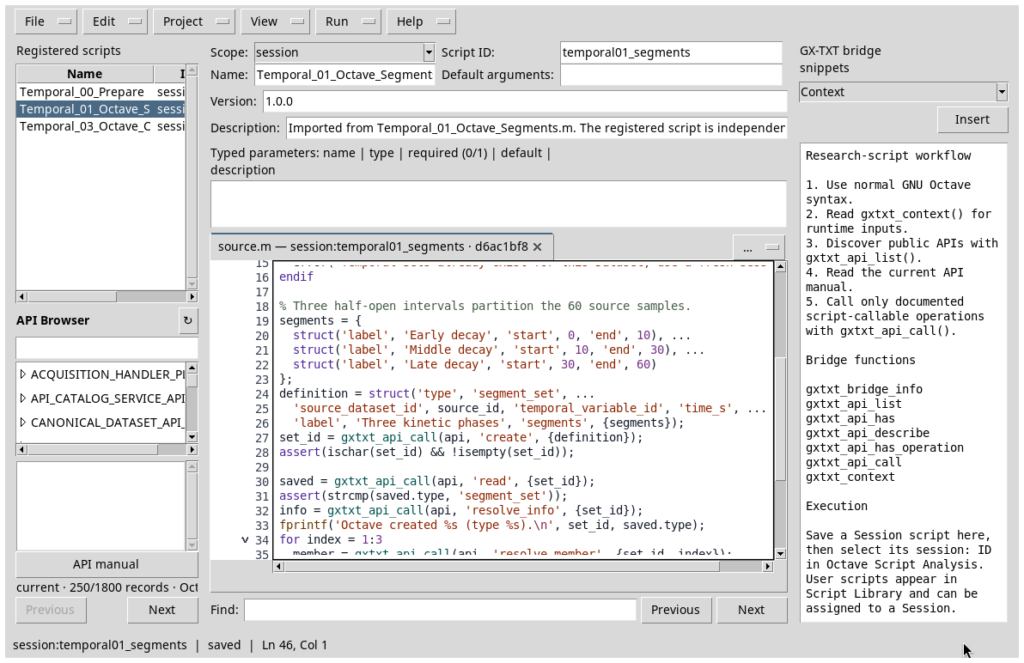
After publishing the source Dataset, we define three intervals covering the entire sequence:
segments = {
  struct('label', 'Early decay', 'start', 0, 'end', 10), ...
  struct('label', 'Middle decay', 'start', 10, 'end', 30), ...
  struct('label', 'Late decay', 'start', 30, 'end', 60)
};

definition = struct('type', 'segment_set', ...
  'source_dataset_id', 'temporal_demo_decay', ...
  'temporal_variable_id', 'time_s', ...
  'label', 'Three kinetic phases', 'segments', {segments});

set_id = gxtxt_api_call('TEMPORAL_SET_API_v1', 'create', {definition});
source_dataset_id identifies the Dataset, while temporal_variable_id is its temporal Variable ID, not a title displayed in the GUI. CORE returns an ID such as tset_001, which other scripts and modules can reuse.
5.1 Resolve segments rather than reading internal files
After creation, we can read the definition with read and ask CORE which rows correspond to the second segment:
member = gxtxt_api_call('TEMPORAL_SET_API_v1', ...
  'resolve_member', {set_id, 2});

block = gxtxt_api_call('CANONICAL_DATASET_API_v2', 'read_range', ...
  {'temporal_demo_decay', {'time_s', 'concentration_mmol_L'}, ...
   member.row_start, member.row_count});
In this example, resolution returns the following intervals:
| Segment | Defined interval | row_start | row_count | Actual sampled times |
|---|---|---|---|---|
seg_001 | [0,10) s | 0 | 10 | 0…9 s |
seg_002 | [10,30) s | 10 | 20 | 10…29 s |
seg_003 | [30,60) s | 30 | 30 | 30…59 s |
The three phases form a single persistent segment_set. We have not published three new Datasets or changed the source.
6. Python example: read Octave segments and create overlapping windows
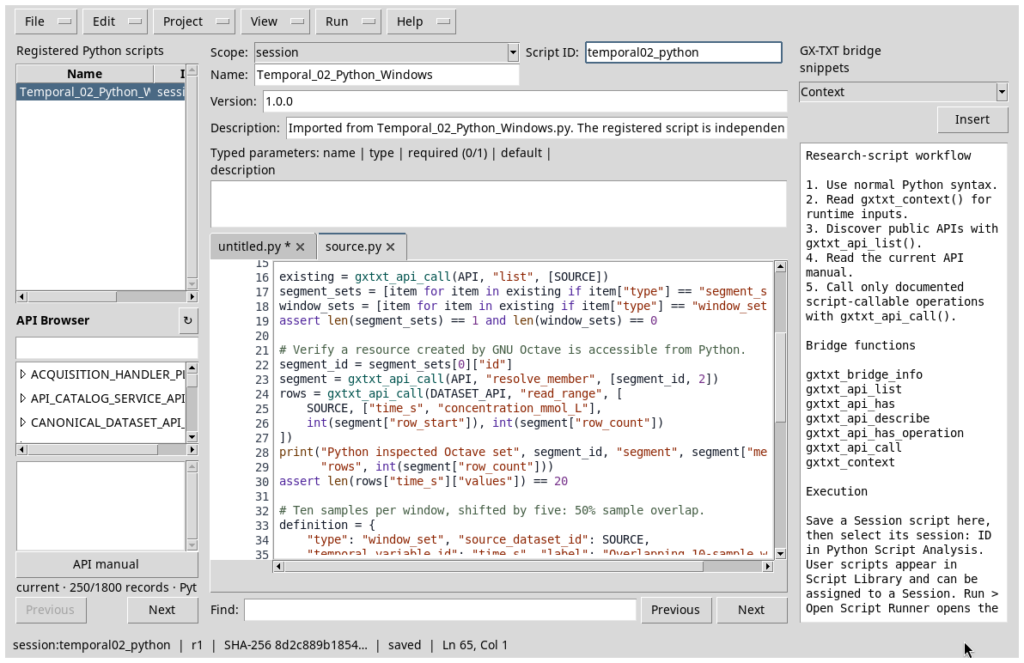
The Python script runs in the same Session. It first calls list to find the segment_set, then resolves its second member and reads 20 samples through the canonical API. This shows that the resource does not belong to the language that created it.
We now define a window_set with 10 samples per window and a step of 5 samples:
from gxtxt import gxtxt_api_call, gxtxt_api_require

API = 'TEMPORAL_SET_API_v1'
gxtxt_api_require([API])

window_definition = {
    'type': 'window_set',
    'source_dataset_id': 'temporal_demo_decay',
    'temporal_variable_id': 'time_s',
    'generator_basis': 'samples',
    'window_size': 10,
    'step': 5,
    'partial_policy': 'drop',
    'label': 'Overlapping 10-sample windows'
}
window_id = gxtxt_api_call(API, 'create', [window_definition])
info = gxtxt_api_call(API, 'resolve_info', [window_id])
print(info['member_count'])  # 11
The overlap, expressed as a fraction of the window size in samples, is
\[\mathrm{overlap}=\frac{10-5}{10}=50\%.\]
With 60 samples, we obtain 11 complete windows. The first starts at row 0 and contains 10 values; the last starts at row 50 and contains the final 10. CORE generates deterministic IDs such as win_000001 and win_000011.

6.1 Sample-based windows versus duration-based windows
With generator_basis=samples, window_size and step are sample counts. The 50% overlap here describes overlapping rows, not necessarily 50% of the physical duration when the time grid is irregular.
GX-TXT also supports generator_basis=duration, with duration_unit when needed. This mode requires a uniform canonical time grid and an exact conversion from durations to integer sample counts: CORE does not silently round incompatible intervals. With nonuniformly sampled data, a 10-sample window must not be treated as equivalent to a 10-second window.
The partial_policy=drop policy excludes a potentially incomplete final window. With include, a truncated final window is included explicitly. The choice should be documented because it affects the number and coverage of members.
7. Updating and deleting a Temporal Set
A persistent resource can be updated without changing its ID:
updated = gxtxt_api_call(API, 'update', [
    window_id, {'label': 'Overlap 50% (10 samples / 5 step)'}
])
Changing a label does not change the samples. However, the intervals must be revalidated whenever the size, step, source, or scientific definition changes. For a segment_set, existing segment IDs must be included in the updated definition if those identities are to be preserved.
delete deletes only the Temporal Set resource, not the source Dataset. In the complete Python example, we create a temporary Set and delete it, leaving the two main teaching resources intact. For Datasets and Temporal Sets shared by multiple analyses, dependencies should be checked before deleting a Set.
8. Back to Octave: the result can be reused
A further GNU Octave script retrieves the window_set created by Python. list and read identify it; resolve_info reports 11 members, and resolve_member returns the first and second windows.
info = gxtxt_api_call('TEMPORAL_SET_API_v1', ...
  'resolve_info', {window_id});
first = gxtxt_api_call('TEMPORAL_SET_API_v1', ...
  'resolve_member', {window_id, 1});
second = gxtxt_api_call('TEMPORAL_SET_API_v1', ...
  'resolve_member', {window_id, 2});

assert(first.row_start == 0 && first.row_count == 10);
assert(second.row_start == 5 && second.row_count == 10);
The resolved values can be passed directly to CANONICAL_DATASET_API_v2/read_range. To demonstrate how this can be combined with a mathematical service, the script then calls NUMERIC_API_v1/integrate on the values in the first window. The result is 28.40200061 mmol·s/L, corresponding to samples from 0 to 9 seconds.
A note about integration boundaries
The sample-based window covers the first ten rows, with times from 0 to 9 s. The numerical integral calculated on these ten coordinates therefore covers [0,9] s, not automatically the continuous interval [0,10] s. Including a point at that boundary would require an additional scientific decision, not a silent adjustment of the indices.

9. Run the four scripts inside the framework
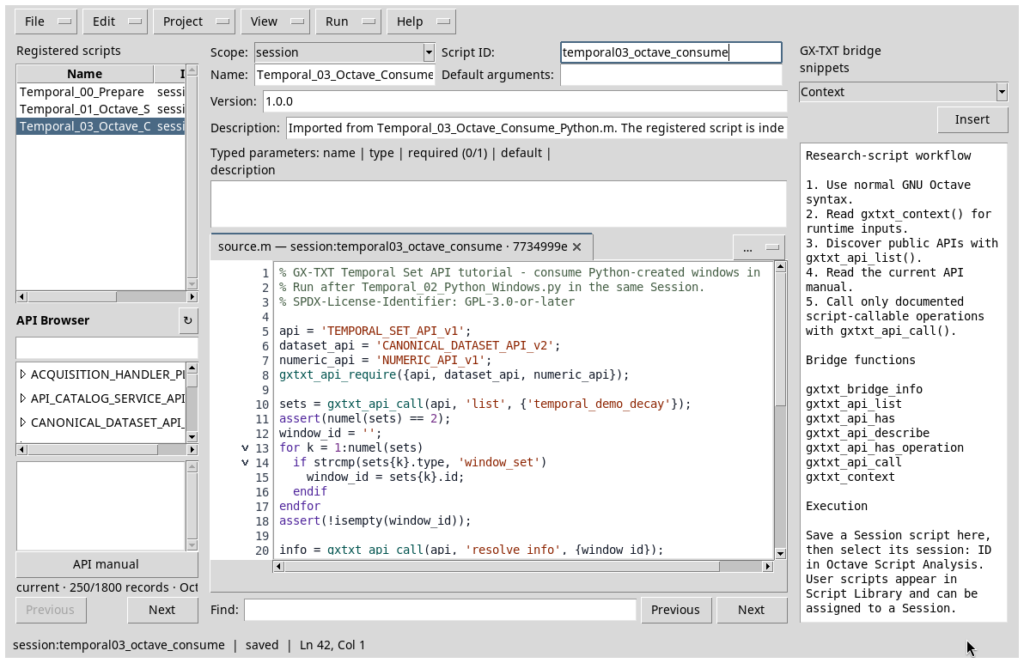
Create a new GX-TXT Session, then use the Octave Scripts and Python Scripts Viewers. Import and register each file with a separate Script ID, saving it before opening its Script Runner. Run the examples in the following order:
Temporal_00_Prepare.m— creates a Dataset with 60 samples andelapsed_timesemantics;Temporal_01_Octave_Segments.m— creates and resolves thesegment_set;Temporal_02_Python_Windows.py— reads the Octave Set and creates/updates thewindow_set;Temporal_03_Octave_Consume_Python.m— reads the Python Set and uses the samples in the numerical service.
All four Jobs share the same Session, but each executes a snapshot of its saved script revision. After execution, the Temporal Set resources remain available to other consumers in that Session.

10. When to avoid Temporal Sets and which errors to prevent
| Situation | Appropriate choice |
|---|---|
| A single calculation over the entire series | Read the Dataset directly: a Temporal Set is not essential |
| A one-off local read that will not be reused | A read_range call with known row offset and count may be sufficient |
| Experimental phases, separate or noncontiguous intervals | segment_set |
| Many regular windows, overlap, and repeated analysis | window_set |
| Windows with a fixed physical duration | window_set using duration, provided the time-axis contract and grid are compatible |
| Analysis shared across Octave, Python, and GX-TXT modules | A persistent Temporal Set with a stable ID |
| Need to generate new scientific results | Publish results as Datasets through DATASET_PUBLICATION_API_v2; a Temporal Set alone does not create them |
Common problems concern the time axis: a missing semantic role, units incompatible with time, nonexistent Dataset/Variable IDs, coordinates that do not match the defined intervals, or resources referring to sources that are no longer available. CORE explicitly invalidates stale references rather than producing a misleadingly valid result.
A Temporal Set may include a parent_selection_id: an x_range Selection over the same Dataset and temporal variable restricts the effective interval before members are generated. The Set remains a view rather than a copy of the samples.
A practical rule
Use Temporal Sets when you want to retain and share the scientific definition of a temporal selection. Do not use them simply because a column contains time. Dataset APIs remain responsible for reading observations, numeric APIs for processing them, and the Temporal Set API for persisting interval definitions.
11. Sources, version, and example materials
This example uses GX-TXT 0.9.8.10-dev-112 Release 2, cumulative patch P008, available from the official GitHub release. The release tag points to commit 17ff2a7f93de0612015a873e626f87dbeb56b6a2; the patch bundle identifies source commit f691b0f6e1016cb9af3db30ba3d1c8b5ea91429c. API contract versions are independent of the framework release number.
Public API documentation:
- Temporal Set API v1
- Octave Script Bridge API v1
- Python Script Client v1
- Canonical Dataset API v2
- Dataset Publication API v2
- Numeric API v1
The complete scripts appear at the end of this article in expandable sections. Source comments and headers are in English, under the GPL-3.0-or-later.
12. Complete GNU Octave and Python scripts
Expand a section below to inspect and copy the full script. These examples require a new Session and must be run in the order shown.
Note: the scripts use only public GX-TXT APIs. All comments in the code are in English.
Temporal_00_Prepare.m — complete source code
% GX-TXT Temporal Set API tutorial - create a canonical timed Dataset.
% Framework: GX-TXT DEV112-r2 P008; all GX-TXT access uses public APIs.
% SPDX-License-Identifier: GPL-3.0-or-later

source_id = 'temporal_demo_decay';
dataset_api = 'CANONICAL_DATASET_API_v2';
publication_api = 'DATASET_PUBLICATION_API_v2';
gxtxt_api_require({dataset_api, publication_api});
assert(gxtxt_api_has_operation(publication_api, 'publish_series_batch'));
assert(gxtxt_api_has_operation(dataset_api, 'read_range'));

existing_ids = gxtxt_api_call(dataset_api, 'list', {});
if any(strcmp(existing_ids, source_id))
  error('Dataset already exists: use a fresh Session.');
endif

% Sixty samples, one sample per second: t = 0, 1, ..., 59 s.
time_s = (0:59)';
concentration_mmol_L = 4.0 * exp(-0.055 * time_s);
assert(numel(time_s) == 60 && all(diff(time_s) == 1));

% Elapsed-time semantics are explicit, not inferred from the column name.
x_variable = struct('variable_id', 'time_s', 'name', 'time_s', ...
  'display_label', 'Elapsed time', 'unit', 's', 'dtype', 'float64', ...
  'value_kind', 'number', 'semantic_role', 'elapsed_time', ...
  'time_reference', 'elapsed', 'semantic_source', 'generator');
y_variable = struct('variable_id', 'concentration_mmol_L', ...
  'name', 'concentration_mmol_L', 'display_label', 'Concentration', ...
  'unit', 'mmol/L', 'dtype', 'float64', 'value_kind', 'number', ...
  'semantic_source', 'generator');

metadata = struct();
metadata.('simulation.synthetic') = true;
metadata.('simulation.kinetic_rate_per_s') = 0.055;
metadata.('simulation.uniform_time_step_s') = 1;
series = struct('dataset_id', source_id, 'contract', 'table.generic', ...
  'storage', 'auto', 'x_values', time_s, 'y_values', concentration_mmol_L, ...
  'x_variable', x_variable, 'y_variable', y_variable, ...
  'producer_version', '1.0.0', 'source', 'GX-TXT Temporal Set tutorial', ...
  'provenance', 'Deterministic first-order decay (synthetic data)', ...
  'structured_metadata', metadata);
batch = struct('series', {{series}});
receipt = gxtxt_api_call(publication_api, 'publish_series_batch', {batch});
assert(receipt.atomic && receipt.output_count == 1);
readback = gxtxt_api_call(dataset_api, 'read_range', ...
  {source_id, {'time_s', 'concentration_mmol_L'}, 0, 60});
assert(max(abs(readback.time_s.values(:) - time_s)) < 1e-12);
assert(max(abs(readback.concentration_mmol_L.values(:) - concentration_mmol_L)) < 1e-12);
fprintf('PASS: source Dataset %s; 60 elapsed-time samples, 0..59 s.n', source_id);
Temporal_01_Octave_Segments.m — complete source code
% GX-TXT Temporal Set API tutorial - create and inspect a Segment Set.
% Run after Temporal_00_Prepare.m in the same GX-TXT Session.
% SPDX-License-Identifier: GPL-3.0-or-later

api = 'TEMPORAL_SET_API_v1';
dataset_api = 'CANONICAL_DATASET_API_v2';
gxtxt_api_require({api, dataset_api});
for op = {'create', 'list', 'read', 'resolve_info', 'resolve_member'}
  assert(gxtxt_api_has_operation(api, op{1}));
endfor

source_id = 'temporal_demo_decay';
existing = gxtxt_api_call(api, 'list', {source_id});
if !isempty(existing)
  error('Temporal Sets already exist for this Dataset; use a fresh Session.');
endif

% Three half-open intervals partition the 60 source samples.
segments = {
  struct('label', 'Early decay', 'start', 0, 'end', 10), ...
  struct('label', 'Middle decay', 'start', 10, 'end', 30), ...
  struct('label', 'Late decay', 'start', 30, 'end', 60)
};
definition = struct('type', 'segment_set', ...
  'source_dataset_id', source_id, 'temporal_variable_id', 'time_s', ...
  'label', 'Three kinetic phases', 'segments', {segments});
set_id = gxtxt_api_call(api, 'create', {definition});
assert(ischar(set_id) && !isempty(set_id));

saved = gxtxt_api_call(api, 'read', {set_id});
assert(strcmp(saved.type, 'segment_set'));
info = gxtxt_api_call(api, 'resolve_info', {set_id});
fprintf('Octave created %s (type %s).n', set_id, saved.type);
for index = 1:3
  member = gxtxt_api_call(api, 'resolve_member', {set_id, index});
  assert(member.row_count > 0);
  block = gxtxt_api_call(dataset_api, 'read_range', ...
    {source_id, {'time_s', 'concentration_mmol_L'}, ...
     member.row_start, member.row_count});
  values = block.time_s.values(:);
  fprintf('Segment %d: %s, row_start=%d, row_count=%d, t=%g..%g s.n', ...
    index, member.member_id, member.row_start, member.row_count, ...
    values(1), values(end));
endfor
fprintf('PASS: persistent Segment Set created through public Octave Script Bridge.n');
Temporal_02_Python_Windows.py — complete source code
"""Create a Window Set with the GX-TXT public Python Script Bridge.

Run after Temporal_01_Octave_Segments.m in the same managed Session.
SPDX-License-Identifier: GPL-3.0-or-later
"""
from gxtxt import gxtxt_api_require, gxtxt_api_has_operation, gxtxt_api_call

API = "TEMPORAL_SET_API_v1"
DATASET_API = "CANONICAL_DATASET_API_v2"
SOURCE = "temporal_demo_decay"
gxtxt_api_require([API, DATASET_API])
for operation in ("list", "read", "create", "resolve_info", "resolve_member",
                  "resolve", "update", "delete"):
    assert gxtxt_api_has_operation(API, operation), operation

existing = gxtxt_api_call(API, "list", [SOURCE])
segment_sets = [item for item in existing if item["type"] == "segment_set"]
window_sets = [item for item in existing if item["type"] == "window_set"]
assert len(segment_sets) == 1 and len(window_sets) == 0

# Verify a resource created by GNU Octave is accessible from Python.
segment_id = segment_sets[0]["id"]
segment = gxtxt_api_call(API, "resolve_member", [segment_id, 2])
rows = gxtxt_api_call(DATASET_API, "read_range", [
    SOURCE, ["time_s", "concentration_mmol_L"],
    int(segment["row_start"]), int(segment["row_count"])
])
print("Python inspected Octave set", segment_id, "segment", segment["member_id"],
      "rows", int(segment["row_count"]))
assert len(rows["time_s"]["values"]) == 20

# Ten samples per window, shifted by five: 50% sample overlap.
definition = {
    "type": "window_set", "source_dataset_id": SOURCE,
    "temporal_variable_id": "time_s", "label": "Overlapping 10-sample windows",
    "generator_basis": "samples", "window_size": 10, "step": 5,
    "partial_policy": "drop",
}
window_id = gxtxt_api_call(API, "create", [definition])
assert isinstance(window_id, str) and window_id
saved = gxtxt_api_call(API, "read", [window_id])
assert saved["type"] == "window_set"
info = gxtxt_api_call(API, "resolve_info", [window_id])
print("Python created", window_id, "window count:", info["member_count"])
first = gxtxt_api_call(API, "resolve_member", [window_id, 1])
last = gxtxt_api_call(API, "resolve_member", [window_id, int(info["member_count"])])
print("First window:", first["member_id"], "rows", first["row_start"], first["row_count"])
print("Last window:", last["member_id"], "rows", last["row_start"], last["row_count"])
assert int(first["row_start"]) == 0 and int(first["row_count"]) == 10
assert int(info["member_count"]) == 11
assert int(last["row_start"]) == 50 and int(last["row_count"]) == 10

# Update the presentation label without changing the stable resource identity.
updated = gxtxt_api_call(API, "update", [window_id, {"label": "Overlap 50% (10 samples / 5 step)"}])
assert updated["id"] == window_id
all_members = gxtxt_api_call(API, "resolve", [window_id])
print("Resolved window-set fields:", sorted(all_members.keys()))

# Exercise delete safely on a temporary, disposable resource only.
scratch = dict(definition, label="Disposable demonstration set")
scratch_id = gxtxt_api_call(API, "create", [scratch])
assert scratch_id not in {window_id, segment_id}
assert gxtxt_api_call(API, "delete", [scratch_id]) == scratch_id
print("PASS: Python read the Octave set, created/updated windows and deleted a disposable set.")
Temporal_03_Octave_Consume_Python.m — complete source code
% GX-TXT Temporal Set API tutorial - consume Python-created windows in Octave.
% Run after Temporal_02_Python_Windows.py in the same Session.
% SPDX-License-Identifier: GPL-3.0-or-later

api = 'TEMPORAL_SET_API_v1';
dataset_api = 'CANONICAL_DATASET_API_v2';
numeric_api = 'NUMERIC_API_v1';
gxtxt_api_require({api, dataset_api, numeric_api});

sets = gxtxt_api_call(api, 'list', {'temporal_demo_decay'});
assert(numel(sets) == 2);
window_id = '';
for k = 1:numel(sets)
  if strcmp(sets{k}.type, 'window_set')
    window_id = sets{k}.id;
  endif
endfor
assert(!isempty(window_id));

info = gxtxt_api_call(api, 'resolve_info', {window_id});
assert(info.member_count == 11);
first = gxtxt_api_call(api, 'resolve_member', {window_id, 1});
second = gxtxt_api_call(api, 'resolve_member', {window_id, 2});
assert(first.row_start == 0 && first.row_count == 10);
assert(second.row_start == 5 && second.row_count == 10);

% row_start is zero-based, but resolve_member index is one-based.
block = gxtxt_api_call(dataset_api, 'read_range', ...
  {'temporal_demo_decay', {'time_s', 'concentration_mmol_L'}, ...
   first.row_start, first.row_count});
time_s = block.time_s.values(:);
y = block.concentration_mmol_L.values(:);
assert(numel(time_s) == 10 && time_s(1) == 0 && time_s(end) == 9);

% An integral over selected samples covers [0, 9] s, not the half-open [0, 10) definition.
area = gxtxt_api_call(numeric_api, 'integrate', {time_s, y, struct()});
fprintf('Octave read Python set %s: %d windows, step=5 samples.n', ...
  window_id, info.member_count);
fprintf('First window samples t=%g..%g s; integrated area=%.8f mmol*s/L.n', ...
  time_s(1), time_s(end), area.value);
fprintf('PASS: public cross-language Temporal Set resource and data range verified.n');
From the same category
- Lesson 12 – Linear Algebra: Analyzing a Spectrophotometric Mixture with GNU Octave and GX-TXT
- Turbulence and Electrical Resistance in Single-Phase Electrolytes: When Flow Changes the Electrochemical Response
- Electric Field-Line Distortion in Electrochemistry: Turbulence and Resistance
- Lesson 11 – Numerical Differentiation and Integration with GNU Octave and GX-TXT
- GX-TXT Curve Digitalizer: From a Titration Curve to the Equivalence Point with Python
- GX-TXT Curve Digitalizer: From a TLC Photograph to Retention Factors with Python