Common problems
Troubleshooting
| Situation | What to do |
|---|---|
| Open Dataset does not offer the document | Open the right session and verify that the Dataset is recorded as Canon Markdown. |
| Save Existing Unavailable | A new draft does not yet have a Dataset to be updated. Publish with a new ID; for an existing document it controls properties and permits. |
| ID already used | For Publish New choose a different canonical ID; do not use this to overwrite a Dataset. |
| Changed session or modified/mancating source | Before changing Session, keep the document as Dataset if you want to publish it and verify that it is reopened, or save separately a copy of the source not intended for publication. The save prompt of the Workspace does not guarantee the restoration of the draft in the examined version. The viewer is closed; it returns to the correct session and reopens the Dataset or Workspace, controlling the content. |
| Image absent or not accepted | Use a PNG managed within the specified limits, check the name and references assets/ and check the Preview. |
| Too crowded view | Hide unnecessary panels or use Reset Layout. |
To get back on track, check Preview and Properties. Decide whether to update the existing ID or publish a new one, then reopen the Dataset to verify its contents.
If the canonical source was removed or changed after you opened it, Save Existing may be refused. Keep the text in the editor, check the diagnostics and Session, then restore or review the source before trying again. Publishing a copy requires a new ID.
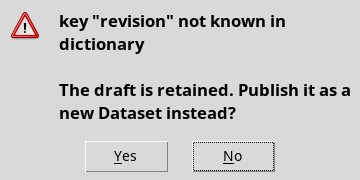
On a new draft, the Save to Existing Dataset command can open a notice with the technical text key "revision" not known in dictionary. The draft remains in the editor: choose the proposal to publish it as new Dataset or answer No and use File → Publish as New Dataset… when you are ready.