

Lesson 03 — Vectors and Matrices in GNU Octave with GX-TXT: Temperature Measurement Analysis
Introduction: From Individual Values to Scientific Matrices
In earlier lessons, we learned to perform our first calculations with GNU Octave and to work with variables and operators. We now turn to one of its most important features: working directly with vectors and matrices.
Scientific applications seldom involve just one numeric value. An experiment may produce hundreds of readings over time, or several instruments may measure the same physical quantity simultaneously.
GNU Octave is particularly well suited to these tasks because it was designed for matrix-oriented numerical computing. Operations that require explicit loops in other languages can often be expressed directly as vector or matrix operations.
In this third lesson we will use a simulated experiment with three temperature sensors, each collecting six measurements at regular five-minute intervals.
We will arrange the 18 measurements in a matrix, select rows and columns, perform element-wise operations, calculate means, and locate maximum values.
Finally, we will use GX-TXT’s public APIs to perform selected numerical operations and publish the results as scientific Datasets, accessible directly through the framework’s interface.
The data are synthetic and deterministic. This lets us focus on programming and verify the results easily.
2. Organizing Experimental Data into Vectors and Matrices
Before writing code, we need to understand how to represent the measurements from our experiment correctly.
Imagine three sensors, labelled A, B, and C, measuring the temperature of the same system at different locations. Readings are taken every five minutes over a total duration of 25 minutes.
The simulated experimental data are shown in the following table.
| Time (min) | Sensor A (°C) | Sensor B (°C) | Sensor C (°C) |
|---|---|---|---|
| 0 | 19.8 | 20.1 | 19.9 |
| 5 | 20.3 | 20.4 | 20.2 |
| 10 | 20.8 | 20.9 | 20.6 |
| 15 | 21.1 | 21.3 | 21.0 |
| 20 | 21.0 | 21.2 | 20.9 |
| 25 | 20.6 | 20.8 | 20.5 |
We can see that the temperature initially rises, reaches a maximum, and then falls.
To represent these measurements in GNU Octave, we can use two fundamental data structures: a vector for the observation times and a matrix for the temperatures.
2.1 The Time Vector
A vector is an ordered sequence of elements. In GNU Octave, we can arrange its elements horizontally as a row vector or vertically as a column vector.
For this experiment, we choose a column vector with six elements:
time_min = [0; 5; 10; 15; 20; 25];Square brackets [] delimit the vector, while semicolons ; separate the elements into different rows.
The vector therefore has dimensions 6 × 1: six rows and one column.
This arrangement is useful because each element of the time vector corresponds to a row of the temperature matrix.
2.2 The Temperature Matrix
A matrix is a two-dimensional structure consisting of rows and columns.
In our case, we use a matrix with six rows and three columns:
temperature_C = [
  19.8, 20.1, 19.9;
  20.3, 20.4, 20.2;
  20.8, 20.9, 20.6;
  21.1, 21.3, 21.0;
  21.0, 21.2, 20.9;
  20.6, 20.8, 20.5
];
The syntax has several important features:
- Square brackets delimit the whole matrix.
- Commas separate elements within the same row.
- Semicolons separate rows.
- All rows must contain the same number of elements.
In Octave code, the decimal separator is a period, even though the Italian article uses a comma.
Overall, the matrix contains 18 numeric values, arranged as follows:
Row = observation time; column = sensor.
2.3 Row and Column Indices
To access an element of a matrix, we provide two indices enclosed in parentheses:
temperature_C(row, column)
Unlike some other programming languages, GNU Octave uses one-based rather than zero-based indices.
For example:
temperature_C(3, 2)returns:
ans = 20.900This is the value in row three and column two: the temperature of sensor B at minute 10.
We can also select groups of elements using the : operator.
To obtain all temperature readings taken at minute 10:
temperature_C(3, :)The result is a row vector:
20.800 20.900 20.600To extract all measurements from sensor B instead:
temperature_C(:, 2)we obtain a column vector:
20.100
20.400
20.900
21.300
21.200
20.800
In these examples, the colon : means select every element along this dimension.
The ability to extract entire rows or columns with a single instruction is a fundamental feature of matrix programming.
2.4 Matrix Dimensions
GNU Octave provides several functions for examining the structure of an array.
The size() function returns its dimensions, while rows() and columns() return the number of rows and columns separately.
size(temperature_C)
rows(temperature_C)
columns(temperature_C)
numel(temperature_C)
For our matrix, the results are:
| Expression | Result |
|---|---|
| size(temperature_C) | [6 3] |
| rows(temperature_C) | 6 |
| columns(temperature_C) | 3 |
| numel(temperature_C) | 18 |
These functions are particularly important when processing scientific instrument data: they let us check that the number of observations and the matrix dimensions match the experiment.
We have now transformed an ordinary table of measurements into two numeric data structures that GNU Octave can process directly. In the next section, we will apply matrix operations, distinguishing element-wise calculations from matrix algebra.
3. Matrix-Based Processing of Temperature Measurements
In the previous section, we arranged measurements from three sensors in a matrix with six rows and three columns.
We can now process these data, using one of GNU Octave’s key strengths: performing operations on entire groups of values instead of writing a separate instruction for every measurement.
Arithmetic operators, element-wise operations, and the principles of vectorization were introduced in Lesson 02. Here we apply them to a concrete scientific problem.
We will work with the temperature_C matrix and the time_min vector defined earlier.
3.1 Computing Temperature Changes Between Consecutive Measurements
One of the first useful calculations is finding how much the temperature changes between successive readings.
For each sensor, we want the difference between one measurement and the immediately preceding measurement.
Mathematically, if T(i,j) denotes the temperature measured by sensor j at time index i, the change is:
Delta_T(i,j) = T(i+1,j) - T(i,j)Because there are six measurement times, we will obtain five consecutive differences for each sensor.
GNU Octave can calculate all these differences with a single instruction:
temperature_change_C = temperature_C(2:end, :) - ...
                       temperature_C(1:end-1, :);
Let us examine the two selections carefully.
temperature_C(2:end, :) selects every row from the second through the last, keeping all three columns. The result has five rows and three columns.
temperature_C(1:end-1, :), by contrast, selects the first five rows, excluding the last.
The two matrices therefore have identical dimensions and can be subtracted element by element.
When used in indexing, end represents the last valid index of the relevant dimension. Accordingly, end-1 identifies the second-to-last index.
The three dots ... at the end of the first line let an Octave instruction continue on the next line. They do not change the calculation but improve readability.
We obtain:
| Interval (min) | Sensor A (°C) | Sensor B (°C) | Sensor C (°C) |
|---|---|---|---|
| 0–5 | +0.5 | +0.3 | +0.3 |
| 5–10 | +0.5 | +0.5 | +0.4 |
| 10–15 | +0.3 | +0.4 | +0.4 |
| 15–20 | −0.1 | −0.1 | −0.1 |
| 20–25 | −0.4 | −0.4 | −0.4 |
The result is a new 5 × 3 matrix.
Initially, all three sensors show increasing temperatures. After minute 15, the changes become negative, indicating a cooling phase.
These differences do not yet represent heating or cooling rates: to obtain rates, we must also account for the elapsed time between readings.
3.2 Calculating Time Intervals
The time vector contains:
time_min = [0; 5; 10; 15; 20; 25];To determine the duration of each interval, we use the native diff() function:
step_min = diff(time_min);The result is:
5
5
5
5
5
The function subtracts each element from the next one, producing a five-element column vector.
All intervals happen to be equal in this experiment, but that need not be true generally. A real acquisition system may sample at irregular intervals.
Using diff() gives us the actual time steps rather than assuming that each interval lasts five minutes.
3.3 Constructing a Matrix of Time Intervals
The temperature-change matrix has dimensions 5 × 3, whereas step_min has dimensions 5 × 1.
We need to associate each temperature difference with its corresponding time interval.
To build a structure with the same dimensions as the temperature-change matrix, the script uses:
step_matrix = step_min * ones(1, n_sensors);The function ones(1, n_sensors) creates a row vector containing one unit value for each sensor.
In this experiment:
1 1 1Multiplying the 5 × 1 time-step column vector by the 1 × 3 row vector gives a 5 × 3 matrix:
5   5   5
5   5   5
5   5   5
5   5   5
5   5   5
This is an example of the outer product of two vectors.
It is useful for repeating a sequence of values across multiple columns while keeping a compact mathematical expression.
Recent versions of Octave also support automatic expansion of compatible dimensions for certain element-wise operations. We intentionally construct the matrix explicitly here because it makes the dimensional relationships easier to see.
3.4 Average Rate of Temperature Change
We can now divide each temperature change by the duration of the corresponding interval.
The script uses:
rate_C_per_min = temperature_change_C ./ step_matrix;Division takes place element by element, as explained in Lesson 02.
The result is:
| Interval (min) | Sensor A (°C/min) | Sensor B (°C/min) | Sensor C (°C/min) |
|---|---|---|---|
| 0–5 | +0.10 | +0.06 | +0.06 |
| 5–10 | +0.10 | +0.10 | +0.08 |
| 10–15 | +0.06 | +0.08 | +0.08 |
| 15–20 | −0.02 | −0.02 | −0.02 |
| 20–25 | −0.08 | −0.08 | −0.08 |
These values describe the average rate of temperature change over each interval.
For example, +0.10 for sensor A in the first interval means its temperature increased by an average of 0.10 °C per minute between minutes 0 and 5.
The value -0.08 for the same sensor in the last interval means an average cooling rate of 0.08 °C per minute.
An average rate over a finite interval is not an instantaneous derivative. Here we calculate finite differences divided by finite time intervals, not the exact derivative of a continuous function.
A later lesson on numerical methods will revisit this distinction and explain how to estimate derivatives from experimental measurements.
Notice also the size of the resulting matrix: six measurements define five intervals, so we obtain five average rates for each sensor.
This is the expected behaviour of methods based on consecutive differences.
3.5 Weighted Average as a Matrix–Vector Product
Now consider a different problem.
Suppose the three sensors do not have equal importance when estimating the system’s temperature. We can assign them different weights.
In our experiment, we use:
sensor_weights = [0.25; 0.50; 0.25];Sensor B receives 50% of the weight, while sensors A and C contribute 25% each.
The weights add up to 1.
These coefficients are chosen for teaching purposes. They do not come from a calibration, an uncertainty analysis, or any metrological property of the sensors.
At any observation time, the weighted temperature is:
T_weighted = 0.25*T_A + 0.50*T_B + 0.25*T_CWe could calculate this expression separately for each of the six time points.
However, matrix algebra lets us do it all at once:
weighted_mean_C = temperature_C * sensor_weights;The temperature_C matrix has dimensions 6 × 3.
The sensor_weights column vector has dimensions 3 × 1.
The product is valid and yields a 6 × 1 vector.
In other words, one matrix multiplication calculates all six weighted averages simultaneously.
The results are:
| Time (min) | Weighted average (°C) |
|---|---|
| 0 | 19.975 |
| 5 | 20.325 |
| 10 | 20.800 |
| 15 | 21.175 |
| 20 | 21.075 |
| 25 | 20.675 |
At minute 10, for instance, we obtain:
0.25*20.8 + 0.50*20.9 + 0.25*20.6 = 20.8 °CThis is a practical example of matrix–vector multiplication, a common operation in scientific data processing.
The method scales naturally to additional sensors: the weight vector simply needs one coefficient for each column of the measurement matrix.
Important: The script calculates the weighted mean as a matrix-algebra exercise, but the fourth Dataset published in GX-TXT contains the arithmetic mean, not the weighted mean. These quantities are different and must not be confused.
3.6 Transposition and Vector Orientation
In the preceding example, we used a column vector to hold the weights.
Had we written:
sensor_weights = [0.25, 0.50, 0.25];we would have obtained a 1 × 3 row vector, which cannot be used directly as the second operand of the 6 × 3 by 3 × 1 matrix product.
To turn a row vector into a column vector, we can transpose it:
sensor_weights = [0.25, 0.50, 0.25];
sensor_weights = sensor_weights.';
The result is:
0.25
0.50
0.25
GNU Octave has two transpose operators:
.'performs transposition without conjugation;'performs conjugate (Hermitian) transposition.
For matrices containing real numbers only, both operators produce the same transposed values.
With complex numbers, however, their behaviour differs.
Consider:
z = [1+2i, 3-4i];

z_transposed = z.';
z_hermitian = z';
The first operation places the original complex values in a column without changing them:
1 + 2i
3 - 4i
The second also reverses the signs of their imaginary parts:
1 - 2i
3 + 4i
This distinction will become important for complex signals, Fourier transforms, electrical systems, and other linear-algebra applications.
Our temperature matrix contains only real numbers, but the script still uses .' whenever we want to change orientation without conjugation.
3.7 Numerical Normalization Against a Reference
The script also includes a simple division of the temperature matrix by a reference value:
reference_C = 20.0;
normalized_ratio = temperature_C ./ reference_C;
The resulting matrix has the same dimensions as the original.
For example, the first element becomes:
19.8 / 20.0 = 0.99This illustrates how to apply a numerical factor to an entire matrix without changing its structure.
There is an important physical qualification: the ratio of values expressed in degrees Celsius does not generally represent a meaningful ratio of absolute thermodynamic temperatures, because the Celsius scale has a conventional zero.
Here the division is only a numerical teaching example. Where a physical ratio of absolute temperatures is needed, we must use an appropriate absolute scale such as kelvin.
We have now used vectors and matrices to calculate changes, average rates, weighted combinations, and numerical transformations.
The next section examines the native GNU Octave functions used by the script in detail, including their syntax, arguments, and behaviour.
4. Native GNU Octave Functions Used in This Lesson
So far we have focused on mathematical operations. To understand how they are implemented, we must also learn several fundamental functions of the language.
We introduced size(), rows(), columns(), and numel() in Section 2. Here we examine the other functions used in the script.
For each function, we will describe its purpose, syntax, and practical use.
4.1 diff() — Computing Consecutive Differences
The diff() function computes the differences between consecutive elements of an array.
Its simplest form is:
result = diff(values);For a vector:
x = [2, 5, 9, 14];
dx = diff(x);
we obtain:
3 4 5The first value comes from 5 - 2, the second from 9 - 5, and the third from 14 - 9.
The result has one fewer element than the original vector.
The function also accepts optional arguments:
diff(X, n, dim)where:
Xis the vector or matrix to process;nis the difference order;dimspecifies the dimension along which differences are computed.
With n = 1, the function computes ordinary consecutive differences.
With n = 2, it takes a second difference of the first differences, yielding a second-order difference.
When dim is omitted, Octave follows its array rules and operates along the first non-singleton dimension.
In our experiment, we use:
step_min = diff(time_min);We could also apply diff() directly to the temperature matrix:
temperature_change_C = diff(temperature_C, 1, 1);Here the first 1 specifies first-order differences, and the final 1 requests differences along the rows.
This produces the same matrix of changes as the subtraction of row slices in Section 3.
Comparing the two approaches is instructive: explicit indexing shows how the calculation works, while diff() expresses it more concisely and recognizably.
4.2 ones() — Creating Arrays of Ones
The ones() function creates arrays in which every element is equal to 1.
A common syntax is:
A = ones(rows_count, columns_count);For example:
A = ones(2, 3);produces:
1   1   1
1   1   1
With a single scalar argument, ones(n) creates an n × n square matrix.
In our script, we use:
ones(1, n_sensors)to create a three-element row vector of ones.
Multiplying it by the step_min column vector repeats the time intervals across the three sensor columns.
This function is also useful for initializing matrices, building numerical models, and preparing data structures with known dimensions.
A related function is zeros(), which generates arrays of zeros. We do not use it in this experiment, but it frequently appears when preparing arrays that will receive computed results later.
4.3 sum() — Summing Elements Along a Dimension
The sum() function sums the elements of an array.
For a vector:
x = [2, 4, 6];
total = sum(x);
the result is:
12For a matrix, we can specify the dimension of the operation:
sum(A, dim)For example, sum(A, 1) sums along the rows, returning one result for each column.
By contrast, sum(A, 2) sums across the columns, returning one result for each row.
In our experiment, the function checks whether the sensor weights are normalized:
sensor_weights = [0.25; 0.50; 0.25];

sum(sensor_weights)
giving:
1For a normalized weighted average, the weights must sum to 1.
The script checks this property with a numerical assertion, which we will examine shortly.
4.4 mean() — Computing the Arithmetic Mean
The mean() function calculates the arithmetic mean of an array’s elements.
For a vector:
x = [10, 20, 30];
m = mean(x);
we obtain:
20For a matrix, however, we must pay attention to the dimension along which values are reduced.
The syntax is:
mean(A, dim)Our temperature matrix has six rows representing observation times and three columns representing sensors.
If we write:
mean(temperature_C, 1)we obtain the average over time for each sensor:
20.6000 20.7833 20.5167The result is a three-element row vector.
If instead we write:
mean(temperature_C, 2)we obtain the average across the three sensors at each time point.
The result is a six-element column vector:
19.9333
20.3000
20.7667
21.1333
21.0333
20.6333
This distinction is essential when processing experimental matrices.
The choice of dimension determines the scientific meaning of the result.
In the first case, we compare the sensors’ average behaviour throughout the experiment.
In the second, we examine how the system’s average temperature evolves over time.
We will also use mean() to check results returned by GX-TXT’s public numerical API.
4.5 max() — Finding the Maximum Value
The max() function finds the largest value in a vector or other collection of values.
For example:
x = [4, 8, 3, 6];
maximum_value = max(x);
returns:
8For a matrix, max(A) normally operates along the first non-singleton dimension.
To find the maximum of the entire matrix, we can temporarily turn it into a vector:
maximum_C = max(temperature_C(:));The expression temperature_C(:) selects every matrix element and arranges them into a single column vector in Octave’s linear indexing order.
The experiment’s maximum is:
21.3But a maximum value alone is not sufficient for scientific interpretation.
We also want to know which sensor recorded it and at what time.
4.6 find() — Locating Elements and Their Indices
The find() function returns the indices of elements satisfying a condition.
Consider:
x = [3, 7, 2, 7];
positions = find(x == 7);
The result contains:
2 4because positions 2 and 4 both contain the value 7.
Our script uses:
[max_row, max_col] = find(temperature_C == maximum_C, ...
                          1, 'first');
This instruction has three important parts.
temperature_C == maximum_C creates a logical matrix identifying entries equal to the maximum.
The argument 1 asks for only one match.
The string 'first' selects the first match in the matrix’s linear indexing order.
With two output variables, find() returns the row and column indices directly.
In our case:
max_row = 4
max_col = 2
We can then retrieve the corresponding time and sensor:
time_min(max_row)
sensor_ids(max_col)
giving:
15
2
The 21.3 °C maximum was therefore recorded by sensor B at minute 15.
There is an important point about comparing floating-point numbers. Here, we compare a matrix entry to a maximum extracted from those same data, so direct equality is appropriate.
When comparing results produced by independent calculations, however, we should generally apply a numerical tolerance rather than demand exact equality.
4.7 all() and isfinite() — Validating Data
Before scientific processing, it is good practice to check that our data contain valid numeric values.
The isfinite() function tests whether values are finite.
It returns logical true for finite values and false for values such as NaN or infinity.
For example:
x = [1, 2, Inf, NaN];
isfinite(x)
produces:
1 1 0 0The all() function checks whether all values along the relevant array dimension satisfy a logical condition.
For example:
all([1, 1, 0])returns false.
Our script combines the two functions:
all(isfinite(temperature_C(:)))We first convert the matrix to a vector, then check that every element is finite.
The script also uses:
all(diff(time_min) > 0)This expression checks that all time intervals are positive.
This matters: two identical time stamps could lead to division by zero when we calculate the average rate of change.
For a strictly increasing sequence of times, all consecutive differences must be positive.
4.8 isequal() and assert() — Automated Correctness Checks
The isequal() function checks whether two or more arrays have equal dimensions and contents, according to its comparison rules.
For example:
isequal([1, 2, 3], [1, 2, 3])returns true.
The comparison:
isequal([1, 2, 3], [1; 2; 3])returns false because the arrays have different orientations.
This makes the function especially useful for checking the structure of data.
In our experiment, we check that the matrix has as many rows as time values and as many columns as sensors:
assert(isequal(size(temperature_C), ...
               [numel(time_min), numel(sensor_ids)]));
Here we also encounter assert().
The assert() function checks a logical condition. If it is true, execution continues; if it is false, an error is raised.
A simple example is:
assert(2 + 2 == 4);The check passes, and the program continues.
By contrast:
assert(2 + 2 == 5);raises an error.
In our script, assert() checks dimensions, the validity of readings, the normalization of weights, and agreement between native Octave calculations and GX-TXT results.
Such checks are a basic but important form of automated testing for scientific code.
4.9 abs() — Absolute Values and Numerical Tolerances
The abs() function returns the absolute value of a real number or the magnitude of a complex number.
For real numbers:
abs(-3.5)it returns:
3.5In numerical computing, abs() is often used to measure the difference between two results.
For example:
a = 0.1 + 0.2;
b = 0.3;

abs(a - b)
produces a very small difference due to floating-point representation.
This is why the script uses comparisons such as:
assert(abs(sum(sensor_weights) - 1) < 1e-12);The value 1e-12 specifies the required tolerance.
Instead of requiring a computed sum to equal 1 exactly in every possible calculation, we check that its absolute difference from 1 is smaller than a very small threshold.
To check entire arrays, the script also uses:
assert(max(abs(sensor_mean_C - mean(temperature_C, 1))) < 1e-10);This calculates the differences between two vectors, takes their absolute values, and checks that the largest difference is within the tolerance.
These tolerances refer to numerical agreement; they must not be confused with experimental measurement uncertainty.
Appropriate tolerances depend on the problem, the scale of the values, and the numerical algorithms involved.
4.10 disp(), fprintf(), and sprintf() — Displaying Results
GNU Octave provides several ways to display and format results.
The disp() function displays a variable directly:
disp(temperature_C);It is convenient for vectors and matrices because we do not need to define a separate format for every element.
The fprintf() function creates formatted output:
fprintf('Maximum temperature: %.2f degC\n', maximum_C);The sequence %.2f requests two digits after the decimal point.
The escape sequence \n inserts a new line.
Other common formatting codes include:
| Format | Meaning |
|---|---|
| %d | Integer |
| %f | Floating-point number |
| %.2f | Number with two decimal places |
| %.4f | Number with four decimal places |
| %s | String |
| \n | New line |
The sprintf() function uses similar formatting rules to fprintf(), but it returns the formatted string instead of writing it to the output stream.
For example:
dataset_id = sprintf('octave_l03_sensor_%s', 'a');produces:
octave_l03_sensor_aThe script uses this function to construct Dataset IDs dynamically.
The script also uses upper(), which converts text to uppercase; for example, it changes the sensor label from a to A.
4.11 cell() — Working with Cell Arrays
So far, we have mainly worked with numeric vectors and matrices.
Octave also provides cell arrays, which can contain elements of different types and sizes.
The statement:
items = cell(1, 3);creates a one-row cell array containing three initially empty cells.
We can assign a value to each cell:
items{1} = 10;
items{2} = 'Sensor A';
items{3} = [1, 2, 3];
Here the first cell contains a scalar, the second a string, and the third a vector.
The difference between parentheses and braces is important.
items(2)returns a cell array containing the second cell.
items{2}returns the cell’s contents instead: the string 'Sensor A'.
Our script uses:
series_requests = cell(1, n_sensors + 1);to prepare a container for four publication requests.
Each cell will hold a structure describing a scientific Dataset.
4.12 struct() — Data with Named Fields
Another fundamental Octave structure is struct, which associates field names with values.
Consider:
sensor = struct( ...
  'name', 'Sensor A', ...
  'unit', 'degC', ...
  'value', 20.5);
We have created a structure with three fields:
name, which identifies the sensor;unit, describing the unit of measurement;value, containing its numeric value.
We access a field using dot notation:
sensor.valueThe result is:
20.5The struct() function is especially important for GX-TXT integration because many public APIs receive structured arguments and return results with named fields.
In our script, for example, a numeric operand sent to a GX-TXT API is declared as:
matrix_C = struct( ...
  'kind', 'matrix', ...
  'value', temperature_C);
This passes both the numeric values and the information that the operand is a matrix.
Octave also provides isstruct() and isfield() to check an object’s type and whether a field exists.
For example:
isstruct(sensor)
isfield(sensor, 'value')
Both expressions return true.
The script uses these functions to inspect the context returned by GX-TXT before accessing certain optional fields.
4.13 error() and Execution Control
The error() function stops execution by raising an error with an explanatory message.
For example:
if (!isfinite(temperature_C(1, 1)))
  error('Invalid temperature measurement.');
endif
The condition checks the first matrix element. If it is not finite, execution stops.
In our experiment, error() is mainly used when a required public operation is unavailable.
The intention is to prevent the script from continuing with an unintended execution path or producing incomplete results.
The script also contains if and for constructs, used for execution control and for preparing publication requests.
We will study them in Lesson 04, which focuses on conditions, loops, and functions. For now, it is enough to know that if executes a block when a condition is met, while for repeats a block over a sequence of values.
With these functions, we have covered the native tools needed to understand the script.
We can now introduce GX-TXT’s public APIs and see how the framework receives and returns structured numeric values.
5. Using GX-TXT Public APIs from GNU Octave
In the previous sections, we used GNU Octave to organize and process experimental data directly.
We now turn to the second part of this course: integrating our script with GX-TXT.
The aim is not to replace the language’s ordinary functions but to understand how an Octave script can use the framework’s public services for processing, scientific data management, and publishing results within a Session.
This lesson uses three public interfaces:
- OCTAVE_SCRIPT_BRIDGE_API_v1, for communication with the framework.
- NUMERIC_API_v1, for numerical operations through the Numeric service.
- DATASET_PUBLICATION_API_v2, for publication of framework-managed scientific Datasets.
The signatures and contracts below were checked against the GX-TXT 0.9.8.10-dev-111 GitHub sources at commit 4daf135e49378eff1f413310bc17cf32f1928c44.
5.1 Why Use the GX-TXT Script Bridge?
GNU Octave already offers many mathematical and scientific functions.
However, a program running inside GX-TXT must also communicate with the framework without accessing its internal structures directly.
For that purpose, we use the Script Bridge, a public interface through which scripts can discover available APIs and invoke registered operations.
The Bridge separates user-written code from framework services and transports structured values, including Octave matrices, vectors, cells, and structures.
It does not grant unlimited access to GX-TXT internals: a script can call only public operations explicitly registered and made available for script execution.
In our experiment, Script Runner manages the Bridge lifecycle automatically.
We therefore do not need to start or stop the connection manually.
This is an important principle throughout the course: the script interacts with the framework through public interfaces, leaving CORE responsible for its resources and services.
5.2 gxtxt_context() — Inspecting the Execution Context
The first public function we use is:
context = gxtxt_context();It returns a structure containing information about the script’s execution context.
Public fields can include module identity, run identifier, registered script name, SHA-256 source digest, and scientific input bindings.
The script checks whether a registered script name is available:
if (isstruct(context) && isfield(context, 'script_name'))
  fprintf('Registered script: %s\n', context.script_name);
endif
This check avoids accessing a field that may not be present.
During our test, GX-TXT returned the registered script name, which appears in the execution log.
Learning objective: Query the public execution context rather than reconstructing it from internal configuration files or filesystem paths.
5.3 gxtxt_api_require() — Declaring Public Dependencies
A scientific script needs to know which framework services it requires.
For this experiment, the Numeric module is mandatory.
We declare that requirement with:
gxtxt_api_require('NUMERIC_API_v1@1:math.numeric');This declaration specifies:
| Element | Meaning |
|---|---|
| NUMERIC_API_v1 | Public API identifier |
| @1 | Required API version |
| math.numeric | Provider identity |
The notation requests a specific public API and its provider.
It is important to distinguish the API version from the overall application version: GX-TXT can evolve while keeping a particular public API stable.
Similarly, for Dataset publication we use:
gxtxt_api_require('DATASET_PUBLICATION_API_v2@2:dataset_publication');This requirement is evaluated only when publication is enabled.
Using gxtxt_api_require() lets us detect a missing dependency before reaching the scientific operations that need it.
5.4 gxtxt_api_has_operation() — Checking a Specific Operation
The presence of an API does not necessarily mean that every operation is script-callable in the current GX-TXT configuration.
For this reason, GX-TXT provides:
gxtxt_api_has_operation(api_id, operation)The function returns a logical value indicating whether the requested operation is exposed and available to the script.
In this experiment, we check:
gxtxt_api_has_operation('NUMERIC_API_v1', 'array_binary')and:
gxtxt_api_has_operation('NUMERIC_API_v1', 'array_reduce')These checks are performed before the script invokes the numerical service.
They do not establish that any arbitrary arguments will produce a valid result; they establish that the named operation is registered and callable.
Argument validation occurs when the operation is invoked.
This preliminary check is often called a preflight and makes compatibility problems easier to diagnose.
5.5 gxtxt_api_call() — Invoking a Public Service
The main public function for communicating with GX-TXT is:
result = gxtxt_api_call(api_id, operation, args);Its three arguments have distinct purposes.
api_id identifies the public API to use.
operation identifies the operation exposed by that API.
args holds the operation’s positional arguments in an Octave cell array.
For example:
result = gxtxt_api_call( ...
  'NUMERIC_API_v1', ...
  'array_binary', ...
  {'add', matrix_C, kelvin_offset});
In this call:
- we select the
NUMERIC_API_v1service; - we request the
array_binaryoperation; - we specify the mathematical action
add; - we supply the two operands
matrix_Candkelvin_offset.
The result is returned to Octave as a structure, according to the contract of the selected operation.
The Bridge does not require the script to know how CORE implements the operation internally.
5.6 Representing Numeric Operands
Before performing a calculation through NUMERIC_API_v1, we must prepare operands in the format expected by that API.
For generic array operations, the contract used by our script requires a structure with at least two fields:
kind, identifying the operand type;value, containing its numeric value.
The permitted operand kinds for these operations include scalar, vector, and matrix.
In our experiment, we create:
matrix_C = struct( ...
  'kind', 'matrix', ...
  'value', temperature_C);
The kind field declares a matrix operand, while value contains its 18 Celsius temperature readings.
We then prepare a scalar:
kelvin_offset = struct( ...
  'kind', 'scalar', ...
  'value', 273.15);
This structure contains the value to be added to each reading to obtain the corresponding temperature in kelvin.
The numerical operation is separate from the physical meaning of the calculation: the framework carries out the requested addition, while the script specifies that 273.15 is the Celsius-to-kelvin offset.
5.7 NUMERIC_API_v1.array_binary — Array Operations
The array_binary operation supports several mathematical operations on pairs of numeric operands.
Documented actions include:
| Action | Purpose |
|---|---|
| add | Addition |
| subtract | Subtraction |
| multiply | Element-wise multiplication |
| divide | Element-wise division |
| power | Element-wise exponentiation |
| minimum | Minimum of corresponding elements |
| maximum | Maximum of corresponding elements |
These operations support scalar expansion when one operand is an array and the other is a scalar.
When both operands are non-scalar, they must satisfy the shape restrictions established by the API contract.
In our script, we use addition to convert all temperature values:
kelvin_result = gxtxt_api_call( ...
  'NUMERIC_API_v1', 'array_binary', ...
  {'add', matrix_C, kelvin_offset});

temperature_K = kelvin_result.values;
The first command asks Numeric to add 273.15 to every matrix element.
The second extracts the values field from the returned structure.
The result remains a 6 × 3 matrix:
292.95   293.25   293.05
293.45   293.55   293.35
293.95   294.05   293.75
294.25   294.45   294.15
294.15   294.35   294.05
293.75   293.95   293.65
This agrees with the native Octave expression:
temperature_C + 273.15Nevertheless, the two instructions serve different architectural roles.
The first calls GX-TXT’s public numerical service through a documented contract.
The second is an ordinary operation performed directly by Octave.
When developing integrated applications, it matters which layer actually performs a calculation.
Next we use subtraction:
reference_operand = struct( ...
  'kind', 'scalar', ...
  'value', reference_C);

deviation_result = gxtxt_api_call( ...
  'NUMERIC_API_v1', 'array_binary', ...
  {'subtract', matrix_C, reference_operand});

deviation_C = deviation_result.values;
This gives the differences from a reference temperature of 20 °C.
For sensor B at minute 10, the result is:
0.90 °CThis quantity is a temperature difference, not an absolute temperature.
array_binary does not automatically perform physical-unit conversions based on Octave variable names. The script and the published Dataset metadata must explicitly preserve the scientific meaning of the results.
5.8 NUMERIC_API_v1.array_reduce — Axis-Based Reductions
A central feature of the Numeric API is reducing a matrix along a chosen dimension.
A reduction combines multiple elements to produce a smaller collection of results.
Common examples include sums, means, minima, and maxima.
The public operation is:
result = gxtxt_api_call( ...
  'NUMERIC_API_v1', ...
  'array_reduce', ...
  {action, operand, options});
The action parameter specifies the reduction to perform.
operand contains the numeric array.
options contains the contract-defined options, including the reduction axis.
For the two-dimensional arrays in this lesson, the choices are:
| Axis | Meaning |
|---|---|
| axis = 0 | Reduces all elements to one global result |
| axis = 1 | Reduces across rows, returning one result per column |
| axis = 2 | Reduces across columns, returning one result per row |
The axis numbering follows NUMERIC_API_v1, including the special value 0 for a global reduction.
This convention must not be confused with ordinary Octave indexing, which starts at 1.
Sensor Means over Time
To calculate the mean of each column, we use:
sensor_mean_result = gxtxt_api_call( ...
  'NUMERIC_API_v1', 'array_reduce', ...
  {'mean', matrix_C, struct('axis', 1)});
The returned structure contains the numeric results in its values field.
The script arranges those values into a row vector:
sensor_mean_C = sensor_mean_result.values(:).';We obtain:
20.6000 20.7833 20.5167We now have one mean for each sensor.
Mean Across Sensors at Each Time
To obtain a mean for each row, we use:
time_mean_result = gxtxt_api_call( ...
  'NUMERIC_API_v1', 'array_reduce', ...
  {'mean', matrix_C, struct('axis', 2)});
We convert the result into a column vector:
time_mean_C = time_mean_result.values(:);We obtain six values, one for each observation time.
The axis selection is more than a syntactic detail: it determines which observations are combined and therefore the scientific meaning of the result.
Global Maximum
To find the maximum of the entire matrix, we use:
maximum_result = gxtxt_api_call( ...
  'NUMERIC_API_v1', 'array_reduce', ...
  {'maximum', matrix_C, struct('axis', 0)});

maximum_C = maximum_result.values;
We obtain:
21.30 °CThe position of the maximum is then located with the native find() function, as explained in Section 4.
It is worth noting that the complete array_reduce result can also include facts about the operation performed, including its action, requested axis, original input shape, and valid-observation counts.
The values field carries the numeric results; the other fields allow framework services to retain a more explicit record of the reduction.
5.9 Independently Checking Numerical Results
An important feature of this script is that it does not simply accept the API’s output.
It compares the results with equivalents computed by native Octave functions.
For example:
assert(max(abs(sensor_mean_C - mean(temperature_C, 1))) < 1e-10);Here we compare:
- the mean calculated through
NUMERIC_API_v1; - the mean computed using native Octave
mean().
If the maximum difference exceeds the specified tolerance, assert() stops the script.
Similar checks are performed for the mean at each time and the global maximum.
All these checks passed during the GX-TXT test run.
The log therefore ends with:
Lesson 03 numerical checks: PASSED.
GX-TXT didactic experiment completed.
This does not prove that every Numeric operation will work for all possible inputs. It confirms that, for this experiment and its selected data, GX-TXT and native Octave results agree within the stated tolerances.
5.10 DATASET_PUBLICATION_API_v2 — Publishing Session Results
Until now, computed values have existed as variables in the Octave process’s memory.
To make them available to other GX-TXT components, we need to publish them as scientific Datasets.
We use DATASET_PUBLICATION_API_v2 for this purpose.
This API provides managed publication with Dataset identities, variable descriptors, storage backend selection, validation, and updates to the Session registry.
Our script does not construct internal destination paths, edit the Dataset Registry, or write framework-internal files directly to register new Datasets.
The framework manages these tasks.
For the experiment, we use:
gxtxt_api_call( ...
  'DATASET_PUBLICATION_API_v2', ...
  'publish_series_batch', ...
  {batch_request});
The operation publishes a group of scientific X/Y series through an atomic transaction.
To understand the call, we first need to inspect the request structure.
5.11 Building a Publication Request
Each sensor must produce a Dataset containing a time variable and a temperature variable.
We therefore declare scientific information describing each series.
The structure includes fields such as:
| Field | Meaning |
|---|---|
| dataset_id | Stable Dataset identifier |
| contract | Contract of the published data |
| storage | Requested storage backend |
| x_values | X-variable values |
| y_values | Y-variable values |
| x_variable | Scientific descriptor for the X variable |
| y_variable | Scientific descriptor for the Y variable |
| notes | Descriptive notes |
Here the contract is table.generic, because we publish ordinary tabular measurement series.
The script explicitly requests storage = 'csv', an appropriate choice for these small series.
Larger applications could use automatic backend selection or multidimensional writing services, but we do not need those features in this lesson.
Variable Identities
Each Dataset contains two variables with distinct identities.
The time-variable descriptor looks like this:
x_variable = struct( ...
  'variable_id', 'time', ...
  'name', 'time_min', ...
  'display_label', 'Elapsed time', ...
  'unit', 'min', ...
  'semantic_role', 'time');
The variable_id field is the variable’s stable logical identifier.
name supplies its scientific or technical name.
display_label supplies text intended for presentation.
unit declares the physical unit.
semantic_role describes the scientific role of the variable: time, in this case.
For temperature, we use a comparable descriptor with unit K and semantic role temperature.
These are not merely decorative labels.
They let services reading the Dataset identify variables and their scientific context without deducing them from column names or physical storage paths.
The logical identity therefore remains independent of how the underlying values are stored.
5.12 Preparing Four Datasets
To publish the measurements from our three sensors, we first prepare a sequence of requests.
The script creates a cell array:
series_requests = cell(1, n_sensors + 1);Because there are three sensors, it reserves four cells.
The first three correspond to sensors A, B, and C.
The fourth is reserved for the arithmetic mean temperature.
The script prepares sensor names:
sensor_names = {'a', 'b', 'c'};and builds Dataset IDs with sprintf().
Each sensor series is extracted from the corresponding column of the temperature_K matrix.
For example, sensor A occupies:
temperature_K(:, 1)This column contains six kelvin readings, one for each time point.
The for loop repeats the request construction for all three sensors.
This is an early example of combining Octave programming with objects destined for public APIs.
We will study loops in detail in Lesson 04.
5.13 Preparing the Mean-Temperature Dataset
The fourth Dataset contains the arithmetic mean of the three temperature readings at every observation time.
We already computed this quantity in Celsius with array_reduce and axis = 2.
Before publishing it, we convert it to kelvin:
time_mean_K = time_mean_C + 273.15;The corresponding scientific variable has the identifier:
temperature_meanand the unit:
KThe resulting Dataset has the identifier:
octave_l03_meanImportantly, this Dataset represents the arithmetic mean of the three sensors, with equal contributions from each.
It does not represent the weighted average previously calculated as a matrix–vector example.
When publishing scientific data, quantities with similar names but different definitions must be kept distinct to prevent misinterpretation.
5.14 Performing Atomic Publication
Once the four requests are prepared, the script places them in a structure:
batch_request = struct();
batch_request.series = series_requests;
It then calls the API:
publication = gxtxt_api_call( ...
  'DATASET_PUBLICATION_API_v2', ...
  'publish_series_batch', ...
  {batch_request});
The publication service receives the requests and manages their validation and creation through framework-owned procedures.
The batch operation is designed to be atomic: the requests are handled as one transaction, so a publication failure should not leave only a subset of the new Datasets registered.
The API returns a publication receipt containing, among other fields, the output count and the registered Dataset IDs.
The script checks:
assert(publication.output_count == n_sensors + 1);For our experiment, the expected value is 4.
The identifiers are then written to the execution log.
The test run produced:
Published 4 managed Datasets in one atomic batch.

Dataset: octave_l03_sensor_a
Dataset: octave_l03_sensor_b
Dataset: octave_l03_sensor_c
Dataset: octave_l03_mean
All four Datasets were successfully registered in the GX-TXT Session.
By default, publication is create-only: if an ID already exists, creating a Dataset with that ID is not automatically treated as an authorized update.
To repeat the experiment in the same Session and publish new Datasets, use different IDs or an explicitly authorized replacement workflow. Replacement is outside the scope of this lesson.
5.15 Why Publication Is Separate from Calculation
We can now step back and examine the experiment’s overall architecture.
The original matrix is created and manipulated in GNU Octave.
Selected numeric operations run through the public Numeric service.
The results we want to retain are registered through Dataset Publication API v2.
This separation offers several benefits.
Code clarity. We can distinguish data preparation, numerical processing, and publication.
Reproducibility. The script contains the synthetic data and all operations needed to repeat the analysis.
Scientific identity. Published results have logical identifiers, variables, and descriptors managed by GX-TXT.
Resource management. The script need not know the internal directory layout or edit Dataset Registry files directly.
Verifiability. We can check numerical results before publication and subsequently inspect the registered Datasets.
This approach will guide our more advanced applications later in the course.
5.16 Results of the Actual Test Run
The original Lesson 03 script was executed inside GX-TXT Script Workspace.
The Job ended with state COMPLETED, exit code 0, and no recorded errors.
The numerical assertions passed, and GX-TXT confirmed publication of the four Datasets.
The results include:
| Result | Value |
|---|---|
| Sensor A mean | 20.600 °C |
| Sensor B mean | 20.783 °C |
| Sensor C mean | 20.517 °C |
| Maximum temperature | 21.300 °C |
| Time of maximum | 15 min |
| Sensor at maximum | B |
| Published Datasets | 4 |
The Datasets were subsequently inspected through the GX-TXT interface and used to produce the scientific visualizations included later in the article.
The script does not directly create chart images: it publishes Datasets that can be visualized using the framework’s graphical tools.
This completes the task set for the lesson: starting with an Octave matrix, performing scientific calculations, checking the results, and making them available through GX-TXT’s public APIs.
5.17 References for the APIs Used
This lesson uses the following public contracts, verified against the official GX-TXT GitHub repository at commit 4daf135e49378eff1f413310bc17cf32f1928c44:
Octave Script Bridge API v1
Official documentation on GitHub
It describes communication between GNU Octave and GX-TXT public services, API discovery, the execution context, and invocation conventions.
Numeric API v1
Official documentation on GitHub
It defines public mathematical operations, including array calculations and numerical reductions.
Dataset Publication API v2
Official documentation on GitHub
It defines managed creation, validation, and publication of scientific Datasets.
Framework version used for the test: GX-TXT 0.9.8.10-dev-111.
Language: GNU Octave.
Script: GXTXT_Octave_L03.m.
Code license: GNU GPL v3 or later.
6. Complete Lesson 03 Script
We have learned to represent experimental measurements with vectors and matrices, use native GNU Octave functions, and call GX-TXT public APIs.
We can now bring these elements together in a complete program.
The script implements a simulated experiment with three temperature sensors and six acquisition times. It processes the readings, performs numerical checks, and publishes four Datasets in the GX-TXT Session.
The code was successfully executed and tested with GX-TXT 0.9.8.10-dev-111.
6.1 Preparing the Script
To reproduce the experiment:
- Open GX-TXT and create or select a Session.
- Open Octave Script Workspace.
- Create a new Octave script.
- Paste the full code below into the editor.
- Register it as
GXTXT_Octave_L03.m. - Start execution through Script Runner.
There is no need to import external data: all measurements are already defined in the script.
Dataset publication is enabled by default and uses four fixed identifiers. We therefore recommend running the script in a Session that does not already contain these Datasets.
6.2 Complete Source Code
% SPDX-License-Identifier: GPL-3.0-or-later
%
% GX-TXT GNU Octave Course - Lesson 03
% Vectors, matrices, indexing, and vectorized temperature measurements.
%
% Official source: https://github.com/giuxlab-hub/GX-TXT
% GX-TXT reference: 0.9.8.10-dev-111
% Branch: main
% Reference commit: 4daf135e49378eff1f413310bc17cf32f1928c44
% Source verification date: 2026-10-23
%
% Public API references:
% docs/api/OCTAVE_SCRIPT_BRIDGE_API_v1.md
% plugins/modules/math.numeric/NUMERIC_API_v1.md
% docs/api/DATASET_PUBLICATION_API_v2.md
%
% Run inside the GX-TXT Octave Script Workspace in a disposable Session.
% The GX-TXT runner manages the Script Bridge lifecycle.
% Do not call the internal bridge start/stop functions.
%
% The experiment is synthetic, deterministic, and requires no source files.
% Rows represent observation times; columns represent temperature sensors.
%
% IMPORTANT: Publication is create-only by default. Run this script once per
% Session, or change DATASET_PREFIX before another run in the same Session.
% No script-managed files, private directories, or CORE internals are used.

DATASET_PREFIX = 'octave_l03';
PUBLISH_DATASETS = true;

fprintf('\nGX-TXT - GNU Octave Lesson 03: Vectors and Matrices\n');
fprintf('===================================================\n');

% -------------------------------------------------------------------------
% 1. Inspect the GX-TXT execution context and require public APIs.
% -------------------------------------------------------------------------
% gxtxt_context() returns the script's public execution metadata.
% gxtxt_api_require() verifies an API's identity and provider version.
% gxtxt_api_has_operation() verifies that an operation is script-callable.
% gxtxt_api_call() invokes only an operation registered with the public bridge.

context = gxtxt_context();
if (isstruct(context) && isfield(context, 'script_name'))
  fprintf('Registered script: %s\n', context.script_name);
endif

gxtxt_api_require('NUMERIC_API_v1@1:math.numeric');

if (PUBLISH_DATASETS)
  gxtxt_api_require('DATASET_PUBLICATION_API_v2@2:dataset_publication');
endif

numeric_ops = {'array_binary', 'array_reduce'};
for op_index = 1:numel(numeric_ops)
  if (!gxtxt_api_has_operation('NUMERIC_API_v1', numeric_ops{op_index}))
    error('Missing public numerical operation: %s', numeric_ops{op_index});
  endif
endfor

if (PUBLISH_DATASETS)
  if (!gxtxt_api_has_operation('DATASET_PUBLICATION_API_v2', ...
                               'publish_series_batch'))
    error('The public Dataset batch-publication operation is unavailable.');
  endif
endif

fprintf('Public API preflight: passed.\n');

% -------------------------------------------------------------------------
% 2. Create a row vector, a column vector, and a measurement matrix.
% -------------------------------------------------------------------------
% Row vector: measurements written horizontally with commas or spaces.
% Column vector: observations written vertically with semicolons.
% Octave uses one-based indexing: the first element has index 1.

sensor_ids = [1, 2, 3];
time_min = [0; 5; 10; 15; 20; 25];

% Temperature matrix in degrees Celsius.
% Each row is one observation time.
% Column 1 = Sensor A; column 2 = Sensor B; column 3 = Sensor C.
temperature_C = [
  19.8, 20.1, 19.9;
  20.3, 20.4, 20.2;
  20.8, 20.9, 20.6;
  21.1, 21.3, 21.0;
  21.0, 21.2, 20.9;
  20.6, 20.8, 20.5
];

n_times = rows(temperature_C);
n_sensors = columns(temperature_C);

assert(isequal(size(temperature_C), [numel(time_min), numel(sensor_ids)]));
assert(all(isfinite(temperature_C(:))));
assert(all(diff(time_min) > 0));

fprintf('\n[1] Array shapes and indexing\n');
fprintf('Time vector: %d x %d\n', size(time_min, 1), size(time_min, 2));
fprintf('Sensor vector: %d x %d\n', size(sensor_ids, 1), size(sensor_ids, 2));
fprintf('Temperature matrix: %d x %d (%d elements)\n', ...
        n_times, n_sensors, numel(temperature_C));

% Extract a single element, an entire row, and an entire column.
sample_time_10_sensor_B = temperature_C(3, 2);
measurements_at_10_min = temperature_C(3, :);
sensor_B_series = temperature_C(:, 2);
first_three_times = temperature_C(1:3, :);
last_sensor_series = temperature_C(:, end);

fprintf('Sensor B at 10 min: %.2f degC\n', sample_time_10_sensor_B);
fprintf('Readings at 10 min (degC): '); disp(measurements_at_10_min);
fprintf('All Sensor B readings (degC):\n'); disp(sensor_B_series);
fprintf('First three time rows:\n'); disp(first_three_times);
assert(isequal(last_sensor_series, temperature_C(:, 3)));

% Non-conjugating transpose (.') changes orientation without conjugation.
sensor_ids_column = sensor_ids.';
assert(isequal(size(sensor_ids_column), [3, 1]));

% -------------------------------------------------------------------------
% 3. Compare element-wise arithmetic and matrix multiplication.
% -------------------------------------------------------------------------
% .^ applies a power to each element.  ^ is matrix exponentiation and
% requires a square matrix, which this measurement matrix is not.
% ./ divides corresponding elements; * performs matrix multiplication.

temperature_change_C = temperature_C(2:end, :) - ...
                       temperature_C(1:end-1, :);
step_min = diff(time_min);
step_matrix = step_min * ones(1, n_sensors);
rate_C_per_min = temperature_change_C ./ step_matrix;

% A weighted average is a matrix-vector product: (6 x 3) * (3 x 1).
sensor_weights = [0.25; 0.50; 0.25];
assert(abs(sum(sensor_weights) - 1) < 1e-12);
weighted_mean_C = temperature_C * sensor_weights;

% Element-wise operations are also useful for normalizing each sensor.
reference_C = 20.0;
normalized_ratio = temperature_C ./ reference_C;

fprintf('\n[2] Matrix and element-wise operations\n');
fprintf('Temperature rates in degC/min (five intervals x three sensors):\n');
disp(rate_C_per_min);
fprintf('Weighted temperature at 10 min: %.4f degC\n', weighted_mean_C(3));
fprintf('Normalized Sensor A at 0 min: %.4f\n', normalized_ratio(1, 1));

% -------------------------------------------------------------------------
% 4. Use GX-TXT NUMERIC_API_v1 for calculations on an entire matrix.
% -------------------------------------------------------------------------
% A public numerical operand is a struct with 'kind' and 'value'.
% An operand kind can be scalar, vector, or matrix.
% array_binary('add', ...) performs element-wise addition and scalar
% expansion using the framework's verified numerical service.

matrix_C = struct('kind', 'matrix', 'value', temperature_C);
kelvin_offset = struct('kind', 'scalar', 'value', 273.15);

kelvin_result = gxtxt_api_call( ...
  'NUMERIC_API_v1', 'array_binary', ...
  {'add', matrix_C, kelvin_offset});

temperature_K = kelvin_result.values;

assert(isequal(size(temperature_K), size(temperature_C)));
assert(max(abs(temperature_K(:) - (temperature_C(:) + 273.15))) < 1e-10);

% A second public binary operation computes the deviation from a reference.
reference_operand = struct('kind', 'scalar', 'value', reference_C);
deviation_result = gxtxt_api_call( ...
  'NUMERIC_API_v1', 'array_binary', ...
  {'subtract', matrix_C, reference_operand});
deviation_C = deviation_result.values;

fprintf('\n[3] GX-TXT numerical matrix operations\n');
fprintf('All temperatures converted to kelvin:\n');
disp(temperature_K);
fprintf('Deviation of Sensor B at 10 min: %.2f degC\n', deviation_C(3, 2));

% -------------------------------------------------------------------------
% 5. Reduce along explicit axes through the public NUMERIC API.
% -------------------------------------------------------------------------
% axis = 1: reduce the time dimension -> one mean per sensor.
% axis = 2: reduce the sensor dimension -> one mean per time step.
% axis = 0: reduce all elements -> one scalar.
% Each API result contains a 'values' field and reduction metadata.

sensor_mean_result = gxtxt_api_call( ...
  'NUMERIC_API_v1', 'array_reduce', ...
  {'mean', matrix_C, struct('axis', 1)});

time_mean_result = gxtxt_api_call( ...
  'NUMERIC_API_v1', 'array_reduce', ...
  {'mean', matrix_C, struct('axis', 2)});

maximum_result = gxtxt_api_call( ...
  'NUMERIC_API_v1', 'array_reduce', ...
  {'maximum', matrix_C, struct('axis', 0)});

sensor_mean_C = sensor_mean_result.values(:).';
time_mean_C = time_mean_result.values(:);
maximum_C = maximum_result.values;

% Independently validate GX-TXT's answers with native Octave operations.
assert(numel(sensor_mean_C) == n_sensors);
assert(numel(time_mean_C) == n_times);
assert(max(abs(sensor_mean_C - mean(temperature_C, 1))) < 1e-10);
assert(max(abs(time_mean_C - mean(temperature_C, 2))) < 1e-10);
assert(abs(maximum_C - max(temperature_C(:))) < 1e-10);

[max_row, max_col] = find(temperature_C == maximum_C, 1, 'first');

fprintf('\n[4] Statistics and maximum measurement\n');
fprintf('Sensor averages (degC): '); disp(sensor_mean_C);
fprintf('Average by time step (degC):\n'); disp(time_mean_C);
fprintf('Maximum: %.2f degC at t=%.0f min, Sensor %d\n', ...
        maximum_C, time_min(max_row), sensor_ids(max_col));

% -------------------------------------------------------------------------
% 6. Publish four independent time/temperature series atomically.
% -------------------------------------------------------------------------
% Dataset Publication API v2 is responsible for storage, stable Dataset IDs,
% variables, units, provenance, rollback, and Session registration.
% publish_series_batch() uses one reviewed, atomic publication transaction.
% The script does not choose a filesystem path or directly write CSV/HDF5.
%
% The first three Datasets contain the sensor measurements in kelvin.
% The fourth contains the mean across sensors in kelvin.
% The matrix itself remains in memory and is taught above as an Octave array.

if (PUBLISH_DATASETS)
  series_requests = cell(1, n_sensors + 1);
  sensor_names = {'a', 'b', 'c'};

  for sensor_index = 1:n_sensors
    dataset_id = sprintf('%s_sensor_%s', DATASET_PREFIX, ...
                         sensor_names{sensor_index});

    series_requests{sensor_index} = struct( ...
      'dataset_id', dataset_id, ...
      'contract', 'table.generic', ...
      'storage', 'csv', ...
      'x_values', time_min, ...
      'y_values', temperature_K(:, sensor_index), ...
      'x_variable', struct( ...
        'variable_id', 'time', 'name', 'time_min', ...
        'display_label', 'Elapsed time', 'unit', 'min', ...
        'semantic_role', 'time'), ...
      'y_variable', struct( ...
        'variable_id', 'temperature', 'name', 'temperature_K', ...
        'display_label', sprintf('Temperature - Sensor %s', ...
                                 upper(sensor_names{sensor_index})), ...
        'unit', 'K', 'semantic_role', 'temperature'), ...
      'notes', 'Synthetic Lesson 03 temperature measurements');
  endfor

  % Convert the time-step means from Celsius to kelvin for publication.
  time_mean_K = time_mean_C + 273.15;

  series_requests{n_sensors + 1} = struct( ...
    'dataset_id', [DATASET_PREFIX '_mean'], ...
    'contract', 'table.generic', ...
    'storage', 'csv', ...
    'x_values', time_min, ...
    'y_values', time_mean_K, ...
    'x_variable', struct( ...
      'variable_id', 'time', 'name', 'time_min', ...
      'display_label', 'Elapsed time', 'unit', 'min', ...
      'semantic_role', 'time'), ...
    'y_variable', struct( ...
      'variable_id', 'temperature_mean', 'name', 'temperature_mean_K', ...
      'display_label', 'Mean temperature of three sensors', ...
      'unit', 'K', 'semantic_role', 'temperature'), ...
    'notes', 'Arithmetic mean at each observation time; synthetic data');

  batch_request = struct();
  batch_request.series = series_requests;

  publication = gxtxt_api_call( ...
    'DATASET_PUBLICATION_API_v2', 'publish_series_batch', {batch_request});

  assert(publication.output_count == n_sensors + 1);

  fprintf('\n[5] Canonical GX-TXT Dataset publication\n');
  fprintf('Published %d managed Datasets in one atomic batch.\n', ...
          publication.output_count);
  for dataset_index = 1:numel(publication.dataset_ids)
    fprintf('Dataset: %s\n', publication.dataset_ids{dataset_index});
  endfor
else
  fprintf('\n[5] Dataset publication disabled by PUBLISH_DATASETS.\n');
endif

fprintf('\nLesson 03 numerical checks: PASSED.\n');
fprintf('GX-TXT didactic experiment completed.\n');
7. How the Script Works: From Simulated Acquisition to Publication
The program follows a well-defined series of steps. We can identify six main phases corresponding to the numbered blocks in the source comments.
7.1 Initialization and Environment Checks
At the beginning of the script, we define two configuration variables:
DATASET_PREFIX = 'octave_l03';
PUBLISH_DATASETS = true;
The first establishes the prefix for output Dataset IDs. The second enables or disables publication of the results.
The program then calls gxtxt_context() to obtain information about its execution environment.
Next it requires the two public APIs needed for this experiment: NUMERIC_API_v1 and DATASET_PUBLICATION_API_v2.
Before proceeding, it also checks that array_binary, array_reduce, and publish_series_batch are callable.
If a required operation is missing, the script stops with a diagnostic message, preventing calculations that could not be completed as intended.
7.2 Building the Experimental Matrix
The second block defines the time vector and the temperature matrix.
The time_min vector contains six observation times from 0 to 25 minutes.
The temperature_C matrix contains 18 measurements: six from each of the three sensors.
The program checks that dimensions are consistent, temperature values are finite, and observation times are strictly increasing.
It also performs several indexing operations to extract individual values, entire rows, columns, and matrix slices.
This phase demonstrates how Octave can represent experimental data while preserving the relationship between observation time and sensor.
7.3 Direct Processing in GNU Octave
The third block performs the first numerical operations directly in GNU Octave, without calling framework APIs.
It calculates differences between successive readings and divides them by elapsed time to obtain average temperature-change rates in °C/min.
Next, it constructs a weight vector and multiplies it by the temperature matrix.
This single matrix–vector multiplication returns six weighted averages, one for each observation time.
Finally, it calculates a numeric ratio relative to a 20 °C reference value. As explained in Section 3, this is a numerical exercise, not a thermodynamic normalization of absolute temperatures.
7.4 Processing Through NUMERIC_API_v1
In the fourth block, the script prepares numeric operands as Octave structures containing both an operand kind and its value.
Using array_binary, it asks Numeric to add 273.15 to every element of the temperature matrix.
The result is a new matrix in kelvin, with the original six-row, three-column arrangement preserved.
A second API call computes the difference between each temperature and the reference value.
The program checks that the GX-TXT conversion agrees with the result computed directly by Octave, within a specified tolerance.
7.5 Statistical Reductions and Result Validation
The fifth block uses array_reduce for three separate operations on the matrix.
The first calculates the mean over time for each sensor.
The second calculates the arithmetic mean across all three sensors at each observation time.
The third finds the largest temperature in the entire matrix.
The script validates these results against the native mean() and max() functions.
It also identifies the observation time and sensor associated with the maximum temperature.
This illustrates a central principle of scientific programming: obtaining a number is not enough; we should also check its consistency against a reference calculation.
7.6 Publishing the Four Datasets
The final block turns the selected results into four scientific series.
The first three contain kelvin temperatures for sensors A, B, and C, each paired with the time vector.
The fourth contains the arithmetic mean of the three sensors, also expressed in kelvin.
Each request includes an identifier, the table.generic contract, scientific variables, units of measurement, and descriptive metadata.
The script collects the requests in a structure and sends them to DATASET_PUBLICATION_API_v2 via publish_series_batch.
The framework manages publication as an atomic transaction.
The new Datasets are:
| Dataset | Content |
|---|---|
| octave_l03_sensor_a | Sensor A temperatures |
| octave_l03_sensor_b | Sensor B temperatures |
| octave_l03_sensor_c | Sensor C temperatures |
| octave_l03_mean | Arithmetic mean of the three sensors |
Each Dataset contains six time observations.
The previously computed weighted mean is not published: it remains an Octave variable illustrating matrix–vector multiplication.
7.7 Overall Result
After processing, the script checks that exactly four Datasets were published.
If every check passes, it prints:
Lesson 03 numerical checks: PASSED.
GX-TXT didactic experiment completed.
These messages were observed during the actual Lesson 03 test run.
We have therefore built a reproducible experiment in which GNU Octave handles matrix representation and processing, while GX-TXT supplies public numerical services and managed publication of scientific results.
In the next section, we document the actual execution in GX-TXT and examine the four resulting Datasets.
8. Practical Execution in GX-TXT and Result Verification
Now that we have examined the code and the public APIs, let us look at what happened when we actually executed the script inside GX-TXT.
The experiment was tested with GX-TXT 0.9.8.10-dev-111 and GNU Octave 10.0.
Execution completed successfully, all numerical assertions passed, and the four expected Datasets were published in the Session.
In this section, we retrace the procedure and inspect the results through the framework’s user interface.
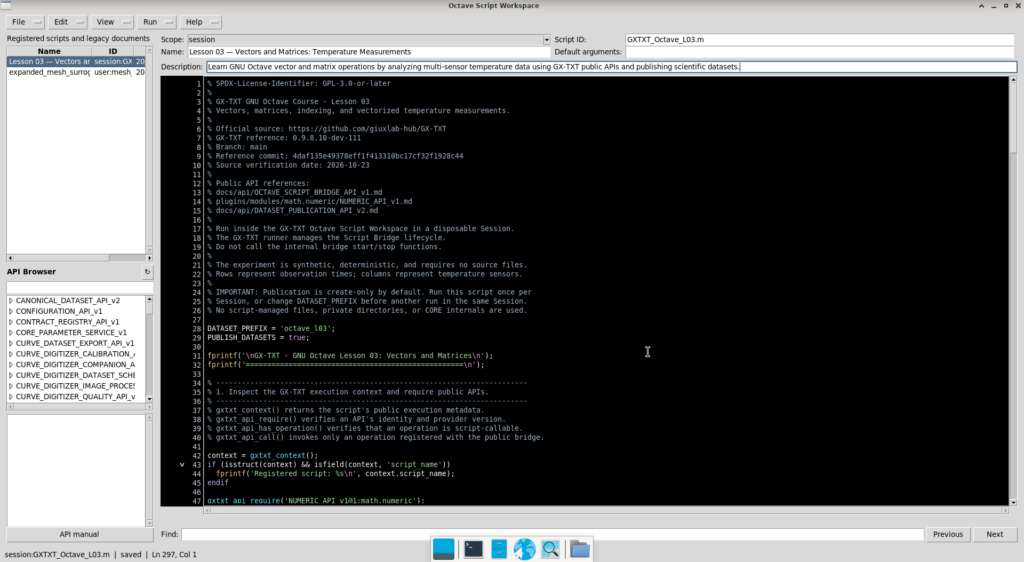
8.1 Importing the Script into Script Workspace
The first step is to register the program in GX-TXT.
After opening the Session intended for the experiment, we access Octave Script Workspace.
There we can create a new script, paste the code from Section 6, and save it in the Session script registry.
For the experiment, we used the following name:
Lesson 03 — Vectors and Matrices: Temperature Measurements
Its registered identifier is:
session:GXTXT_Octave_L03.m
This identifier distinguishes the program from other registered scripts.
In Script Workspace, we can see the source code, script name, description, and registered identifier.
Registration is also important for reproducibility: GX-TXT retains a source revision and executes a snapshot identified by a SHA-256 digest.
This allows the framework to associate each Job with the exact source that ran.
The program uses only public GX-TXT APIs and does not need to read framework-internal directories directly.
8.2 Starting the Script and Monitoring the Job
Once registered, the script can be started through Script Runner.
GX-TXT executes it as a supervised Job.
This means that the framework manages execution instead of simply running an Octave command manually in a terminal.
The Script Jobs window lets us monitor execution states and inspect Job details.
During our test, the script initially appeared with the state:
RUNNING
This indicates that the Octave process was still executing.
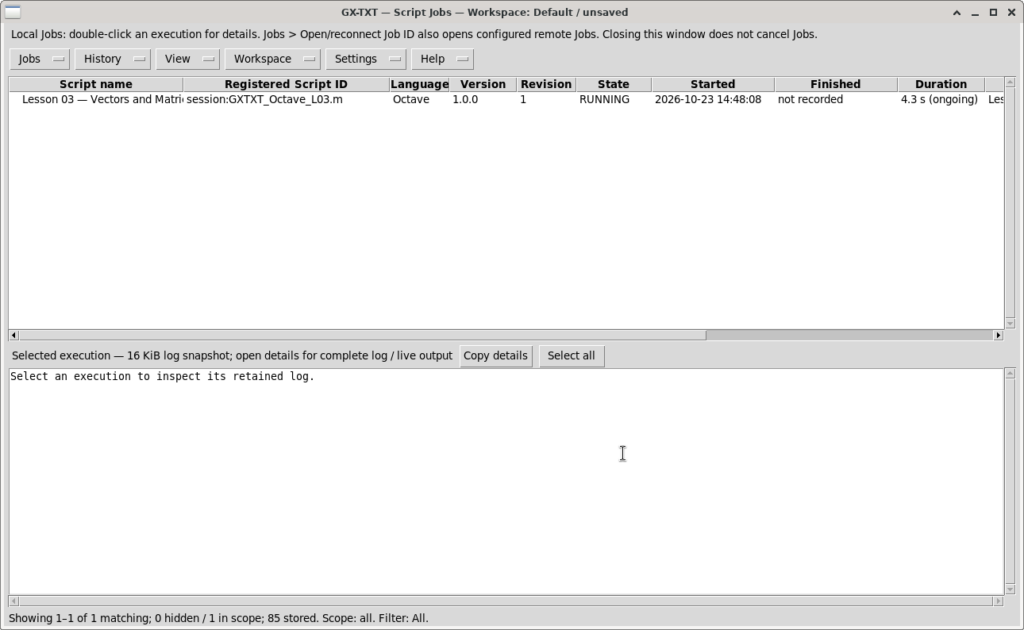
When the Job finished, GX-TXT recorded:
| Information | Result |
|---|---|
| Final status | COMPLETED |
| Language | GNU Octave 10.0 |
| Execution time | 10.7 seconds |
| Exit code | 0 |
| Recorded errors | None |
| Published Datasets | 4 |
Exit code 0 indicates that the process terminated successfully.
The system also retains information such as start time, duration, script identity, source revision, and execution log.
The measured 10.7 seconds should not be interpreted as the time spent on matrix calculations alone. It also includes Job preparation and supervision, environment startup, communication with GX-TXT, and Dataset publication.
It describes the duration of the complete experiment, not a performance benchmark for the individual numerical algorithms.
8.3 Reading and Interpreting the Execution Log
After the Job finishes, we can open its details and read the log produced by GNU Octave.
Our script divides its output into numbered blocks corresponding to the main processing stages.
The first block confirms that the required public APIs are available:
GX-TXT - GNU Octave Lesson 03: Vectors and Matrices
===================================================
Registered script: Lesson 03 — Vectors and Matrices: Temperature Measurements
Public API preflight: passed.
Next, the program reports the array shapes:
[1] Array shapes and indexing
Time vector: 6 x 1
Sensor vector: 1 x 3
Temperature matrix: 6 x 3 (18 elements)
Sensor B at 10 min: 20.90 degC
These values confirm the structure described in Section 2.
The time vector contains six vertically arranged values, the sensor vector contains three horizontally arranged values, and the temperature matrix contains 18 elements.
The second block displays the average rates of temperature change for the five time intervals:
[2] Matrix and element-wise operations
Temperature rates in degC/min (five intervals x three sensors):
   0.100000   0.060000   0.060000
   0.100000   0.100000   0.080000
   0.060000   0.080000   0.080000
  -0.020000  -0.020000  -0.020000
  -0.080000  -0.080000  -0.080000
The resulting matrix has five rows and three columns.
Positive rates correspond to heating intervals, while negative rates indicate cooling intervals.
The third block confirms conversion of the temperatures to kelvin through NUMERIC_API_v1.
The fourth block reports the statistical results:
[4] Statistics and maximum measurement
Sensor averages (degC):    20.600   20.783   20.517

Average by time step (degC):
   19.933
   20.300
   20.767
   21.133
   21.033
   20.633

Maximum: 21.30 degC at t=15 min, Sensor 2
Sensor B has the highest mean temperature, while sensor C has the lowest.
The largest temperature in the experiment is 21.30 °C, recorded by sensor B at minute 15.
Finally, the log confirms Dataset publication:
[5] Canonical GX-TXT Dataset publication
Published 4 managed Datasets in one atomic batch.

Dataset: octave_l03_sensor_a
Dataset: octave_l03_sensor_b
Dataset: octave_l03_sensor_c
Dataset: octave_l03_mean

Lesson 03 numerical checks: PASSED.
GX-TXT didactic experiment completed.
The last two messages indicate that all the script’s numeric checks passed and that execution reached its end without errors.
8.4 Finding the Datasets in the Session
After the Job completes, we can return to GX-TXT’s main window.
We open the Dataset tab, where the framework lists Datasets available in the current Session.
In our experiment, the four newly created Datasets are grouped under the producing module analysis.octave_script.
This makes clear that the data were published by running an Octave script.
The Datasets are:
| Identifier | X variable | Y variable |
|---|---|---|
| octave_l03_sensor_a | Time (min) | Temperature A (K) |
| octave_l03_sensor_b | Time (min) | Temperature B (K) |
| octave_l03_sensor_c | Time (min) | Temperature C (K) |
| octave_l03_mean | Time (min) | Mean temperature (K) |
Selecting a Dataset gives us access to its information and the Preview tab, which can display its scientific data.
For this experiment, we select time as the X variable and temperature as the Y variable.
The framework can then display the relationship between them using the values published by the script.
It is important to understand that the script does not directly generate four chart image files.
The script creates four Datasets through DATASET_PUBLICATION_API_v2. The curves in the screenshots are visualizations subsequently produced by GX-TXT Dataset Preview.
This distinction reflects the separation between numerical analysis, result storage, and graphical presentation.
8.5 Graphical Analysis of the Four Datasets
The four visualizations show how temperature changes over time and allow us to compare the sensors.
All plots show elapsed time in minutes on the horizontal axis and temperature in kelvin on the vertical axis.
The values are plotted in kelvin because that is the unit chosen for the published Datasets.
Sensor A
Sensor A starts at 292.95 K, corresponding to 19.8 °C.
During the first fifteen minutes, its temperature increases gradually to 294.25 K, equivalent to 21.1 °C.
It then decreases to 293.75 K at minute 25.
The curve therefore shows an initial heating phase followed by cooling.
Sensor B
Sensor B records slightly higher temperatures than the other sensors throughout the experiment.
Its initial reading is 293.25 K, corresponding to 20.1 °C.
The maximum is 294.45 K, or 21.3 °C, at minute 15.
This is also the highest of all 18 readings.
Sensor B thus follows a similar trend to the other two, but at consistently higher temperatures.
Sensor C
Sensor C starts at 293.05 K, corresponding to 19.9 °C.
Its temperature rises to 294.15 K, or 21.0 °C, at minute 15.
It then falls to 293.65 K at minute 25.
This curve has the same overall shape but a lower mean than the other sensors.
Mean Temperature of the Three Sensors
The fourth Dataset contains the arithmetic mean of the three temperatures at each observation time.
This curve summarizes the system’s average temperature evolution in one series instead of three.
| Time (min) | Mean temperature (K) |
|---|---|
| 0 | 293.083 |
| 5 | 293.450 |
| 10 | 293.917 |
| 15 | 294.283 |
| 20 | 294.183 |
| 25 | 293.783 |
The mean curve also reaches its maximum at minute 15.
However, the mean-curve maximum is lower than the maximum recorded by sensor B, because it averages the three readings taken at that time.
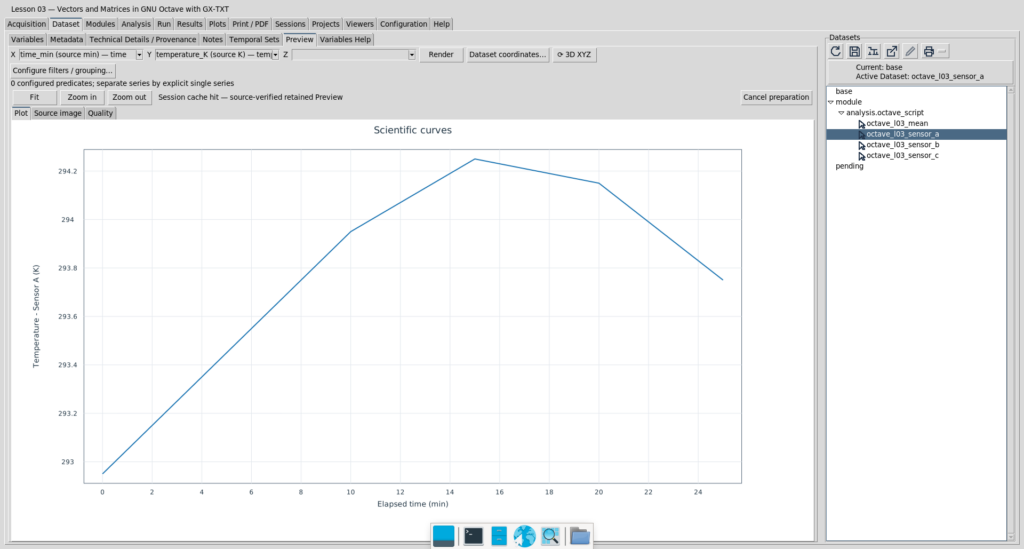
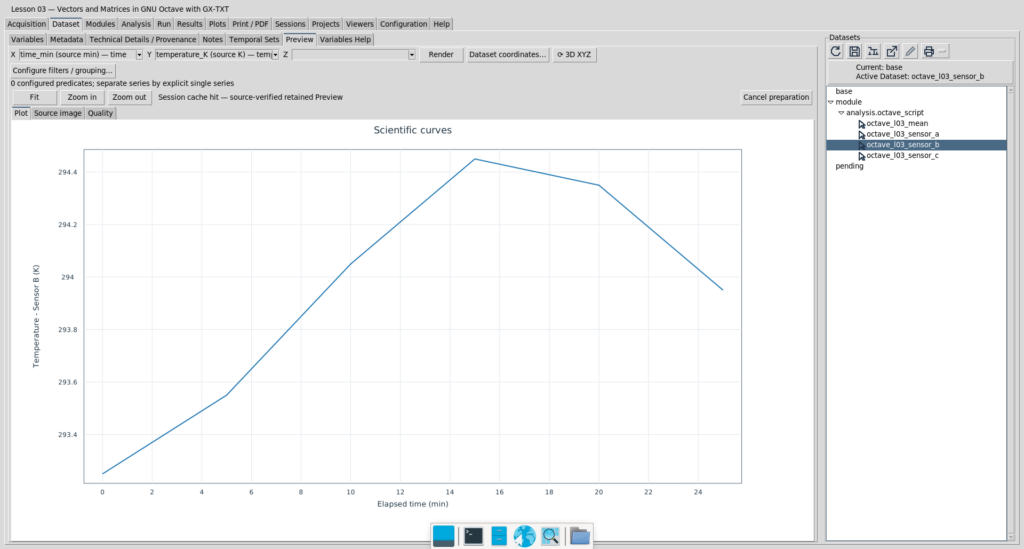
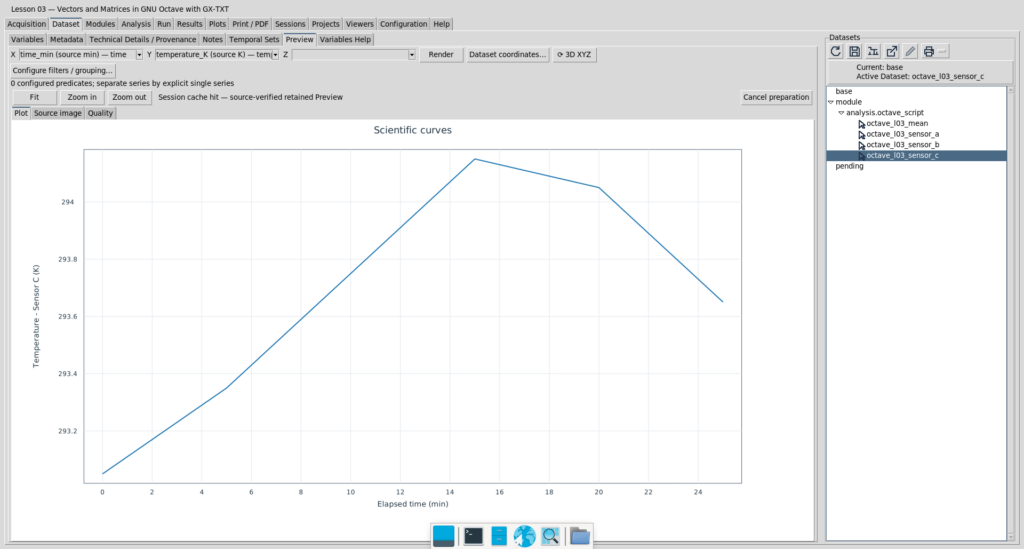
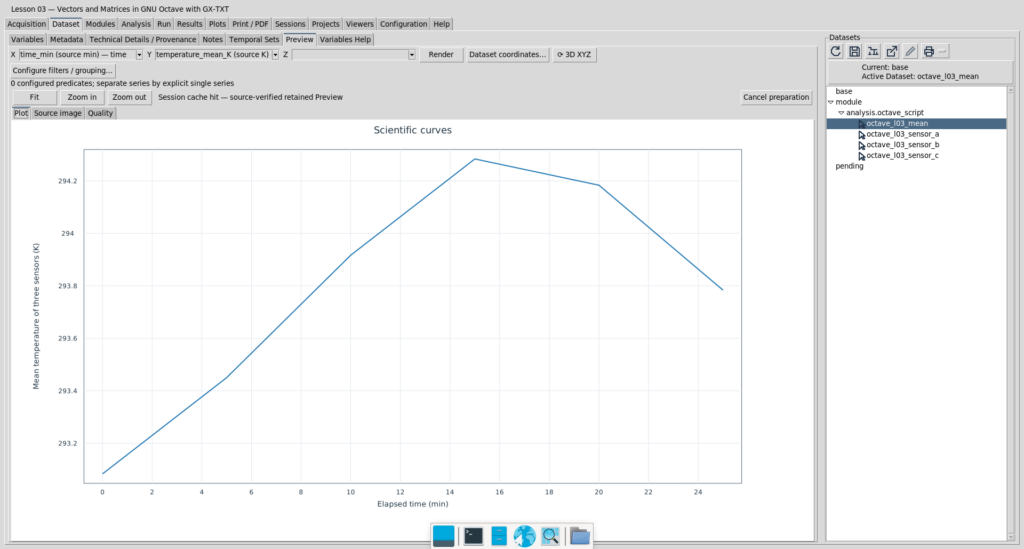
Another important consideration is the vertical scale of the previews.
The preview system may automatically adapt the Y-axis limits to each Dataset’s value range.
Consequently, two separately displayed curves may look very similar even when their temperature ranges differ.
For quantitative comparisons, we must inspect axis values rather than relying only on the apparent curve shapes.
8.6 Scientific Interpretation of the Results
The three sensors show consistent behaviour in this experiment.
All three temperatures rise during the first fifteen minutes and fall during the following ten minutes.
Every sensor reaches its maximum at the same observation time.
Differences between readings do not change the overall trend, but indicate slightly different temperature levels.
In a real experiment, such differences might result from sensor position, the system’s spatial temperature distribution, instrument characteristics, or calibration.
Here, however, the data are synthetic, so we cannot assign the observed differences to any particular physical cause.
The experiment’s purpose is not to interpret a real thermal process but to demonstrate how to organize multiple measurements, apply matrix processing, and obtain verifiable results using GNU Octave and GX-TXT.
An especially important point is the continuity between numeric results and their presentation.
The curves are not manually transcribed from the log; the interface draws them from the Datasets registered in the Session by GX-TXT.
This confirms completion of the entire workflow, from creating matrices to making the scientific results available inside the framework.
8.7 Test Outcome
The Lesson 03 test confirmed the operation of every component needed for this experiment.
GNU Octave successfully executed the vector and matrix calculations.
Public calls to NUMERIC_API_v1 returned results consistent with the independent calculations.
Publication through DATASET_PUBLICATION_API_v2 registered the four intended Datasets.
The Datasets could subsequently be inspected using GX-TXT’s scientific preview.
The test was therefore successful both numerically and in terms of script-framework integration.
We have completed the practical part of Lesson 03, from measurement organization through processing, validation, and visualization.