

Comparisons, Booleans and Capabilities
Scientific Python in GX-TXT · Module 2 · Lesson 7
When a script has to decide whether an operation is available or if a value respects a condition, the result of a comparison is often a boolean. In this lesson we combine comparisons and logical operators and interrupt the public features of GX-TXT.
Objectives: to use comparisons, and, or and not; to understand truthiness and short-circuit; to distinguish identity and equality; to control the presence of an API and its operations.
Prerequisites: variables, types, dictionaries and public clients of module 1.
Compare values
==, !=, <, <=, > and >= compare two values and produce True or False:
sample_count = 4
print(sample_count >= 2)  # True.
print(sample_count == 3)  # False
= assigns a value; == compares values. Comparisons such as 0 < temperatura < 100 verify both relationships. Units and conditions must be consistent: Python does not know if two numbers represent degrees Celsius or kelvin.
The comparison between calculated float deserves attention, because some decimals are not exact in binary. For approximate results use a tolerance justified by the problem instead of assuming that == always expresses the scientific agreement.
Combine conditions
and requires both conditions to be true; or requires at least one; not reverses the logical value. For example:
strumento_pronto = True
campione_disponibile = False
print(strumento_pronto and campione_disponibile)  # False
print(not campione_disponibile)                   # True.
The brackets make legible expressions more complex. and and or evaluate from left to right and use short-circuit: and does not evaluate the second by acting if the first is false; or does not evaluate it if the first is true. For example, len(values) > 0 and values[0] > 0 avoids access to the first item when the list is empty. This does not replace data validation.
and and or operators return one of the operators, not necessarily a bool: [] or [1] returns [1]. In our script the combinations are boolean, so the result shown is True or False.
Truthiness and Identity
In a logical context, values such as 0, None, blank strings and lists are considered false; non-empty values are normally considered true. This is called truthiness. Do not confuse the absence of a value with zero: a numerical result equal to zero can be a valid measure. If you need to distinguish the missing value, please explicitly check value is None.
== verifies equality according to the rules of objects; is verifies whether two names refer to the same object. To compare numbers and strings normally use ==; to check the special None value, use is None or is not None. Do not rely on is to determine if two numbers have the same value.
Capability of bridge
gxtxt_api_has(api_id) returns a boolean indicating whether the API is registered. gxtxt_api_has_operation(api_id, operation) asks if an operation is available for that API. In the script we control CANONICAL_DATASET_API_v2, list and describe, and a deliberately non-existent operation to observe the False case.
These preachers describe the features declared by the bridge in the current Session. A True does not mean that each Dataset is valid, that the parameters are correct or that a subsequent scientific operation succeeds. In lesson 5 we saw how to read the API descriptor; here we use two targeted controls.
Full code
from gxtxt import gxtxt_api_has, gxtxt_api_has_operation

api = "CANONICAL_DATASET_API_v2"
available = gxtxt_api_has(api)
can_list = gxtxt_api_has_operation(api, "list")
can_describe = gxtxt_api_has_operation(api, "describe")
print("API available:", available)
print("Operation list:", can_list)
print("Operation describe:", can_describe)
print("Both available:", available and can_list and can_describe)
print("Intensive testing of non-existent operation:", gxtxt_api_has_operation(api, "inesistente"))

sample_count = 4
print("At least two samples:", sample_count >= 2)
print("Number different from zero:", sample_count != 0)
The last group uses a number of synthetic samples, not a measure. >= 2 and != 0 are two distinct comparisons: for this value they are both true, but they are not equivalent conditions in general.
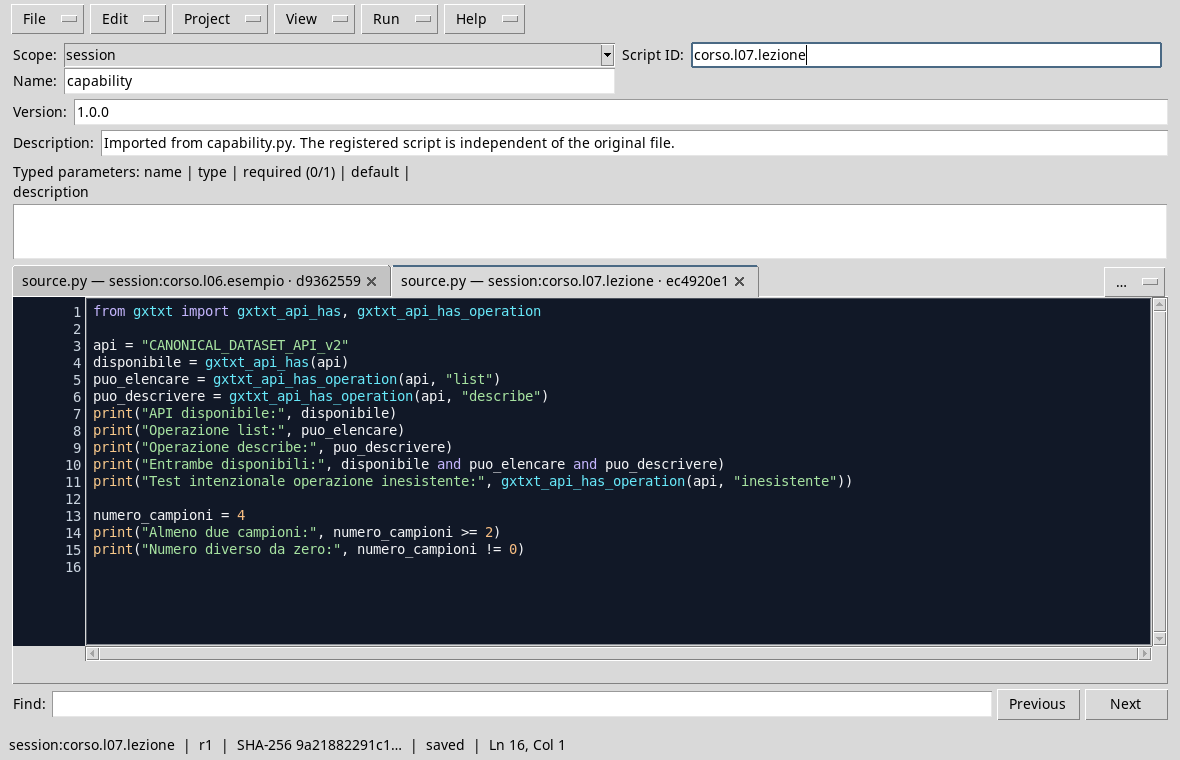
The script in the Viewer Python with the Rich Dark theme.
Execution
- Open a Session and the Viewer Python Scripts.
- Import
capabilities.py, assigns name and Script ID into thesessionbroom and saves. - Open Run → Open Script Runner…, press Run Job and read the result.
- Compare Booleans with the descriptor available in your installation. The intentionally non-existent item must be false; the others depend on the API actually published.

In the performance shown, APIs and required operations are available; the invented operation is not.
Common error
x == 1 or 2 does not mean “x is equal to 1 or 2”: the second operating is the number 2, which in a logical context is true. Write x == 1 or x == 2, or use x in (1, 2) when appropriate. In the next lessons we will use these preachers to choose code blocks.
Exercise
With n = 3 and calibrazione_pronta = True, write an expression that is true only if there are at least two samples and the calibration is ready. Then replace n with 1 and predict the result.
Worked solution
n = 3
calibrazione_pronta = True
pronto = n >= 2 and calibrazione_pronta
print(pronto)  # True.
With n = 1, the first comparison is fake and pronto becomes False. A true value only indicates that these two conditions are met: it does not certify the accuracy of calibration.
In the next lesson we will use Booleans in the if, elif and else branches.