

Array Indexing and Slicing
Scientific Python in GX-TXT · Module 3 · Lesson 14
The shape of an array tells us how many axes it possesses. In this lesson we select rows and columns of a NumPy table, preserving the correspondence between times and signals read by GX-TXT.
Objectives: indexing two-dimensional arrays; using slices and understanding axes; distinguishing views and copies; recognizing the risks of unmotivated form modification.
Prerequisites: lesson 4 lists and slicing; ndarray, shape and dtype of lesson 13; Synthetic lesson 9 dataset.
Rows, columns and indices
Consider a table with four rows and two columns. The first column contains time, the second signal. In NumPy table[1, 0] selects the second row and the first column: the indices start from zero. table[:, 0] selects the first column for all rows; table[1:3, :] selects index rows 1 and 2 and all columns.
The final limit of the slice is excluded. For synthetic course data, the two central rows associate 0.5 s to 1.5 mV and 1.0 s to 1.3 mV. They are invented values, not measures, and do not have a given uncertainty. Select the same rows from both columns keeps the correspondence between time and signal.
Shape of the result
A (4, 2) array has four rows and two columns. table[1:3, :] has (2, 2) shape. Selecting table[:, 0], NumPy normally produces a single-dimensional array of (4,) shape; table[:, 0:1] instead retains a two-dimensional column of (4, 1) shape. The values can be the same, but the shape influences the subsequent operations.
An axis is a direction of the structure: in this table the axis 0 crosses the rows and the axis 1 columns. Do not deduce the physical meaning of the axes from the form alone: here the meaning comes from metadata and the explicit way in which we build the table.
Views and copies
A simple NumPy slice is often a view: another object that shares the memory of the original data. Changing the view can also change the starting array. np.shares_memory(table, middle) allows you to control sharing in the example; middle.copy() creates a copy of the selected array data.
Advanced indexing with index lists or boolean masks follows different rules and generally produces a copy. The masks will be treated in the next lesson. Before changing a subset of scientific data, decide whether you want to change the original or work on a copy and store the origin.
reshape and missing values
reshape proposes a new form compatible with the number of elements: for example, four elements can have (4, 1) or (2, 2) shape. The numerical compatibility of the form does not guarantee that change makes a scientific sense. Do not transform a sequence of times and signals into a different matrix only to satisfy an operation without explaining what the new axes represent. Depending on the data layout, reshape can return a view or request a copy.
Missing values require attention: a NaN and a missing cell mask are not necessarily the same. The API can provide metadata or additional masks; select data and masks consistently. The synthetic series of this lesson does not contain intentional missing cells.
Example with GX-TXT
CANONICAL_DATASET_API_v2/read_range receives the Dataset identifier, variable IDs, initial index and row number. We read time_values and signal for the first four rows. np.column_stack((time_values, signal)) builds the two-column table; then we select both columns for the two central rows.
Full code
import numpy as np
from gxtxt import gxtxt_api_call, gxtxt_api_require

gxtxt_api_require("CANONICAL_DATASET_API_v2@2")
b = gxtxt_api_call("CANONICAL_DATASET_API_v2", "read_range", ["corso_python_serie_sintetica", ["tempo", "segnale"], 0, 4])
time_values = np.asarray(b["tempo"]["values"])
signal = np.asarray(b["segnale"]["values"])
table = np.column_stack((time_values, signal))
middle = table[1:3, :]
print("Timetable (s), signal (mV):\n", table)
print("Shape:", table.shape)
print("Central rows:\n", middle)
print("Central time:", middle[:, 0])
print("Central signal:", middle[:, 1])
print("Shared view:", np.shares_memory(table, middle))
The code requires four rows already present in the Session; a general program must read the metadata before setting the range. column_stack here receives two matching row columns per row: it is not enough that they have the same length if they come from unaligned acquisitions.
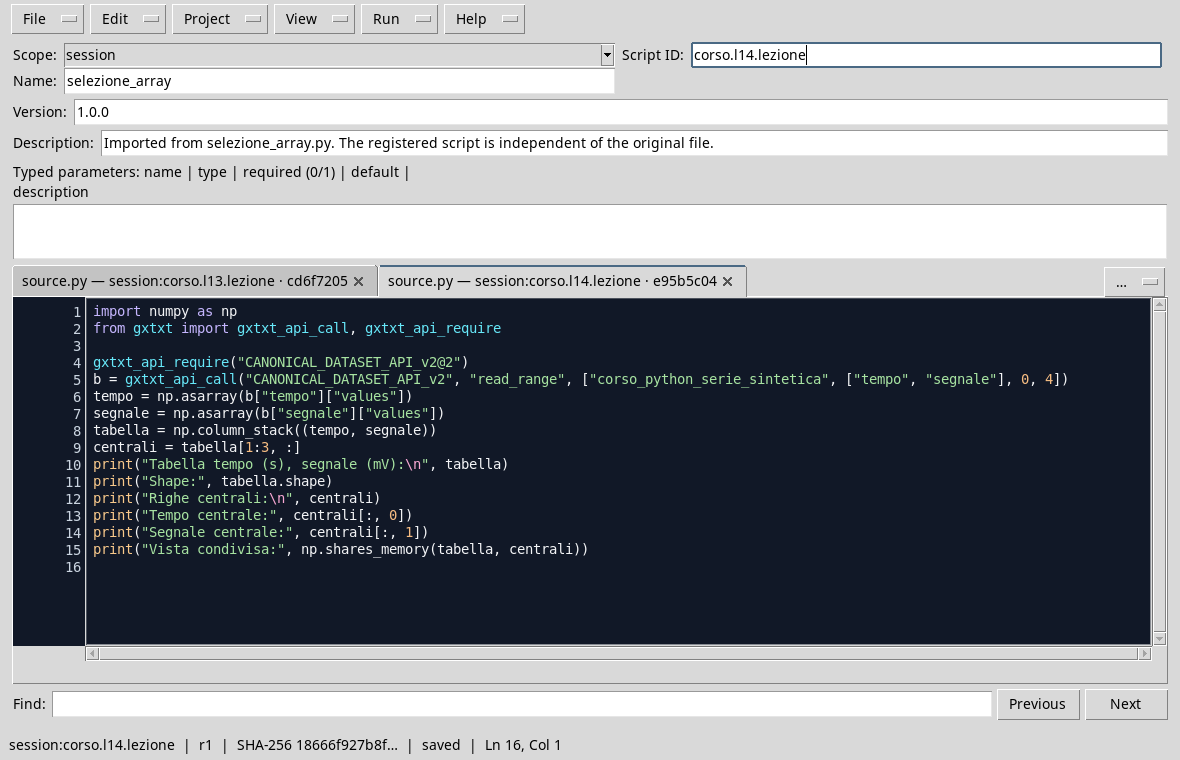
The editor shows the public reading and the selection of the central lines.
Execution and control
- Open the Session with the Synthetic Dataset of lesson 9 and the Viewer Python Scripts.
- Import
array_selection.py, assigns name and Script ID into thesessionbroom and saves. - Launch the Runner and press Run Job. Open the output after completion.
- Control
shape (4, 2),(0.5, 1.5)and(1.0, 1.3)central pairs, andTrueshares_memoryZXZ ZXQ for this slice.
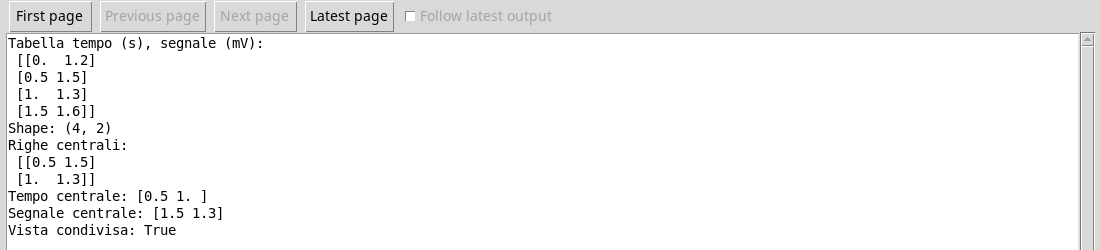
Time and signal remain associated in the two selected rows.
Common error
Select the time with time_values[1:3] and the signals with signal[2:4] produces two sets of the same length but staggered by a row. A compatible form does not prove that couples are correct: it always checks indices and the relationship between coordinates and values.
Exercise
For a (4, 2) table, write the selection of the first three rows while keeping both columns. What form does the result have? How do you get an independent copy?
Worked solution
selection = table[:3, :] has (3, 2) shape. For an independent copy of the data use copia = table[:3, :].copy(). The simple selection can share memory with the original table; the explicit copy avoids that its change alters the table through that shared memory.
In the next lesson we will select values based on Boolean masks.