

Sessions, Workspaces and Scientific Notes
Scientific Python in GX-TXT · Module 7 · Lesson 38
A Session collects data and results of the work. A Workspace retains a status of work managed by a provider; a note can document an object without becoming the Dataset itself. In this lesson we read the Session and associate a note with a synthetic Dataset.
Objectives
- Read the summary of the Session and the Workspace list.
- Publish a didactic series and document it with a well-known Markdown.
- Reread the note through the Public API.
- Distinguish identity, numerical content and documentation.
Execution
In the corso_python Session, import session_workspace.py, save it and run it from Run → Open Script Runner → Run Job. The script creates or updates its educational dataset corso_python_note_sintetiche; the note is written for that ID.
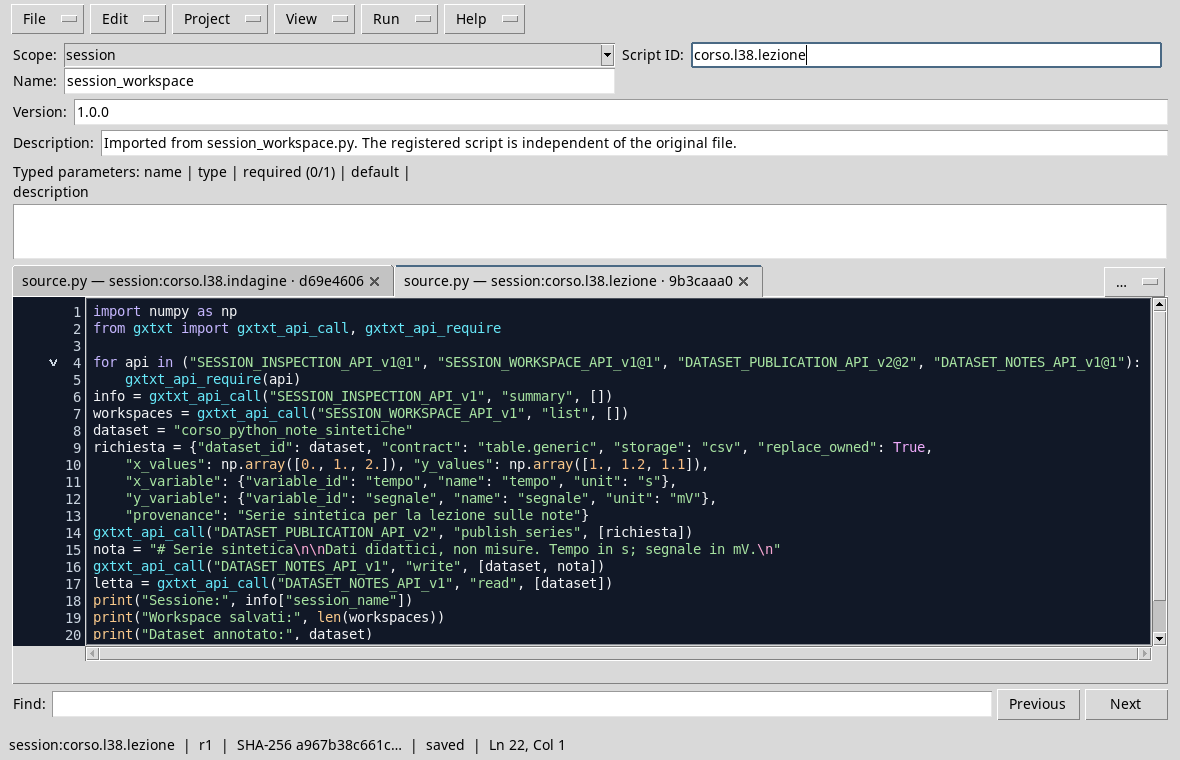
import numpy as np
from gxtxt import gxtxt_api_call, gxtxt_api_require

for api in ("SESSION_INSPECTION_API_v1@1", "SESSION_WORKSPACE_API_v1@1", "DATASET_PUBLICATION_API_v2@2", "DATASET_NOTES_API_v1@1"):
    gxtxt_api_require(api)
info = gxtxt_api_call("SESSION_INSPECTION_API_v1", "summary", [])
workspaces = gxtxt_api_call("SESSION_WORKSPACE_API_v1", "list", [])
dataset = "corso_python_note_sintetiche"
request = {"dataset_id": dataset, "contract": "table.generic", "storage": "csv", "replace_owned": True,
    "x_values": np.array([0., 1., 2.]), "y_values": np.array([1., 1.2, 1.1]),
    "x_variable": {"variable_id": "tempo", "name": "tempo", "unit": "s"},
    "y_variable": {"variable_id": "segnale", "name": "segnale", "unit": "mV"},
    "provenance": "Synthetic series for the lesson on notes"}
gxtxt_api_call("DATASET_PUBLICATION_API_v2", "publish_series", [request])
note = "# Synthetic series Teaching data, not measures. Time in s; signal in mV.\n"
gxtxt_api_call("DATASET_NOTES_API_v1", "write", [dataset, note])
retrieved = gxtxt_api_call("DATASET_NOTES_API_v1", "read", [dataset])
print("Sessione:", info["session_name"])
print("Workspace saved:", len(workspaces))
print("Dateset noted:", dataset)
print("Note:\n", retrieved)
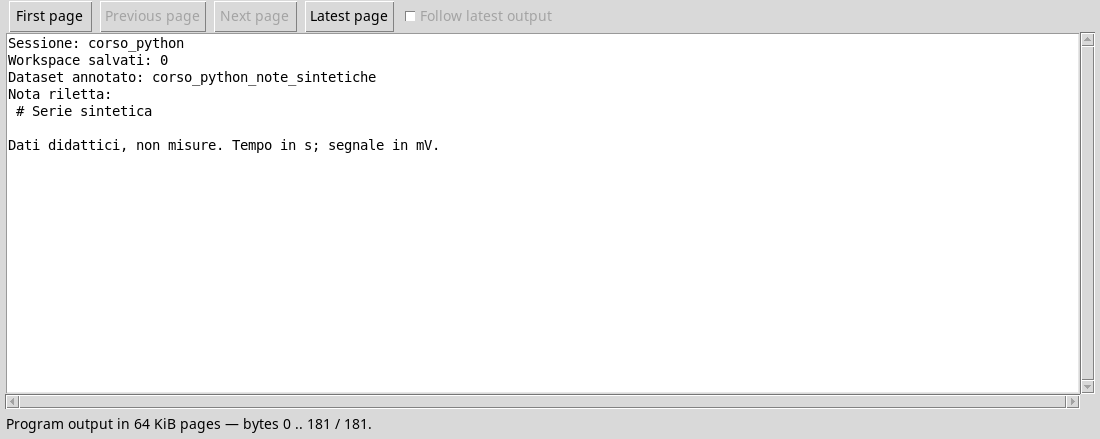
summary returns information about the Current Session. list returns saved Workspaces; in the execution shown the list is empty. An empty list does not mean that the Session does not contain Dataset or graphs: they are resources with distinct roles.
The script publishes three synthetic points, with time in seconds and signal in millivolt. Then DATASET_NOTES_API_v1/write associates a Markdown note to the Dataset and read reread. The note says that the data is didactic and explicit the units.
A note on a Dataset and a note on a Workspace belong to different objects. When a managed Workspace exists, SESSION_WORKSPACE_API_v1 also exposes note_read and note_write using its ID; here we do not write a Workspace note because there is no saved example. Use the APIs of the respective owners, instead of directly modifying the internal files of the Session.
Documentation in a useful way
A note can describe the origin of data, method, unity, hypotheses and limits. It does not replace the variable scheme nor warrants on its own that a result is correct. It retains the identity of the Dataset to which it refers and does not attribute to synthetic data the status of measures.
Exercise
- Does the zero number of Workspace imply that there are no Datasets in the Session?
- Which ID identifies the annotated dataset?
- Why reread the note after writing?
Worked solution
- No: Workspace and Dataset are distinct resources.
corso_python_note_sintetiche.- It allows you to control the content returned by the API for that object, instead of assuming that a string prepared in memory has been saved.
In the next lesson, we will describe a transformation before applying it.