

Dataset Transformations: Description and Planning
Scientific Python in GX-TXT · Module 7 · Lesson 39
Before turning a Dataset it is useful to describe what we want to get and control predictions. In this lesson we prepare a projection of the time_values and signal variables of the synthetic series, without creating the target dataset again.
Objectives
- Discover an operation through the public API.
- Compose a poster with source, variables and destination.
- Validate and plan transformation.
- Distinguish a plan ready by a published result.
Manifest and contract
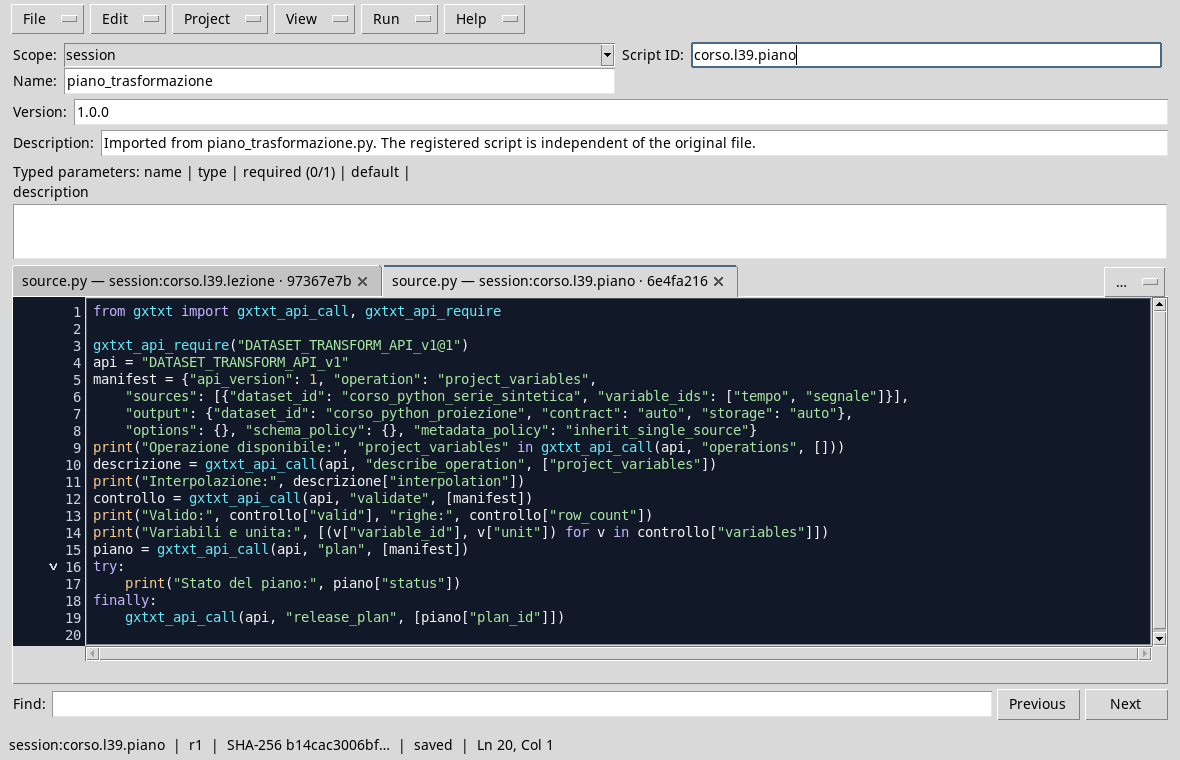
A transformation can be seen as a sequence: identify the source, declare the operation, control schema and unit, finally perform. The poster is a dictionary describing the request. In this example project_variables selects the two variables of the Synthetic Dataset and maintains the order of the rows. No interpolation is planned.
Execution
In the corso_python Session, import transformation_plan.py, save it and run it from Run → Open Script Runner → Run Job. The ID proposed for output must be free because the transformation creates a new Dataset.
from gxtxt import gxtxt_api_call, gxtxt_api_require

gxtxt_api_require("DATASET_TRANSFORM_API_v1@1")
api = "DATASET_TRANSFORM_API_v1"
manifest = {"api_version": 1, "operation": "project_variables",
    "sources": [{"dataset_id": "corso_python_serie_sintetica", "variable_ids": ["tempo", "segnale"]}],
    "output": {"dataset_id": "corso_python_proiezione", "contract": "auto", "storage": "auto"},
    "options": {}, "schema_policy": {}, "metadata_policy": "inherit_single_source"}
print("Operation available:", "project_variables" in gxtxt_api_call(api, "operations", []))
description = gxtxt_api_call(api, "describe_operation", ["project_variables"])
print("Interpolazione:", description["interpolation"])
check = gxtxt_api_call(api, "validate", [manifest])
print("Valid:", check["valid"], "righe:", check["row_count"])
print("Variables and units:", [(v["variable_id"], v["unit"]) for v in check["variables"]])
plan = gxtxt_api_call(api, "plan", [manifest])
try:
    print("State of the plan:", plan["status"])
finally:
    gxtxt_api_call(api, "release_plan", [plan["plan_id"]])
operations lists the available operations; describe_operation describes the contract of that choice. validate checks the request and returns, among other information, validity, number of rows and schematics. plan prepares a plan that can be used in current execution; the finally lock releases it when we are finished.
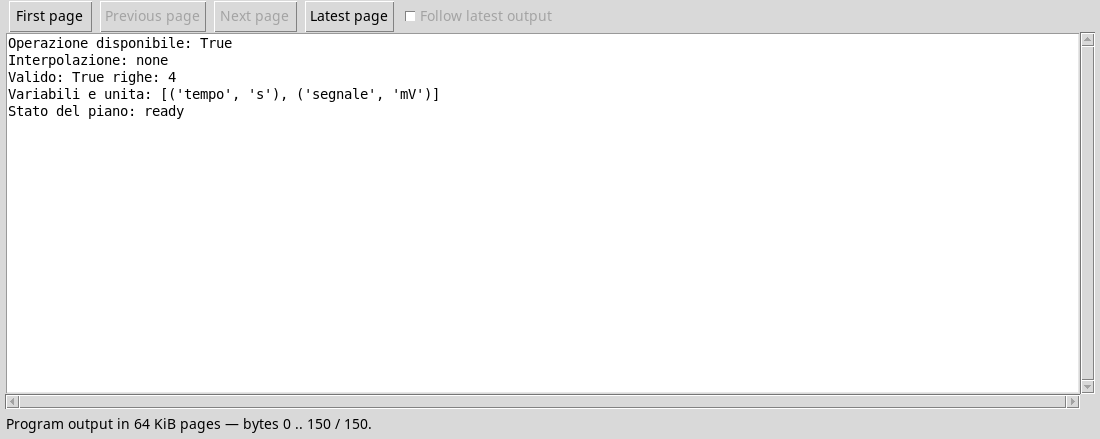
The result shows four lines and time_values variables in s and signal in mV. ready means that the plan is ready; it does not mean that the output has been published. In this lesson we do not call execute. The data remains synthetic and the projection does not invent new samples.
Errors to avoid
Do not deduce the syntax of a transformation from the only name: consult the descriptor and the contract of the poster. An unexisting variable ID, an already occupied destination or incompatible units require you to correct your request. Do not confuse a schema control with a verification of scientific meaning.
Exercise
- What is the source and which ID proposed for the result?
- How many lines are provided for in the plan?
- Has the
readyplan already created the output dataset?
Worked solution
- Source
corso_python_serie_sintetica; output proposedcorso_python_proiezione. - Four.
- No: to publish, it is necessary to execute the transformation.
In the next lesson we will perform a projection and compare the result with the source.