

Running a Transformation and Tracking Provenance
Scientific Python in GX-TXT · Module 7 · Lesson 40
After preparing a plan, we can perform the transformation and verify the Dataset obtained. In this lesson we project two variables of the synthetic series and compare the values published with those of the source.
Objectives
- Perform a declared transformation into a poster.
- Read source and destination through canonical IDs.
- Compare the numerical values and consult the source.
- Understanding why a request is not yet the result.
Before leaving
The source is corso_python_serie_sintetica; the output of the example is corso_python_proiezione. The transformation is created-only: if the output ID already exists, choose a new free ID in the manifest and the output variable, then save the script before running it. Do not overwrite an existing result without an explicit choice.
In the corso_python Session, import transformation.py, save it and run it from Run → Open Script Runner → Run Job. The example uses four synthetic lines.
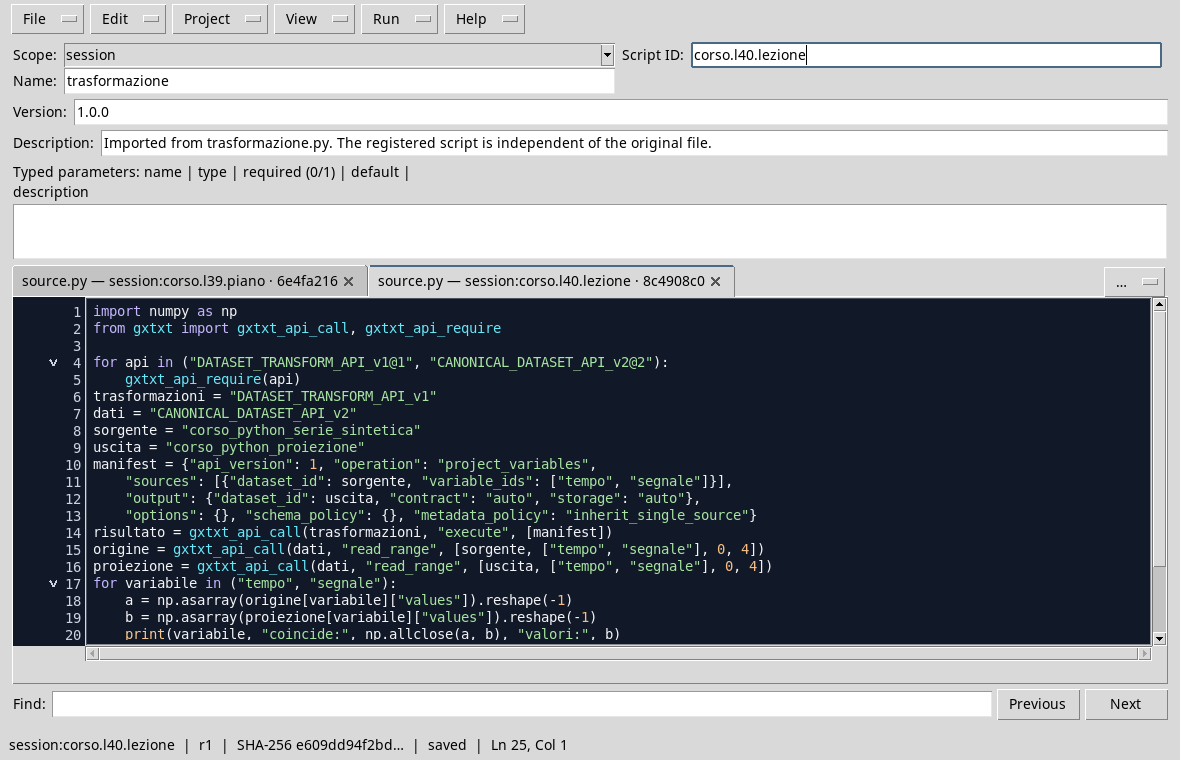
import numpy as np
from gxtxt import gxtxt_api_call, gxtxt_api_require

for api in ("DATASET_TRANSFORM_API_v1@1", "CANONICAL_DATASET_API_v2@2"):
    gxtxt_api_require(api)
transformations = "DATASET_TRANSFORM_API_v1"
data_values = "CANONICAL_DATASET_API_v2"
source = "corso_python_serie_sintetica"
output = "corso_python_proiezione"
manifest = {"api_version": 1, "operation": "project_variables",
    "sources": [{"dataset_id": source, "variable_ids": ["tempo", "segnale"]}],
    "output": {"dataset_id": output, "contract": "auto", "storage": "auto"},
    "options": {}, "schema_policy": {}, "metadata_policy": "inherit_single_source"}
result = gxtxt_api_call(transformations, "execute", [manifest])
origin = gxtxt_api_call(data_values, "read_range", [source, ["tempo", "segnale"], 0, 4])
projection = gxtxt_api_call(data_values, "read_range", [output, ["tempo", "segnale"], 0, 4])
for variable in ("tempo", "segnale"):
    a = np.asarray(origin[variable]["values"]).reshape(-1)
    b = np.asarray(projection[variable]["values"]).reshape(-1)
    print(variable, "coincide:", np.allclose(a, b), "valori:", b)
provenance = gxtxt_api_call(transformations, "provenance", [output])
print("Dataset created:", result["dataset_id"], "righe:", result["row_count"])
print("Available source:", bool(provenance))
print("Provenienza:", provenance)
execute creates the requested Dataset through the public manager. read_range rereads source and output variables; np.allclose compares values with tolerance. Here the projection does not change or convert the values, so we expect them to coincide. For real data, the comparison should be chosen according to the operation and the units.
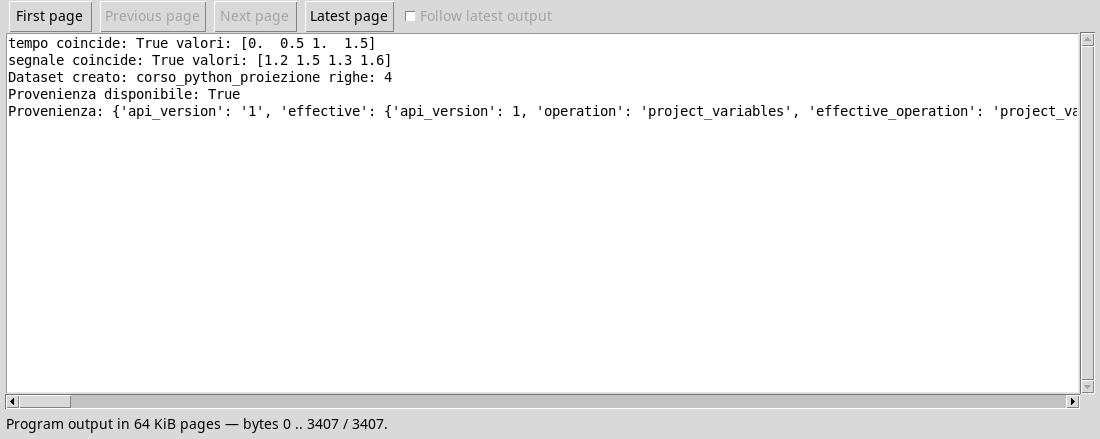
The performance shown shows True for both published variables and four lines. provenance returns the record of transformation, which includes the poster and actual information, including the operation and identity of the source. Reading the record helps to understand how you got to the output; it does not replace the control of values or scientific evaluation.
Request and result
The manifest expresses what we ask; the execution response identifies what has been created. Keeping both, together with the IDs and context, makes it easier to retrace the analysis. Intermediate controls allow you to detect differences before using the result in a chart or in a subsequent calculation.
Exercise
- How many rows does the projection perform in the example?
- Does the projection add interpolated samples?
- What do you have to do before repeating the script if the target ID is already there?
Worked solution
- Four.
- No: Select the required variables without interpolation.
- Choose a free output ID and use the same ID both in the poster and in subsequent readings.
In the next lesson we will observe progress and management of Jobs.