

OpenFOAM 14 Part 1: Case Anatomy and Dictionary Language
This article begins the second stage of the Learning OpenFOAM 14 path. The first stage teaches how to access the computational environment and execute a prepared CFD workflow. This stage changes the question from “How do I run this case?” to “Why does this case have these files, and how would I construct them myself?”. It is Part 1 of 8 of the case-construction series.
The target is OpenFOAM 14 from the OpenFOAM Foundation / CFD Direct distribution. Some syntax described here is specific to version 14, especially the current treatment of named dimensions, units, and global configuration.
Primary learning objective
After completing this part, you should be able to open an unfamiliar OpenFOAM input file, identify its structural elements, place it within the case architecture, and use the official documentation or command-line tools to investigate entries you do not yet understand.
0. Before you start
0.1 What you are expected to know already
- How to log in to the Linux server and open a shell.
- Basic navigation with
cd,pwdandls. - How to run a simple prepared OpenFOAM case.
- The general idea that a CFD case contains a mesh, fields, physical properties and solver controls.
0.2 What you are not expected to know yet
- The complete finite-volume derivation of the governing equations.
- How to choose an optimal numerical scheme for a research problem.
- All available boundary conditions or turbulence models.
- OpenFOAM C++ source-code development.
0.3 Contents
- The mental model of an OpenFOAM case
- The three structural layers: system, constant and time directories
- The FoamFile header
- Dictionary syntax: keywords, values, braces and semicolons
- Data types: words, strings, scalars, vectors, tensors and lists
- Dimensions and units in OpenFOAM 14
- Field files: a special but consistent form of dictionary
- Macros, includes, environment variables and regular expressions
- How OpenFOAM reads configuration and resolves overrides
- Inspection tools: shell commands and foamDictionary
- Guided laboratory: build and inspect a harmless dictionary
- Reading exercise: classify a real case
- Independent exercises
- Competency checklist and quick reference
- Exercise notes and expected observations
- Official references
1. The mental model of an OpenFOAM case
An OpenFOAM case is a directory tree that describes a simulation. It is not a single project file. Different files describe different layers of the problem, and OpenFOAM applications read only the information they need.
The most useful first mental model is to separate the case into three questions:
| Location | Question answered | Typical contents |
|---|---|---|
system/ | How should the simulation run and how should the equations be treated numerically? | controlDict, fvSchemes, fvSolution and other run-time configuration |
constant/ | What does the physical system contain? | Mesh data, material properties, transport and physical-model configuration |
| time directories | What are the field values at a particular simulated time? | Initial fields and later results, e.g. 0/U, 0/p, 1/U |
Key idea
The directory names are semantic. system is about solution procedure and run control; constant is about mesh and physical/model data; a time directory stores field state at a simulated time.
1.1 A minimal conceptual case tree
trainingChannel/
|-- 0/
|   |-- U
|   `-- p
|-- constant/
|   |-- physicalProperties
|   |-- momentumTransport
|   `-- polyMesh/
|       |-- points
|       |-- faces
|       |-- owner
|       |-- neighbour
|       `-- boundary
`-- system/
    |-- controlDict
    |-- fvSchemes
    `-- fvSolution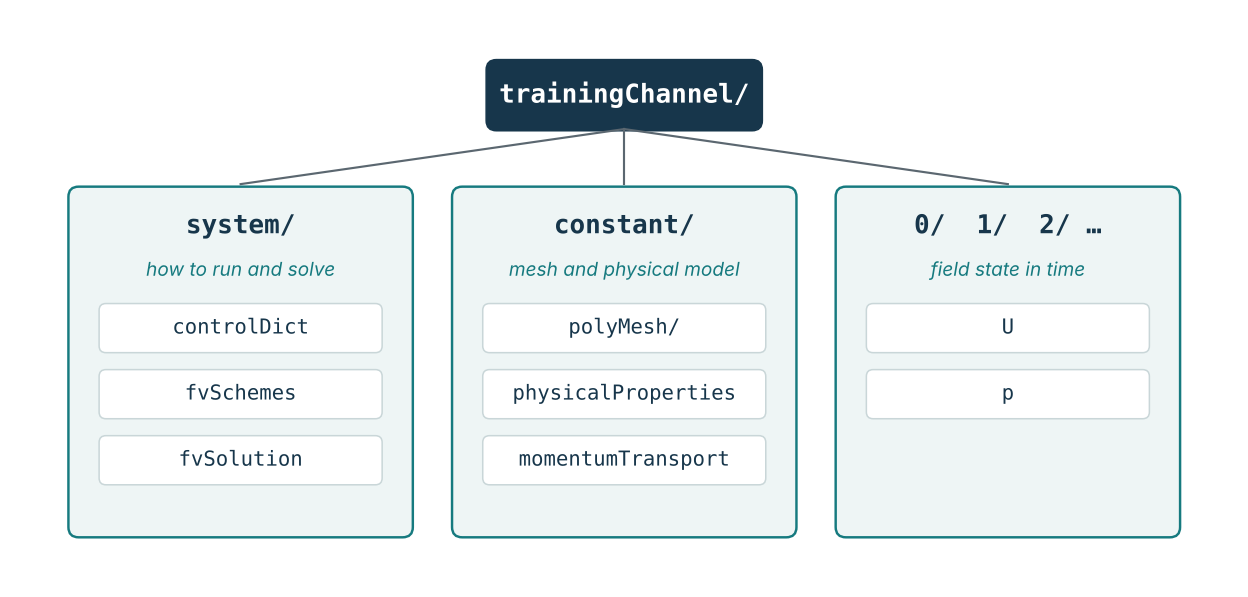
1.2 A file is read because an application needs it
OpenFOAM is a collection of applications and libraries. A mesh utility, a solver module, and a post-processing application do not necessarily read the same files. The presence of a file in a case therefore has meaning only in relation to the application or model that consumes it.
This prevents a common beginner error: assuming that every OpenFOAM case must contain exactly the same files. The three-directory architecture is stable, but the contents vary with the problem.
1.3 A directory is not the same as a physical concept
The directory constant does not mean “numbers that never change during the simulation”. It is the standard location for the mesh and configuration describing physical properties and models. Some model data can still depend on temperature, composition, or other variables.
Likewise, 0 is not a special hard-coded “initial conditions folder” in the abstract. It is normally the time directory corresponding to simulation time zero, and it is commonly used to provide initial field values and boundary conditions.
1.4 The six layers you should learn to separate
| Layer | Typical example | Question |
|---|---|---|
| Geometry / mesh | constant/polyMesh | Where are the cells and boundary patches? |
| Field definition | 0/U, 0/p | What variables exist and how are they initialised? |
| Physical model | constant/physicalProperties | What material and model behaviour is represented? |
| Discretisation | system/fvSchemes | How are differential operators approximated? |
| Algebraic solution | system/fvSolution | How are the resulting equation systems solved? |
| Execution control | system/controlDict | When does the run start/stop and when is data written? |
The later parts of this series will treat these layers separately. For now, your task is to recognise which layer a file belongs to.
2. The three structural layers
2.1 The system directory
The system directory contains settings associated with the solution procedure and case execution. According to the OpenFOAM v14 User Guide, a basic case contains at least controlDict, fvSchemes, and fvSolution in this directory.
controlDict controls simulation execution and data writing. Typical concepts include the start time, end condition, time step, and output interval. Detailed treatment is deferred to Part 4.
fvSchemes selects numerical discretisation schemes for time derivatives, gradients, divergence terms, Laplacians, interpolation and related finite-volume operators. Detailed treatment is deferred to Part 5.
fvSolution configures linear equation solvers, tolerances, relaxation and pressure-velocity coupling controls such as SIMPLE or PIMPLE settings. Detailed treatment is deferred to Part 6.
Do not mix these three rolescontrolDict controls execution, fvSchemes controls discretisation, and fvSolution controls algebraic solution and algorithm settings. They are related but not interchangeable.
2.2 The constant directory
The constant directory contains the complete mesh in constant/polyMesh together with physical-property and model configuration needed by the selected solver module. For a simple incompressible case, files such as physicalProperties and momentumTransport are typical, but exact requirements depend on the problem.
constant/
|-- polyMesh/
|   |-- points
|   |-- faces
|   |-- owner
|   |-- neighbour
|   `-- boundary
|-- physicalProperties
`-- momentumTransport
You will normally generate polyMesh using a meshing utility rather than writing all its files by hand. Part 2 of this series uses blockMeshDict to construct a simple mesh.
2.3 Time directories
Time directories contain field files at a simulated time. At the beginning of a case, 0/ usually contains the initial values and boundary conditions. During a run, OpenFOAM writes later time directories according to the output controls.
0/
|-- U
`-- p

0.1/
|-- U
`-- p

0.2/
|-- U
`-- p
OpenFOAM fields must be initialised even in cases where the steady solution does not mathematically require a transient initial state. This is why a steady case still normally contains a 0 directory with field files.
2.4 Generated data versus user configuration
Some files are primarily written by the user, while others are generated by applications. The distinction matters when diagnosing a case.
| Item | Usually created by | Typical handling |
|---|---|---|
system/controlDict | User or copied template | Read and edit directly |
system/fvSchemes | User or copied template | Read and edit directly |
system/fvSolution | User or copied template | Read and edit directly |
constant/polyMesh/* | Meshing utility | Inspect; regenerate rather than hand-edit in normal work |
0/U, 0/p | User / initialisation tool | Edit or generate initial conditions |
| later time directories | Solver | Treat as results; normally do not hand-edit |
3. The FoamFile header
Every OpenFOAM data file read or written by the framework begins with a dictionary named FoamFile. The header identifies the I/O format, object class and object name. Optional entries can also provide version and location information.
FoamFile
{
    format      ascii;
    class       dictionary;
    location    "system";
    object      controlDict;
}
3.1 Header entries
| Entry | Meaning | Typical values / notes |
|---|---|---|
version | I/O format version | Optional; defaults to 2.0 in current documentation |
format | How data is encoded | ascii or binary |
class | OpenFOAM object/data class | dictionary, volScalarField, volVectorField, etc. |
object | Object/file name | For example controlDict, U, p |
location | File path relative to the case | Optional; e.g. "system" or "0" |
3.2 Dictionary class versus field class
A file such as controlDict is structurally a dictionary:
class       dictionary;
object      controlDict;
A velocity field is a different OpenFOAM class:
class       volVectorField;
object      U;
The class tells you what kind of data structure OpenFOAM expects. A field file therefore cannot be understood only by looking at the filename; the header provides a stronger clue.
3.3 A useful reading habit
When you open an unfamiliar OpenFOAM file, read the FoamFile block first. Before interpreting individual keywords, answer:
- What class of object is this?
- What object is being represented?
- Where in the case does the file live?
- Is this likely to be user configuration, a field, or generated data?
4. Dictionary syntax
4.1 Free-form input
OpenFOAM input is free form. Columns are not significant and line breaks generally do not terminate entries. This means spacing can be chosen for readability.
deltaT 0.001;

// Equivalent in meaning to:
deltaT        0.001;
4.2 The fundamental entry: keyword plus data
keyword data;Most configuration is ultimately built from this pattern. A keyword is used to look up the associated data. The terminating semicolon is part of the syntax for ordinary entries.
4.3 Why semicolons matter
Missing semicolons are among the simplest and most useful errors to learn from. Because line breaks are not statement terminators, OpenFOAM continues reading and eventually encounters a token that does not fit the expected grammar.
// Correct
myValue        42;

// Incorrect
myValue      42
nextValue    7;
Debugging habit
When OpenFOAM reports a parsing error near a keyword, also inspect the line immediately before it. The true error can be a missing semicolon or closing brace earlier in the file.
4.4 Sub-dictionaries
A dictionary can contain another dictionary. The nested block has a name and is enclosed by curly braces.
solvers
{
    p
    {
        solver         GAMG;
        tolerance      1e-7;
        relTol         0.01;
    }
}
Read this structurally before reading it numerically: solvers contains a sub-dictionary named p, which contains three ordinary entries.
4.5 Comments
// Everything after // on this line is a comment.

deltaT 0.001;       // This is also a comment.

/*
This is a multi-line comment.
OpenFOAM ignores the enclosed text.
*/
Comments are important when learning from tutorial cases, but remember that foamDictionary normally prints the logical dictionary content without preserving ordinary comments.
4.6 Braces, parentheses and square brackets are different
| Delimiter | Typical role | Example |
|---|---|---|
{} | Dictionary or sub-dictionary | boundaryField { ... } |
() | List or vector-like data | (1 0 0) or (inlet outlet) |
[] | Dimensions or units | [velocity], [m/s], [kg m^-3] |
Do not treat delimiters as decoration
A very large fraction of OpenFOAM syntax becomes readable once you identify whether a block is a dictionary {}, a list (), or dimensional/unit information [].
5. Data types you will encounter
5.1 Words and strings
A word is a token used for names and selections. A string is enclosed in double quotes and can contain characters or spaces that would not be valid in a simple word.
solver         GAMG;
location       "system";
Do not assume that every unquoted token is arbitrary text. Many keywords expect a value from a defined run-time selection table, while others expect a path, a word, or a numerical type.
5.2 Scalars
A scalar is a single numerical value.
deltaT         0.001;
tolerance      1e-7;
Scientific notation is common and should be read normally: 1e-7 means 0.0000001.
5.3 Vectors
A vector has three components and uses parenthesised list syntax.
(1 0 0)For a velocity vector in a Cartesian coordinate system, the three entries correspond to x, y and z components. The meaning comes from the context: the same syntax can represent any vector quantity.
5.4 Tensors and symmetric tensors
A general tensor contains nine components. A symmetric tensor stores only six independent components. You do not need to memorise their ordering yet, but you should recognise them as structured numerical data rather than long lists of unrelated values.
// General tensor: 9 values
(1 0 0 0 1 0 0 0 1)

// Symmetric tensor: 6 independent values
(1 0 0 1 0 1)
5.5 Lists
Lists are enclosed by round parentheses. User input often omits a list size, while OpenFOAM output can explicitly write a count before the list.
patches
(
    inlet
    outlet
    walls
);

3
(
    inlet
    outlet
    walls
)
These are two list forms you may encounter. Context determines the expected element type.
5.6 Nested data is normal
A realistic case file combines data types. Do not try to interpret the whole file at once. Decompose it into layers.
example
{
    name            channelA;
    scale           0.001;
    direction       (1 0 0);
    patches
    (
        inlet
        outlet
        walls
    );
}
This example is simply a sub-dictionary containing a word, a scalar, a vector, and a list.
6. Dimensions and units in OpenFOAM 14
OpenFOAM attaches dimensions to physical quantities and performs dimensional consistency checks. Version 14 makes named dimensions and units especially prominent in case configuration. This is one of the areas where you should prefer v14 documentation over older examples found online.
6.1 Dimensions answer: what kind of physical quantity is this?
Dimensions describe the powers of the seven base physical dimensions. The older exponent form is still valid and important to recognise:
[0 1 -1 0 0 0 0]This corresponds to length divided by time, i.e. velocity. OpenFOAM 14 example cases prefer named dimensions where available:
[velocity]Other useful named examples include [pressure] and [kinematicViscosity]. Named dimensions are easier to read and reduce the cognitive load of counting exponents.
6.2 Units answer: in what measurement unit is the value supplied?
A value can optionally be followed by units. OpenFOAM converts the value to the active base unit system and checks that the supplied unit has the correct dimensions.
rho       1000 [kg m^-3];
nu        10 [cSt];
The second example is especially useful: centistokes are converted to the internal base units while OpenFOAM verifies that cSt has kinematic-viscosity dimensions.
6.3 Dimensioned properties in v14
Current v14 examples commonly use a compact syntax in which the property dimensions are known by the code and the user supplies only the value, optionally with units.
rho       1000;
nu        1e-5;
Do not assume that an older tutorial showing explicit numerical dimension vectors for every property represents the preferred v14 style. Older syntax may still help you read legacy cases, but new training material should follow the v14 conventions.
6.4 Field dimensions
Field files explicitly describe field dimensions. For velocity, a v14-style entry is:
dimensions [velocity];For pressure-like fields, the exact dimensions depend on the formulation. Never infer the physical meaning of a field only from its filename; check the selected solver module and the field definition.
6.5 The foamUnits utility
OpenFOAM 14 provides foamUnits as a utility application for listing dimensions and units, inspecting a specific unit, and calculating conversion factors.
foamUnits
foamUnits power
foamUnits cal
foamUnits -all
Use this tool when you are unsure whether a named unit exists or what dimensions it represents. It is safer than relying on memory or on an unrelated online example.
6.6 Global and case-level unit configuration
In OpenFOAM 14, global controls are stored in $FOAM_ETC/configDict. A case can override selected controls using system/configDict. The global file contains the active unit set and conversion definitions, among other controls.
cat $FOAM_ETC/configDictYou do not need to edit the global configuration during this course. The important point is to recognise that v14 uses configDict for global controls and permits case-level overrides.
Version 14 rule for this course
When a syntax difference exists between an old tutorial and the v14 User Guide, treat the v14 User Guide and the installed OpenFOAM 14 tools as the reference.
7. Field files: special files using the same language
Field files such as U and p live in time directories. They use the same general dictionary language, but their class and required entries describe a distributed field over the mesh.
7.1 A minimal velocity field example
FoamFile
{
    format            ascii;
    class             volVectorField;
    object            U;
}

dimensions            [velocity];

internalField         uniform (0 0 0);

boundaryField
{
    inlet
    {
        type          fixedValue;
        value         uniform (0.5 0 0);
    }

    outlet
    {
        type          zeroGradient;
    }

    walls
    {
        type          noSlip;
    }
}
A simplified velocity field used only to illustrate structure. Boundary-condition selection is treated in Part 3.
7.2 The four important structural entries
| Entry | Role |
|---|---|
dimensions | Physical dimensions of the field |
internalField | Values in the internal mesh field; often a uniform initial value in a user-created 0 file |
boundaryField | Sub-dictionary containing field conditions for mesh boundary patches |
sources | Optional field-source initialisation/configuration in cases that use internal sources |
7.3 Uniform and nonuniform
A user often initialises a field with one uniform value:
internalField uniform (0 0 0);Solver output is generally nonuniform because different cells contain different values. A written result can therefore contain a list with one value per element of the field.
internalField         nonuniform List<scalar>
4
(
    0.12
    0.15
    0.18
    0.17
);
The example is deliberately short. Real result lists may contain thousands or millions of entries.
7.4 Mesh patch type versus field boundary condition
Critical distinction
The mesh has boundary patches with mesh/topological types stored in constant/polyMesh/boundary. Each field then assigns a field boundary condition to those patches in its own boundaryField. These are related but they are not the same thing.
For example, a mesh patch named walls may be of mesh type wall, while the velocity field U applies the noSlip boundary condition to that patch. A pressure field can apply a different condition to the same patch.
7.5 Patch names must match the mesh
When a field file names a boundary patch directly, the name must correspond to a patch in the mesh. OpenFOAM also supports patch groups and regular-expression matching, which you will see later in this article and revisit in Part 3.
8. Macros, includes, environment variables and regular expressions
OpenFOAM dictionaries can avoid repetition and share configuration. You do not need to master every mechanism now, but you should recognise the most common ones when reading real cases.
8.1 Macro expansion with $
A value or dictionary entry can be reused through macro expansion. A simple conceptual example is:
referenceValue      0.25;
selectedValue       $referenceValue;
In nested dictionaries, macros are widely used to reuse solver settings or shared scheme definitions. Later parts will show real examples in fvSchemes and fvSolution.
8.2 Including another file
#include "studentValues"The included file is read as if its contents were present at the include location. If it is in another directory, the path can use environment variables, for example:
#include "$FOAM_CASE/constant/initialConditions"Two variants you may encounter are #includeIfPresent and #includeEtc. Their names indicate their purpose: conditional inclusion and inclusion relative to OpenFOAM configuration directories.
8.3 Environment variables
Environment variables can appear inside paths and strings. Common OpenFOAM variables include:
| Variable | Meaning |
|---|---|
$FOAM_CASE | Path of the currently running case |
$FOAM_CASENAME | Name of the current case directory |
$FOAM_APPLICATION | Name of the running application |
$FOAM_TUTORIALS | Installed tutorial-case directory |
$FOAM_ETC | OpenFOAM configuration directory |
echo $FOAM_TUTORIALS
echo $FOAM_ETC
8.4 Regular expressions in keyword matching
Some dictionary lookups allow a quoted regular expression to match multiple names. This is common in boundary-field configuration and solver settings.
".*Wall"
{
    type        noSlip;
}
The pattern .*Wall means “any characters followed by Wall”. It could therefore match names such as upperWall and lowerWall.
"(upper|lower)Wall"
{
    type    noSlip;
}
This second pattern is more specific and matches upperWall or lowerWall. Do not add complex regular expressions unless they genuinely improve clarity.
8.5 Advanced coded input: recognise it, do not use it yet
OpenFOAM 14 includes a substantially updated coded-input framework with directives such as #calc, #codeBlock, #stream, #codeDict and #print. They are powerful, but they are intentionally outside the practical scope of Part 1.
For now
If you see a coded directive, identify it as an advanced input mechanism and consult the v14 documentation. Do not replace a simple dictionary entry with run-time code unless there is a clear need.
9. How configuration is resolved
9.1 Keyword order usually does not matter
For ordinary distinct keywords in a dictionary, order is generally not significant. OpenFOAM looks up entries by keyword rather than by line position.
9.2 Duplicate keywords: the later entry wins
When the same keyword is specified more than once in a dictionary context, the later definition overrides the earlier one. This behaviour is useful with macros and includes.
relTol    0.05;
relTol    0;
The effective value is the final one. This makes it possible to import a common set of settings and override one parameter locally.
9.3 Exact keyword matches take precedence over regular expressions
If both an exact keyword and a regular-expression entry could match a lookup, the exact keyword has higher precedence. This becomes important when a general rule is followed by a patch- or field-specific rule.
9.4 Global controls and local overrides
OpenFOAM 14 reads global configuration from $FOAM_ETC/configDict. User- or case-level configDict files can override selected settings with a defined precedence. This is another reason to diagnose a case by asking not only “What is in this file?” but also “Could this value be inherited or overridden elsewhere?”
9.5 The most useful debugging question
Ask this first
What exact keyword is the application trying to read, from which dictionary, and what data type does it expect?
This question converts many long error messages into a small investigation: file → dictionary → keyword → expected type → supplied value.
10. Inspection tools
A good OpenFOAM user does not rely only on a text editor. The shell and OpenFOAM case-management tools can answer structural questions quickly.
10.1 Basic shell inspection
pwd
ls
find . -maxdepth 2 -type f | sort
less system/controlDict
grep -n "FoamFile" system/*
These commands answer basic questions: where am I, which files exist, and where a token appears. Use less for reading rather than cat when a file is long.
10.2 foamDictionary
foamDictionary parses OpenFOAM dictionary syntax. This is more useful than raw text inspection when you want to know the effective logical entry structure.
foamDictionary system/fvSchemesThe command prints dictionary entries without ordinary comments. Macros are preserved unless expansion is requested.
10.3 Extract a particular entry
foamDictionary -entry startFrom system/controlDict
foamDictionary -entry startFrom -value system/controlDict
The first form prints the full entry. The second prints only its value.
10.4 Navigate nested dictionaries with /
foamDictionary -entry "solvers/p" system/fvSolutionThe slash syntax addresses entries through nested dictionaries. The exact path depends on the case.
10.5 List keywords inside a sub-dictionary
foamDictionary -entry solvers -keywords system/fvSolutionThis is useful when you want to discover which field equations have explicit solver configuration.
10.6 Expand macros when needed
foamDictionary -expand system/fvSchemesThis helps when a file is compact because several entries are defined through macros.
10.7 Other tools to remember for later
| Tool | Use |
|---|---|
foamSearch | Search tutorial dictionaries for examples of a particular entry |
foamGet | Copy supported configuration templates into a case |
foamInfo | Show information and examples for selectable models, boundary conditions and solver modules |
foamToC | List run-time selectable options directly from OpenFOAM tables |
foamUnits | Inspect dimensions, units and conversions |
These tools are developed more fully in Part 8. Part 1 only establishes that the installed OpenFOAM environment itself is a source of documentation.
11. Guided laboratory: build and inspect a harmless dictionary
This laboratory is designed to teach syntax without affecting a CFD calculation. You will create a dictionary that no solver uses, then inspect it with foamDictionary.
11.1 Create the file
Inside a disposable training case, create system/studentDict with the following content:
FoamFile
{
    format          ascii;
    class           dictionary;
    object          studentDict;
}

studentName         student01;
referenceValue      0.25;
direction           (1 0 0);

labels
(
    inlet
    outlet
    walls
);

settings
{
    enabled         true;
    count           4;
    tolerance       1e-6;
}
11.2 Parse the whole file
foamDictionary system/studentDictIf the file is syntactically valid, foamDictionary should print the parsed entries. This proves that the file conforms to OpenFOAM dictionary grammar even though no simulation application uses it.
11.3 Read one value
foamDictionary -entry referenceValue -value system/studentDictExpected logical value: 0.25.
11.4 Read a nested value
foamDictionary -entry settings/tolerance -value system/studentDictThe slash path traverses into the settings sub-dictionary.
11.5 List the nested keywords
foamDictionary -entry settings -keywords system/studentDictYou should see enabled, count, and tolerance.
11.6 Introduce a controlled syntax error
Make a copy of the file, then remove the semicolon after referenceValue 0.25. Run foamDictionary again.
Observe, do not guess
Read the first meaningful parser error. Note the file, the approximate location, and the token OpenFOAM did not expect. Restore the semicolon and verify that the file parses again.
11.7 Add a macro
After restoring the valid file, add:
copyOfReference $referenceValue;Then compare:
foamDictionary system/studentDict
foamDictionary -expand system/studentDict
The expanded form is useful for seeing the effective value after macro substitution.
11.8 Add an include
Create system/studentValues containing:
includedValue 17;Then add the following lines to studentDict before an entry that uses it:
#include "studentValues"

copiedIncludedValue       $includedValue;
Run foamDictionary -expand system/studentDict and verify that the included entry is visible and the macro resolves.
11.9 What this laboratory teaches
- OpenFOAM syntax can be learned independently of the physics.
- The parser can validate dictionary structure.
- Nested dictionaries have addressable paths.
- Macros and includes can reduce repetition.
- A controlled error is useful when you read the diagnostic instead of changing multiple things at once.
12. Reading exercise: classify a real case
Choose a simple OpenFOAM 14 tutorial case that has already been run successfully in the training environment. Do not edit it initially.
12.1 Locate the tutorial tree
echo $FOAM_TUTORIALSBrowse a simple case relevant to the solver module you already used in the first training stage.
12.2 Produce a shallow file inventory
find . -maxdepth 2 -type f | sortDo not immediately open every file. First classify file locations.
12.3 Create a classification table
For each important file, record the following.
| File | Layer | Class from FoamFile | What you think it controls |
|---|---|---|---|
system/controlDict | Execution | dictionary | … |
system/fvSchemes | Discretisation | dictionary | … |
system/fvSolution | Algebraic solution | dictionary | … |
0/U | Field | volVectorField | … |
0/p | Field | volScalarField | … |
12.4 Inspect only the structure
For each file, identify:
FoamFileclass and object;- top-level keywords;
- sub-dictionaries;
- lists;
- scalars and vectors;
- dimensions or units;
- macros, includes or regular-expression entries if present.
You are not expected to explain every numerical choice yet. The objective is structural literacy.
12.5 Use foamDictionary to test your reading
foamDictionary system/controlDict
foamDictionary system/fvSchemes
foamDictionary system/fvSolution
Compare the parsed structure with what you identified manually.
13. Independent exercises
13.1 Exercise A – Parse the structure
Without running OpenFOAM, describe the structure of the following dictionary.
measurement
{
    name          probeA;
    origin        (0.01 0.02 0.03);
    channels
    (
        pressure
        velocity
        temperature
    );
    settings
    {
        interval     0.1;
        enabled      true;
    }
}
Answer these questions:
- How many direct entries exist inside
measurement? - Which entry is a vector?
- Which entry is a list?
- Which entry is itself a sub-dictionary?
- What is the full path to
intervalif addressed withfoamDictionaryslash syntax?
13.2 Exercise B – Identify the syntax fault
parameters
{
    length        0.2;
    width         0.05
    height        0.01;
}
Identify the fault before using a parser. Then create a temporary dictionary containing the block and verify your diagnosis with foamDictionary.
13.3 Exercise C – Dimensions versus units
Classify each bracketed expression as a dimension or as a measurement unit in context:
dimensions        [velocity];
nu                10 [cSt];
rho               1000 [kg m^-3];
dimensions        [0 1 -1 0 0 0 0];
Then use foamUnits to inspect cSt and velocity.
13.4 Exercise D – Field anatomy
Given the simplified U file in section 7, answer:
- What proves that
Uis a vector field? - What is the initial internal velocity?
- Which sub-dictionary contains conditions for mesh patches?
- Which entry prescribes an explicit inlet value?
- Why is
noSlipnot a mesh patch type in this file?
13.5 Exercise E – Macro and include reasoning
Suppose system/commonValues contains:
baseTolerance 1e-6;and another dictionary contains:
#include "commonValues"

tolerance           $baseTolerance;
Explain which file defines the numerical literal and which entry receives the expanded value. Then state what foamDictionary -expand should reveal.
13.6 Exercise F – Case classification
Take one working tutorial case and classify at least ten files or directories using the six-layer model from section 1.4. At least one item must come from each of these categories: mesh, field, physical model, discretisation, algebraic solution, execution control.
14. Competency checklist and quick reference
14.1 You are ready for Part 2 when you can do the following
- ☐ Explain the difference between
system,constant, and time directories. - ☐ Read a
FoamFileheader and identifyclassandobject. - ☐ Recognise a keyword/value entry and explain why it ends with a semicolon.
- ☐ Distinguish dictionaries
{}, lists(), and dimensions/units[]. - ☐ Recognise scalars, vectors, tensors and lists.
- ☐ Explain the difference between a physical dimension and a measurement unit.
- ☐ Recognise v14 named dimensions such as
[velocity]. - ☐ Explain the roles of
internalFieldandboundaryField. - ☐ Explain the difference between a mesh patch and a field boundary condition.
- ☐ Recognise
$macro expansion and#include. - ☐ Use
foamDictionaryto print a file and extract a nested entry. - ☐ Read a parser error without changing several unrelated settings at once.
14.2 One-page structural reference
CASE
|
|-- system/                  HOW TO RUN / SOLVE
|    |-- controlDict         execution and output control
|    |-- fvSchemes           discretisation
|    `-- fvSolution          equation solvers and algorithms
|
|-- constant/                WHAT PHYSICAL SYSTEM / MESH
|    |-- polyMesh/           generated mesh data
|    |-- physicalProperties  material properties (case-dependent)
|    `-- ...                 other model files
|
`-- 0/, 0.1/, 1/, ...        FIELD STATE AT SIMULATED TIMES
     |-- U                   vector field example
     `-- p                   scalar field example

COMMON SYNTAX
keyword value;                       ordinary entry
name { ... }                         sub-dictionary
( ... )                              list / vector-like data
[ ... ]                              dimensions or units
$keyword                             macro expansion
#include "file"                      include another file
".*Wall"                             regular-expression keyword
14.3 The method to use when you do not know an entry
- Identify the file and its
FoamFileclass. - Identify the dictionary/sub-dictionary containing the entry.
- Identify the expected data type.
- Check the OpenFOAM v14 User Guide.
- Search installed tutorials if an example is useful.
- Use
foamDictionary/foamInfo/foamToCwhere appropriate. - Change one thing at a time.
- Re-run and read the first meaningful error.
End-state of Part 1
You do not need to know every keyword. You need to know how the language is structured and how to investigate a keyword you have not seen before.
A. Exercise notes and expected observations
These notes are intentionally concise. They are meant for self-checking after you have attempted the exercises.
A.1 Exercise A
measurementcontains four direct entries:name,origin,channels, andsettings.originis a three-component vector.channelsis a list of words.settingsis a sub-dictionary.- The slash path to
intervalismeasurement/settings/intervalifmeasurementis itself a top-level dictionary entry.
A.2 Exercise B
The semicolon after width 0.05 is missing. Because OpenFOAM input is free form, the parser may complain at a later token rather than exactly at the missing punctuation.
A.3 Exercise C
[velocity]is a named dimension.[cSt]is a unit of kinematic viscosity.[kg m^-3]is a compound measurement unit.[0 1 -1 0 0 0 0]is the exponent form of dimensions for velocity.
A.4 Exercise D
- The header class
volVectorFieldidentifiesUas a volume vector field. - The initial internal velocity is
(0 0 0). boundaryFieldcontains field conditions for mesh patches.- The inlet
fixedValueblock contains an explicit value. noSlipis a field boundary condition applied to a patch; the mesh patch type is defined separately in the mesh boundary description.
A.5 Exercise E
commonValues supplies the literal 1e-6 through baseTolerance. The receiving dictionary assigns that value to tolerance through macro expansion. The expanded view should show the effective numerical value rather than leaving the reference unresolved.
B. Official references
This part is based on OpenFOAM 14 documentation from the OpenFOAM Foundation / CFD Direct. Use the following references when checking syntax or version-specific behaviour.
- C. Greenshields, OpenFOAM v14 User Guide, OpenFOAM Foundation, 14 July 2026
- OpenFOAM v14 User Guide, Section 4.1 – File structure of OpenFOAM cases
- OpenFOAM v14 User Guide, Section 4.2 – Input/output file format
- OpenFOAM v14 User Guide, Section 4.3 – Global controls
- OpenFOAM v14 User Guide, Section 4.7 – Case management tools
- OpenFOAM v14 User Guide, Section 6.3 – Introduction to boundary conditions
- OpenFOAM 14 release notes – version-specific changes, including units and coded file input
Documentation discipline
Use the v14 documentation when writing new material. Older tutorials remain useful for concepts, but syntax and preferred configuration patterns can change between OpenFOAM releases.
B.1 What comes next
Part 2: Building a Mesh with blockMeshDict. The next part moves from language and case anatomy to the first configuration file that you will construct from geometry: vertices, hexahedral blocks, cell counts, grading and boundary patches. All parts are collected in the Learning OpenFOAM 14 project.