
GX Spectra Library: IR, UV/Vis and NMR reference spectra on Debian, complete guide
GX Spectra Library is a small Debian desktop program, written in Python with Tkinter and Matplotlib, that searches IR, UV/Vis and NMR (1H and 13C) reference spectra in the NIST Chemistry WebBook and nmrshiftdb2, previews them, keeps their original JCAMP-DX files in a local library that works offline and exports them to CSV and to ZIP archives with their provenance. The code is free software (GNU GPL v3 or later) and the Debian package is on the Releases page of the GitHub repository; the program’s card is on the software page. This article reproduces in full the original illustrated guide, with a complete worked example on benzene and twelve real screenshots; the deep-dive and practical-tip boxes, which open with a click, explain how the program works behind the scenes (the requests to NIST, PubChem and nmrshiftdb2, the JCAMP-DX format, the SQLite catalogue with SHA-256 fingerprints), interpret the benzene spectra with bibliographic references and present four small tested scripts to audit the catalogue, verify ZIP archives, compute IR absorbance and compare the data before and after the CSV round trip. An Italian translation is in the Italian version of this article.
GX Spectra Library · Debian 13 · Illustrated laboratory tutorial
Find and inspect infrared, ultraviolet/visible and NMR reference data, save the original JCAMP-DX files, manage an offline catalogue, and exchange spectra using CSV and ZIP.
- Case study: benzene · CAS 71-43-2
- 32 online matches in this session
- 12 real desktop screenshots
- Version 0.1.1 · Debian build 0.1.1-2
What you will learn
One molecule, four complementary spectra
This worked example uses benzene (C₆H₆, CAS 71-43-2). We retrieve a gas-phase IR reference and a UV/Vis spectrum from the NIST Chemistry WebBook, together with 1H and 13C NMR peak lists from nmrshiftdb2.
All application images below are genuine screenshots of the program running on the Debian 13 XFCE desktop, with its English interface. The walkthrough was executed against the public services on 1 November 2026. Database content and availability may change.
- Starting point: Empty demonstration catalogue; online search in English
- Result: Four downloaded JCAMP-DX files, a CSV export, a ZIP with metadata, and a verified CSV re-import
How to follow along. Keep this page open next to GX Spectra Library. Click any screenshot to view the original full-size PNG. The files produced by the tutorial are described in the Files generated section.
Step 01 · Prepare the workstation
Install and launch with the English interface
The Debian package declares Tkinter, Matplotlib, NumPy, Requests, Beautiful Soup, certificate and desktop utilities as APT dependencies. The JCAMP reader is bundled, so no pip command is required. Download gx-spectra-library_0.1.1-2_all.deb from the Releases page of the GitHub repository and install it from the folder that contains it:
sudo apt install ./gx-spectra-library_0.1.1-2_all.deb
LANGUAGE=en gx-spectra-library
The application normally follows Debian’s LANGUAGE, LC_MESSAGES and LANG settings. The command above selects English for this run only. Alternatively, launch GX Spectra Library from the XFCE applications menu.
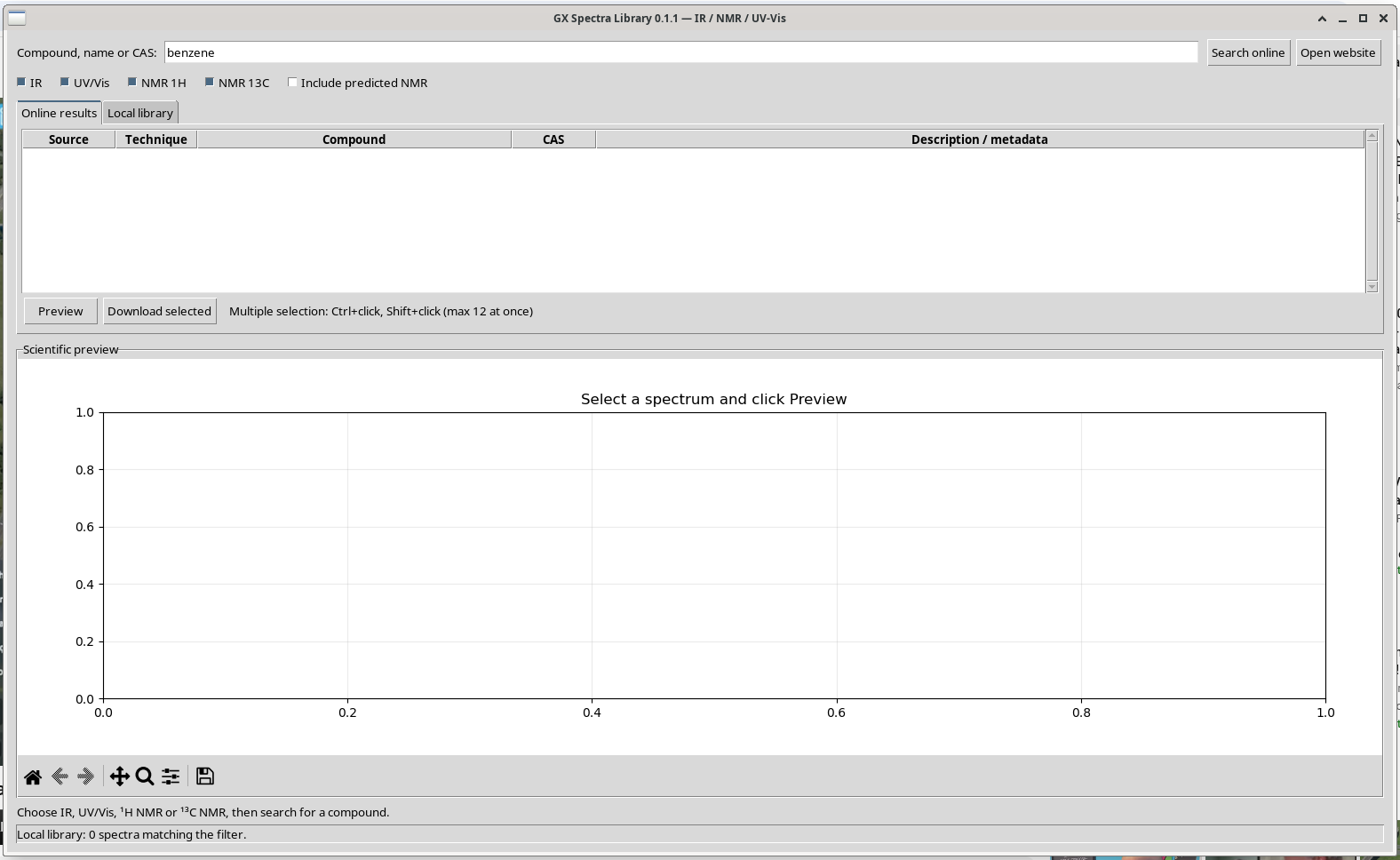
This tutorial used a separate demonstration catalogue. It did not overwrite the user’s existing library or require a system-level package installation to obtain the screenshots.
Practical tip · Download, verify and install the package; an isolated catalogue for testing
From the Releases page download the package and the SHA256SUMS file; checking the fingerprint before installing guarantees that the file is the published one:
sha256sum -c --ignore-missing SHA256SUMS
# gx-spectra-library_0.1.1-2_all.deb: OK
sudo apt install ./gx-spectra-library_0.1.1-2_all.deb
The published fingerprint of version 0.1.1-2 is 9c2e43dd5cc357db2bc45ea5f46bc09cf2f6885839c91ee13ffe3284fe7b5887. The ./ before the name is required: without it APT looks for a package with that name in the repositories instead of the local file.
The Debian package stores the library in $XDG_DATA_HOME/gx-spectra-library and, if the variable is not set, in ~/.local/share/gx-spectra-library (the packaging/build_deb.py script replaces the source data folder this way). To try the program without touching one’s own library, as was done for the screenshots, it is enough to point it to a temporary folder:
XDG_DATA_HOME="$HOME/spectra-test" LANGUAGE=en gx-spectra-library- at the first launch, if the catalogue does not exist yet, the package copies any library of the old standalone version from
~/spettriwithout modifying it; - from the source (
git clone, then./installa_ambiente.shand./avvia_spettri.sh) the program uses a virtual environment with thejcampdependency from pip and keeps catalogue and data in the source folder (catalogo.sqlite3anddata/), not in the XDG folder; - the repository contains 16 automatic offline tests (
tests.py,tests_i18n.py):PYTHONPATH=packaging/vendor python3 -m unittest tests tests_i18nruns them without network; in our run all 16 passed.
Step 02 · Online discovery
Search for benzene in the public databases
- Enter
benzenein Compound, name or CAS. The CAS number71-43-2is another useful identifier. - Leave IR, UV/Vis, NMR 1H and NMR 13C selected.
- For this example, leave Include predicted NMR unchecked.
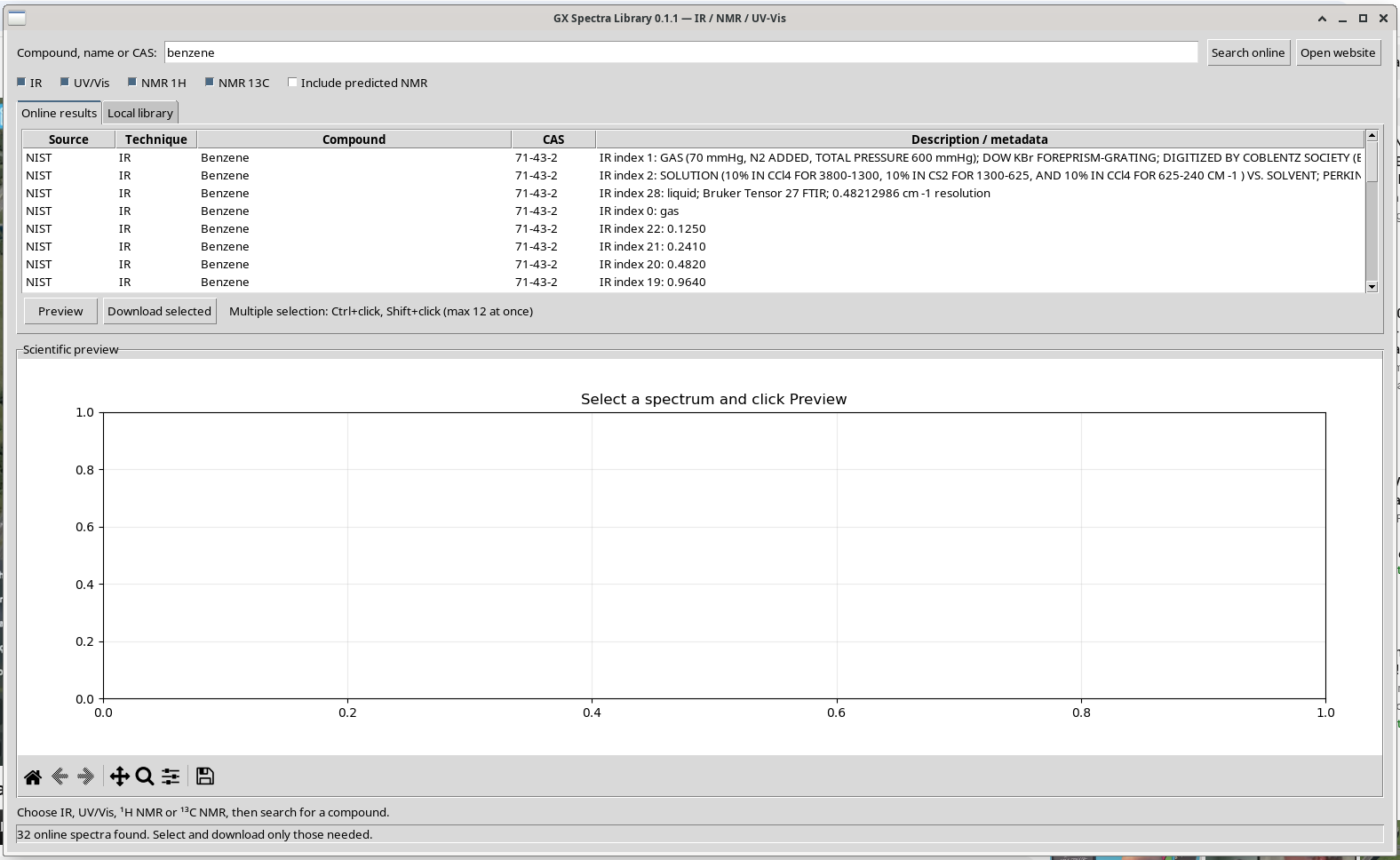
- Click Search online. The results populate the table without replacing the current library.
| Technique | Source | Matches in this run | What varies |
|---|---|---|---|
| IR | NIST | 29 | Physical state, recording conditions and instrumental resolution |
| UV/Vis | NIST | 1 | Published spectrum and wavelength range |
| 1H NMR | nmrshiftdb2 | 1 | Shift list, solvent and source record |
| 13C NMR | nmrshiftdb2 | 1 | Shift list, solvent and source record |
Search results are not all equivalent measurements. For a meaningful comparison, choose an individual record and inspect its conditions and original units before downloading it.
Deep dive · How the program searches: NIST, PubChem and nmrshiftdb2 behind the scenes
The code is in backend.py. Every search is a single query, not a bulk crawl of the databases:
| Technique | Request | What it extracts |
|---|---|---|
| IR, UV/Vis | webbook.nist.gov/cgi/cbook.cgi?Name=benzene&cIR=on&cUV=on (with a CAS number: ID=C71432) | the CAS number from the page, then the links to the Type=IR-SPEC variants, turned into the JCAMP URL cbook.cgi?JCAMP=C71432&Index=n&Type=IR, and the UV/Vis JCAMP links |
| NMR (step 1) | pubchem.ncbi.nlm.nih.gov/rest/pug/compound/name/benzene/property/ConnectivitySMILES/JSON | the connectivity SMILES (C1=CC=CC=C1) and CID 241 |
| NMR (step 2) | nmrshiftdb.nmr.uni-koeln.de/NmrshiftdbServlet/nmrshiftdbaction/searchorpredict/smiles/<SMILES>/spectrumtype/1H | the first spectrum of the XML response with peaks, solvent and identifier; the download URL appends /format/jcamp |
- the nmrshiftdb2 service is called search or predict: if the compound has no archived spectrum it returns a prediction. The program recognises it by the missing spectrum identifier (or by a calculation program in the metadata) and hides it unless Include predicted NMR is enabled; archived spectra too are labelled “experimental origin unverified”;
- every request declares the agent
GX-SpectraLibrary/0.1, has time limits of 8 s for connecting and 22 s for reading, and refuses responses above 12 MB per spectrum (3 MB for the NIST page, 4 MB for the NMR response); - for name resolution the SMILES notation (Weininger 1988, doi:10.1021/ci00057a005) and PubChem (Kim et al. 2023, doi:10.1093/nar/gkac956) only serve to identify the structure; nmrshiftdb2 is described in Steinbeck, Krause and Kuhn (2003, doi:10.1021/ci0341363) and Steinbeck and Kuhn (2004, doi:10.1016/j.phytochem.2004.08.027), the WebBook in Linstrom and Mallard (2001, doi:10.1021/je000236i).
The 29 IR entries for benzene are 29 different recordings (phase, cell, instrument, digitisation), not duplicates: the description of each reports the conditions and is the first thing to read before choosing.
Step 03 · Spectral inspection
Preview the infrared spectrum
Select the NIST entry beginning “IR index 1: GAS…” and click Preview. The spectrum is read from the remote JCAMP-DX source and plotted without first adding it to the local library.
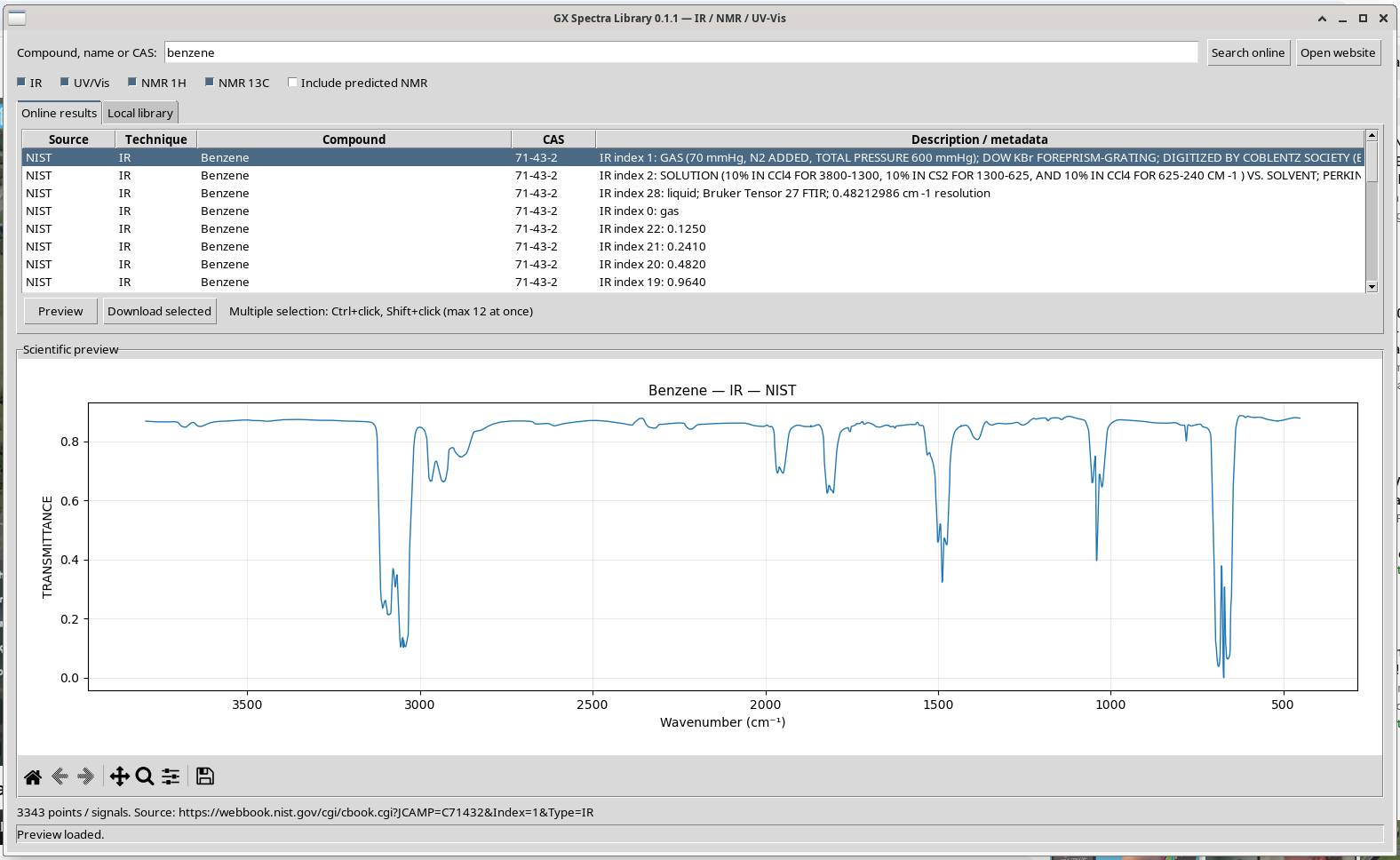
Note the downward absorption features characteristic of a transmittance plot. The horizontal axis runs from higher to lower wavenumber, following conventional IR presentation. Use Matplotlib’s toolbar to zoom into regions of interest, pan, return to the full view or save an image.
Source traceability. The selected record points to the original NIST IR JCAMP-DX resource. The complete file and associated catalogue metadata should be retained for quantitative work.
Deep dive · What the benzene IR JCAMP-DX contains, and its bands
JCAMP-DX is the standard text format for exchanging IR spectra (McDonald and Wilks 1988, doi:10.1366/0003702884428734), later extended to NMR (Davies and Lampen 1993, doi:10.1366/0003702934067874). The ##KEY=value headers describe the data; values are often compressed (SQZ, DIF, DUP forms) and scaled by XFACTOR and YFACTOR: this is why the program uses a dedicated reader, Nathan Hagen’s jcamp module, MIT licence. The headers of the file downloaded in this walkthrough:
| Header | Value | Meaning |
|---|---|---|
XUNITS, YUNITS | 1/CM, TRANSMITTANCE | wavenumber in cm⁻¹, transmittance between 0 and 1 |
NPOINTS | 3343 | one point per cm⁻¹ from 452 to 3794 |
RESOLUTION | 2 | instrumental resolution 2 cm⁻¹: the 1 cm⁻¹ step adds no detail |
STATE | GAS (70 mmHg, N2 ADDED, TOTAL PRESSURE 600 mmHg) | gas phase: bands carry P, Q, R rotational structure |
ORIGIN, OWNER | DOW CHEMICAL COMPANY, Copyright (C) 1987 by the Coblentz Society | origin and rights holder, to be cited |
The ir_bands.py script (in the archive at the end of the article) reads the CSV exported at step 08, computes the absorbance A = −log₁₀T and lists its strongest maxima; on this spectrum:
#!/usr/bin/env python3
# SPDX-License-Identifier: GPL-3.0-or-later
"""Absorbance and strongest bands from an IR transmittance CSV exported by GX Spectra Library.

Reads the two-column CSV (comment lines starting with #, header x,y), converts
transmittance to absorbance A = -log10(T) and lists the N strongest local
maxima of A that are separated by at least --min-sep cm-1. Optionally writes
the absorbance CSV (never overwriting an existing file). The values are those
of the source file: check its YUNITS before applying the conversion.
Bands with T below 0.001 are flagged as saturated: their absorbance is
limited by the 1e-6 floor used here and has no quantitative meaning.

Usage: python3 ir_bands.py benzene_IR_export.csv [--n 8] [--min-sep 40] [--out absorbance.csv]
"""
import argparse, csv, math, os, sys

ap = argparse.ArgumentParser(description=__doc__.split("\n")[0])
ap.add_argument("csv")
ap.add_argument("--n", type=int, default=8)
ap.add_argument("--min-sep", type=float, default=40.0)
ap.add_argument("--out")
a = ap.parse_args()
x, t = [], []
with open(a.csv, encoding="utf-8") as f:
    for row in csv.reader(line for line in f if not line.startswith("#")):
        try:
            x.append(float(row[0])); t.append(float(row[1]))
        except (ValueError, IndexError):
            continue          # header line "x,y"
if max(t) > 1.5:
    sys.exit("values above 1.5: not a 0-1 transmittance; check the units of the source")
A = [-math.log10(max(v, 1e-6)) for v in t]
peaks = [i for i in range(1, len(A) - 1) if A[i] >= A[i - 1] and A[i] > A[i + 1]]
peaks.sort(key=lambda i: A[i], reverse=True)
chosen = []
for i in peaks:
    if all(abs(x[i] - x[j]) >= a.min_sep for j in chosen):
        chosen.append(i)
    if len(chosen) == a.n:
        break
print(f"{len(x)} points, {min(x):g}-{max(x):g} cm-1, T from {min(t):.4f} to {max(t):.4f}")
print(f"{'cm-1':>8s} {'T':>8s} {'A':>8s}")
sat = 1e-3
for i in sorted(chosen, key=lambda i: x[i], reverse=True):
    print(f"{x[i]:8.1f} {t[i]:8.4f} {A[i]:8.4f}" + ("  saturated (T < 0.001): A not quantitative" if t[i] < sat else ""))
if a.out:
    if os.path.exists(a.out):
        sys.exit(f"{a.out} exists: refusing to overwrite")
    with open(a.out, "w", newline="", encoding="utf-8") as f:
        f.write("# absorbance A = -log10(T) computed from " + os.path.basename(a.csv) + "\n")
        w = csv.writer(f); w.writerow(["wavenumber_cm-1", "absorbance"])
        w.writerows(zip(x, (f"{v:.6g}" for v in A)))
    print("written", a.out)
$ python3 ../ir_bands.py benzene_IR_export.csv --n 8 --min-sep 40 --out benzene_IR_absorbance.csv
3343 points, 452-3794 cm-1, T from 0.0000 to 0.8868
cm-1 T A
3092.0 0.2122 0.6733
3048.0 0.1027 0.9884
2932.0 0.6623 0.1789
1949.0 0.6921 0.1598
1821.0 0.6244 0.2045
1488.0 0.3231 0.4907
1041.0 0.3963 0.4020
673.0 0.0000 6.0000 saturated (T < 0.001): A not quantitative
written benzene_IR_absorbance.csv
[exit 0]
$ head -4 benzene_IR_absorbance.csv
# absorbance A = -log10(T) computed from benzene_IR_export.csv
wavenumber_cm-1,absorbance
452.0,0.0561594
453.0,0.0561594
[exit 0]
$ python3 ../ir_bands.py benzene_IR_export.csv --out benzene_IR_absorbance.csv
3343 points, 452-3794 cm-1, T from 0.0000 to 0.8868
cm-1 T A
3092.0 0.2122 0.6733
3048.0 0.1027 0.9884
2932.0 0.6623 0.1789
1949.0 0.6921 0.1598
1821.0 0.6244 0.2045
1488.0 0.3231 0.4907
1041.0 0.3963 0.4020
673.0 0.0000 6.0000 saturated (T < 0.001): A not quantitative
benzene_IR_absorbance.csv exists: refusing to overwrite
[exit 1]Benzene (D6h) has four IR-active fundamentals, in the regions of 3050 (C–H stretching, together with the 3092 cm⁻¹ band), 1484, 1038 and 673 cm⁻¹ (out-of-plane C–H bending) according to Shimanouchi’s tables (1972, doi:10.6028/NBS.NSRDS.39); the maxima found fall at 3048, 1488, 1041 and 673 cm⁻¹. The bands at 1949 and 1821 cm⁻¹ are combination bands typical of aromatics. The 673 cm⁻¹ band reaches zero transmittance: it is saturated, and its absorbance has no quantitative value.
Step 04 · A second experimental technique
Preview the UV/Vis reference
Scroll toward the end of the NIST results, select UV/Vis spectrum #0, and click Preview. The display updates to the published electronic spectrum.
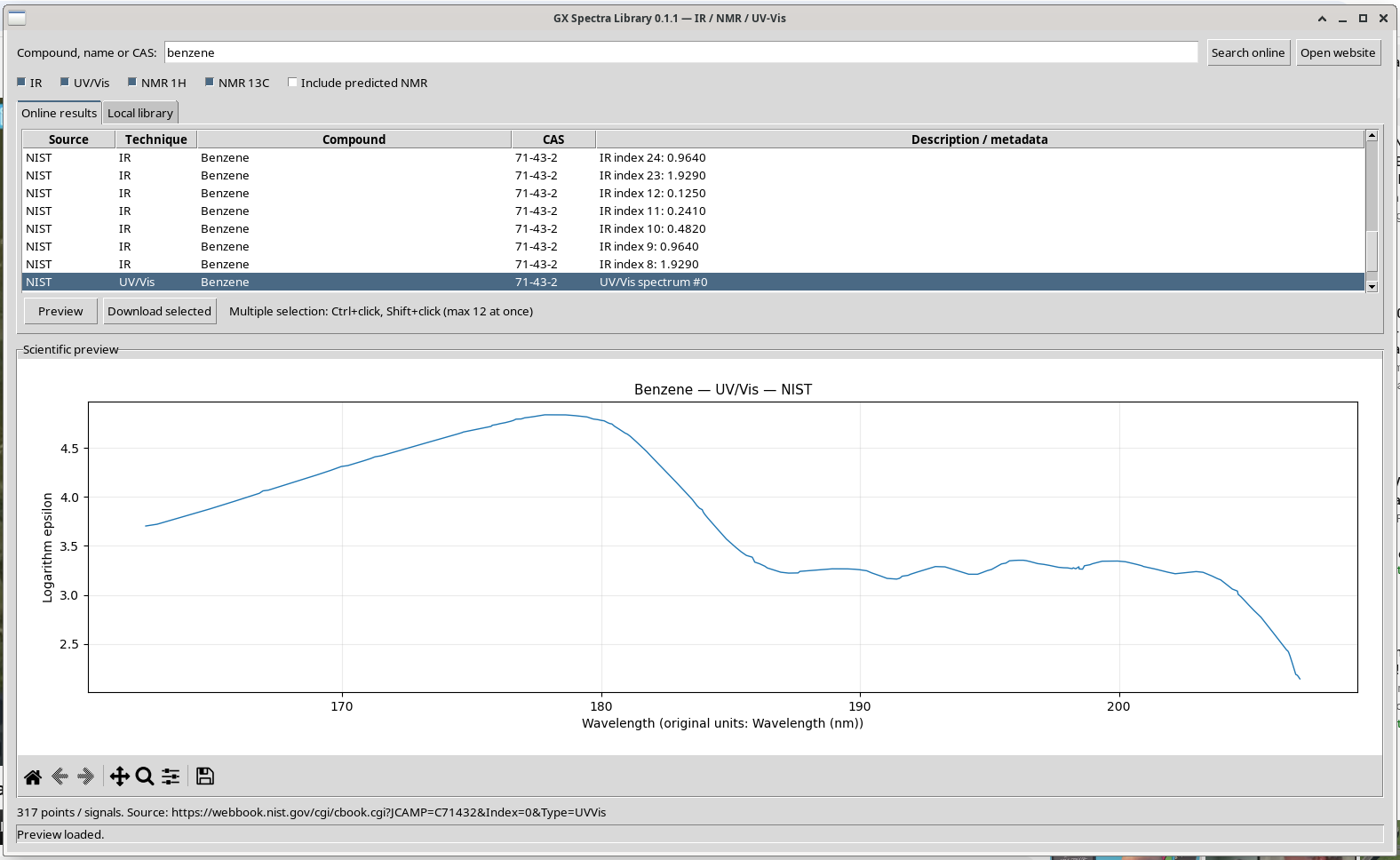
Notice that this record covers the far-ultraviolet region. Preserve the exact wavelength interval and the data’s original ordinate definition when comparing it with another dataset. Never assume that spectra from different sources have matching units or experimental conditions.
Deep dive · The benzene UV spectrum: which bands the record covers and what log ε means
Benzene has three well-known π→π* transitions: a weak one around 254 nm (¹B2u, with its typical vibronic structure), one around 200 nm (¹B1u) and a very strong one around 180 nm (¹E1u). The NIST record runs from 162.4 to 207.0 nm: it contains the 180 nm band, with the maximum log ε = 4.84 at 177.8 nm (ε ≈ 6.9·10⁴ L mol⁻¹ cm⁻¹), and the flank of the 200 nm band (log ε ≈ 3.3 at 200 nm), but not the 254 nm band, the one most used in routine measurements. The headers name the Institute of Energy Problems of Chemical Physics of the Russian Academy of Sciences as origin; for benzene vapour in the vacuum ultraviolet a classic reference is Pantos, Philis and Bolovinos (1978, doi:10.1016/0022-2852(78)90041-3).
The ordinate is the decimal logarithm of the molar extinction coefficient. To compare it with a spectrophotometer trace it must be brought to absorbance with the Beer–Lambert law, A = ε·c·l, knowing molar concentration c and path length l; for example with c = 10⁻⁵ mol/L and l = 1 cm, at 177.8 nm one would get A ≈ 0.69. Conversely, an absorbance spectrum becomes log ε only by dividing by c·l. Below 190 nm oxygen and almost all solvents absorb: data in this region require instruments under vacuum or in inert gas.
Step 05 · Spectroscopic assignments
Preview the proton and carbon NMR records
In the same Online results table, select NMR 1H and click Preview. Repeat for NMR 13C. The program retrieves peak tables from nmrshiftdb2, using PubChem to resolve the compound to a structure identifier.
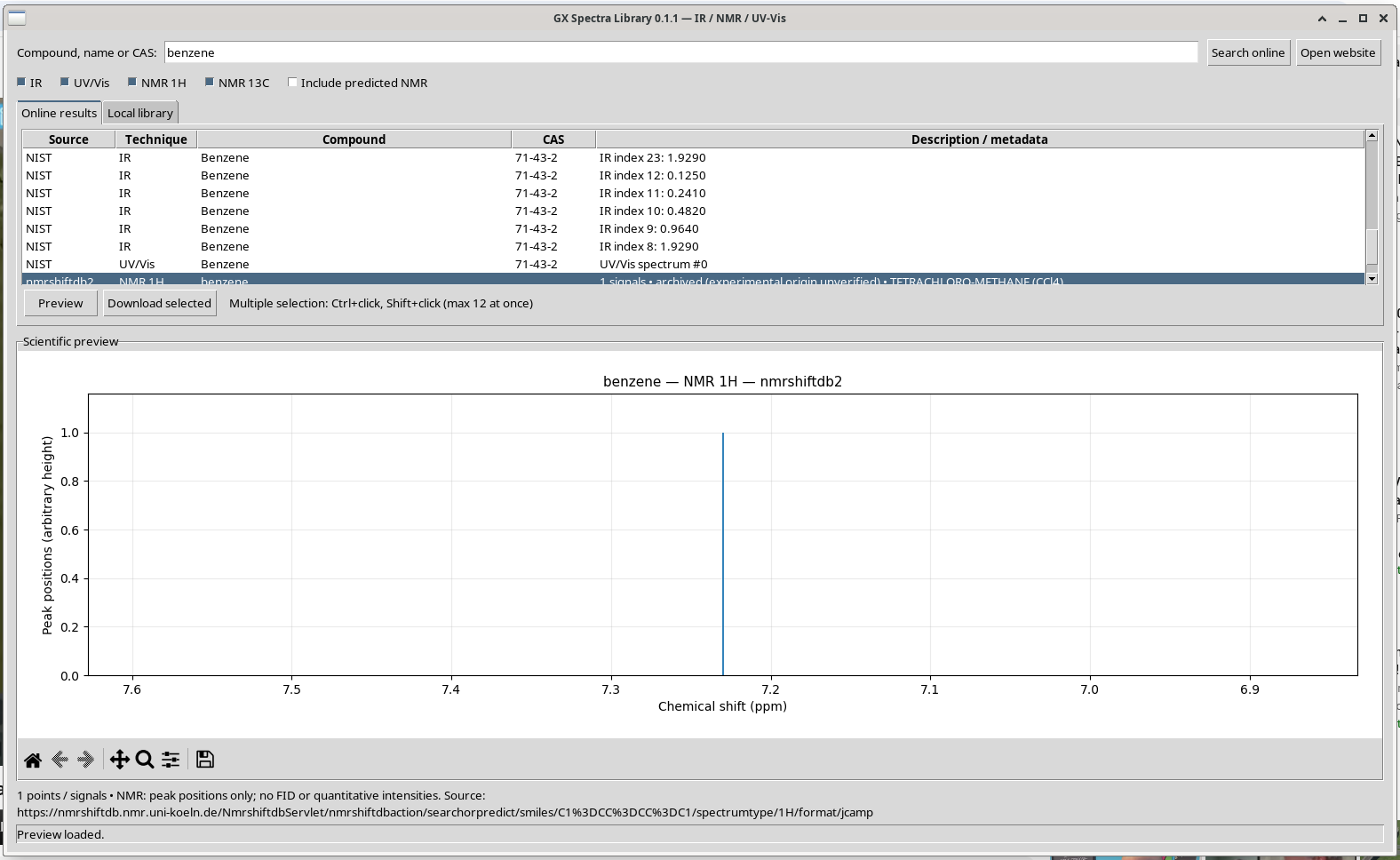
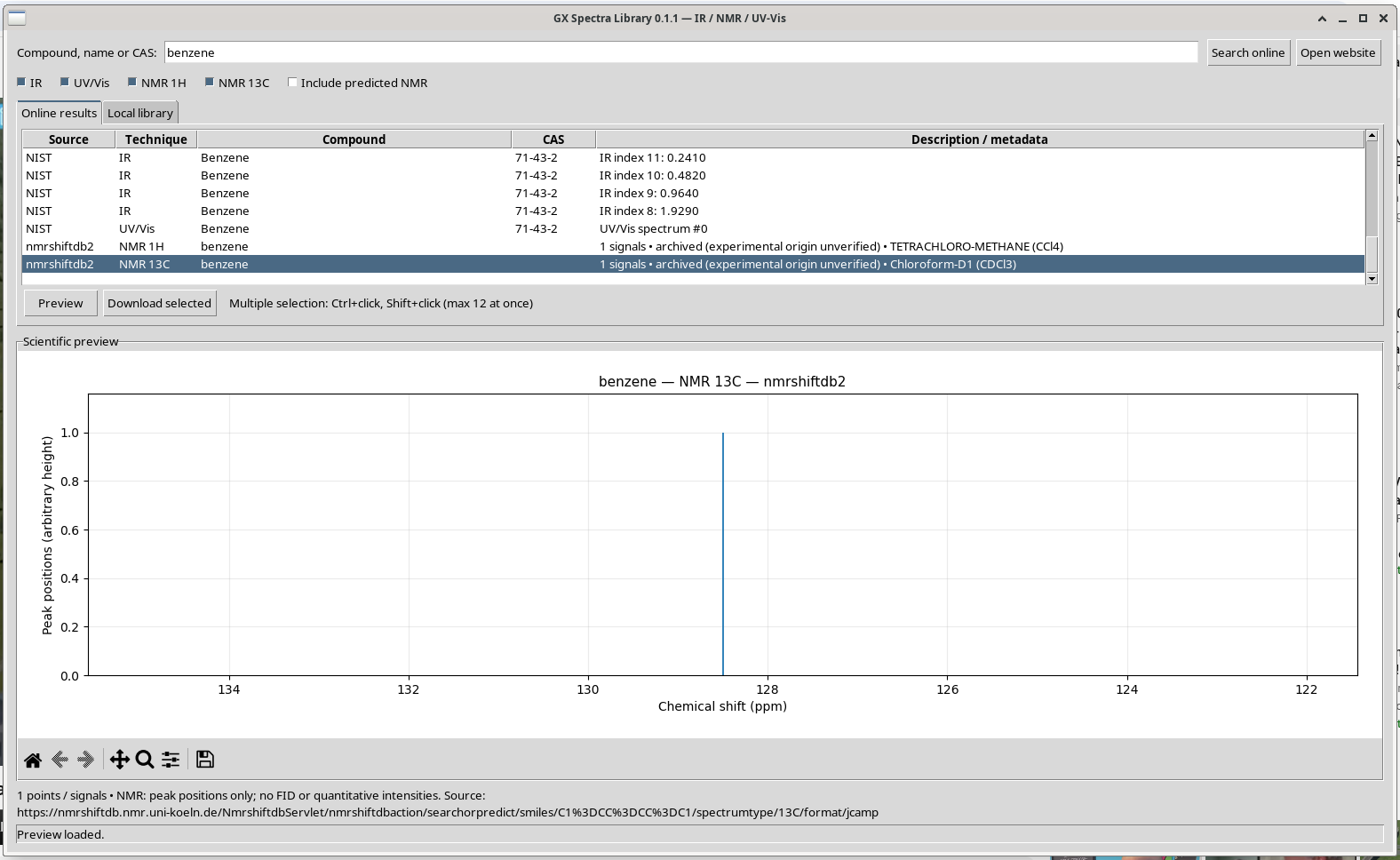
Important NMR limitation. These displays are peak-position lists, not measured free-induction decays (FIDs) or intensity-calibrated spectral traces. The viewer intentionally draws sticks with arbitrary height. The record is archived, but its experimental origin must be verified in the upstream database before drawing metrological conclusions. Predicted records may be available if you enable Include predicted NMR.
Deep dive · What an nmrshiftdb2 NMR record really contains
The file downloaded for 1H is this, in full:
##TITLE=SPECTRUM
##JCAMP-DX=5.01
##DATATYPE=NMR PEAK TABLE
##DATACLASS=PEAK TABLE
##.OBSERVENUCLEUS=1H
##.OBSERVEFREQUENCY=60.0
##XUNITS=PPM
##YUNITS=ARBITRARY UNITS
##NPOINTS=1
##PEAKTABLE=(XY..XY)
7.230000019073486,7.230000019073486
##END=- the peak table reports as “intensity” the same value as the shift (Y = X): it is not an intensity, and this is why the program draws fixed-height sticks (the comment in the code says so explicitly);
- the observation frequency is 60 MHz, that of a vintage continuous-wave instrument; in the 13C record it is 0.0, that is, not declared;
- the solvent is not in the file but in the catalogue metadata (from the XML response of the service): tetrachloromethane for 1H, CDCl3 for 13C. The ZIP keeps it in
manifest.json, the CSV does not.
The chemical shift depends on solvent and reference: the tables of Gottlieb, Kotlyar and Nudelman (1997, doi:10.1021/jo971176v) and Fulmer et al. (2010, doi:10.1021/om100106e) give for benzene in CDCl3 7.36 ppm (1H) and 128.37 ppm (13C). The record’s 7.23 ppm, in CCl4 at 60 MHz, and 128.5 ppm for 13C are consistent within solvent and era differences, but show why the condition must always travel with the number.
Step 06 · Preserve the original data
Download one spectrum per technique
Return to the Online results list and select the four entries just previewed. Hold Ctrl while clicking nonadjacent rows; use Shift to select a continuous range. Click Download selected.
The app downloads the response, checks that it is JCAMP-DX (it must begin with ##TITLE or contain a ##JCAMP-DX header), writes the original source data, and registers source, technique, URL, timestamp and SHA-256 in its SQLite catalogue. To avoid overloading public servers, downloads are limited to 12 selected spectra per operation.
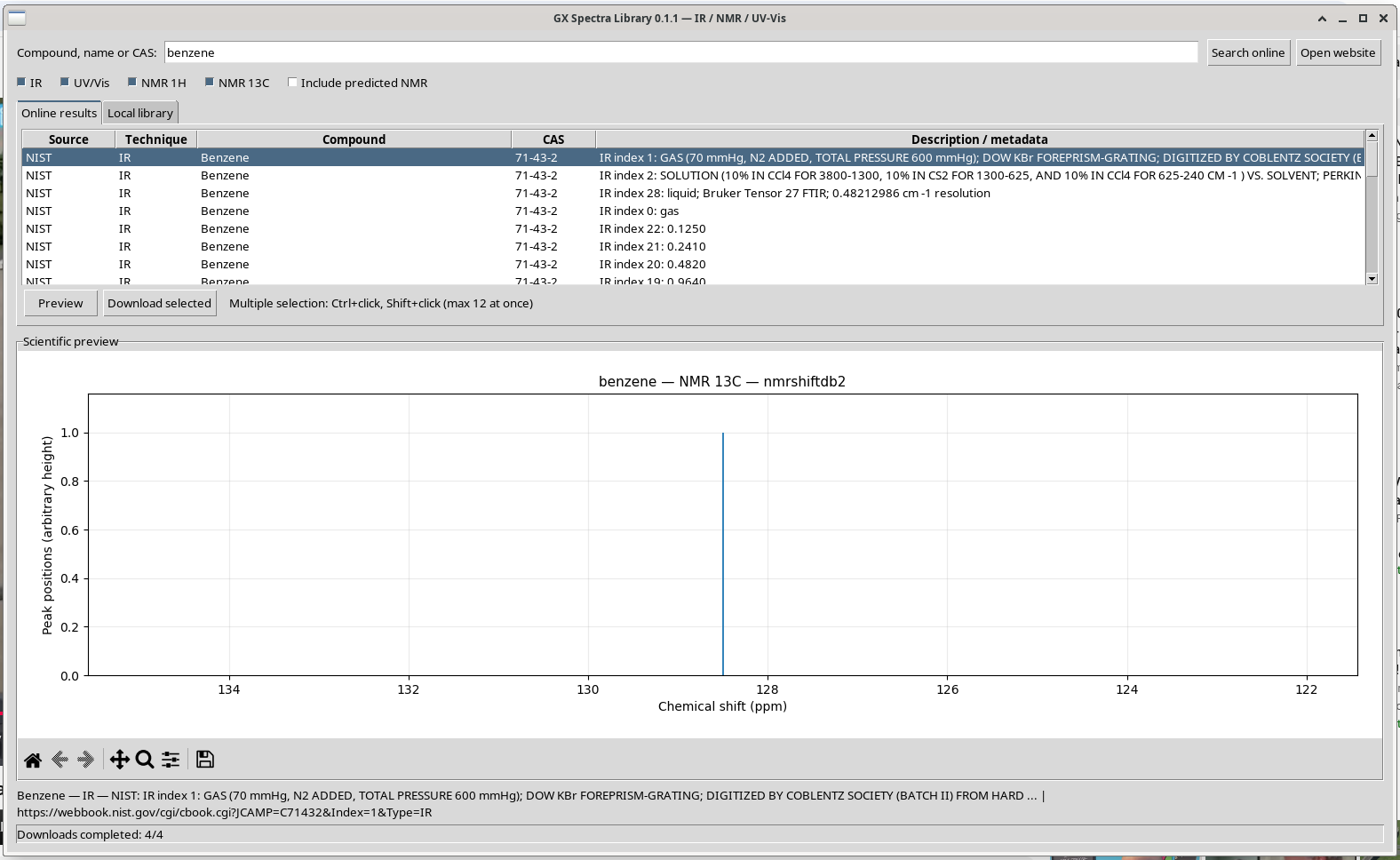
The installed Debian application normally stores downloaded data under ~/.local/share/gx-spectra-library/data/. By design, this tutorial was recorded using an isolated data directory; it did not add the demonstration files to the workstation’s ordinary personal catalogue.
Practical tip · The SQLite catalogue and the SHA-256 fingerprints: checking them with a script
The catalogue is a single spectra table with the columns uid, source, kind, compound, cas, detail, url, filename, nmr_status, metadata, created. Some useful details:
uidis the first 24 hexadecimal characters of the SHA-256 of “source|technique|URL”: downloading the same record again updates the existing row instead of duplicating it;- the file is named
<compound>_<technique>_<uid[:8]>.jdxand is written first as.tmpand then renamed, so an interruption does not leave truncated files; - the
metadatacolumn (JSON) holds the file SHA-256 (the standard is FIPS 180-4, doi:10.6028/NIST.FIPS.180-4), the size in bytes, the NIST page or, for NMR, SMILES, CID, spectrum identifier and solvent.
catalogue_audit.py opens the catalogue read-only and recomputes the fingerprint of every file: the check to run before using the library for quantitative work or after copying it to another computer.
#!/usr/bin/env python3
# SPDX-License-Identifier: GPL-3.0-or-later
"""Audit a GX Spectra Library catalogue: list every record and re-check the SHA-256 of its file.

Reads catalogo.sqlite3 read-only and, for every row, recomputes the SHA-256
of the stored JCAMP-DX file and compares it with the value written at
download time (metadata.sha256). Nothing is modified.

Usage: python3 catalogue_audit.py [LIBRARY_DIR]
       (default: $XDG_DATA_HOME/gx-spectra-library or ~/.local/share/gx-spectra-library)
"""
import hashlib, json, os, sqlite3, sys
from pathlib import Path

base = Path(sys.argv[1]) if len(sys.argv) > 1 else \
    Path(os.environ.get("XDG_DATA_HOME") or Path.home() / ".local" / "share") / "gx-spectra-library"
db = base / "catalogo.sqlite3"
if not db.is_file():
    sys.exit(f"catalogue not found: {db}")
con = sqlite3.connect(f"file:{db}?mode=ro", uri=True)
rows = con.execute("SELECT uid, source, kind, compound, cas, filename, url, metadata, created "
                   "FROM spectra ORDER BY created").fetchall()
bad = 0
print(f"{len(rows)} records in {db}")
for uid, source, kind, compound, cas, filename, url, meta, created in rows:
    meta = json.loads(meta or "{}")
    path = base / filename
    if not path.is_file():
        state, bad = "MISSING FILE", bad + 1
    else:
        digest = hashlib.sha256(path.read_bytes()).hexdigest()
        state = "OK" if digest == meta.get("sha256") else "HASH MISMATCH"
        bad += state != "OK"
    print(f"{state:13s} {kind:8s} {source:12s} {compound:10s} {cas or '-':9s} {filename}")
    print(f"{'':13s} {meta.get('dimensione_byte', '?')} bytes, {created}, {url[:90]}")
sys.exit(1 if bad else 0)
Run on the demonstration catalogue of the guide:
$ python3 ../catalogue_audit.py gx-spectra-library
5 records in gx-spectra-library/catalogo.sqlite3
OK            IR       NIST         Benzene    71-43-2   data/IR/Benzene_IR_c92c9880.jdx
              32255 bytes, 2026-11-01T11:43:45+01:00, https://webbook.nist.gov/cgi/cbook.cgi?JCAMP=C71432&Index=1&Type=IR
OK            UV/Vis   NIST         Benzene    71-43-2   data/UV_Vis/Benzene_UV_Vis_cb758131.jdx
              6644 bytes, 2026-11-01T11:43:45+01:00, https://webbook.nist.gov/cgi/cbook.cgi?JCAMP=C71432&Index=0&Type=UVVis
OK            NMR 1H   nmrshiftdb2  benzene    -         data/NMR_1H/benzene_NMR_1H_d4aa46e0.jdx
              254 bytes, 2026-11-01T11:43:46+01:00, https://nmrshiftdb.nmr.uni-koeln.de/NmrshiftdbServlet/nmrshiftdbaction/searchorpredict/smi
OK            NMR 13C  nmrshiftdb2  benzene    -         data/NMR_13C/benzene_NMR_13C_32ac5c67.jdx
              230 bytes, 2026-11-01T11:43:46+01:00, https://nmrshiftdb.nmr.uni-koeln.de/NmrshiftdbServlet/nmrshiftdbaction/searchorpredict/smi
OK            IR       Locale       benzene_IR_export -         data/IR/benzene_IR_export_IR_3016be87.jdx
              42687 bytes, 2026-11-01T11:43:51+01:00, file-import://21f9ce427cfa49f351ba5c2c264909f1229f3caa9f97daf4c8f77fd26eede2e2
[exit 0]
Step 07 · Offline consultation
Open the Local library
Select the Local library tab. It now contains four records. Select the downloaded NIST IR row and click Preview. This time, the plot is loaded from the saved disk file: it works without an internet connection.
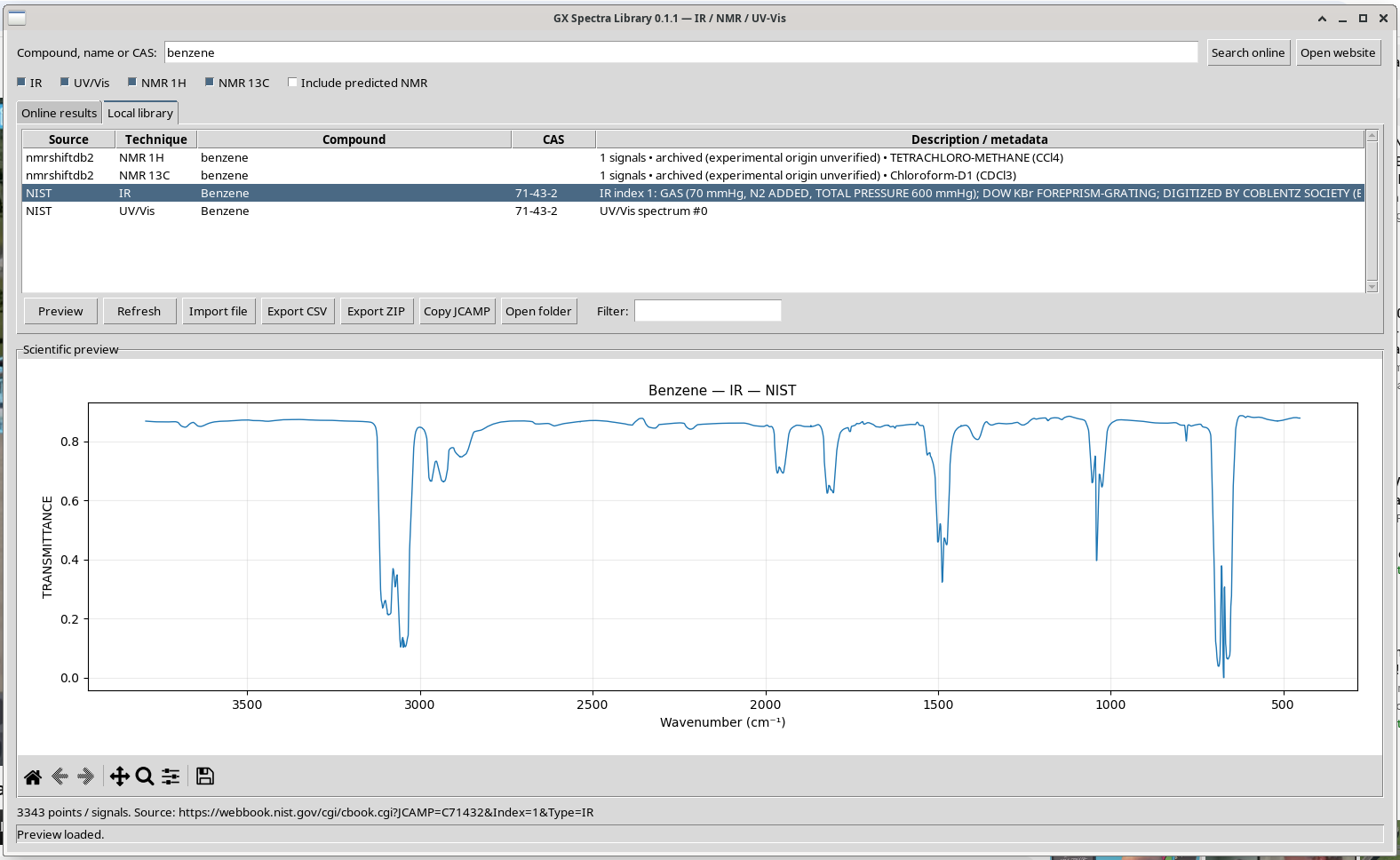
The Filter field searches catalogue names, CAS identifiers, techniques and descriptions; press Enter to update the view. Refresh reloads the catalogue, and Open folder opens the spectrum data directory in the desktop file manager.
Step 08 · Exchange numerical data
Export a two-column CSV
With the saved benzene IR record selected, click Export CSV, choose a destination in the save dialog and confirm. In this walkthrough the file is named benzene_IR_export.csv.
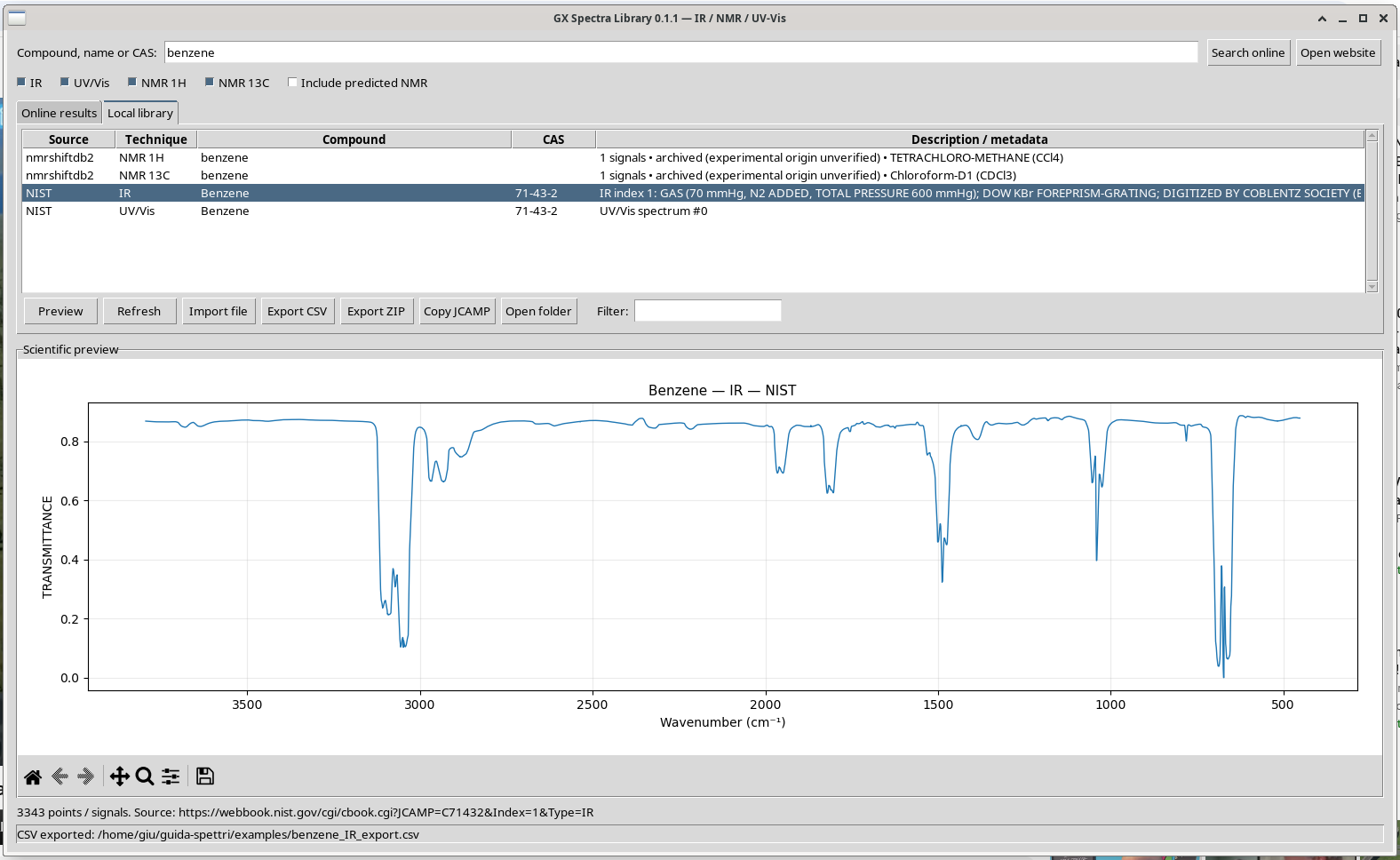
CSV contains the original numerical X,Y data, with comment lines holding the compound, technique, source, URL and a unit warning. A small excerpt of the actual exported file:
# compound: Benzene
# technique: IR
# source: NIST
# url: https://webbook.nist.gov/cgi/cbook.cgi?JCAMP=C71432&Index=1&Type=IR
# note: Units and conditions are those in the original JCAMP
x,y
452.0,0.8787
453.0,0.8787
454.0,0.8787
Here the 3,343 X,Y rows can be imported into numerical software, including GX-TXT, Octave or Python. The CSV is a derived numerical export: keep the JCAMP original if you need all instrument and provenance metadata.
Practical tip · Reading the CSV in Python, GX-TXT or Octave
The file has five comment lines starting with #, a header line x,y and then the data, with decimal point and comma separator. Only the first selected record is exported. In Python with NumPy:
import numpy as np
x, y = np.loadtxt("benzene_IR_export.csv", delimiter=",", comments="#", skiprows=6, unpack=True)
print(len(x), x.min(), x.max())     # 3343 452.0 3794.0
In skiprows NumPy also counts the comment lines: 5 comments plus the header make 6. In Octave dlmread("benzene_IR_export.csv", ",", 6, 0) skips the same six lines; GX-TXT and spreadsheets accept the file as a CSV with header. The comment lines of the CSV give the URL but neither the physical state nor the resolution: for a quantitative comparison they must be noted separately, or the JCAMP used instead.
Step 09 · Portable collection
Export a multi-spectrum ZIP with provenance
Use Ctrl+click in Local library to select the four original spectra. Click Export ZIP and choose benzene_reference_spectra.zip.
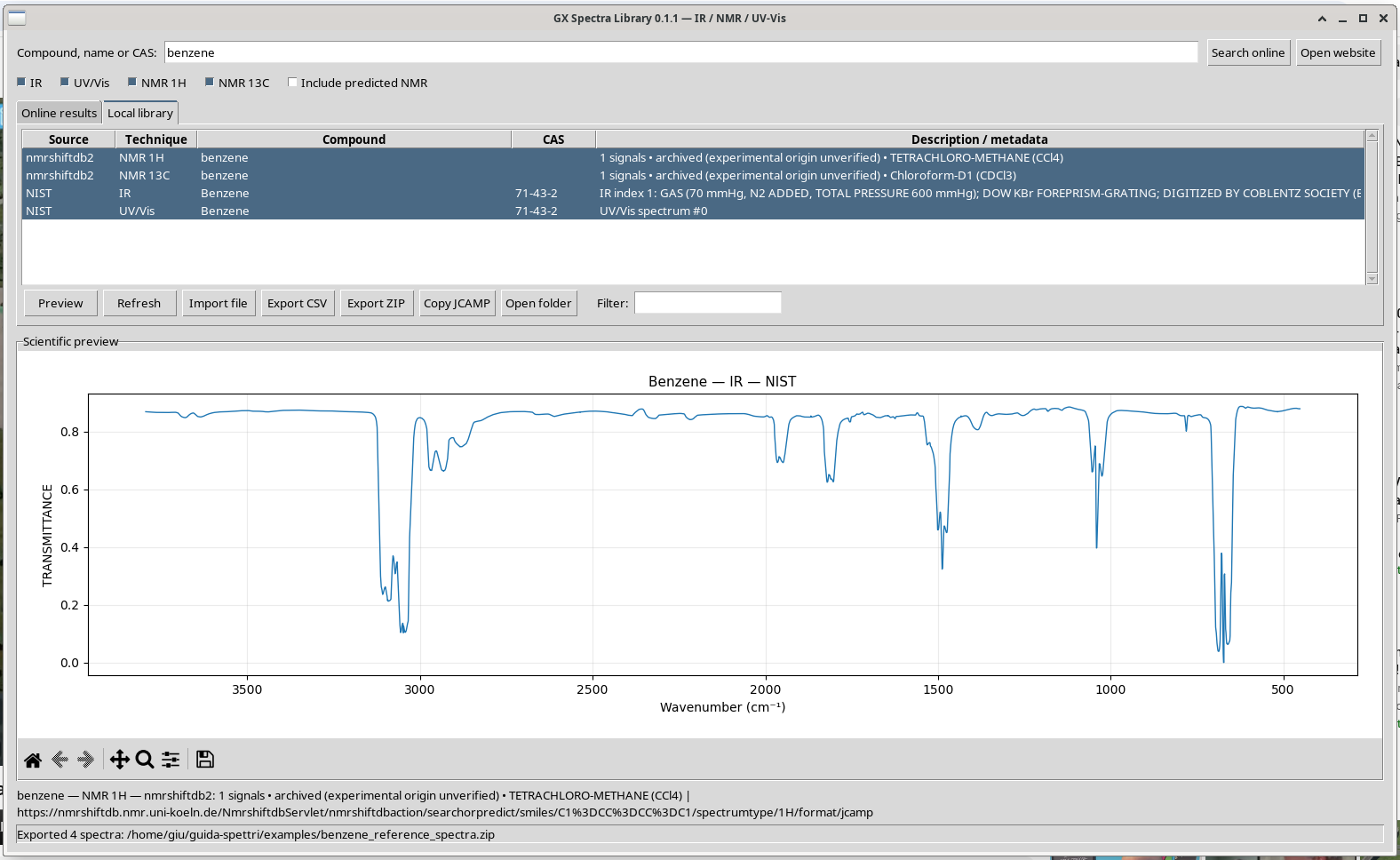
manifest.json were verified in the resulting archive.The ZIP preserves the unmodified JCAMP files, grouped by technique. Its manifest.json contains their source, the original URL, record metadata and file hashes. This is convenient for transferring the collection between your scientific programs without discarding traceability.
Rights and redistribution. A source being publicly accessible does not mean that its data are in the public domain. These example files are for local testing; check the source’s licence and citation requirements before distributing the ZIP or reusing images in a publication.
Practical tip · Verifying a received ZIP against its manifest
For every spectrum, manifest.json contains the whole catalogue record (source, technique, URL, solvent, SMILES, SHA-256 fingerprint and size) and the path of the file in the archive. verify_zip.py recomputes the fingerprints and reports missing, altered or unlisted files:
#!/usr/bin/env python3
# SPDX-License-Identifier: GPL-3.0-or-later
"""Check a ZIP exported by GX Spectra Library against its manifest.json.

For every spectrum listed in the manifest, the file in the archive is hashed
(SHA-256) and compared with the hash recorded in the catalogue at download
time; files present in the archive but absent from the manifest are reported.

Usage: python3 verify_zip.py collection.zip
"""
import hashlib, json, sys, zipfile

if len(sys.argv) != 2:
    sys.exit(__doc__)
with zipfile.ZipFile(sys.argv[1]) as z:
    manifest = json.loads(z.read("manifest.json"))
    names = set(z.namelist()) - {"manifest.json"}
    print(f"{manifest['application']}, created {manifest['created']}: {len(manifest['spectra'])} spectra")
    bad = 0
    for s in manifest["spectra"]:
        arc = s["file_in_archive"]
        names.discard(arc)
        digest = hashlib.sha256(z.read(arc)).hexdigest()
        ok = digest == s["metadata"].get("sha256")
        bad += not ok
        print(f"{'OK ' if ok else 'BAD'} {s['kind']:8s} {s['source']:12s} {arc}")
        print(f"    {s['url']}")
    for extra in sorted(names):
        print(f"NOT IN MANIFEST {extra}")
        bad += 1
sys.exit(1 if bad else 0)
$ python3 ../verify_zip.py benzene_reference_spectra.zip
GX Spectra Library, created 2026-11-01T10:43:50.405573+00:00: 4 spectra
OK NMR 1H nmrshiftdb2 spectra/NMR_1H/benzene_NMR_1H_d4aa46e0.jdx
https://nmrshiftdb.nmr.uni-koeln.de/NmrshiftdbServlet/nmrshiftdbaction/searchorpredict/smiles/C1%3DCC%3DCC%3DC1/spectrumtype/1H/format/jcamp
OK NMR 13C nmrshiftdb2 spectra/NMR_13C/benzene_NMR_13C_32ac5c67.jdx
https://nmrshiftdb.nmr.uni-koeln.de/NmrshiftdbServlet/nmrshiftdbaction/searchorpredict/smiles/C1%3DCC%3DCC%3DC1/spectrumtype/13C/format/jcamp
OK IR NIST spectra/IR/Benzene_IR_c92c9880.jdx
https://webbook.nist.gov/cgi/cbook.cgi?JCAMP=C71432&Index=1&Type=IR
OK UV/Vis NIST spectra/UV_Vis/Benzene_UV_Vis_cb758131.jdx
https://webbook.nist.gov/cgi/cbook.cgi?JCAMP=C71432&Index=0&Type=UVVis
[exit 0]The manifest also states that exporting the files does not change the usage rights of the source databases: the ZIP is a traceability tool, not a licence.
Step 10 · Verify the round trip
Import the CSV and preview it again
- In Local library, click Import file.
- Select the previously exported
benzene_IR_export.csv. - When asked for the technique, enter IR.
- The library creates a new Local record called
benzene_IR_export. Select it and click Preview.
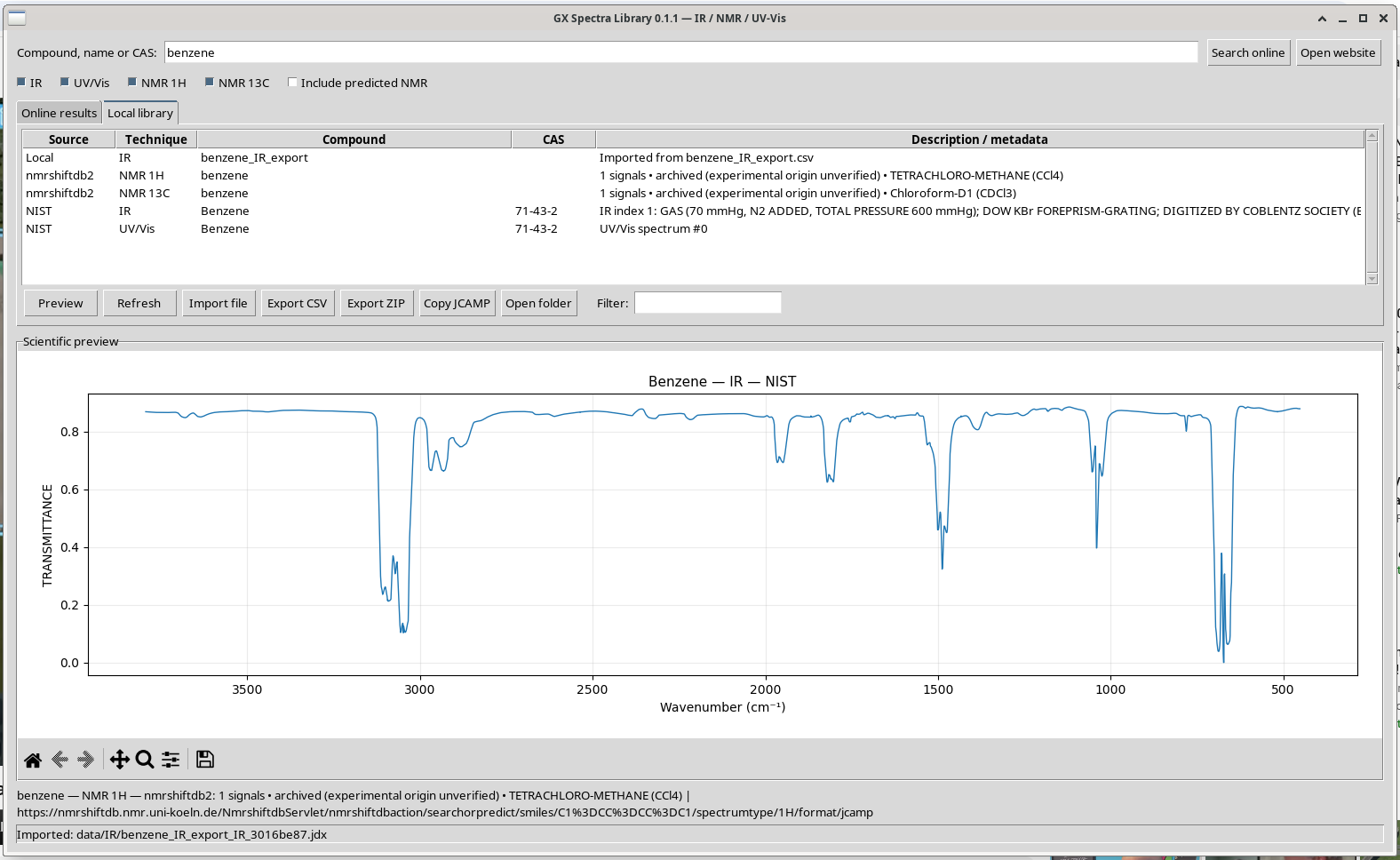
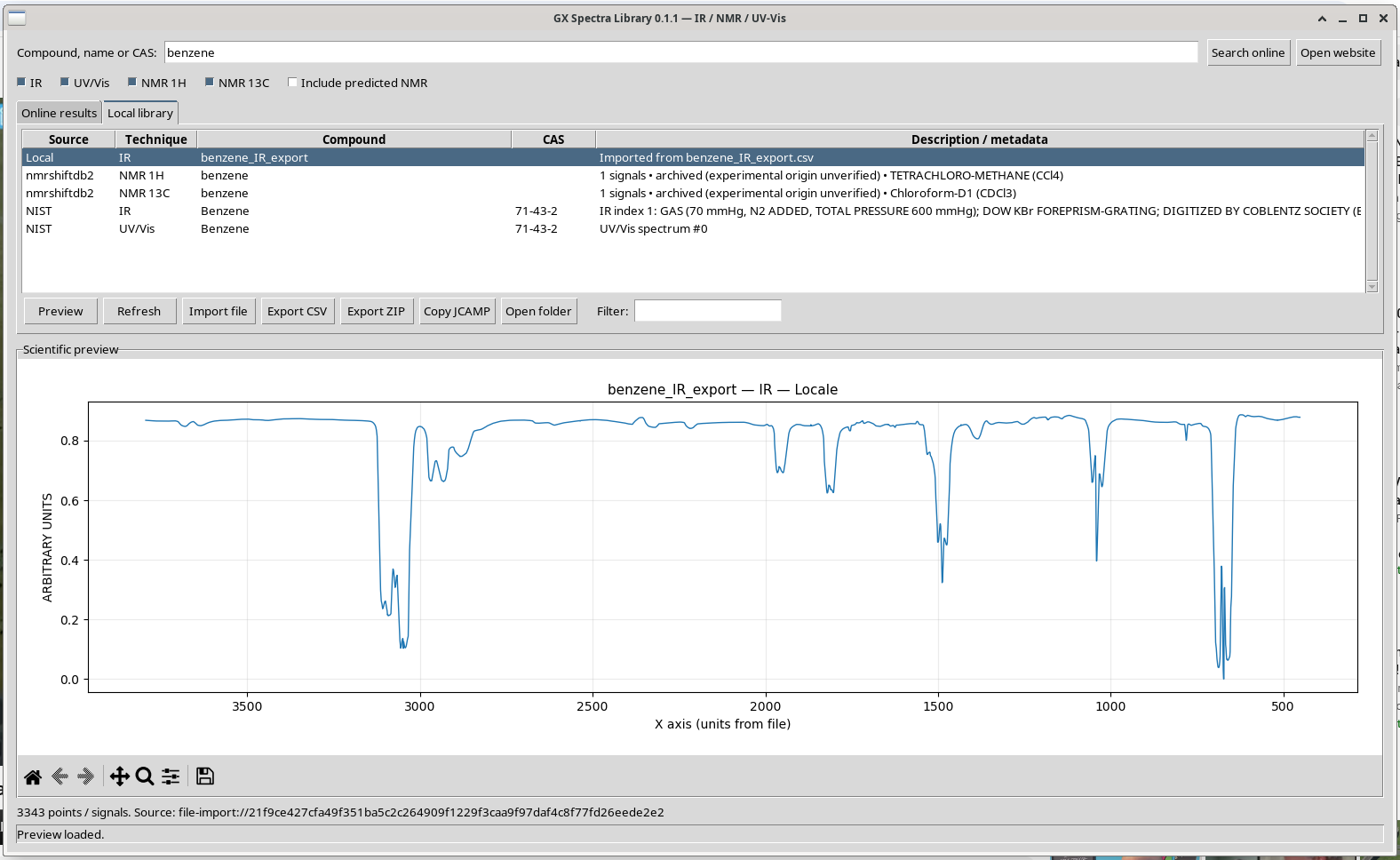
The import converts the CSV X,Y series into a local JCAMP record. It does not recreate every header and condition from the original NIST file; that is why both versions were kept in the demonstration catalogue. This separation matters for scientific provenance.
Deep dive · What is lost in the JCAMP → CSV → JCAMP round trip
Importing a CSV creates a minimal JCAMP: ##DATA TYPE=XY DATA, ##XUNITS=ARBITRARY UNITS, ##YUNITS=ARBITRARY UNITS and a (XY..XY) table; the source becomes “Locale” and the URL file-import:// followed by the SHA-256 of the data. roundtrip_check.py compares the two files with the same reader as the program:
#!/usr/bin/env python3
# SPDX-License-Identifier: GPL-3.0-or-later
"""Compare an original JCAMP-DX file with its CSV round trip: numbers and headers.

Uses the same reader as GX Spectra Library (spectrum_io.load_spectrum, run it
from the source checkout or set PYTHONPATH to it) to decode both files, then
reports the number of points, the largest difference in X and Y and the
JCAMP headers that the re-imported file no longer carries.

Usage: PYTHONPATH=/path/to/gx-spectra-library:/path/to/gx-spectra-library/packaging/vendor \\
       python3 roundtrip_check.py original.jdx reimported.jdx [--kind IR]
"""
import argparse
from spectrum_io import load_spectrum

ap = argparse.ArgumentParser(description=__doc__.split("\n")[0])
ap.add_argument("original"); ap.add_argument("reimported"); ap.add_argument("--kind", default="IR")
a = ap.parse_args()
x1, y1, h1, m1 = load_spectrum(a.original, a.kind)
x2, y2, h2, m2 = load_spectrum(a.reimported, a.kind)
print(f"points: {len(x1)} original, {len(x2)} re-imported")
if len(x1) == len(x2):
    print(f"max |dX| = {abs(x1 - x2).max():.3g}, max |dY| = {abs(y1 - y2).max():.3g}")
for key in ("XUNITS", "YUNITS", "DATA TYPE", "STATE", "RESOLUTION", "ORIGIN", "OWNER"):
    print(f"{key:11s} original: {h1.get(key, '-')!s:45.45s} re-imported: {h2.get(key, '-')}")
lost = sorted(set(h1) - set(h2))
print(f"{len(lost)} headers of the original are absent after the round trip:", ", ".join(lost))
$ PYTHONPATH=../../repo:../../repo/packaging/vendor python3 ../roundtrip_check.py gx-spectra-library/data/IR/Benzene_IR_c92c9880.jdx gx-spectra-library/data/IR/benzene_IR_export_IR_3016be87.jdx --kind IR
points: 3343 original, 3343 re-imported
max |dX| = 0, max |dY| = 0
XUNITS original: 1/CM re-imported: ARBITRARY UNITS
YUNITS original: TRANSMITTANCE re-imported: ARBITRARY UNITS
DATA TYPE original: INFRARED SPECTRUM re-imported: XY DATA
STATE original: GAS (70 mmHg, N2 ADDED, TOTAL PRESSURE 600 mm re-imported: -
RESOLUTION original: 2 re-imported: -
ORIGIN original: DOW CHEMICAL COMPANY re-imported: -
OWNER original: Copyright (C) 1987 by the Coblentz Society re-imported: -
26 headers of the original are absent after the round trip: $NIST IMAGE, $NIST SOURCE, CAS REGISTRY NO, CLASS, DATA PROCESSING, DATE, FIRSTX, FIRSTY, INSTRUMENT PARAMETERS, LASTX, MAXX, MAXY, MINX, MINY, MOLFORM, ORIGIN, OWNER, PATH LENGTH, RESOLUTION, SAMPLING PROCEDURE, SOURCE REFERENCE, SPECTROMETER/DATA SYSTEM, STATE, XFACTOR, XYDATA, YFACTOR
[exit 0]The numbers are identical (zero difference over all 3343 points), but 26 headers disappear: units, state, resolution, origin and rights holder. Figure 12 shows it too: the axes become “X axis (units from file)” and “ARBITRARY UNITS”, and the plot title shows “Locale”, the untranslated internal label of the source. This is why the original JCAMP must always be kept next to the CSV.
Files generated in this tutorial
Open the real output files
These example files were created while operating the actual GUI against the public sources. They are not distributed with this article: the spectra belong to their sources (NIST, the Coblentz Society, nmrshiftdb2), whose terms govern redistribution, and following steps 06–10 with the program recreates them exactly.
- Original NIST benzene IR — JCAMP-DX: the unmodified gas-phase IR record used in the screenshots (32,255 bytes).
- Benzene IR — exported CSV: 3,343 X,Y samples plus source comments (derived export, approximately 49 kB).
- Benzene reference collection — ZIP: one IR, one UV/Vis, one 1H NMR and one 13C NMR JCAMP, plus a provenance manifest.
- Capture and validation metadata — JSON: recorded source URLs, sample counts, units, techniques and file identifiers from the live walkthrough.
Where does the installed application save your library?
~/.local/share/gx-spectra-library/
├── catalogo.sqlite3
└── data/
    ├── IR/
    ├── UV_Vis/
    ├── NMR_1H/
    └── NMR_13C/
Data are stored outside the Debian package, so updating or removing the program does not delete the user’s spectra. The demonstration catalogue and the example exports used for this guide were kept in a separate folder, away from this normal library location.
Scientific and reproducibility notes
Interpret the numbers, not just the graph
| Record | Observed in the walkthrough | Interpretation / limitation |
|---|---|---|
| NIST benzene IR | 3,343 samples; 452–3,794 cm⁻¹; transmittance | IR X axis is reversed for display. Conditions and spectrum index must travel with the dataset. |
| NIST benzene UV/Vis | 317 samples; 162.418–206.9805 nm; logarithm epsilon | Far-UV source with its own ordinate definition; not automatically a conventional absorbance trace. |
| nmrshiftdb2 1H | One listed shift, ~7.23 ppm | Peak position, not FID. Stick height is arbitrary. Origin requires source verification. |
| nmrshiftdb2 13C | One listed shift, 128.5 ppm | Peak position, not calibrated intensity. Solvent and acquisition details need review. |
The data were downloaded directly from NIST Chemistry WebBook and nmrshiftdb2. PubChem is used by the app to resolve names to SMILES, not as a spectral dataset. These sources should be cited according to their own terms in any scientific work.
For numerical processing, prefer original JCAMP-DX over an image. If CSV is required, document the original units, state and acquisition conditions, source URL, time of retrieval and any transformations you apply.
Deep dive · Citing the sources and respecting their terms
- NIST Chemistry WebBook: NIST Standard Reference Database Number 69, doi:10.18434/T4D303, described in Linstrom and Mallard (2001, doi:10.1021/je000236i). Many IR spectra come from the Coblentz Society collection, which holds the rights: the
OWNERheader of the file says so; - nmrshiftdb2: cite Steinbeck, Krause and Kuhn (2003, doi:10.1021/ci0341363) and give the spectrum identifier (here
nmrshiftdb19943for 1H andnmrshiftdb15502for 13C, from the catalogue metadata); - PubChem: Kim et al. (2023, doi:10.1093/nar/gkac956), if the identity of the compound is part of the reasoning;
- for data documentation the FAIR principles (Wilkinson et al. 2016, doi:10.1038/sdata.2016.18) ask for persistent identifiers, explicit provenance and licence: the program’s catalogue and manifest already provide URL, date and fingerprint, to be reported in the methods of a paper.
For this reason the JCAMP, CSV and ZIP files produced in the walkthrough are not distributed with this article: repeating steps 06–10 the program recreates them identically from the source.
Practical reference
Common questions
The application opens in Italian
Launch it as LANGUAGE=en gx-spectra-library. GNU gettext also reads LC_MESSAGES and LANG; some desktop sessions override them. Restart after changing language. The installed package includes English and Italian translation files.
The online search gives fewer entries
Availability is controlled by the source. Search in English or by CAS; for benzene use 71-43-2. Check the internet connection, and inspect which technique was selected. Do not assume all NIST entries are comparable experimental conditions.
Why does the NMR look like a single line?
Benzene has one listed proton shift and one listed carbon shift in this record. The endpoint provides peak data rather than a continuous FID. The diagram uses fixed-height sticks to represent chemical shift positions.
How do I work offline or exchange files with other software?
Use Local library to access saved spectra without a network. Use Copy JCAMP when you need an unchanged native file, Export CSV for tabular analysis and Export ZIP for portable multi-spectrum collections.
Where can I find the source code and packaging scripts?
The project is published at github.com/giuxlab-hub/gx-spectra-library, with the Debian packages, the source archive and the checksums on the Releases page. Its Debian package is generated using packaging/build_deb.py; translations are editable in the GNU gettext .po files under locale/.
Documentation method: screenshots captured directly from the physical X11 desktop (DISPLAY=:0) running the Debian-package version of GX Spectra Library in English, not a headless recreation or synthetic interface. Source searches, JCAMP downloads, CSV and ZIP exports, and a CSV round-trip were executed and checked. The demo catalogue was intentionally isolated.
GX Spectra Library · Practical Guide · English · 1 November 2026
Download: the scripts of the boxes
The archive gx-spectra-library-script-giuxlab.zip contains the four scripts presented in the boxes (catalogue_audit.py, verify_zip.py, ir_bands.py, roundtrip_check.py), a README with instructions and SHA-256 checksums and the GNU GPL v3 licence. They use only the Python 3 standard library, except roundtrip_check.py, which uses the program’s reader (from the source on GitHub). It contains no spectra.
Links: GX Spectra Library software page · GitHub repository · Debian packages and checksums · NIST Chemistry WebBook · nmrshiftdb2.