

For Loops, Enumerate and the Dataset Catalog
Scientific Python in GX-TXT · Module 2 · Lesson 9
A cycle repeats a block for each element of a sequence. In this lesson we will cross lists and intervals, then we will use a cycle to list Dataset actually present in a GX-TXT Session. To make the example reproducible, the script prepares a small synthetic series if it is not already present.
Objectives: use for, range and enumerate; understand unpacking and indentation; question the Dataset catalog with public APIs and recognize the cost of repeated calls.
Prerequisites: Lists and dictionaries of module 1, conditions and Booleans of lessons 7–8.
One element at a time
readings_mv = [1.2, 1.5, 1.3]
for read_result in readings_mv:
    print(read_result, "mV")
For each element of the list, Python associates the current value to the read_result name and executes the indented block. After the last element the cycle ends. If the list is empty, the body is not executed. The values here are synthetic: they are not measures and do not have a given uncertainty.
The name after for is an ordinary variable: its value changes to each iteration. Avoid changing the length of the list while crossing it, because it is easy to skip or repeat items. If you need to transform it, prepare a new list or use an explicit procedure.
range and positions
range(4) generates wholes 0, 1, 2 and 3: the final limit is excluded, as in slicing. range(1, 4) produces 1, 2 and 3; range(0, 6, 2) produces 0, 2 and 4. A cycle can use these values without building a complete list first:
for index in range(3):
    print(index)
If you only need the values of a list, iterating directly on the elements is usually clearer. If you need position and value together, use enumerate.
enumerate and unpacking
for position, read_result in enumerate(readings_mv, start=1):
    print(position, read_result)
enumerate provides position–value pairs. Python assigns the two elements of the pair to the names position and read_result: this is called unpacking. start=1 makes the numbering more convenient to read, but does not change the list indexes, which continue from zero. If a row shows location 1, the corresponding Python index is 0.
Another form of unpacking is x, y = (0.5, 1.5). The number of names must be compatible with the number of values; otherwise Python signals an error.
The Session catalogue
The public API CANONICAL_DATASET_API_v2 offers list to obtain dataset identifiers from the Session and describe to read metadata from an identified Dataset. The Python client uses gxtxt_api_call(api_id, operation, argomenti): list receives a list of blank topics, describe receives the identifier in a list.
For the test we create, if necessary, a Dataset called corso_python_serie_sintetica with DATASET_PUBLICATION_API_v2/publish_series. The times are [0.0, 0.5, 1.0, 1.5] s and the [1.2, 1.5, 1.3, 1.6] mV signals. They are synthetic values chosen for the course, not experimental measures; no uncertainty has been assigned. The publication uses the variable identifiers time_values and signal and metadata that declare the teaching nature.
If the identifier is already in the catalog, the script does not overwrite it. Name control alone does not show that a pre-existing Dataset contains the same data: use a Session dedicated to the course and, if there is already a Dataset with that name but different, choose one free or control the content before continuing.
Full code
from gxtxt import gxtxt_api_call, gxtxt_api_require

gxtxt_api_require("CANONICAL_DATASET_API_v2@2")
gxtxt_api_require("DATASET_PUBLICATION_API_v2@2")
catalog = gxtxt_api_call("CANONICAL_DATASET_API_v2", "list", [])
identifier = "corso_python_serie_sintetica"
if identifier not in catalog:
    request = {
        "dataset_id": identifier, "contract": "table.generic", "storage": "csv",
        "x_values": [0.0, 0.5, 1.0, 1.5], "y_values": [1.2, 1.5, 1.3, 1.6],
        "x_variable": {"variable_id": "tempo", "name": "tempo", "unit": "s", "semantic_role": "time"},
        "y_variable": {"variable_id": "segnale", "name": "segnale", "unit": "mV"},
        "structured_metadata": {"experimental.sample": "synthetic didactic series"},
    }
    gxtxt_api_call("DATASET_PUBLICATION_API_v2", "publish_series", [request])
    catalog = gxtxt_api_call("CANONICAL_DATASET_API_v2", "list", [])
print("Dataset Number:", len(catalog))
for position, dataset_id in enumerate(catalog, start=1):
    description = gxtxt_api_call("CANONICAL_DATASET_API_v2", "describe", [dataset_id])
    print(position, dataset_id, "campi:", list(description.keys()))
The request dictionary describes the series and its variables. After the publication, we collect the catalogue. The cycle visits each identifier, asks for the description and shows the keys available; the fields and the order depend on the content and version of the Session.
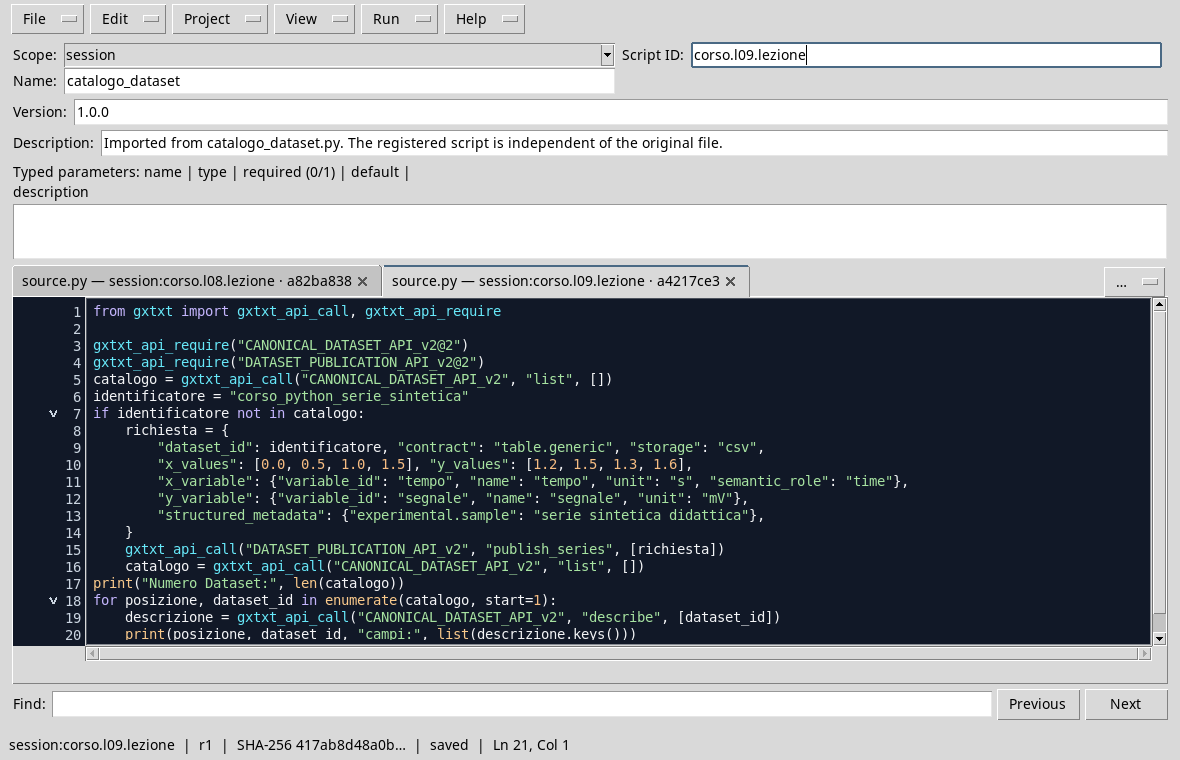
The script in the Viewer Python; the full code is available in the lesson file.
Execution
- Open a course session and the Viewer Python Scripts.
- Import
dataset_catalog.py, assigns name and Script ID into thesessionbroom, then saves. - Open Run → Open Script Runner… and press Run Job. The first performance publishes the synthetic series if the identifier is not present.
- Read the output and compare the Dataset listed with the Session catalog. A Session may contain multiple Datasets; the figure shows an example with only one element.

The Sample Session contains the Synthetic Dataset of the course.
Attention to the cost of calls
The cycle carries out a describe call for each Dataset. For a large or remote catalog, each call can take time: avoid repeatedly requesting the same metadata if you can store them during processing. Do not assume that the location of a Dataset in the catalog is stable; use its identifier.
Exercise
Given the synthetic list times = [0.0, 0.5, 1.0], print a numbering starting from 1 and time in seconds. What happens if the list is empty?
Worked solution
times = [0.0, 0.5, 1.0]
for position, time_values in enumerate(times, start=1):
    print(position, time_values, "s")
The rows are numbered 1, 2 and 3; the internal indexes remain 0, 1 and 2. With an empty list the body is not executed and no row is printed.
In the next lesson we will read the block series with a while cycle.