

Pathlib, Context Managers and Managed Output
Scientific Python in GX-TXT · Module 3 · Lesson 18
A script can produce a file, but in GX-TXT it must use the paths and public operations planned to store it in the Session. We will create a small synthetic CSV in the output directory assigned to the job and publish it as a text document.
Objectives: build paths with pathlib.Path; open and close files with with; write CSV UTF-8; distinguish a file published by a table dataset with scientific variables.
Prerequisites: functions, dictionaries, exceptions and Dataset of previous lessons.
Routes with pathlib
Path represents a path independent of the syntax used by the operating system. The / operator combines a directory and a name:
from pathlib import Path
cartella = Path("risultati")
file_csv = cartella / "serie.csv"
This builds a path object; it does not automatically create the directory or file. In the GX-TXT Runner we use Path(gxtxt_context()["output_dir"]) to get the directory assigned to the execution. We do not write directly in the internal archives of the Session or framework.
Open a file with with
with file_csv.open("w", encoding="utf-8", newline="") as file:
    file.write("tempo_s,segnale_mV\n")
"w" opens the file in writing and can overwrite an existing file on the same path: choose an appropriate name in the assigned directory. encoding="utf-8" specifies text coding. The with block uses a context manager: when the block ends, even for many exceptions, the file is closed properly. An orderly closure is important before asking GX-TXT to publish the full file.
I/O operations may fail, for example for insufficient permits or space. A program must show or manage the error appropriately; it should not publish a written file as complete only in part.
Write CSV
A CSV represents lines of textual fields separated by a delimiter. The standard csv module correctly manages delimiters and quotes in the fields. With newline="" we leave the module the management of line terminations:
import csv
with file_csv.open("w", encoding="utf-8", newline="") as file:
    writer = csv.writer(file)
    writer.writerow(["tempo_s", "segnale_mV"])
    writer.writerow([0.0, 1.2])
Headers document the selected units. The values of the example are synthetic: they are not experimental measures and there is no uncertainty. In a real project you also describe origin, unity, uncertainty and formatting conventions.
Publish the file in Session
DATASET_FILE_PUBLICATION_API_v1/publish accepts a request with identification, contract, format, source file, type of storage and media type. The source must be a complete file under the managed output directory. The provider publishes a copy in the Session and returns information about the result; the script must not directly modify logs or internal paths.
The document.text contract used here publishes the CSV as a text document. Headers describe the content, but this path does not automatically create canonical scientific variables with schema and unit. To create a series with GX-TXT variables, use the schema-first DATASET_PUBLICATION_API_v2 path seen in lesson 9.
The example requires replace_owned=True to allow a new execution on the same identifier only if the replacement is authorized by the provider’s rules for that manufacturer. Do not use this parameter to overwrite others’ data; if the identifier exists with another property, choose a free identifier.
Full code
import csv
from pathlib import Path
from gxtxt import gxtxt_context, gxtxt_api_call, gxtxt_api_require

gxtxt_api_require("DATASET_FILE_PUBLICATION_API_v1@1")
output_dir = Path(gxtxt_context()["output_dir"])
file_csv = output_dir / "serie_sintetica.csv"
with file_csv.open("w", encoding="utf-8", newline="") as file:
    writer = csv.writer(file)
    writer.writerow(["tempo_s", "segnale_mV"])
    writer.writerows([[0.0, 1.2], [0.5, 1.5], [1.0, 1.3], [1.5, 1.6]])
request = {
    "dataset_id": "corso_python_file_sintetico", "contract": "document.text",
    "format": "csv", "source_file": str(file_csv), "storage_kind": "text",
    "media_type": "text/csv", "replace_owned": True,
    "provenance": "Synthetic didactic series, not experimental measures",
}
result = gxtxt_api_call("DATASET_FILE_PUBLICATION_API_v1", "publish", [request])
print("Synthetic file written:", file_csv.name)
print("Dateset published:", result)
writerows writes four lines after the header. The call to publish takes place after the with block, when the file has been closed. The result dictionary describes the published object; the actual fields depend on the version of the API.
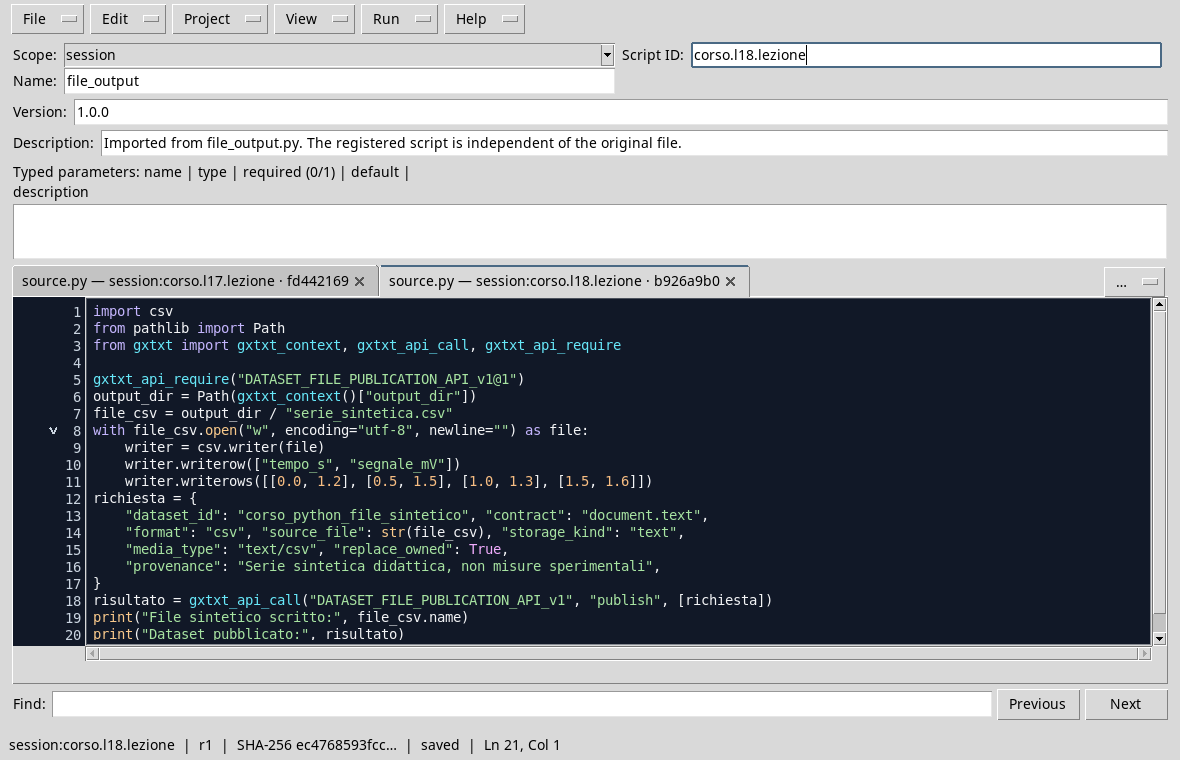
The file is written in the output managed and published with the Public API.
Execution and control
- Open a dedicated session and the Viewer Python Scripts.
- Import
file_output.py, assigns name and Script ID into thesessionbroom and saves. - Open the Runner, press Run Job and check that the execution terms properly.
- In the output, he looks for
serie_sintetica.csvand thecorso_python_file_sinteticoidentifier. Open the document from the Session catalog and check header and four rows. The figure shows the response of the publication.

The result shows the identification of the published document.
Common error
Building a path with Path does not automatically grant permission to write anywhere. Publish an external file to the assigned output directory can be refused; do not bypass this bond by writing in the Session logs. A file in the output directory is not necessarily already published: the publication is a separate operation.
Exercise
Add a synthetic line with 2.0 s time and 1.4 mV signal. What do you need to check before reprinting?
Worked solution
Add [2.0, 1.4] to the past list at writerows, save the script and return it to the Runner. Check that the file is closed before publish, that the identifier is available or replaceable according to the provider’s rules and that the published document contains header and five lines. The new line is synthetic, not a measure.
The next module deepens canonical datasets, variables and metadata.