

Configuration
Open Options → Configuration…. The Settings — Interactive Curve Builder window uses the CORE module preferences, which can also be reached from the module configuration. The current options of the single Builder window are in the Options menu. The configuration sets the values for subsequent openings.
Edit scope
- user
- Change the default user values, applicable to Sessions without override. Confirmation with Save User defaults.
- session
- Change the overrides of the Open Session. If an override is missing, the Session inherits the user value. To change, you need an active Session. Confirmation with Save Session overrides, which also records the current state of activation of the modules in the Session.
The Effective line shows the origin of active preferences. Applies: next_viewer indicates that the configuration is read when a new Builder opens. Save any Workspace, close the Builder and reopen it to see the values. The reopening of a Workspace restores the options of that context.
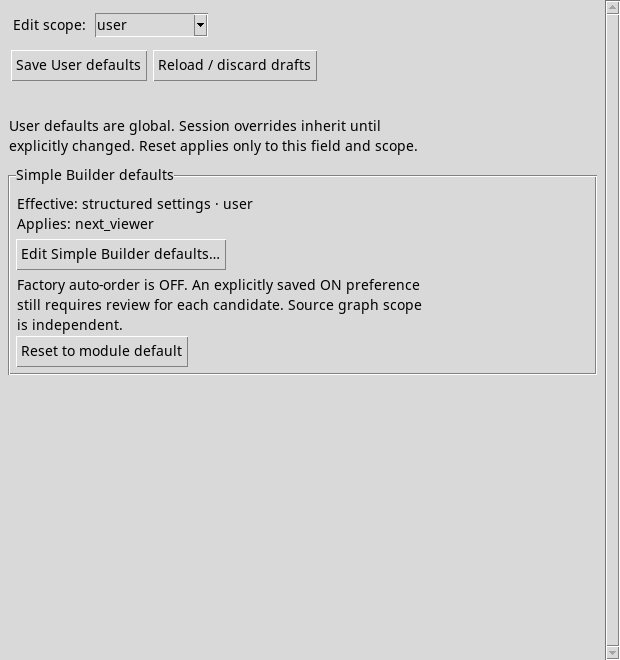
Edit Simple Builder defaults…
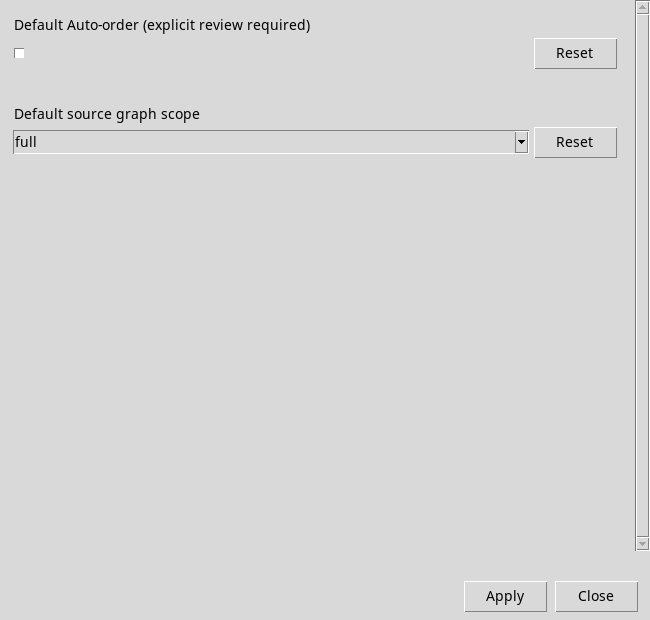
In the Simple Builder defaults box, press Edit Simple Builder defaults…. It opens a module with two fields.
- Default Auto-order (explicit review required)
- With the factory setting, the checkbox is clear and the Builder opens with Auto-order off. Check it to enable Auto-order when the Builder opens. Each new proposal still requires explicit review. The menu may disable Auto-order for time axes.
- Default source graph scope
- With the factory value full, a newly opened Builder displays the full source context. With selected, it displays only the selected subset of rows. This preference applies to the 2D overlay.
Reset next to each field shows that control to its factory value in the module. Press Apply to transfer values to the chosen scope draft. Close closes the module. Changes still in the form must first be transferred to Apply.
Save, reset or discard changes
| Command | Effect |
|---|---|
| Save User defaults | In user, it records the user’s draft. Saved through CORE. confirms the save. Sessions with an override continue to use their value. |
| Save Session overrides | In session, save the changes in the Active Session. Check the confirmation in the status bar and the origin of preferences. |
| Reset to module default | In the user field, it prepares the reset to Auto-order off and full field. Confirmation with Save User defaults. |
| Reset to User default | session prepares the removal of the override. Press Save Session overrides to return to the inheritance of user values. |
| Reload / discard drafts | Reread the settings recorded and discard the draft of the current environment. If another editor has updated the same value, reopen the form after reconciling the changes. |