

GX-TXT Debugger · Module 05 — Core debugging cases in Python
The GX-TXT debugger · 10-module course
In Python many surprises arise from operations that language considers valid: a slicing can return less elements than we imagine, and two names can refer to the same list. We put the hypotheses to the test with small examples, then we observe exceptions, fields and asynchronous Pause.
Download the Python and GNU Octave examples (ZIP). Extract all the archive folders and keep the multifile examples files together.
D25 — Python indexing and slicing
Python indices start from scratch. In a samples[start:stop] slice, the initial limit is included and the end limit is excluded: a difference of one unit can change an entire data window.
Stop after a slice
Import and save slices.py in Python Scripts. The list contains [10, 20, 30, 40, 50]; samples[1:4] selects the elements with 1 indexes, 2 and 3, i.e. [20, 30, 40].
Set a breakpoint on the print statement, start Start Debug and use Continue if the initial pause appears. When you are at the print statement, the slice row has already been performed: in the variable panel the test shows samples with 5 and window length with 3.
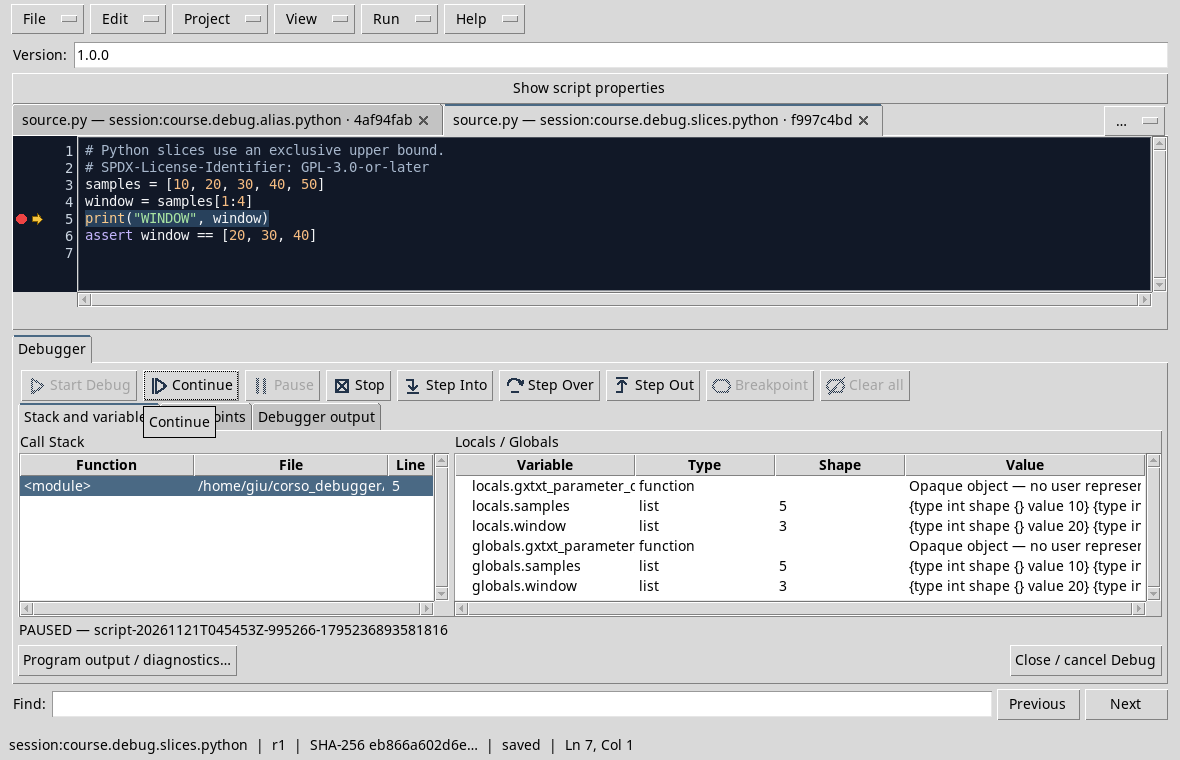
Continue and compare the output WINDOW [20, 30, 40] with the setup. If you also expected the 4 index element, the final slice limit was interpreted as inclusive. For access to only one out-of-range index, see the D23.
Exercise
Which slice select 20 and 30 from the same list?
Worked solution
samples[1:3]: Includes 1 and 2 indices and excludes the 3 index.
Course index · Previous lesson
D26 — Lists and aliases
Assign alias = original does not create a new list: the two names refer to the same object. A change through one of the names becomes visible also through the other.
Follow the change
Import and record alias.py. Set a breakpoint on the independent = original.copy() line and start the debug. In case of initial break, use Continue to reach the point.
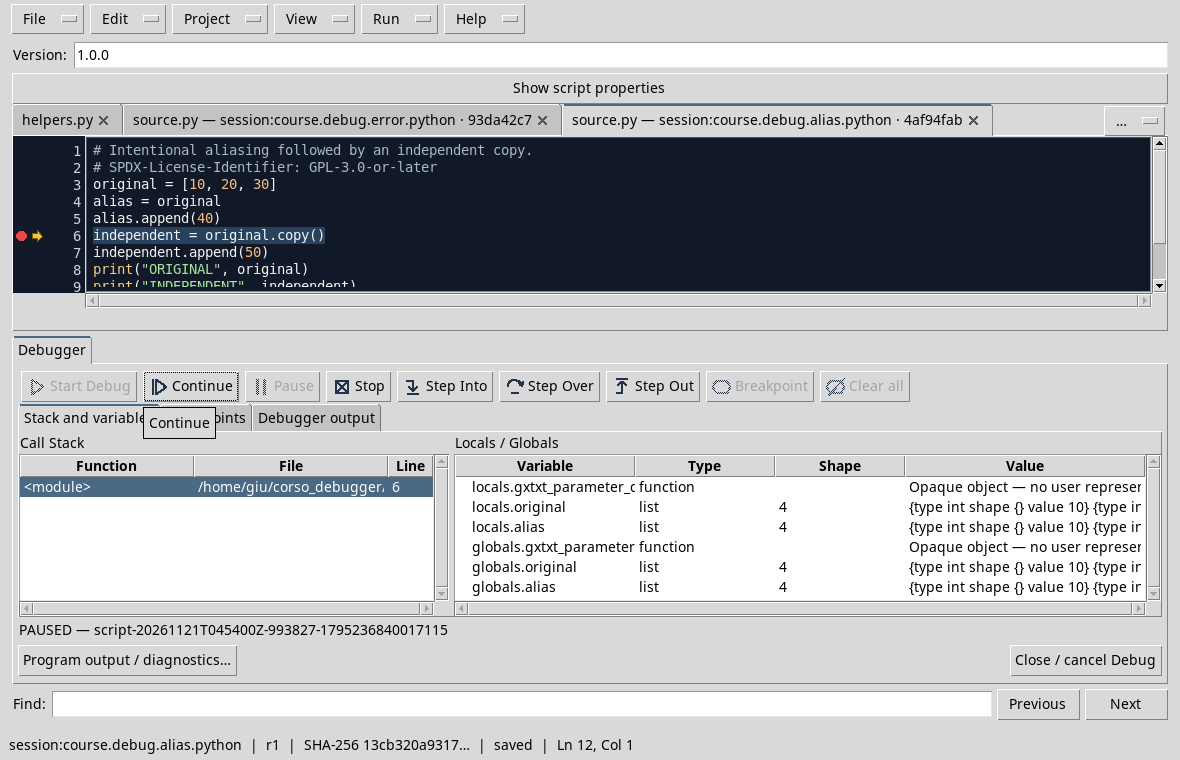
In the original and alias test both have 4 length: alias.append(40) modified the shared list. The highlighted line subsequently creates an independent surface copy; the addition of 50 to independent does not add a fifth element to original.
Continue until the end and check the prints: ORIGINAL [10, 20, 30, 40] and INDEPENDENT [10, 20, 30, 40, 50]. The superficial copy is sufficient for this list of wholes; if the elements were mutable objects nested, they should also be considered their sharings.
Exercise
What if, before append(40), you write alias = original.copy()?
Worked solution
The addition concerns the copy and original remains [10, 20, 30]. Change the assertions to reflect the new result before repeating the test.
Course index · Previous lesson
D27 — Dictionaries and missing values
A dictionary associates keys to values. If a calculation depends on a key, the debugger helps to check that the value obtained is the one expected before it is used.
Check the parameters
Import and record parameters.py. The script uses scale = 2.0, offset = 1.0 and sample = 4.0. Set a breakpoint on result = sample * scale + offset, start the debugger and reach the point with Continue after any initial break.
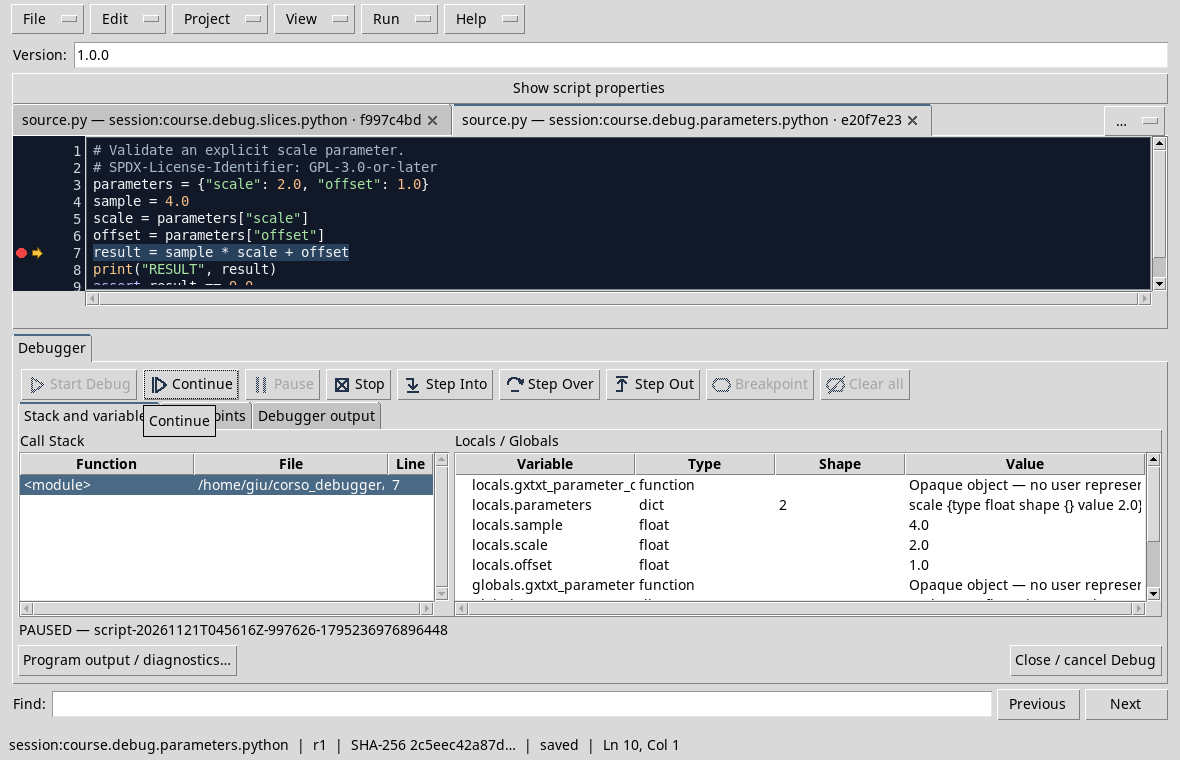
The panel shows a dictionary with two elements and the three scalars sample, scale and offset. The highlighted line has not yet performed the calculation: the expected result is 9.0. Use Step Over, then check result and continue.
If a mandatory key is missing, parameters["scale"] access produces a KeyError. Using get with a default makes sense only if that default value is provided by the requirements; otherwise it risks hiding a missing parameter.
Exercise
What result do you get with sample = 4, scale = 2 and offset = 1?
Worked solution
- First you multiply 4 for 2, then you add 1.
Course index · Previous lesson
D28 — Exceptions and error handling
An exception can be managed by the program or propagate until the Job fails. The two cases require different readings of output and the final state.
A managed conversion
Import parse_input.py and save it in the Session. The not-a-number string cannot be converted with float, but the script explicitly captures ValueError. Set a breakpoint on the press in the except block, start the debugger and reach the point with Continue after any initial break.
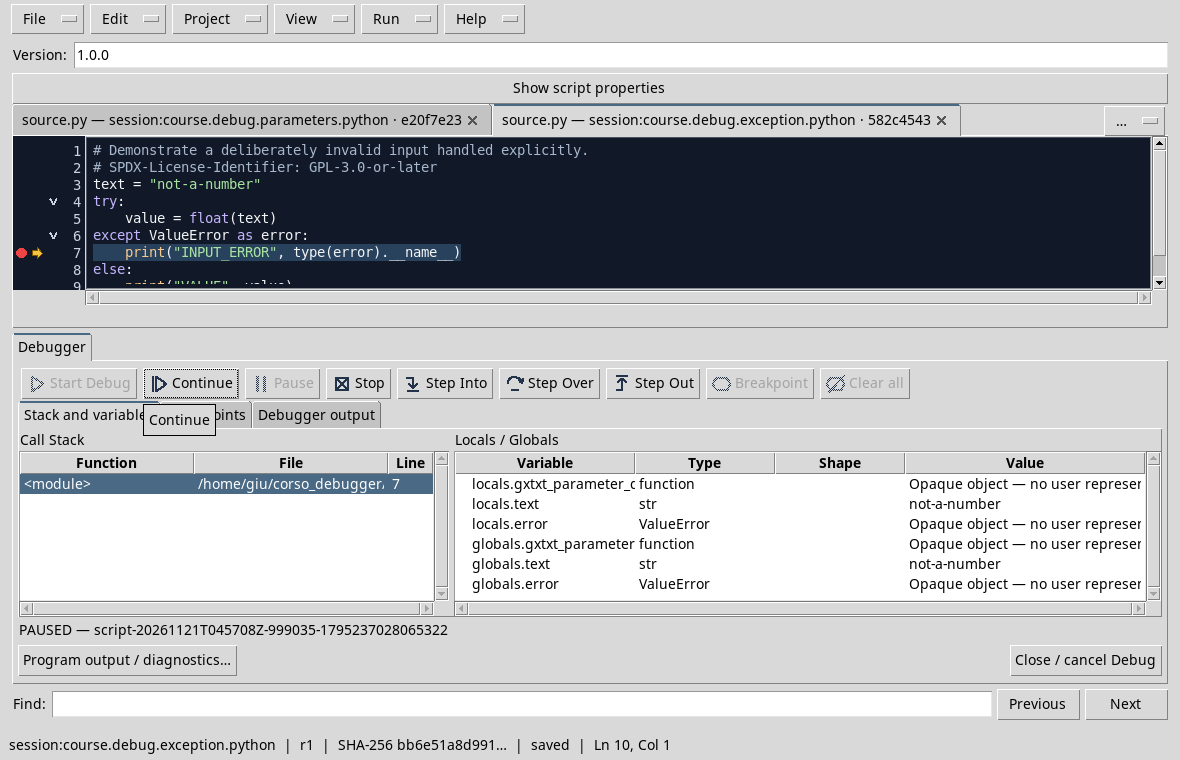
In the test the panel shows text = not-a-number and error type ValueError. Continue: the program must print INPUT_ERROR ValueError. The exception is an intentional incorrect input of the example, not a problem of GX-TXT.
Compare with the D23, where an unsealed IndexError led to FAILED and the track in stderr. Capturing the appropriate exception allows an explicit answer; a general silence on each error would make diagnosis more difficult.
Exercise
What is printed if text is "2.5"?
Worked solution
The conversion succeeds and executes the else branch, which prints VALUE 2.5.
Course index · Previous lesson
D29 — Nested functions and scope
The values we see depend on the selected frame. In this example, a function calls another function: each has its own local arguments and variables.
Comparing the contexts
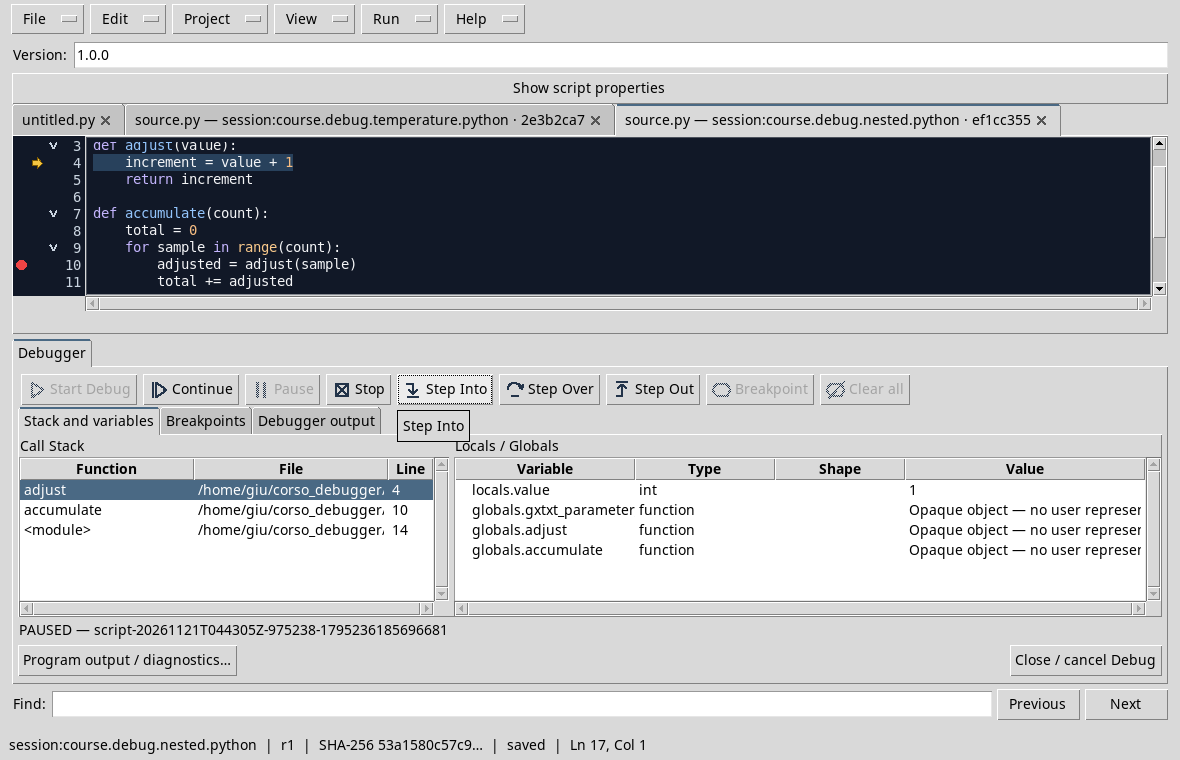
Use nested.py. Stop on the adjust(sample) call, then enter with Step Into. At the second iteration the adjust frame shows value = 1:
Select accumulate in the stack. Here you observe sample = 1, total = 1 and the value of adjusted preserved from the previous tetration; the current call has not yet returned:
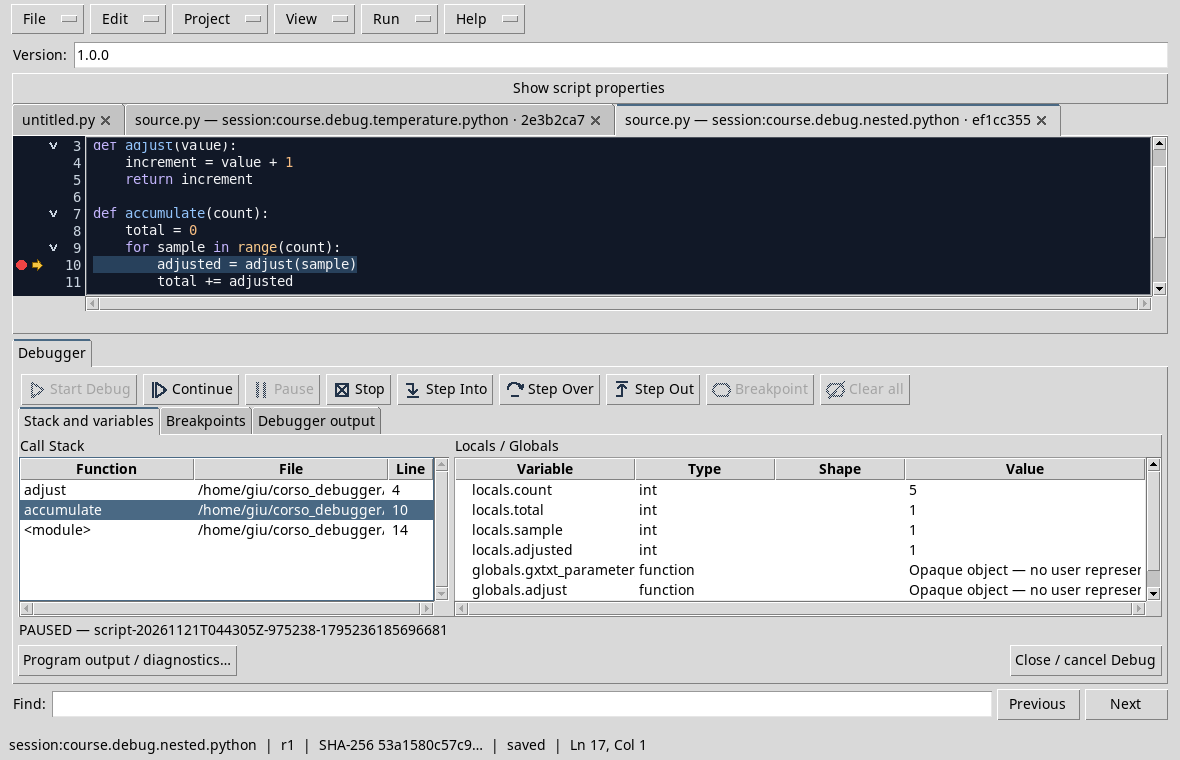
sample is passed to adjust as value argument. The return value of the current call will be assigned to adjusted only after the return. Select the caller’s frame does not perform the assignment.
Exercise
At the second iteration, while adjust(1) has not yet returned, why can adjusted in the caller still be worth 1?
Worked solution
It is the value assigned in the previous edition. The current assignment will receive 2 only after the return of adjust.
Course index · Previous lesson
D30 — Asynchronous Pause in Python
In Python the Pause command can take a break while a Debug Job is running. The exact location depends on when the interpreter can process the request: it is not a prefixed breakpoint.
A short and controlled cycle
Import and record slow_counter.py. The script performs 150 increments, with a short wait for iteration; if completed press COUNT 150. Don’t set breakpoint.
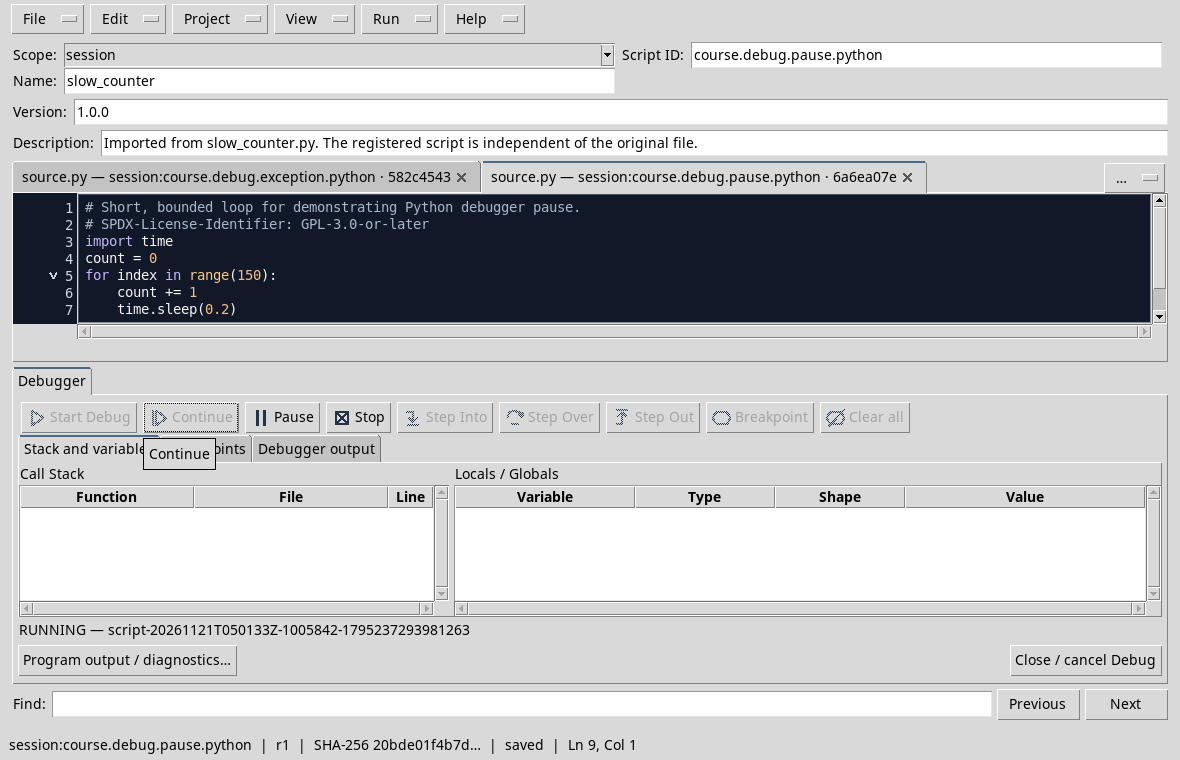
Open the debugger and press Start Debug. In the initial test the debugger stopped at the beginning of the script; press Continue and wait for the state to become RUNNING. The Pause button is available during execution:
Press Pause. In the test the state passes to PAUSED and the variables show count = 21 and index = 20:
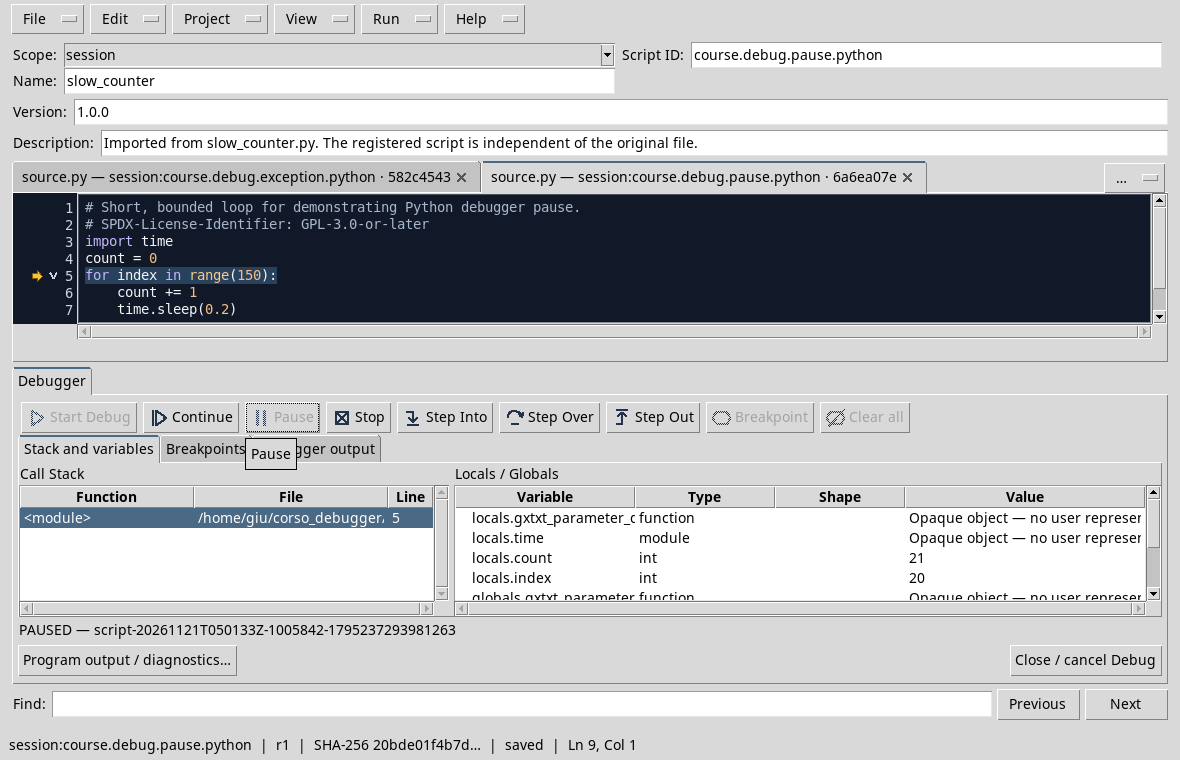
The exact values vary with the time of request. You can use Continue to resume until the end or Stop to cancel. This behavior concerns the Python adaptor of the trial version: the Octave adaptor manual describes the asynchronous Pause as unavailable; for Octave we will use breakpoints and steps.
Exercise
Why can another performance stop with a count value other than 21?
Worked solution
The request arrives during an running loop and the actual time at which execution pauses depends on the execution time. A breakpoint set to a row is more suitable when you need a precise position.
Course index · Previous lesson
Some conventions change in the passage to Octave. It is advisable to remake the same index controls, data form and function behaviour.
Previous: Module 04 · 10-module course contents · Next: Module 06
Other steps of this project
- Debugging GNU Octave in GX-TXT: Breakpoints, Variables and Public APIs
- GX-TXT Debugger · Module 08 — Projects, revisions and Sessions
- GX-TXT Debugger · Module 09 — Integrated practical cases
- GX-TXT Debugger · Module 10 — Independent debugging and the final project
- GX-TXT Debugger · Guide 05 — Debugging scientific data: vectors, structures and Datasets
- GX-TXT Debugger · Guide 06 — Debugging a complete scientific workflow