
Debugging GNU Octave in GX-TXT: Breakpoints, Variables and Public APIs
Learn to execute and inspect GNU Octave scripts step by step in GX-TXT. This practical introduction to the native debugger is based on two experiments run and verified in the framework. It covers breakpoints, Step Into, Step Over, Step Out, the Call Stack, local variables and Script Jobs, and introduces public GX-TXT APIs for numerical computing.
Verified environment: GX-TXT 0.9.8.10-dev-107, GitHub commit 2e4049774309 (October 18, 2026). Both examples use synthetic data; no Dataset is created or modified. The tests were performed in the tutorial_debug Session.
1. From the Octave Script Workspace to the debugger
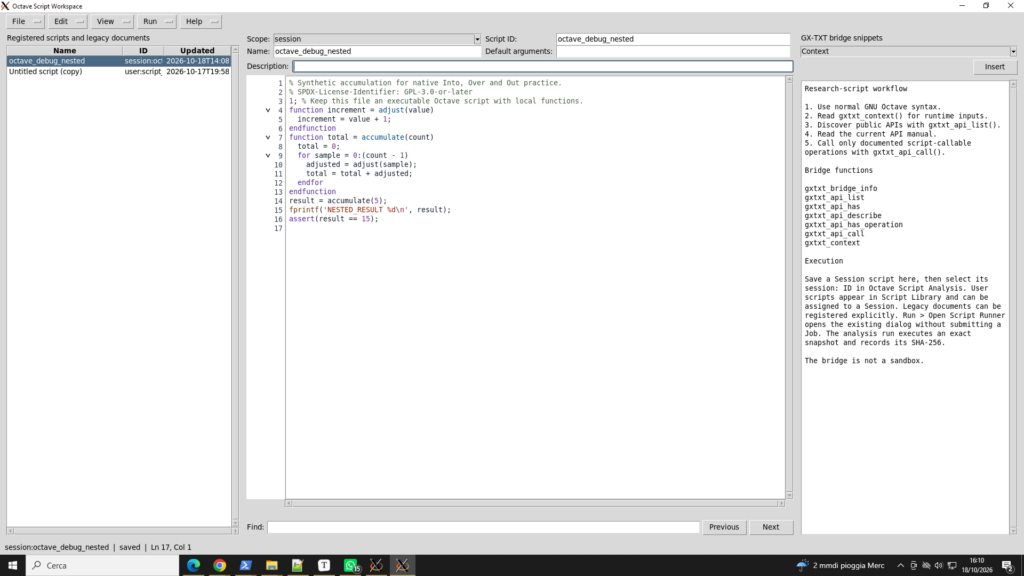
Start by opening a test Session in GX-TXT and selecting Viewers → Octave Script Workspace. Registered scripts appear on the left, the Octave source code in the center and Script Bridge snippets on the right. Choose View → Debugger to display the debugging panel; related commands are also available from the Run menu. Save the script with Scope: Session and a stable Script ID: the debugger executes an immutable registered source revision, not an unsaved editor buffer.
Octave source code can also be authored in the User library without an open Session. However, normal scientific execution and managed Debug Jobs require a real Session. Both exercises use Session scripts.
2. Experiment one: functions, a for loop and the Call Stack
The first program defines two functions. adjust(value) increases its argument by one, and accumulate(count) calls it in a for loop, summing the results. Five iterations produce 1 + 2 + 3 + 4 + 5 = 15. All comments in the source file are in English.
% Synthetic accumulation for native Into, Over and Out practice.
% SPDX-License-Identifier: GPL-3.0-or-later
1; % Keep this file an executable Octave script with local functions.
function increment = adjust(value)
  increment = value + 1;
endfunction
function total = accumulate(count)
  total = 0;
  for sample = 0:(count - 1)
    adjusted = adjust(sample);
    total = total + adjusted;
  endfor
endfunction
result = accumulate(5);
fprintf('NESTED_RESULT %d\n', result);
assert(result == 15);
Download the source:
The corresponding example is also available in the official repository.
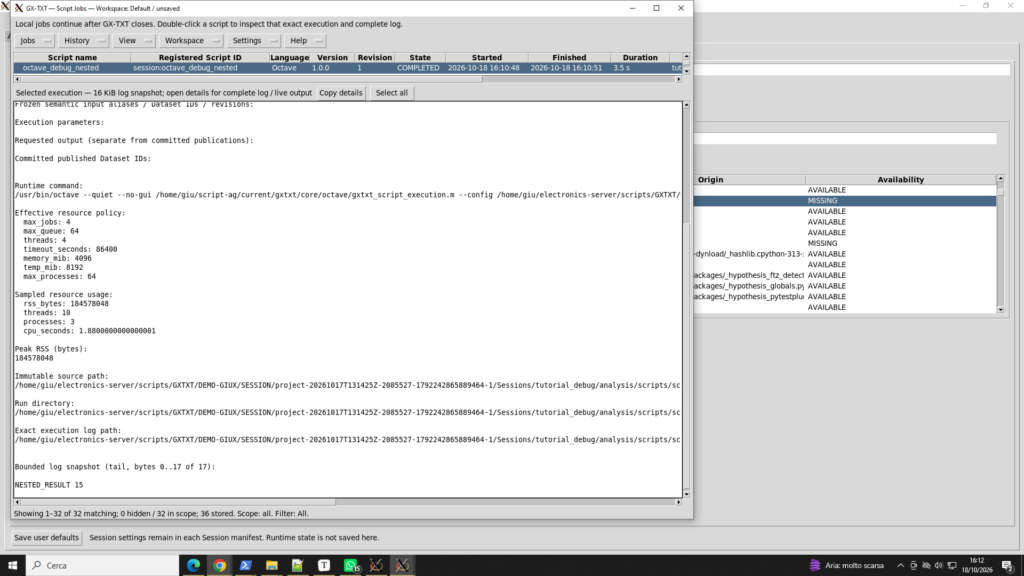
Procedure: import the file using File → Import, register it as session:octave_debug_nested, save it and start a normal run in Script Runner. The expected output is NESTED_RESULT 15, with Script Job status COMPLETED.
Setting the first breakpoint: stop before a function call
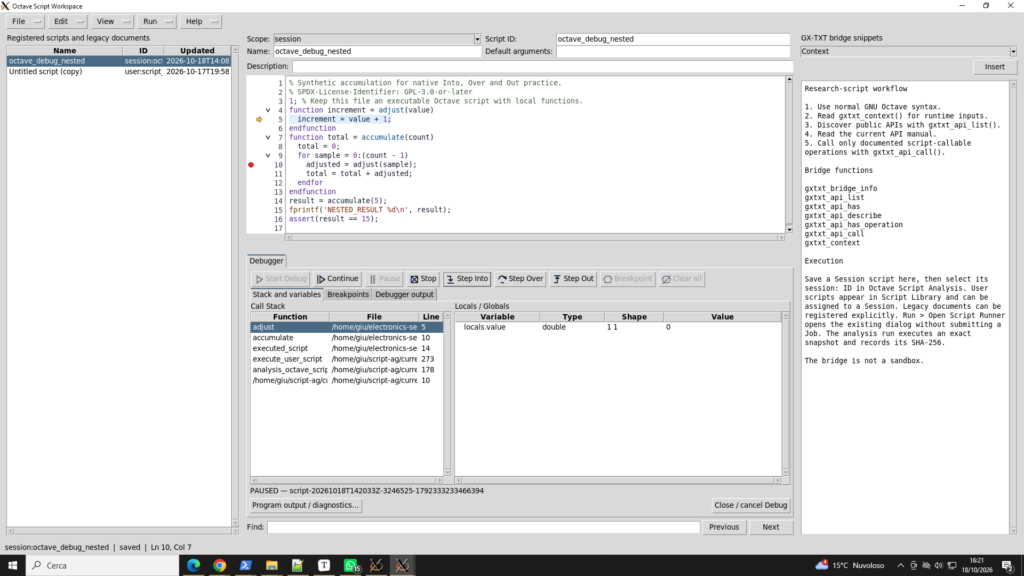
Line 10 of the source reads adjusted = adjust(sample);. Click the breakpoint gutter beside that line to set a red breakpoint marker. Open the debugger, select Start Debug and display the Stack and variables tab. The yellow execution arrow identifies the next instruction to execute.
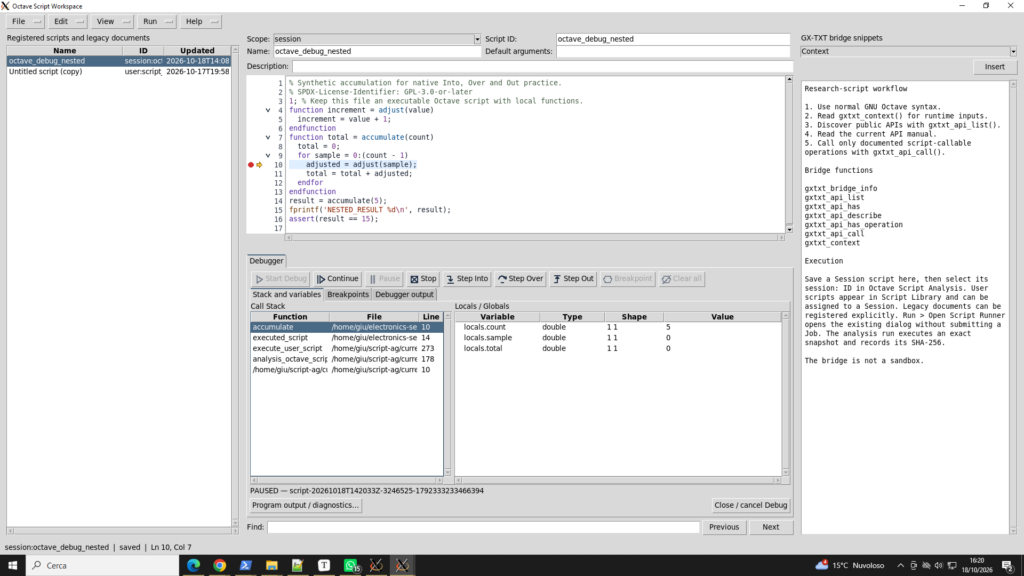
At this stop, count = 5, sample = 0 and total = 0. The current statement has not yet executed. Instead of relying only on the final result, we can observe the interpreter’s actual execution state.
Step Into, Step Out and Step Over
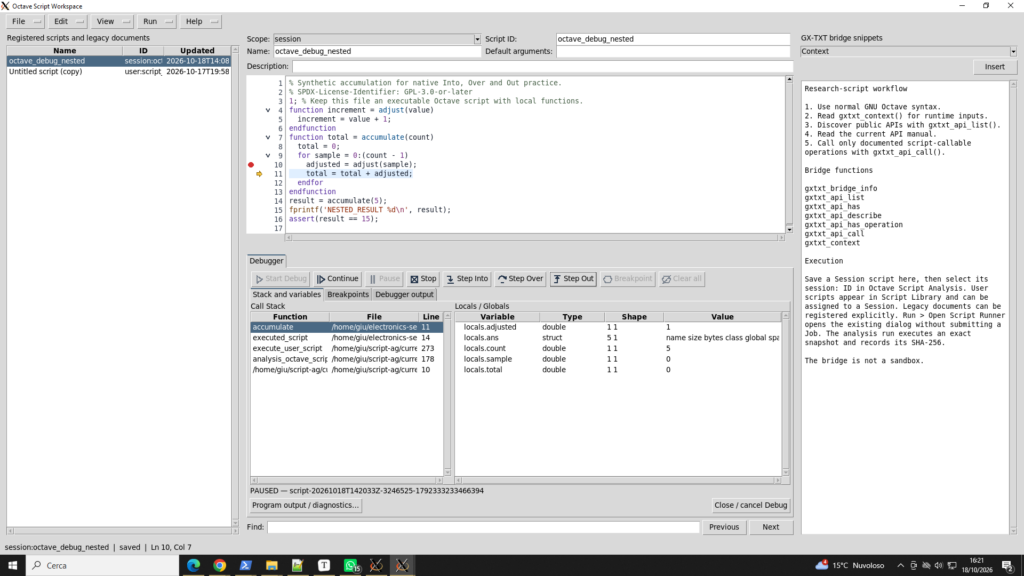
Step Into enters a called function: the interpreter moves from accumulate() to adjust(). The Call Stack gains another frame and the local variable value is shown as 0. Step Out returns to the caller: at line 11, adjusted = 1, while total remains 0 because the addition has not yet executed. Step Over executes the current statement without descending into function calls made by that statement.
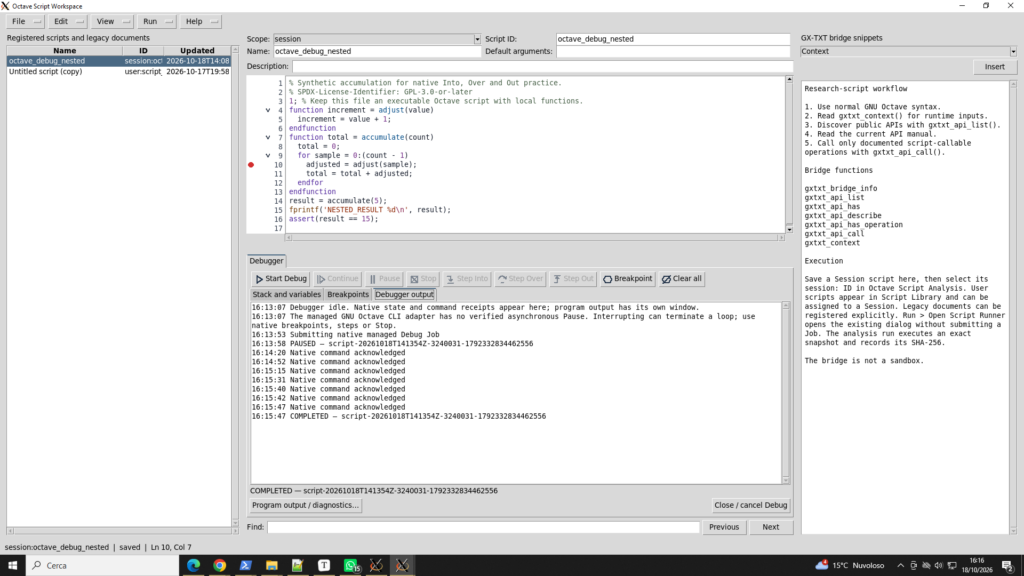
Continue resumes execution until the next breakpoint or program completion. Because this breakpoint is inside a for loop, it can be encountered multiple times. Pressing Continue repeatedly is therefore expected behavior in this exercise. The script ultimately completes successfully.
3. Experiment two: calling public numerical APIs
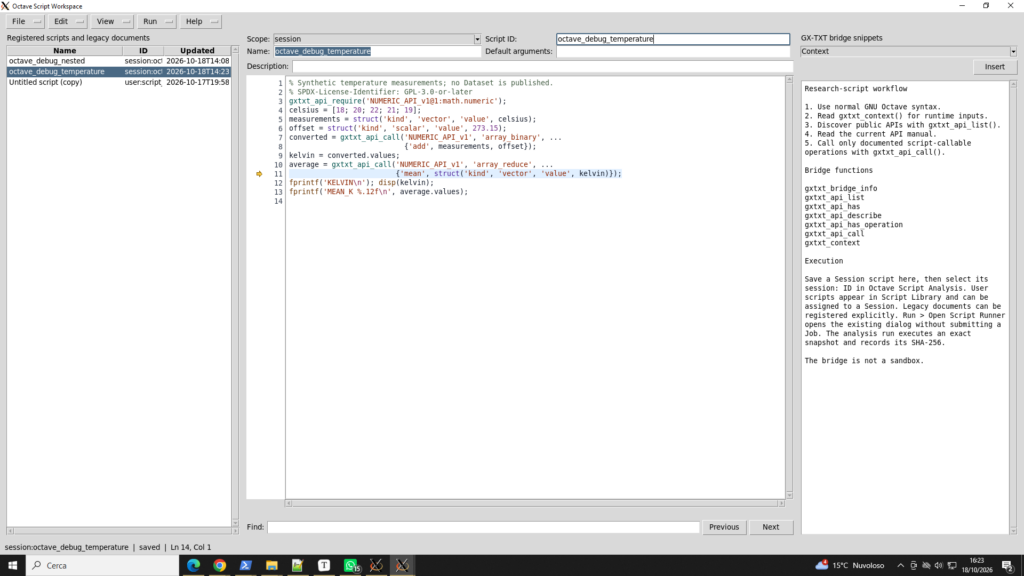
The second example uses five synthetic temperature measurements: 18, 20, 22, 21 and 19 °C. Our goal is to convert them to kelvin and calculate their mean. Instead of performing the calculations outside the GX-TXT integration path, the script calls the public Numeric provider through the Octave Script Bridge.
Public APIs introduced in this lesson
| Function / operation | Purpose |
|---|---|
gxtxt_api_require(...) | Check the required public API identity, version and provider, and fail explicitly if the requirement is not met. |
gxtxt_api_call(api_id, operation, args) | Invoke a registered public API operation through the Script Bridge. |
NUMERIC_API_v1 / array_binary | Apply a binary numerical operation to two typed operands. |
NUMERIC_API_v1 / array_reduce | Reduce a vector to a summary statistic; in this exercise, the mean. |
The statement gxtxt_api_require('NUMERIC_API_v1@1:math.numeric') does not itself perform a calculation; it declares and checks the dependency. The two subsequent Numeric provider calls perform the actual operations. Octave struct values describe typed operands, including kind='vector' and kind='scalar' with an associated value. Numerical results are read from the returned .values field.
% Synthetic temperature measurements; no Dataset is published.
% SPDX-License-Identifier: GPL-3.0-or-later
gxtxt_api_require('NUMERIC_API_v1@1:math.numeric');
celsius = [18; 20; 22; 21; 19];
measurements = struct('kind', 'vector', 'value', celsius);
offset = struct('kind', 'scalar', 'value', 273.15);
converted = gxtxt_api_call('NUMERIC_API_v1', 'array_binary', ...
                           {'add', measurements, offset});
kelvin = converted.values;
average = gxtxt_api_call('NUMERIC_API_v1', 'array_reduce', ...
                         {'mean', struct('kind', 'vector', 'value', kelvin)});
fprintf('KELVIN\n'); disp(kelvin);
fprintf('MEAN_K %.12f\n', average.values);
Download the source:
It is identical to the example verified in the official GitHub repository. For invocation details, consult the Octave Script Bridge API v1 and the Octave module manual.
Numerical results
The conversion adds 273.15 to every Celsius value. The result is 291.15, 293.15, 295.15, 294.15 and 292.15 K. The reduction operation returns a mean of 293.15 K. Both results match the theoretical calculation.
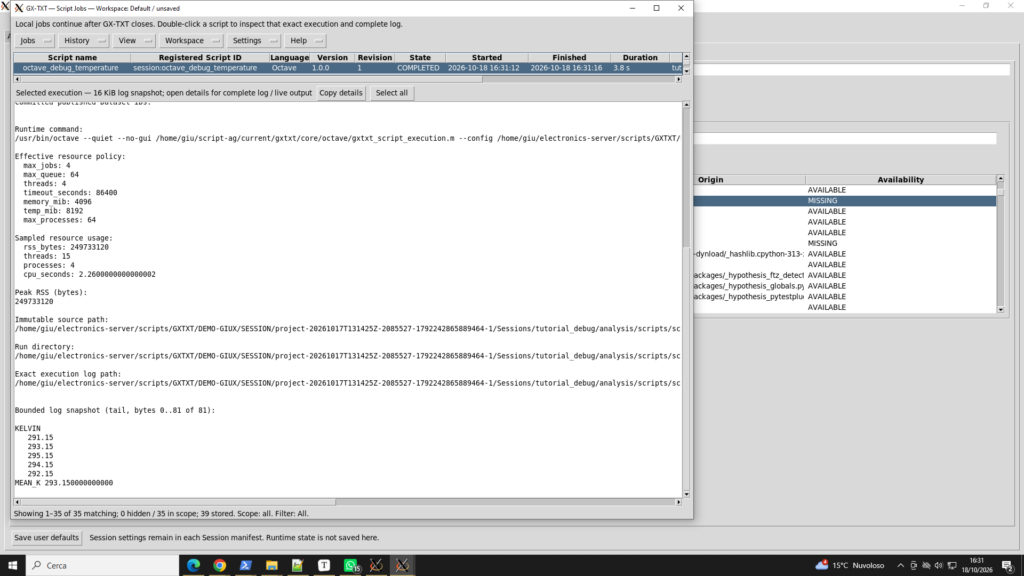
Inspecting values returned by the framework
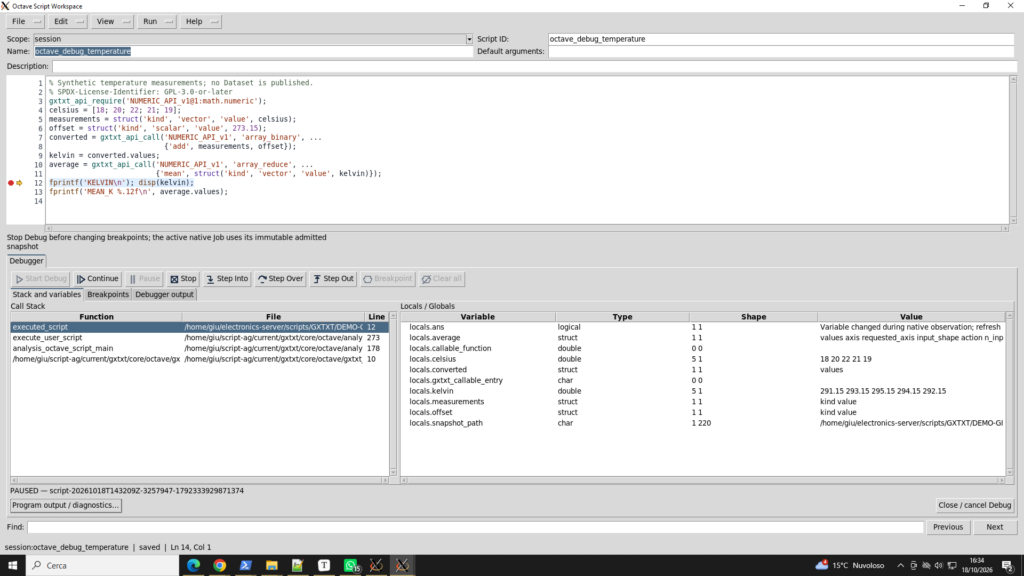
A breakpoint on line 12 (fprintf('KELVIN\n');) allows us to inspect variables before they are printed. The debugger displays celsius and kelvin as 5×1 numeric vectors, while measurements, offset, converted and average are structures. This distinction matters: the debugger’s presentation of a structure is a summary and does not necessarily expand every nested field.
4. Practical rules for debugging Octave scripts
- Save before Start Debug: GX-TXT executes registered source and retains its SHA-256 identity for reproducibility.
- Call Stack and Variables: select the relevant frame to examine its locals; CORE runner frames are different from frames in your script.
- Continue inside a loop: the same breakpoint can be reached repeatedly.
- Asynchronous Pause: this control is not supported for the managed GNU Octave debugger in dev-107; use breakpoints, stepping and Stop instead. A disabled Pause button is not necessarily a malfunction.
- Program output versus Debugger output: these are distinct streams. Printed script results are available in the Script Job details, while the Debugger output tab records debugger events and command receipts.
- Files and Datasets: both examples use synthetic values and do not publish any Dataset.
5. Conclusions and next steps
We have demonstrated two complementary workflows: debugging ordinary GNU Octave execution (functions, loops and stack frames) and debugging a script that calls GX-TXT public APIs. A future article in this series will explore intentionally triggered runtime errors, after the debugger’s exception handling has been improved and retested.
Technical reference: GX-TXT dev-107, commit 2e4049774309. The two sample scripts are available through the source links above; the screenshots in this article document the tests performed with GX-TXT.