

GX-TXT Debugger · Module 06 — Core debugging cases in GNU Octave
The GX-TXT debugger · 10-module course
A row carrier and a column carrier can have the same number of items, but lead to different calculations. With GNU Octave we start from indices, shapes and operators, so we follow calls and errors between.m files, with scheduled breakpoints for the version used in the tests.
Download the Python and GNU Octave examples (ZIP). Extract all the archive folders and keep the multifile examples files together.
D31 — GNU Octave indexing
GNU Octave normally uses indexes from 1. This difference from Python is important when you transfer an algorithm between the two languages.
Check a range
Import and record indexing.m in Octave Scripts. The carrier is [10, 20, 30, 40, 50]. samples(1) selects 10; samples(2:4) selects 20, 30 and 40, because the 2:4 range contains both extremes.
Set a breakpoint on the first print and start Start Debug. In the test the debugger stops after the assignments: first_sample is worth 10 and samples is a five-element line vector. Browse the panel to also examine window.
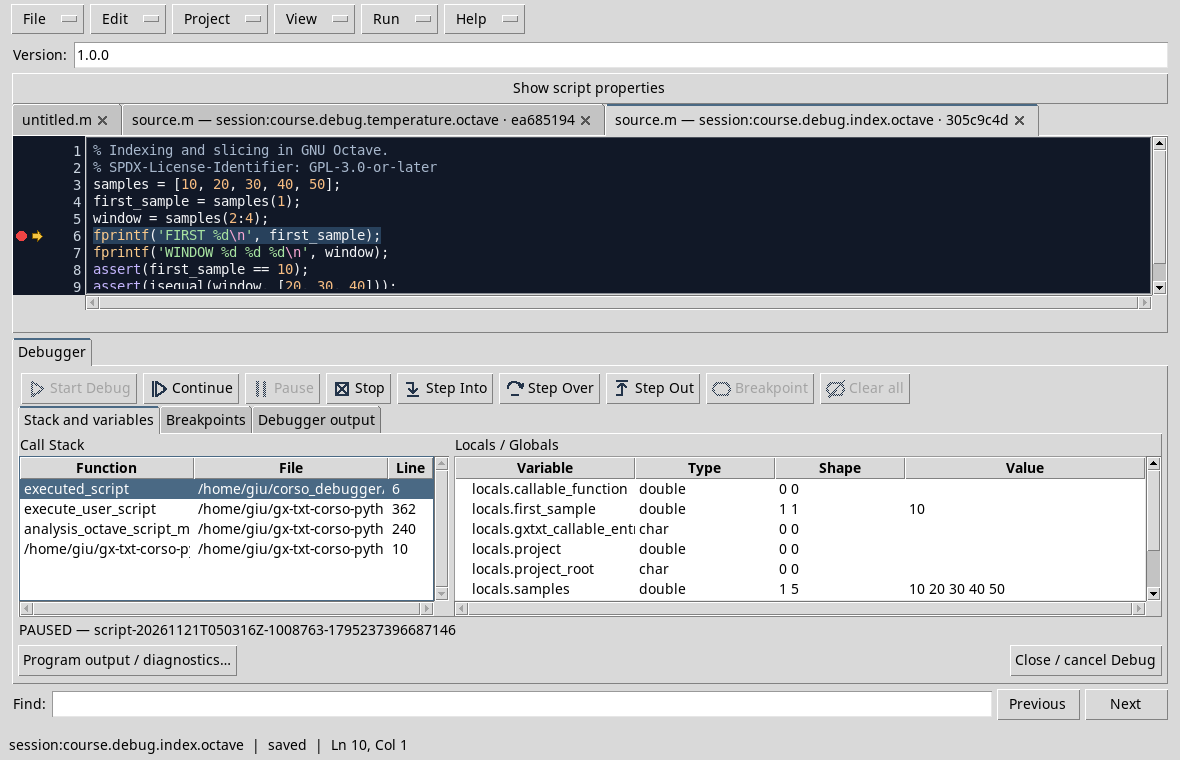
Continue and compare the output FIRST 10 and WINDOW 20 30 40 with the assertions. In the D25, the same window was expressed in Python as samples[1:4], with an exclusive upper limit.
Exercise
What range Octave selects the last two elements of the carrier of five samples?
Worked solution
samples(4:5) selects 40 and 50. In a general code you can use samples(end-1:end) after verifying that there are at least two elements.
Course index · Previous lesson
D32 — Rows, columns and dimensions
In Octave a row vector and a column vector may contain the same numbers, but have different shapes. The form affects matrice operations and how data is transferred.
Compare shapes in debuggers
Import shapes.m, save it in the Session and set a breakpoint on the first press. The code creates row = [1, 2, 3] and column = row.', so use size to save the size.
Start Start Start Debug. On press break, the column display panel with 3 1 and column_shape shape with 3 1 value; scroll the list to see also row and row_shape.
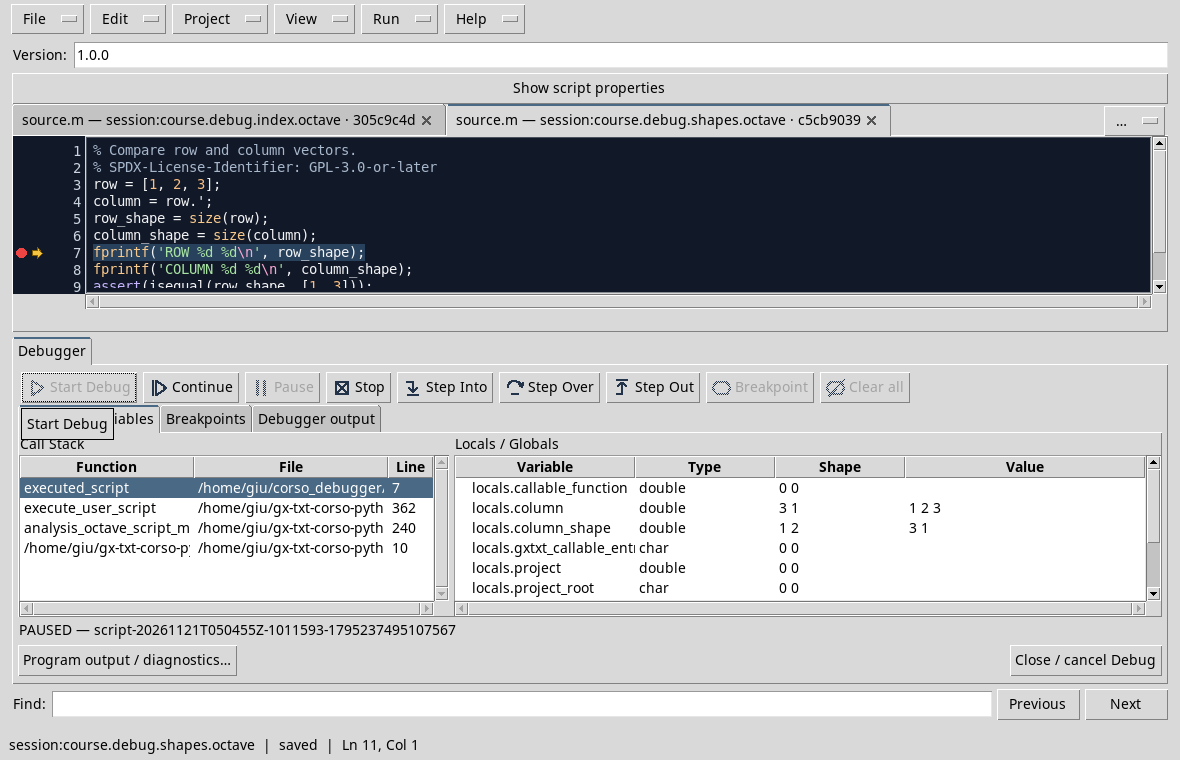
The shape of the line vector is 1 3, that of the column is 3 1. Note that column_shape is in turn a line vector containing two numbers: its shape in the panel is 1 2, while its value is 3 1. It’s two different information.
Continue and verify the output ROW 1 3 and COLUMN 3 1. Here .' is the transposition without conjugation; for complex data the distinction regarding ' is significant.
Exercise
A panel shows 1 2 shape and 3 1 value for column_shape. What is the form of column?
Worked solution
column has 3 1 shape: it is the value saved in column_shape. The 1 2 shape describes the vector that contains the two dimensions.
Course index · Previous lesson
D33 — Scalar and element-wise operators
In Octave, operators with the point, such as .* and .^, operate element by element. The pointless matrice operators instead follow rules of linear algebra and require compatible dimensions.
Observe intermediate results
Import and record elementwise.m. The script calculates [1, 2, 3] squares with .^ 2 and multiplies each element for the corresponding [2, 2, 2] element with .*.
Set a breakpoint on the first print and start the debug. In the test the samples display panel with 1 2 3 and products value with 2 4 6 value; swipe to see also squares.
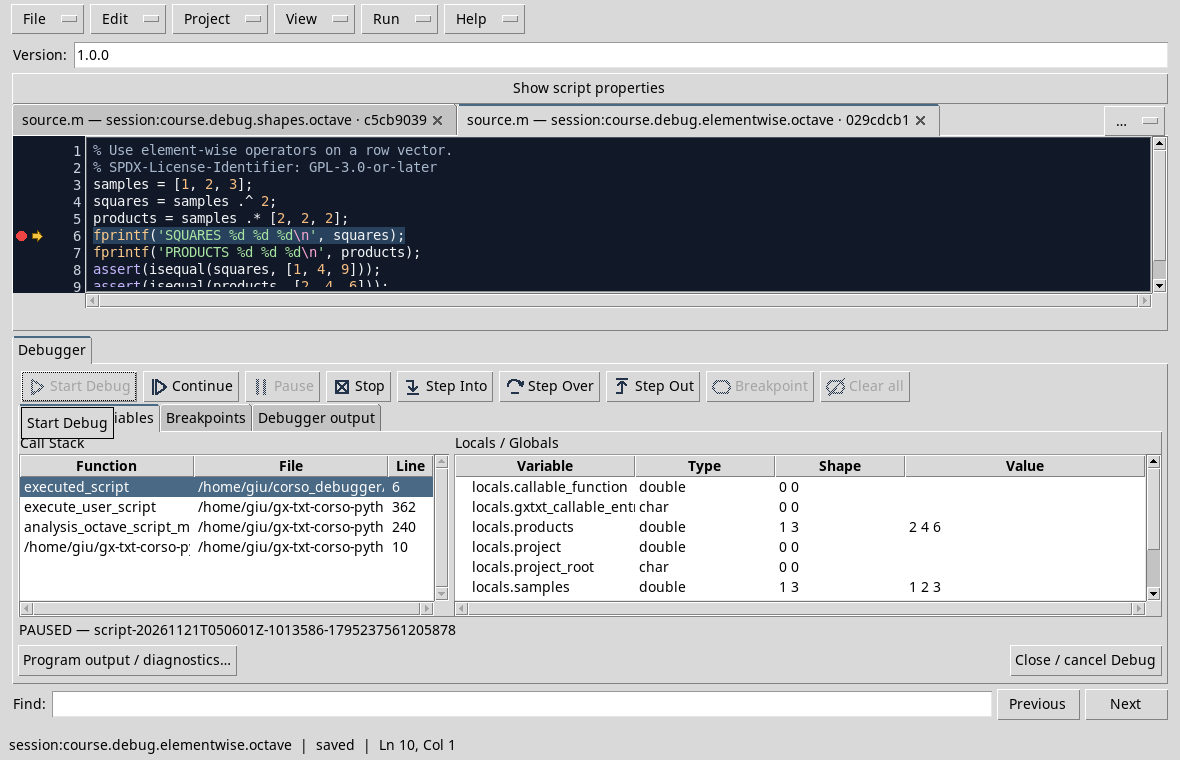
Continue: the expected results are SQUARES 1 4 9 and PRODUCTS 2 4 6. If you replace .* with *, you are not simply changing your handwriting: you are asking for a matrical multiplication, which for these two line vectors has no compatible size.
Exercise
What is the result of [1, 2, 3] .^ 2? Why is .^ appropriate here?
Worked solution
The result is [1, 4, 9]: the square elevation is applied to each element of the carrier.
Course index · Previous lesson
D34 — Functions and .m files
In an Octave project a support function can reside in a separate .m file. The debugger allows you to stop in the function and read the frames that led to the call.
Preparing the project
The example uses main.m and adjust_sample.m. The first assigns 4 to sample and calls adjust_sample; the function returns the increased value of 1.
In Octave Scripts choose Project → New Project, use Session and main.m as entrypoint. Enter the main.m content, create the adjust_sample.m file with Project → New file and enter the function. The file name corresponds to the function name. Save the entire project with File → Save All.
Stop in the function
Open adjust_sample.m from the tree and set a breakpoint on the result = value + 1 line. Start Start Start Debug: in the test the arrow stops in the function and the stack shows adjust_sample and main.
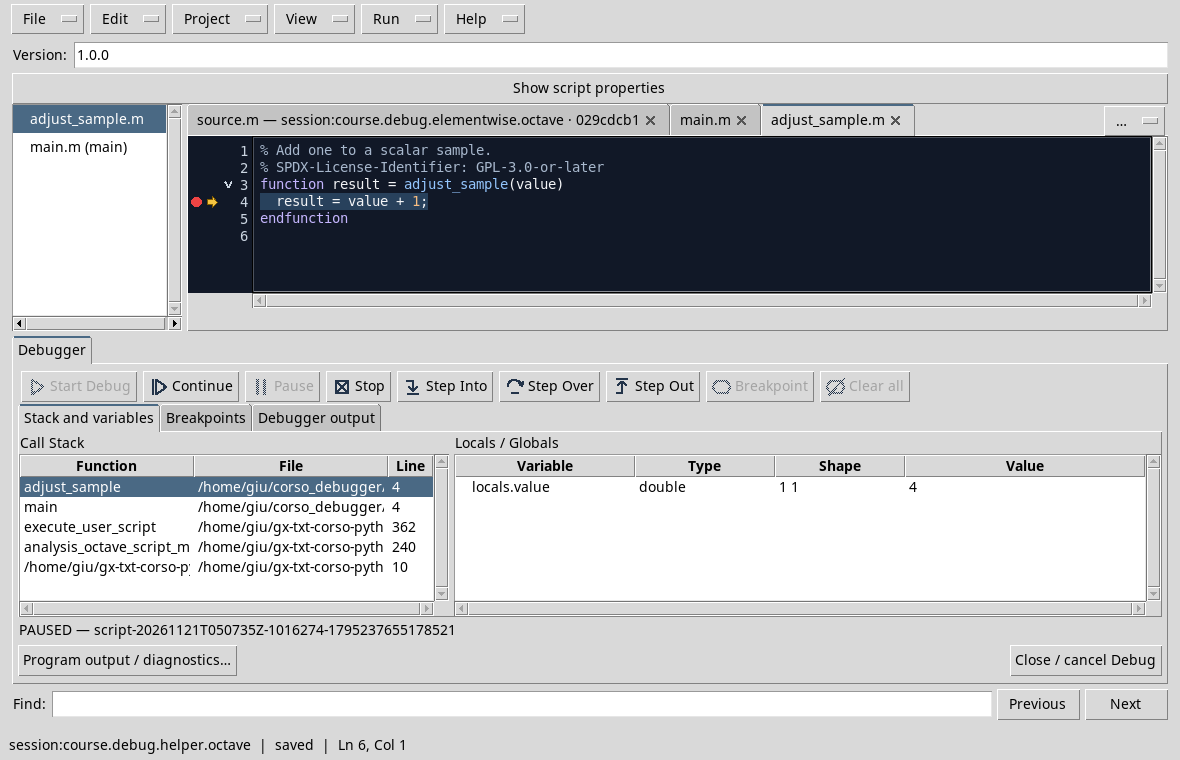
The local value value is 4. With Step Out or Continue the function can return to the caller; the expected result of the program is ADJUSTED 5. Always check the file path in the stack: a line number without the file does not fully identify the location.
Exercise
Which file is the entry point and which contains the support function?
Worked solution
main.m is theentrypoint; adjust_sample.m defines the function called. The file name allows Octave to solve the function in the project.
Course index · Previous lesson
D35 — GNU Octave errors and the originating stack
When an Octave script fails, it observes the message and the point of origin, distinguishing them from the values that the debugger had recorded during the last break.
An out-of-range index
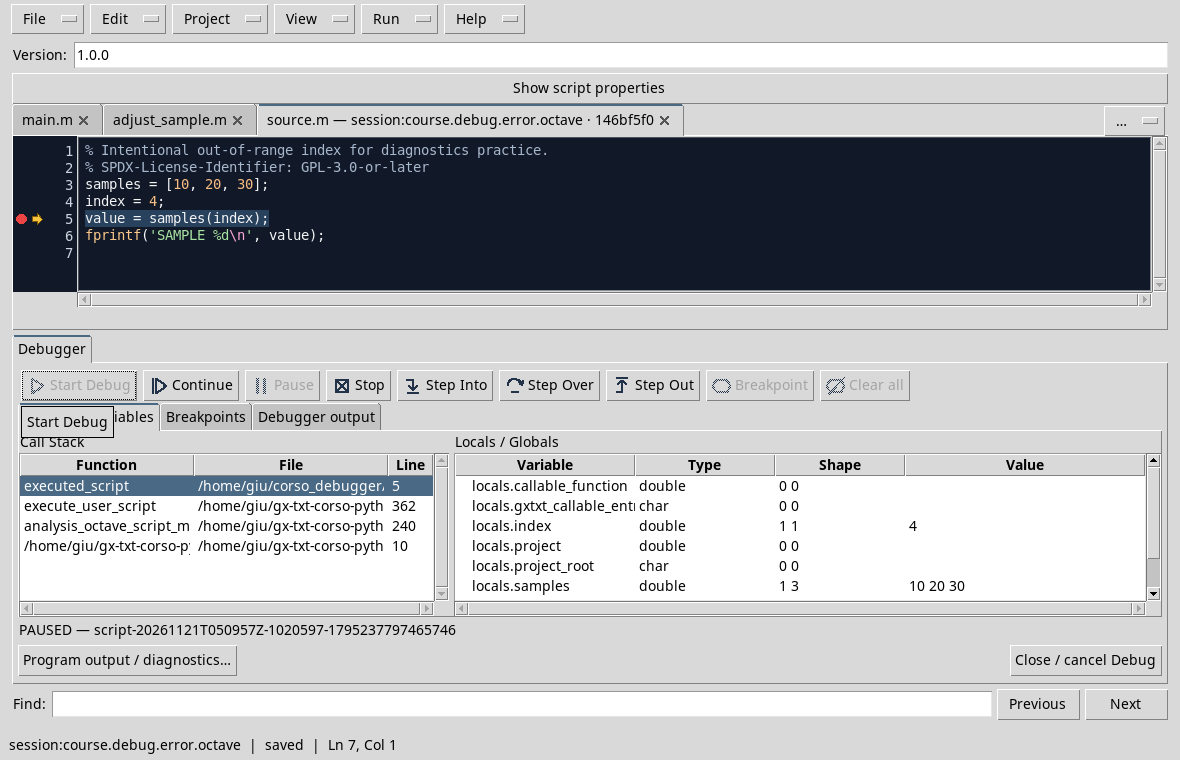
Import index_error.m. The vector contains three elements, but the script uses index = 4. Set a breakpoint to value = samples(index) and start the debug. Before accessing, the test shows index = 4 and a samples 1 3 form vector:
Press Continue. In the test the Job ends with FAILED and the message indicates that samples(4) is out of the limits of a vector with three elements, indicating the origin to the 5 line.
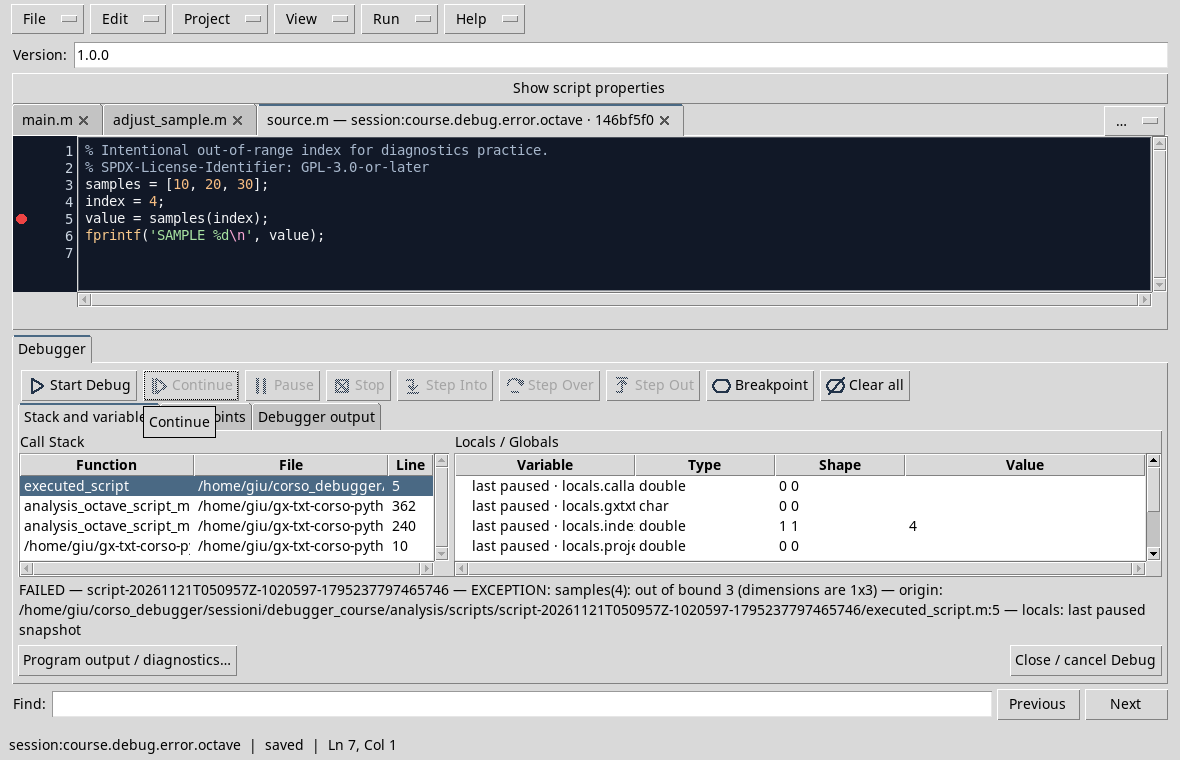
The variables indicated as last breaks are the last photograph observed, not local alive after the error. A frame already released from the stack should not be presented as yet selectable. To deepen program output / diagnostics and consult message and available streams.
Correction
If the goal is to read the third element, the index_fixed.m copy uses index = 3 and SAMPLE 30 print. If the index comes from an input, it validates the limits according to the problem before accessing the vector.
Exercise
What are the valid indices for this carrier of three elements in Octave?
Worked solution
They are 1, 2 and 3. The 4 index would require a fourth element.
Course index · Previous lesson
D36 — Why Pause is unavailable in GNU Octave
In the GX-TXT version used in this guide, the GNU Octave-managed adaptor does not offer a verified asynchronous Pause. The button is disabled; to stop at a well-known point, breakpoints and step commands are used.
Plan your break
Use temperature_fixed.m, recorded at Session. Put a breakpoint on the press and start the debug. The test stops on the required row: the yellow arrow and the red point are visible in the gutter.
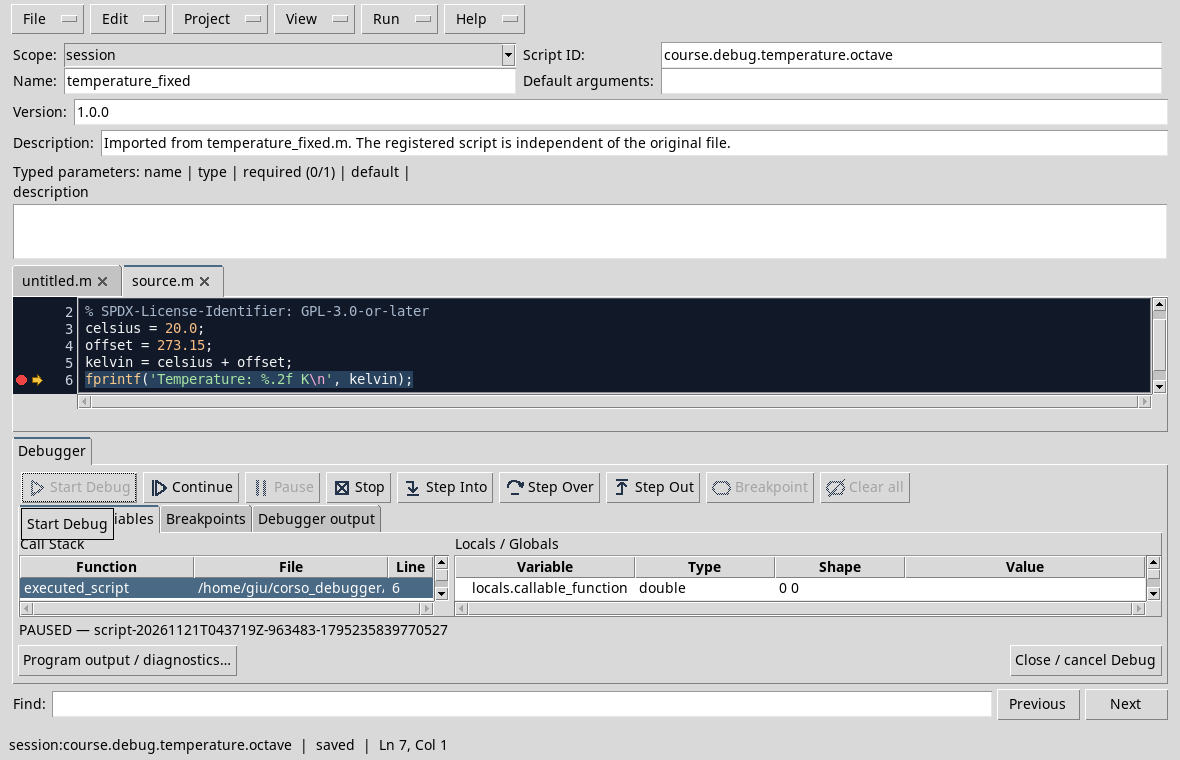
In this example, the break takes place before the print statement, after calculating the value in kelvin. You can use Step Over or Continue according to the goal and Stop to cancel. For a longer cycle, first choose an executable line in the body of the cycle and control each stop the variable of the strain.
The D30 showed an asynchronous request on Python: do not automatically transfer that capacity to the Octave adaptor. An interruption of the process does not necessarily mean an inspectable break.
Exercise
You want to stop at every iteration of an Octave cycle in the reference version. What method can you prepare before startup?
Worked solution
Set a breakpoint on an executable row of the cycle and use Continue between a break and the next, observing the iteration variable.
Course index · Previous lesson
Consolidated language controls, we pass to inputs managed by GX-TXT and to the distinction between calculation errors and Bridge responses.
Previous: Module 05 · 10-module course contents · Next: Module 07
Other steps of this project
- Debugging GNU Octave in GX-TXT: Breakpoints, Variables and Public APIs
- GX-TXT Debugger · Module 08 — Projects, revisions and Sessions
- GX-TXT Debugger · Module 09 — Integrated practical cases
- GX-TXT Debugger · Module 10 — Independent debugging and the final project
- GX-TXT Debugger · Guide 05 — Debugging scientific data: vectors, structures and Datasets
- GX-TXT Debugger · Guide 06 — Debugging a complete scientific workflow