

Find and Follow Records
Properties, resources, exact references and relations.
Search across records
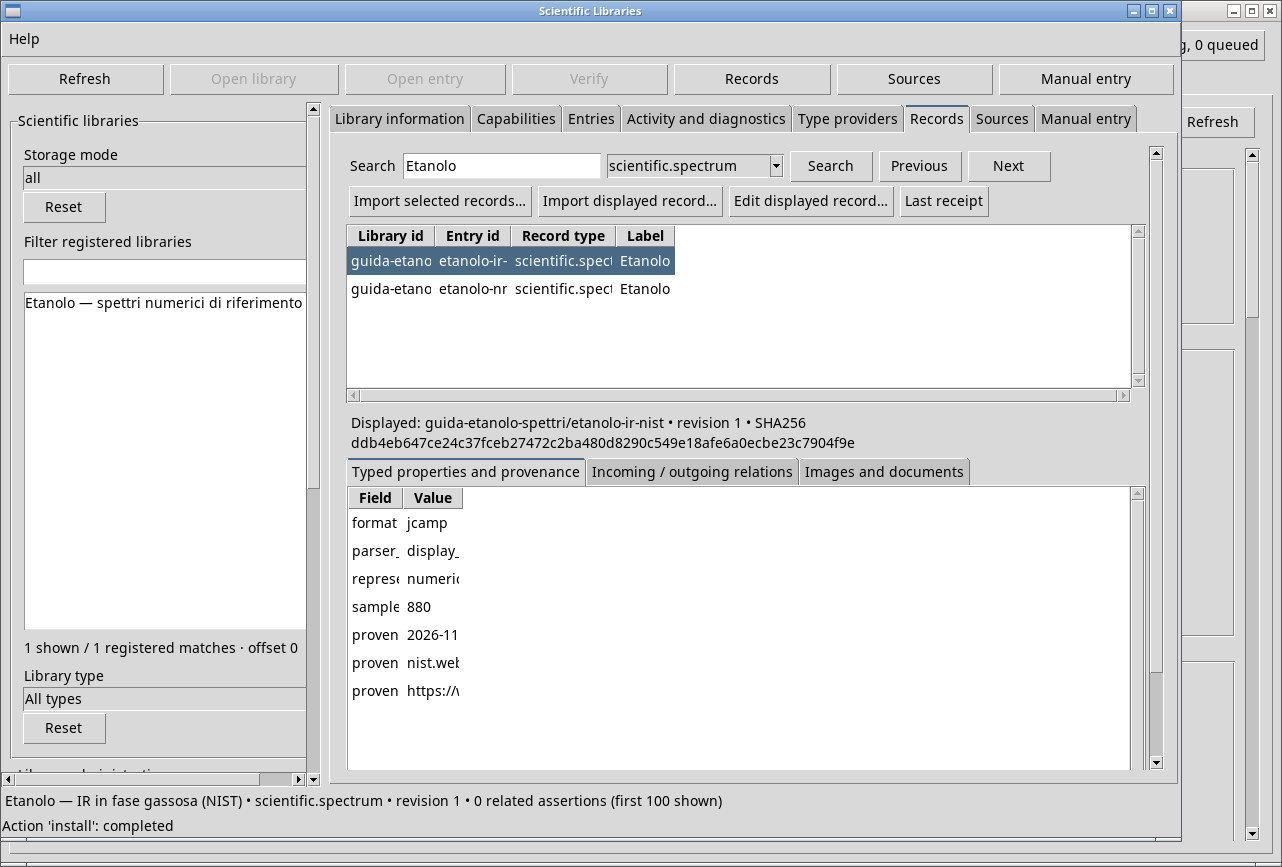
Open Records. In Search, enter part of the name or identity, select the type and press Search. All record types searches all installed types. A blank field lists indexed records. Previous and Next move through pages of up to 100. The grid shows the library, entry ID, type and name. Use the table’s modifier keys to select multiple rows for saving. Select one row to view its details.
Identity and typed properties
The Displayed line pins the record by Library ID, Entry ID, revision and hash. In Typed properties and provenance, read the scientific fields, source, retrieval date and any URL. The provenance.* branch records attribution and provenance. Fields vary with the domain and the information saved in the record.
Relations, filters and navigation
Open Incoming / outgoing relations. Direction with both includes every direction. outgoing follows assertions that originate from the record, and incoming follows those that point to it. Use All relation types for all meanings or select an exact type. In Source, enter the identity of the source to which the relation is attributed. Confirm with Filter and clear with Previous and Next. Check the direction, target identity, revision, hash, source, status and evidence shown in the row.
- Open selected related entry
- With one row selected, this opens the resolved, current local record. An external row may suggest a local candidate with an exact identity to confirm. If the candidate is missing, the reference remains unresolved. A
canonical_datasetrow opens the existing Dataset in the corresponding Session. A stale hash or revision requires verification. - Back / Forward
- Revisit the records opened by following relations. Moving to a new record updates the local history.
- Import selected related entries…
- Review 1 to 100 relations to resolved, current library entries. Follow a Dataset link with Open selected related entry. Review an unresolved or stale remote reference before choosing it. From the PubChem compound, filter by
chemistry.has_structureto acquire the0: molecular_structurefile withacq.molecule_structureand publish it in the Session. To open the resource directly from the Library, follow the molecular viewing workflow in Images and documents.
Record resources
Images and documents lists role, availability, MIME type and hash. local indicates a stored copy you can open. external identifies a declared URL. Show local image thumbnails expands previews of local images. Select a row and use Open selected original / image to open the exact copy. The resource type determines which viewer opens. External URLs remain visible as references. See the PDF, image and SDF workflows.
Acquisition, editing and receipts
- Import selected records… / Import displayed record…
- The first command reviews selected table rows. The second uses the identity pinned in Displayed. Choose a representation and acquisition handler for each item, then confirm the destination in the Session. A descriptive record with no available content cannot supply a Dataset.
- Edit displayed record…
- Opens the current record fields in Manual entry with the previous revision pinned. Explicitly save a new revision. Keep the ID stable and verify it before confirming.
- Last receipt
- Shows the latest receipt available to the viewer. Check individual results, identities and errors even when the overall operation is complete. Back to page returns to the current view.
Values of All relation types
- chemistry.has_structure
- Follow the compound to its exact geometry or conformer.
- chemistry.has_safety_claim
- Follow the compound to an attributed safety claim.
- chemistry.has_spectrum_reference
- Find a reference to a spectrum of the substance. Verify whether numeric data are available separately.
- chemistry.has_publication
- Find the publication related to a chemical identity.
- electronics.sold_as
- Find a supplier’s listing for a component by supplier name and part code.
- electronics.has_document / electronics.has_media
- Filter for technical documents and electronic record images respectively.
- electronics.source_suggests_alternative
- Shows an alternative declared by the source or the record author. Read the assertion and check the fields before deciding whether the parts are compatible.
- publication.has_document
- Find the document linked to the citation.
- scientific.describes_dataset
- Shows the exact Dataset associated with a scientific record. This requires the same Session and the pinned revision.
- scientific.related_measurement
- Shows an attributed association between measurement records. Check the evidence, identity and status to interpret it.
Read relation statuses
resolved indicates an exact entry. A missing identity remains unresolved. stale preserves the historical reference and signals a mismatch with the current revision or hash. unresolved leaves resolution to the relevant check, such as a local candidate for an external reference or a Session Dataset. In a viewer scoped to one Library, outside_scope indicates a retained relation that the current viewer cannot open. Scientific Libraries opens the full catalog.