

OpenFOAM: transient simulations, time step, Courant number and ParaView animations
Eighth operating guide on OpenFOAM installed on a Linux server and used from Windows, after those on server and transfers, monitoring and convergence, quantitative analysis with ParaView, verification and validation, parameter sweeps, mesh generation and boundary conditions and models. This one adds the time dimension: transient simulations, time step, Courant number, probes, numerical comparison and animations. The deep-dive and practical-tip boxes open with a click: they contain every package script, the numerical estimates for the case, two additional scripts for logs and observed order, and verification procedures.
Time stepping, Courant number, monitoring, numerical comparisons, and ParaView animations
Practical OpenFOAM series · Linux server, Windows post-processing · English edition
Goal: design, run, and check a time-dependent simulation, keeping physical time separate from computational time and movie playback time. The material uses OpenFOAM Foundation 14 and ParaView 5.13.2. Visual Studio Code is not needed.
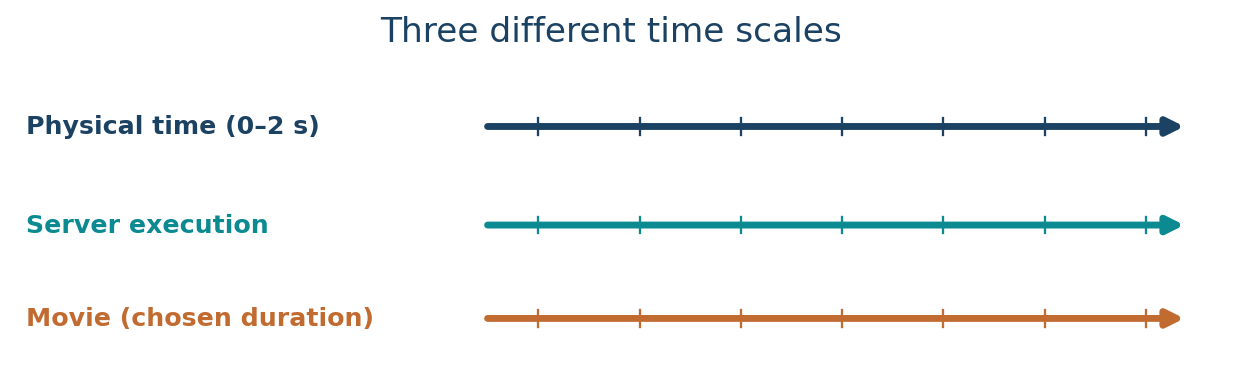
1. How a transient simulation differs from a steady simulation
A steady-state calculation seeks a field that does not evolve with time: time derivatives vanish. A transient calculation follows the evolution of the field; the Navier–Stokes equations include ∂U/∂t. The result is a sequence of physical states influenced by the initial conditions. Completing a solver run is not sufficient: the physical time window must actually cover the phenomenon of interest.
Keep three time scales distinct: t is simulated physical time (seconds in SI); ExecutionTime and ClockTime are computational time; video frame rate is a presentation choice. A simulation covering two physical seconds may consume minutes or hours of computation and be played back as a ten-second movie.
| Entry | Meaning | Example |
|---|---|---|
deltaT | Physical time advancement per time step | 0.005 s |
endTime | End of the simulated physical interval | 2 s |
writeInterval | Frequency of field output | 10 steps |
Time = ... | Current simulation time | Time = 0.5 |
ClockTime | Wall-clock computation time | Not flow time |
Optional refresher — Initial-value problems. Identical meshes and boundary conditions but different initial fields may yield different start-up histories. A final quasi-steady field does not make the transient irrelevant: peak pressures and velocities can occur during start-up.
Deep dive · The time scales of this case, in numbers
Before choosing deltaT and endTime it pays to estimate the time scales of the problem. With side L = 0.1 m, lid speed U = 1 m/s and viscosity ν = 1·10⁻⁵ m²/s:
| Quantity | Expression | Value | Meaning |
|---|---|---|---|
| Reynolds number | Re = U L / ν | 1·10⁴ | regime in which the tutorial uses a RAS model |
| convective time | t_c = L / U | 0.1 s | time for the lid to “travel” one cavity length |
| molecular diffusive time | t_ν = L² / ν | 1000 s | what viscosity alone would need to propagate the motion |
| steps per convective time | t_c / Δt | 20 (Δt = 0.005 s) · 40 (Δt = 0.0025 s) | temporal resolution of the driving mechanism |
| simulated span | endTime / t_c | 20 | twenty convective times: a start-up, not a guaranteed final state |
| total steps | endTime / Δt | 400 · 800 | cost proportional to the number of steps |
The ratio t_ν / t_c = Re says that momentum spreads from the lid by convection and, in the RAS model, by turbulent viscosity, not by molecular diffusion. If the quantity at the probe is still changing at t = 2 s, the run describes a start-up transient: to claim a final state you must extend endTime and show that the series has settled over several convective times.
Deep dive · What an implicit time step actually does
After spatial discretisation the equations become a system of ordinary differential equations in time, dU/dt = R(U), where R collects convection, diffusion and the pressure gradient. The implicit Euler scheme evaluates R at the new instant:
(U^(n+1) − U^n) / Δt = R(U^(n+1))

local truncation error   ~ Δt²   (per step)
global accumulated error ~ Δt    (over a fixed physical interval)
The operational consequence is simple: in the asymptotic range, halving deltaT roughly halves the temporal error of the observed quantities. That is what makes the comparison between cavity_dt005 and cavity_dt0025 useful: if the difference between the two cases is not small compared with the accuracy you need, the larger step is not adequate. Each step requires solving linear systems (momentum, pressure, turbulence quantities): this is why an implicit step costs much more than an explicit one, but tolerates larger steps without diverging.
Practical tip · Telling physical time from computing time at a glance
Three commands to keep at hand while the run proceeds, inside the case folder:
grep -c "^Time = " log.foamRun            # completed time steps
grep "^ExecutionTime" log.foamRun | tail -1   # CPU and wall-clock seconds so far
foamListTimes                              # instants saved on disk (physical time)
The ratio of ExecutionTime to completed steps gives the cost per step; multiplying by the remaining steps yields a reliable estimate of the time left, far more useful than the impression that “it is slow”.
2. Reference example: the lid-driven cavity
We use the official Foundation 14 case $FOAM_TUTORIALS/incompressibleFluid/cavity. The cavity is 0.1 × 0.1 m, numerically 0.01 m deep with one cell in z: a 2D setup with empty faces. The top movingWall moves at 1 m/s, while the remaining walls are stationary. The supplied mesh has 20 × 20 × 1 cells. Kinematic viscosity is 1e-05 m²/s; the original momentum-transport configuration uses RAS with kEpsilon. We leave these fixed during time-step comparisons to isolate the numerical change.
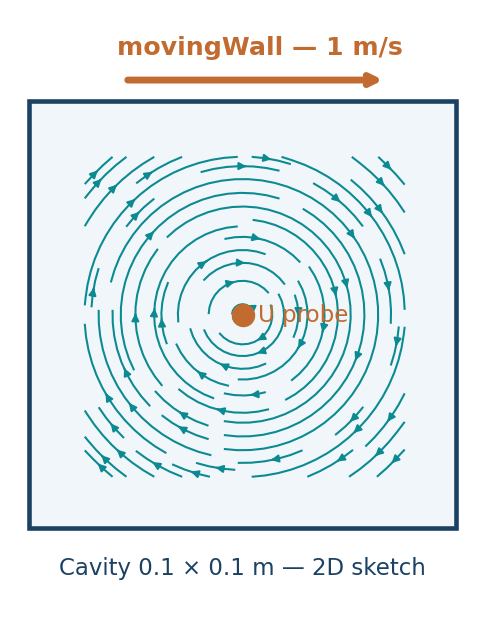
Important files: 0/U and 0/p supply initial and boundary values; constant/physicalProperties supplies viscosity; constant/momentumTransport selects the model; system/blockMeshDict defines the mesh; system/fvSchemes defines the discretisation; system/fvSolution sets linear solvers and coupling; and system/controlDict controls time and output.
The official case already uses ddtSchemes { default Euler; }; the incompressibleFluid module is run by foamRun. Do not switch to a solver name from another OpenFOAM distribution without checking compatibility.
Physical limitation. The cavity is selected to examine start-up transients and time-step sensitivity. It is not a periodic shedding benchmark or experimental validation by itself. The tutorial RAS setup and coarse mesh are not suitable for high-fidelity turbulence structures.
Deep dive · Re = 10⁴, RAS and what to expect from the transient
In the literature on the laminar two-dimensional cavity, the first transition from a steady to a periodic solution is reported around Re ≈ 8000: at Re = 10⁴ a well-resolved laminar 2D computation might therefore already oscillate. The tutorial, however, uses a RAS kEpsilon model: the turbulent viscosity adds dissipation and the RAS solution usually tends to a quasi-steady state that represents the mean flow, not the fluctuations. That is why the guide speaks of a start-up transient: the probe quantity grows while the primary vortex forms and then settles.
Two physical details to keep in mind: at the top corners the velocity jumps from 1 m/s (lid) to 0 (side walls), a singularity that makes local values there mesh-dependent; the probe at the centre is far from those corners and is therefore a robust choice.
Deep dive · Pressure in a closed domain: why pRefCell and pRefValue are needed
The cavity is closed: on all walls the pressure has zero gradient and no patch fixes its value. In incompressible flow pressure appears in the equations only through its gradient, so it is defined up to a constant. The solver makes it unique by fixing the value in a reference cell via pRefCell and pRefValue (or pRefPoint) in the algorithm dictionary in system/fvSolution. Without this constraint the pressure equation is singular.
# check on the installed tutorial
cd "$FOAM_TUTORIALS/incompressibleFluid/cavity"
foamDictionary system/fvSolution -entry PIMPLE
foamDictionary 0/p -entry boundaryField
foamDictionary 0/U -entry boundaryField
Practical consequence: the absolute value of p in this case has no physical meaning; only pressure differences do. When comparing two runs, compare differences, never absolute levels.
Deep dive · The 20 × 20 mesh and wall functions: a y⁺ estimate
Cells are 5 mm wide, so the first cell centre is 2.5 mm from the wall. Assuming a friction velocity of a few percent of the lid speed (u_τ ≈ 0.03 m/s) gives y⁺ = y·u_τ/ν ≈ 0.0025 · 0.03 / 10⁻⁵ ≈ 7.5: a value in the buffer layer, below the range standard wall functions are designed for (roughly 30–300). It is an order-of-magnitude estimate, but enough to confirm the guide’s note: this configuration is didactic, suited to studying the effect of deltaT, not to producing reliable wall values.
To read the actual value at the end of the run you can use the yPlus function object (foamPostProcess -func yPlus -solver incompressibleFluid), checking its availability with foamPostProcess -list.
Practical tip · Read the tutorial before copying it
Ten minutes spent reading the original files save hours of doubt later. Without modifying anything:
T="$FOAM_TUTORIALS/incompressibleFluid/cavity"
ls -R "$T" | head -40
cat "$T/constant/physicalProperties" "$T/constant/momentumTransport"
foamDictionary "$T/system/fvSchemes" -entry ddtSchemes
foamDictionary "$T/system/blockMeshDict" -entry blocks
Record the values you find (viscosity, model, schemes, cell count) in the project notebook: they will be the reference for telling whether a different result comes from one of your changes or from a difference in the installation.
3. Prepare on Linux, edit from Windows
- From Windows PowerShell, connect via SSH, for example
ssh user@server.example.org. - Source the OpenFOAM 14 environment as configured on your server; verify
foamVersionandecho "$FOAM_TUTORIALS". - Transfer the package’s
scripts/directory with FileZilla/SFTP or unzip it on Linux. FileZilla is still useful for logs and results; Notepad++ can be used to edit dictionary copies locally. - Always use fresh directories. The preparation script preserves the original tutorial and refuses to overwrite existing output.
foamVersion
python3 scripts/prepare_cases.py --out "$HOME/OpenFOAM/guide08_run01"
find "$HOME/OpenFOAM/guide08_run01" -maxdepth 2 -type d
The script creates cavity_dt005 and cavity_dt0025. Use --template /path/to/tutorial/cavity if the tutorial is installed elsewhere. The first case runs with deltaT = 0.005 s and writes every 10 time steps; the second uses 0.0025 s and writes every 20 steps. Both save the fields every 0.05 s of physical time, making their saved instants directly comparable. Total physical time is 0–2 s; run logs remain inside each case.
Deep dive · The prepare_cases.py script, full text
#!/usr/bin/env python3
"""Prepare two reproducible transient cavity cases from OpenFOAM Foundation 14.

Copyright (C) 2026. License: GNU GPL v3 or later.
This script preserves the original tutorial and refuses existing destinations.
"""
from __future__ import annotations
import argparse
import os
from pathlib import Path
import re
import shutil
import sys

SPECS = (("cavity_dt005", "0.005", "10"), ("cavity_dt0025", "0.0025", "20"))


def replace_entry(source: str, key: str, value: str) -> str:
    pattern = re.compile(r"(?m)^(\s*" + re.escape(key) + r"\s+)[^;\n]+(;)")
    updated, count = pattern.subn(lambda m: m.group(1) + value + m.group(2), source, count=1)
    if count != 1:
        raise ValueError(f"Expected exactly one setting for {key}")
    return updated


def prepare(template: Path, destination: Path, timestep: str, interval: str) -> None:
    if destination.exists():
        raise FileExistsError(f"Destination already exists: {destination}")
    if not all((template / p).is_file() for p in ("system/controlDict", "system/fvSchemes", "system/blockMeshDict", "0/U", "0/p")):
        raise FileNotFoundError("OpenFOAM 14 cavity tutorial files are missing")
    source = (template / "system/controlDict").read_text(encoding="utf-8")
    for key, value in (("startFrom", "startTime"), ("endTime", "2"), ("deltaT", timestep),
                       ("writeControl", "timeStep"), ("writeInterval", interval),
                       ("purgeWrite", "0")):
        source = replace_entry(source, key, value)
    # The official cavity tutorial has no function objects in controlDict.
    if re.search(r"(?m)^\s*functions\s*\{", source):
        raise ValueError("Unexpected functions dictionary: edit manually")
    source += """
// Monitoring: a fixed point in the interior of the 0.1 m square cavity.
functions
{
    centreVelocity
    {
        type                probes;
        libs                (sampling);
        fields              (U);
        probeLocations      ((0.05 0.05 0.005));
        executeControl      timeStep;
        executeInterval     1;
        writeControl        timeStep;
        writeInterval       1;
    }
}
"""
    shutil.copytree(template, destination, symlinks=True)
    (destination / "system/controlDict").write_text(source, encoding="utf-8")
    (destination / "GUIDE08_METADATA.txt").write_text(
        f"Source: OpenFOAM Foundation 14 tutorials/incompressibleFluid/cavity\n"
        f"deltaT: {timestep} s\nwriteInterval: {interval} steps (=0.05 s)\n"
        "Compare both runs at identical physical times; all data belong to the tutorial.\n",
        encoding="utf-8")


def main() -> int:
    parser = argparse.ArgumentParser(description=__doc__)
    parser.add_argument("--template", type=Path, default=None, help="Path to official cavity tutorial")
    parser.add_argument("--out", type=Path, default=Path("guide08_cases"), help="New output directory")
    args = parser.parse_args()
    foam_tutorials = os.environ.get("FOAM_TUTORIALS", "")
    template = args.template or (Path(foam_tutorials) / "incompressibleFluid/cavity" if foam_tutorials else None)
    if template is None or not template.is_dir():
        parser.error("OpenFOAM tutorials not found: source OpenFOAM environment or use --template")
    out = args.out.resolve()
    if out.exists():
        parser.error(f"Output already exists: {out}. Choose a new --out path")
    # Validate all modifications before creating anything.
    original = (template / "system/controlDict").read_text(encoding="utf-8")
    for key in ("startFrom", "endTime", "deltaT", "writeControl", "writeInterval", "purgeWrite"):
        replace_entry(original, key, "123")
    out.mkdir(parents=True)
    try:
        for name, timestep, interval in SPECS:
            prepare(template, out / name, timestep, interval)
    except Exception:
        # Preserve any partial output for troubleshooting. No cleanup or deletion.
        print(f"Preparation failed; preserved partial files at: {out}", file=sys.stderr)
        raise
    print(f"Prepared two cases at {out}")
    return 0


if __name__ == "__main__":
    raise SystemExit(main())
The design choices worth copying into your own scripts:
- validate before writing:
replace_entry(original, key, "123")tries every substitution on the original text before a single folder is created; if a key is missing or appears twice the script stops without leaving debris; - exactly one occurrence: the regular expression with
count=1and thecount != 1check prevent an accidental edit of a second entry with the same name; - no deletion: on failure partial files stay where they are for diagnosis; an existing destination triggers refusal, never overwriting;
- traceability:
GUIDE08_METADATA.txtrecords origin, step size and write frequency in each case.
Deep dive · Output arithmetic: why 10 and 20 steps give the same instants
| deltaT [s] | writeInterval | output Δt [s] | steps | saved instants | estimated Co (U = 1 m/s, Δx = 5 mm) |
|---|---|---|---|---|---|
| 0.005 | 10 | 0.05 | 400 | 41 (0 included) | 1 |
| 0.0025 | 20 | 0.05 | 800 | 41 | 0.5 |
| 0.00125 (exercise B) | 40 | 0.05 | 1600 | 41 | 0.25 |
The rule is writeInterval × deltaT = constant. Keeping it guarantees that the saved fields of different cases fall exactly on the same physical times, so comparisons in ParaView and in the CSV files need no interpolation of full fields. Disk usage grows with the number of saved instants, not with the number of steps: here it is the same for all three cases.
Practical tip · Check that the script changed only what it should
R="$HOME/OpenFOAM/guide08_run01"
diff "$FOAM_TUTORIALS/incompressibleFluid/cavity/system/controlDict" "$R/cavity_dt005/system/controlDict"
for k in deltaT writeInterval endTime writeControl; do
  printf "%-14s %s  %s\n" "$k" \
    "$(foamDictionary "$R/cavity_dt005/system/controlDict" -entry $k -value)" \
    "$(foamDictionary "$R/cavity_dt0025/system/controlDict" -entry $k -value)"
done
cat "$R/cavity_dt005/GUIDE08_METADATA.txt"
The diff must show only the expected entries and the added functions block. If other differences appear, the installed tutorial is not the one the guide assumes: stop and record it before running.
4. Understanding controlDict
A simplified excerpt from the generated file:
solver          incompressibleFluid;
startFrom       startTime;
startTime       0;
stopAt          endTime;
endTime         2;
deltaT          0.005;
writeControl    timeStep;
writeInterval   10;
purgeWrite      0;
runTimeModifiable true;
writeControl timeStep with writeInterval 10 means write every ten steps, not every ten seconds. At deltaT = 0.005, that is 0.05 s between outputs. If you halve the time step but keep writeInterval unchanged, the sampling interval is also halved and more files are produced.
For automatic time-step control, OpenFOAM 14 provides adjustTimeStep, maxCo, and maxDeltaT (exact behaviour depends on the solver). When the step is adaptive, writeControl adjustableRunTime can align output times with desired physical intervals. A fixed-step comparison should not silently be mixed with an adaptive one.
Deep dive · The controlDict entries that govern time and output
| Entry | Typical values | Effect |
|---|---|---|
startFrom | startTime · latestTime · firstTime | where the run starts; latestTime resumes an interrupted run |
stopAt | endTime · writeNow · noWriteNow · nextWrite | when to stop; the last three stop a running job |
writeControl | timeStep · runTime · adjustableRunTime · cpuTime · clockTime | unit of writeInterval: steps, physical seconds, computing seconds |
purgeWrite | 0 · N | 0 keeps everything; N keeps only the last N instants (useful for restarts, not for animations) |
writeFormat | ascii · binary | binary: smaller files and faster writing, with no loss of precision |
writeCompression | off · on | gzip compression of fields |
timePrecision | 6 (typical) | digits in time-folder names; if too few, different instants land in the same folder |
runTimeModifiable | true | the dictionary is re-read during the run: endTime, writeInterval, stopAt can be changed |
Deep dive · Adaptive stepping: how to write it and how to check it
A typical configuration for a Courant-controlled step is the following; before using it check the entries in the tutorials of your installation, because the exact behaviour depends on the solver:
adjustTimeStep  yes;
maxCo           0.5;
maxDeltaT       0.01;

writeControl    adjustableRunTime;
writeInterval   0.05;      // physical seconds, not steps

// find examples in the distribution:
// grep -rl "adjustTimeStep" "$FOAM_TUTORIALS" | head
With adjustableRunTime the solver shortens the last steps before each write instant to hit it exactly. The actual step appears in the log as deltaT = .... In a sensitivity comparison, however, adaptive stepping changes two things at once (mean step and its distribution in time): to isolate the effect of deltaT, as this guide does, a fixed step is the correct choice.
Practical tip · Stopping or extending a run without losing anything
With runTimeModifiable true you act on the running job by editing the dictionary from the second SSH session:
# write the current instant and stop cleanly
foamDictionary system/controlDict -entry stopAt -set writeNow

# extend the run before it ends
foamDictionary system/controlDict -entry endTime -set 4

# later restart from the last saved instant
foamDictionary system/controlDict -entry startFrom -set latestTime
foamDictionary system/controlDict -entry stopAt -set endTime
Never stop with Ctrl+C if you need the data up to that point: everything computed after the last write is lost. Remember that a restart creates a new probe subfolder (section 8), and record in the notebook every change made while the run was active.
Deep dive · How much disk a real transient run takes
The didactic case has 400 cells and takes almost nothing. For an industrial case estimate: cells × saved scalar quantities × bytes per value × instants. With 5 million cells, about 10 scalars per instant (U counts 3, then p, k, epsilon, nut and the face flux phi) and 8 bytes in binary, each instant weighs about 0.4 GB; in ASCII two or three times more. Forty instants become 16–40 GB.
The levers to control it are writeFormat binary, writeCompression on, a writeInterval chosen on the dynamics you want to show and, above all, function objects such as probes that record time series every step at negligible cost. Rule of thumb: full fields are for animations, time series are for numbers.
5. Courant number, stability, and temporal resolution
The Courant number compares the distance travelled by the flow during a step with a cell length:
Co ≃ |U| Δt / Δx
For a 5 mm cell, 1 m/s velocity, and deltaT = 0.005 s, the simple estimate is Co ≈ 1; halving the time step gives roughly Co ≈ 0.5. OpenFOAM computes a more general local value using face fluxes, so the uniform estimate cannot replace the maximum value printed in the solver log.
Courant is not a universal certificate of accuracy. An implicit scheme may remain stable above a particular value while poorly resolving the physics. Review monitored quantities, numerical dissipation, temporal errors, and the requirements of your turbulence model. Periodic phenomena need enough samples per oscillation.
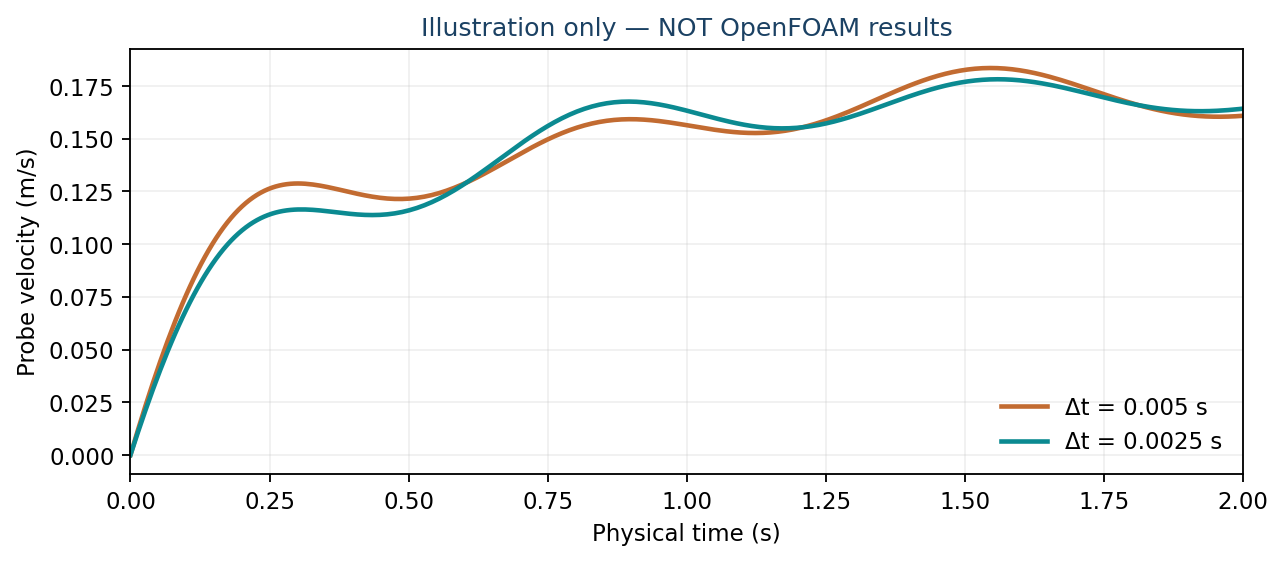
Optional refresher — Sampling theory. Two samples per period merely avoid aliasing under ideal bandwidth-limited assumptions. They are not sufficient to reconstruct the dynamics of a turbulent wake reliably. Time-dependent CFD normally needs many steps per characteristic period and a time-step refinement check.
Deep dive · How OpenFOAM computes the cell Courant number
The value printed in the log is computed cell by cell from the face volumetric fluxes φ_f:
Co_cell = 0.5 · Δt · Σ_f |φ_f| / V_cell

2D square cell, flow along x:   Σ|φ| = 2·|u|·A,  V = A·Δx   →  Co = |u|·Δt/Δx
diagonal flow (u = v):           Co = (|u| + |v|)·Δt/Δx  ≈  1.41·|U|·Δt/Δx
The log reports both the mean and the domain maximum. In the cavity the maximum is not necessarily right under the lid: the lid face is a wall and carries no flux, and the velocity at the centres of the adjacent cells is below 1 m/s. The uniform estimate Co ≈ 1 is thus a reasonable upper bound, not the value you will read: exactly why the guide says to trust the printed maximum.
Deep dive · How much Euler damps: steps per period and retained amplitude
Applying the schemes to a pure oscillation of period P, with N = P/Δt steps per period, gives the fraction of amplitude surviving after one period. Values are computed from scheme theory for the model equation dy/dt = iωy:
| steps per period N | implicit Euler | backward (2nd order) | pure Crank–Nicolson |
|---|---|---|---|
| 10 | 0.19 | 0.82 | 1.00 |
| 20 | 0.39 | 0.96 | 1.00 |
| 50 | 0.68 | 0.997 | 1.00 |
| 100 | 0.82 | ≈ 1.00 | 1.00 |
| 1000 | 0.98 | ≈ 1.00 | 1.00 |
The engineering message is clear: with Euler and 20 steps per period an oscillation loses about 60 % of its amplitude every cycle, so a periodic phenomenon can be killed by the numerical scheme before the physical model does it. Oscillations need many steps per period or a second-order scheme. In the cavity start-up, which is not oscillatory, this damping matters less, but the principle stands: low Courant and stability do not guarantee that the dynamics are preserved.
Deep dive · Diffusion number: why it does not limit the step here
Alongside Courant there is the diffusion number d = ν·Δt/Δx². With ν = 10⁻⁵ m²/s, Δt = 0.005 s and Δx = 0.005 m, d = 0.002: negligible. Even with an effective viscosity ten or a hundred times larger because of the RAS model it stays small. In explicit schemes d > 0.5 causes instability; with OpenFOAM’s implicit scheme diffusion is treated implicitly, but d remains a useful indicator of the temporal resolution of viscous phenomena, for instance in cases with very fine wall meshes where Δx² becomes tiny.
Practical tip · Extracting the Courant history from the log
# maximum Courant over the whole run
grep "^Courant Number" log.foamRun | awk '{print $NF}' | sort -g | tail -1

# complete series to open as a plot
grep "^Courant Number" log.foamRun | awk '{print NR, $4, $NF}' > courant.dat

# alternatively, if available: foamLog splits the log into per-quantity series
foamLog log.foamRun && ls logs/
A maximum Courant that grows during the run signals that the flow is accelerating or that a cell is developing spurious velocities: look at it before the run diverges, not after.
6. Time schemes and pressure–velocity coupling
The official cavity tutorial selects Euler under ddtSchemes: a first-order implicit time discretisation. This differs from steadyState, which discards the temporal derivative. Its fvSolution has a PIMPLE block and pressure-correction settings; the official cavity case uses two correctors. Changing endTime alone does not transform a steady calculation into a transient simulation: the time scheme, solver, and initial conditions must be consistent.
Higher-order schemes may improve accuracy in a later experiment, but only after confirming their support, restrictions, and compatibility with pressure–velocity coupling. In the present exercise keep Euler, the mesh, and the physical model unchanged, varying just one numerical factor at a time.
Deep dive · The available time schemes and when to use them
Syntax in ddtSchemes | Order | Characteristics |
|---|---|---|
default Euler; | 1 | robust and bounded; damps oscillations (see section 5) |
default backward; | 2 | uses two previous time levels; much less dissipative; may produce small unphysical oscillations with large steps |
default CrankNicolson 0.9; | up to 2 | the coefficient between 0 and 1 blends Euler (0) and pure Crank–Nicolson (1); 0.9 is a common compromise between accuracy and robustness |
default steadyState; | — | drops the time derivative: steady calculation |
default localEuler; | — | local per-cell time step: a pseudo-transient to reach a steady state, not a physical transient |
The schemes actually used in your installation can be found with grep -rh "default" --include=fvSchemes "$FOAM_TUTORIALS" | grep -E "Euler|backward|CrankNicolson" | sort | uniq -c. When you change the time scheme, change only that and repeat the step comparison: the second-order scheme should show differences between steps shrinking about four times when deltaT is halved, instead of two.
Deep dive · The PIMPLE block: PISO, PIMPLE and the role of correctors
| Entry | Meaning | Effect on the transient |
|---|---|---|
nOuterCorrectors | outer iterations per step (default 1) | with 1 the algorithm works in PISO mode: accurate when Courant stays around or below 1; larger values resolve the non-linearity within the step and allow larger steps |
nCorrectors | pressure corrections per iteration | in the tutorial 2: each step solves the pressure equation twice |
nNonOrthogonalCorrectors | corrections for non-orthogonal meshes | 0 is right for the cavity’s Cartesian mesh |
momentumPredictor | whether momentum is solved before pressure | usually helpful in convection-dominated cases |
pRefCell / pRefValue | pressure reference | essential in the closed domain (section 2) |
The actual content is read with foamDictionary system/fvSolution -entry PIMPLE. Raising nOuterCorrectors to run at higher Courant is legitimate, but the cost per step grows proportionally: the real gain must be measured on total computing time and accuracy, not on the number of steps alone.
Practical tip · A tidy test matrix
When there is more than one numerical variable to explore, write the matrix first and then run. An example consistent with the guide:
| Case | deltaT [s] | ddtSchemes | nOuterCorrectors | Purpose |
|---|---|---|---|---|
| A1 | 0.005 | Euler | 1 | guide reference |
| A2 | 0.0025 | Euler | 1 | step sensitivity |
| B | 0.00125 | Euler | 1 | third level, observed order |
| D1 | 0.005 | backward | 1 | effect of the scheme at the same step |
| D2 | 0.0025 | backward | 1 | observed order of the scheme |
Each row is a new folder with its own metadata file. Comparing A1 with D2 teaches nothing: two factors change at once.
7. Run both cases and monitor solver logs
chmod +x scripts/run_cases.sh
scripts/run_cases.sh "$HOME/OpenFOAM/guide08_run01"
# In a second SSH session while the run is active:
tail -f "$HOME/OpenFOAM/guide08_run01/cavity_dt005/log.foamRun"
For each case the runner executes blockMesh, checkMesh, and foamRun sequentially, stopping on error. If run logs already exist it refuses to overwrite them. Launch it within tmux for resilience to SSH disconnects (tmux new -s guide08). You do not need to download all field snapshots while the simulation runs; logs and probe output are much smaller.
Find the lines for physical time, residuals, Courant number, and execution time. A small Courant number does not alone prove correctness: check conservation, the evolution of meaningful quantities, and the absence of solver failures. Fields settling to a constant value are not automatically physically validated.
Deep dive · The run_cases.sh script, full text and commentary
#!/usr/bin/env bash
# Run prepared cavity cases sequentially. Do not remove existing results.
# License: GNU GPL v3 or later.
set -Eeuo pipefail
if [[ $# -ne 1 ]]; then
    echo 'Usage: ./run_cases.sh /path/to/new/guide08_cases' >&2
    exit 2
fi
root=$(realpath -- "$1")
command -v blockMesh >/dev/null || { echo 'Source the OpenFOAM 14 environment first' >&2; exit 1; }
command -v checkMesh >/dev/null || exit 1
command -v foamRun >/dev/null || exit 1
for name in cavity_dt005 cavity_dt0025; do
    dir="$root/$name"
    [[ -f "$dir/system/controlDict" ]] || { echo "Missing case $dir" >&2; exit 1; }
    [[ ! -e "$dir/log.blockMesh" && ! -e "$dir/log.checkMesh" && ! -e "$dir/log.foamRun" ]] || {
        echo "Logs already exist in $dir. Existing runs are never overwritten." >&2
        exit 1
    }
    echo "Running $name"
    (cd "$dir" && blockMesh > log.blockMesh 2>&1 && checkMesh > log.checkMesh 2>&1 && foamRun > log.foamRun 2>&1)
    echo "Done: $dir"
done
set -Eeuo pipefail: the script stops at the first failed command, the first undefined variable and the first error inside a pipeline;command -v: checks up front that the OpenFOAM environment is loaded, instead of finding out halfway;- the subshell
( cd "$dir" && ... )changes folder only for that case: an error does not leave the script in the wrong folder; - the three checks on existing logs prevent mixing an old run with a new one in the same folder.
Deep dive · How to read one time step in the log
Typical structure of one step with this configuration (illustrative values, not output of a run):
Courant Number mean: 0.21 max: 0.83
Time = 0.5s

smoothSolver:  Solving for Ux, Initial residual = 0.0021, Final residual = 4.1e-07, No Iterations 3
smoothSolver:  Solving for Uy, Initial residual = 0.0035, Final residual = 6.8e-07, No Iterations 3
DICPCG:  Solving for p, Initial residual = 0.012, Final residual = 5.9e-07, No Iterations 21
time step continuity errors : sum local = 3.1e-09, global = 2.2e-20, cumulative = 1.4e-18
DICPCG:  Solving for p, Initial residual = 0.0031, Final residual = 8.7e-07, No Iterations 18
time step continuity errors : sum local = 8.4e-10, global = -1.3e-20, cumulative = 1.4e-18
smoothSolver:  Solving for epsilon, Initial residual = 0.0018, Final residual = 2.2e-07, No Iterations 3
smoothSolver:  Solving for k, Initial residual = 0.0024, Final residual = 3.0e-07, No Iterations 3
ExecutionTime = 1.92 s ClockTime = 2 s- the Courant line precedes the time line it refers to;
Uzis not solved: withemptypatches the case is 2D;- in a transient the initial residual measures how much the solution changes in one step, not the distance from a steady state: an initial residual falling towards zero means the field is settling;
- two pressure lines and two continuity lines correspond to
nCorrectors 2; - a
sum localcontinuity error growing by orders of magnitude is an earlier warning sign than the residuals.
Deep dive · An additional script to summarise the log
This script, Python standard library only, reads a log.foamRun and prints steps, physical interval, maximum Courant and when it occurred, cost per step, continuity error, number of warnings and fatal errors; optionally it writes the per-step table to CSV, never overwriting. It accepts both Time = 0.5 and Time = 0.5s. It was tried on a sample log with the structure shown above.
#!/usr/bin/env python3
"""Summarise a transient OpenFOAM solver log: physical time, Courant, cost, continuity.

Usage: log_summary.py log.foamRun [--csv courant.csv]
Tolerant of "Time = 0.5" and "Time = 0.5s" styles. Standard library only.
License: GNU GPL v3 or later.
"""
from __future__ import annotations
import argparse, csv, re
from pathlib import Path

NUM = r"([-+]?\d*\.?\d+(?:[eE][-+]?\d+)?)"
R_TIME = re.compile(r"^Time = " + NUM + r"\s*s?\s*$")
R_CO = re.compile(r"^Courant Number mean: " + NUM + r" max: " + NUM)
R_EXE = re.compile(r"^ExecutionTime = " + NUM + r" s\s+ClockTime = " + NUM + r" s")
R_CONT = re.compile(r"continuity errors : sum local = " + NUM)


def main() -> None:
    ap = argparse.ArgumentParser(description=__doc__, formatter_class=argparse.RawDescriptionHelpFormatter)
    ap.add_argument("log", type=Path)
    ap.add_argument("--csv", type=Path, help="write per-step table (never overwrites)")
    a = ap.parse_args()
    rows, cur, warn, fatal, pending = [], None, 0, 0, (None, None)
    for line in a.log.read_text(encoding="utf-8", errors="replace").splitlines():
        s = line.strip()
        if m := R_TIME.match(s):
            # the solver prints the Courant line just BEFORE the "Time =" line it refers to
            cur = {"time_s": float(m[1]), "co_mean": pending[0], "co_max": pending[1],
                   "exec_s": None, "clock_s": None, "cont_local": None}
            rows.append(cur)
            pending = (None, None)
        elif m := R_CO.match(s):
            pending = (float(m[1]), float(m[2]))
        elif cur is not None and (m := R_EXE.match(s)):
            cur["exec_s"], cur["clock_s"] = float(m[1]), float(m[2])
        elif cur is not None and (m := R_CONT.search(s)):
            cur["cont_local"] = float(m[1])   # last corrector of the step wins
        if "FOAM Warning" in s or s.startswith("--> FOAM Warning"):
            warn += 1
        if "FOAM FATAL" in s:
            fatal += 1
    if not rows:
        ap.error("no 'Time = ...' lines found: is this a solver log?")
    co = [(r["co_max"], r["time_s"]) for r in rows if r["co_max"] is not None]
    last = next((r for r in reversed(rows) if r["exec_s"] is not None), None)
    print(f"steps: {len(rows)}   physical time: {rows[0]['time_s']:g} -> {rows[-1]['time_s']:g} s")
    if co:
        cmax, tmax = max(co)
        print(f"Courant max: {cmax:.4g} at t = {tmax:g} s   final step max: {co[-1][0]:.4g}")
    if last:
        print(f"ExecutionTime: {last['exec_s']:g} s   ClockTime: {last['clock_s']:g} s   "
              f"CPU per step: {last['exec_s'] / len(rows):.4g} s")
    cont = [r["cont_local"] for r in rows if r["cont_local"] is not None]
    if cont:
        print(f"continuity 'sum local': max {max(cont):.3g}, final {cont[-1]:.3g}")
    print(f"warnings: {warn}   fatal errors: {fatal}")
    if a.csv:
        if a.csv.exists():
            ap.error(f"refusing to overwrite {a.csv}")
        with a.csv.open("w", newline="", encoding="utf-8") as f:
            w = csv.DictWriter(f, fieldnames=list(rows[0]))
            w.writeheader(); w.writerows(rows)
        print(f"wrote {len(rows)} rows to {a.csv}")


if __name__ == "__main__":
    main()
# on the server or on Windows, after downloading the logs
python3 log_summary.py cavity_dt005/log.foamRun --csv dt005_steps.csv
python3 log_summary.py cavity_dt0025/log.foamRun --csv dt0025_steps.csvPractical tip · tmux in four commands
| Action | Command |
|---|---|
| open a named session | tmux new -s guide08 |
| detach leaving the run active | Ctrl+b, then d |
| list sessions | tmux ls |
| reattach, even from another PC | tmux attach -t guide08 |
If tmux is not installed and you cannot install it, the minimal alternative is nohup scripts/run_cases.sh "$HOME/OpenFOAM/guide08_run01" > run.out 2>&1 &. On shared servers put nice -n 10 in front of the command so as not to penalise other users.
8. Internal velocity probe
The package adds a probes function object in system/controlDict to record U at (0.05 0.05 0.005), inside the cavity. The key part reads:
functions
{
    centreVelocity
    {
        type                probes;
        libs                (sampling);
        fields              (U);
        probeLocations      ((0.05 0.05 0.005));
        executeControl      timeStep;
        executeInterval     1;
        writeControl        timeStep;
        writeInterval       1;
    }
}
The time series is normally saved at postProcessing/centreVelocity/0/U. Restarts can create additional directories. extract_probes.py reads all of them, letting the latest file override samples at duplicate times. A point probe is not a spatial average or a domain-wide maximum.
Deep dive · Where exactly the probe falls in the 20 × 20 mesh
With 5 mm cells the internal faces lie at x, y = 0, 5, 10, …, 100 mm. The point (0.05, 0.05) therefore coincides with the edge shared by four cells, whose centres are at (47.5 or 52.5, 47.5 or 52.5) mm. The probes function object returns the value of the cell containing the point: which of the four is chosen depends on the search algorithm. The recorded value is thus that of a cell whose centre is about 3.5 mm from the nominal point.
For a comparison between two time steps on the same mesh this does not matter, since the chosen cell is the same. It does matter when comparing different meshes or experimental data: then a point inside a cell is preferable, for example (0.0525 0.0525 0.005), or interpolated sampling, stating the choice.
Deep dive · The probe file format and the extract_probes.py script
The postProcessing/centreVelocity/0/U file has a commented header and one line per step, with the time and the vector in brackets (typical structure):
# Probe 0 (0.05 0.05 0.005)
#       Probe             0
#        Time
0.005       (0.000123 -1.2e-05 0)
0.01        (0.000241 -2.3e-05 0)
...
The package script, full text:
#!/usr/bin/env python3
"""Extract the first vector probe from OpenFOAM U time-history files to CSV.

Reads files under postProcessing/centreVelocity/<startTime>/U, including restarts.
License: GNU GPL v3 or later.
"""
from __future__ import annotations
import argparse
import csv
import math
from pathlib import Path
import re

RECORD = re.compile(r"^\s*([+\-\d.eE]+)\s+\(\s*([+\-\d.eE]+)\s+([+\-\d.eE]+)\s+([+\-\d.eE]+)\s*\)")


def parse_case(case: Path) -> list[tuple[float, float, float, float, float]]:
    paths = sorted((case / "postProcessing/centreVelocity").glob("*/U"),
                   key=lambda p: float(p.parent.name))
    if not paths:
        raise FileNotFoundError(f"No probe U file below {case}/postProcessing/centreVelocity")
    # Later restart files override earlier samples at the same physical time.
    samples: dict[float, tuple[float, float, float, float, float]] = {}
    for path in paths:
        for line in path.read_text(encoding="utf-8").splitlines():
            if not line.strip() or line.lstrip().startswith("#"):
                continue
            match = RECORD.match(line)
            if not match:
                raise ValueError(f"Unsupported probe record in {path}: {line[:120]}")
            time, ux, uy, uz = map(float, match.groups())
            if not all(math.isfinite(x) for x in (time, ux, uy, uz)):
                raise ValueError(f"Nonfinite probe data in {path}")
            samples[time] = (time, ux, uy, uz, math.sqrt(ux**2 + uy**2 + uz**2))
    return [samples[t] for t in sorted(samples)]


def main() -> None:
    parser = argparse.ArgumentParser(description=__doc__)
    parser.add_argument("case", type=Path)
    parser.add_argument("--out", type=Path, required=True)
    args = parser.parse_args()
    if args.out.exists():
        parser.error(f"Refusing to overwrite: {args.out}")
    data = parse_case(args.case)
    args.out.parent.mkdir(parents=True, exist_ok=True)
    with args.out.open("w", newline="", encoding="utf-8") as file:
        writer = csv.writer(file)
        writer.writerow(("time_s", "Ux_m_s", "Uy_m_s", "Uz_m_s", "U_magnitude_m_s"))
        writer.writerows(data)
    print(f"Wrote {len(data)} samples to {args.out}")


if __name__ == "__main__":
    main()
The RECORD expression accepts only “time (ux uy uz)” lines for the first probe: if you add more points or scalar fields the format changes and the script stops with an explicit message instead of producing wrong data. That is the correct behaviour: a clear error is better than a plausible but false CSV. Restart folders are sorted by time and, for duplicate times, the latest file wins.
Practical tip · Decide on probes before the run, not after
A probe records every step; reconstructing it afterwards from saved fields would give only one value every 0.05 s. If you need more points, add them before launching, in a fresh copy of the case. Example with the centre, the region under the lid and the region near the bottom:
probeLocations
(
    (0.0525 0.0525 0.005)   // centre, inside a cell
    (0.0525 0.0925 0.005)   // under the lid
    (0.0525 0.0075 0.005)   // near the bottom
);
With several probes the file holds several vectors per line: extract_probes.py as it stands does not accept that and must be adapted, for example by reading every bracket group on the line. Leave the original script unchanged and save the modified version under a new name.
9. Retrieve data on Windows and compare curves
With FileZilla, download postProcessing/centreVelocity and log.foamRun from each case. Then from Windows PowerShell:
py scripts\extract_probes.py cavity_dt005 --out cavity_coarse.csv
py scripts\extract_probes.py cavity_dt0025 --out cavity_fine.csv
py scripts\compare_probes.py cavity_coarse.csv cavity_fine.csv
The directory names here refer to the downloaded local case folders. Adjust them to match your Windows paths. Output CSV columns are time_s, Ux_m_s, Uy_m_s, Uz_m_s, and U_magnitude_m_s. Open them in Excel or another plotting tool. The comparison uses the magnitude of the vector at common physical times, with temporal interpolation when required, and reports a descriptive RMSE.
Key limitation: two time-step sizes cannot establish a convergence order or a temporal GCI. Estimating temporal discretisation uncertainty requires a suitable refinement design (preferably three or more time steps), consistent spatial accuracy, care with start-up transients, and the same physical quantity and physical times.
Deep dive · The compare_probes.py script and what the RMSE measures
#!/usr/bin/env python3
"""Compare two probe CSV series by interpolation over their overlapping times.

The error is descriptive only; it is not a GCI or proof of temporal convergence.
License: GNU GPL v3 or later.
"""
from __future__ import annotations
import argparse
import bisect
import csv
import math
from pathlib import Path


def load_csv(path: Path) -> list[tuple[float, float]]:
    with path.open(newline="", encoding="utf-8") as f:
        points = [(float(row["time_s"]), float(row["U_magnitude_m_s"]))
                  for row in csv.DictReader(f)]
    if len(points) < 2 or any(not (math.isfinite(t) and math.isfinite(v)) for t, v in points):
        raise ValueError(f"Insufficient or invalid data: {path}")
    if any(b[0] <= a[0] for a, b in zip(points, points[1:])):
        raise ValueError(f"Times are not strictly increasing in {path}")
    return points


def interpolate(points: list[tuple[float, float]], at: float) -> float:
    times = [a for a, _ in points]
    idx = bisect.bisect_left(times, at)
    if idx < len(points) and abs(points[idx][0] - at) < 1e-11:
        return points[idx][1]
    if idx == 0 or idx == len(points):
        raise ValueError("Extrapolation is not allowed")
    t0, y0 = points[idx-1]
    t1, y1 = points[idx]
    return y0 + (y1-y0)*(at-t0)/(t1-t0)


def main() -> None:
    parser = argparse.ArgumentParser(description=__doc__)
    parser.add_argument("coarse", type=Path)
    parser.add_argument("fine", type=Path)
    parser.add_argument("--skip-before", type=float, default=0.0,
                        help="Ignore startup interval before this physical time")
    args = parser.parse_args()
    coarse, fine = load_csv(args.coarse), load_csv(args.fine)
    low = max(coarse[0][0], fine[0][0], args.skip_before)
    high = min(coarse[-1][0], fine[-1][0])
    data = [(t, y, interpolate(fine, t)) for t, y in coarse if low <= t <= high]
    if not data:
        parser.error("No overlapping time samples")
    errors = [a-b for _, a, b in data]
    rmse = math.sqrt(sum(x*x for x in errors)/len(errors))
    print(f"Overlap: {data[0][0]:.6g} to {data[-1][0]:.6g} s; samples={len(data)}")
    print(f"RMSE of |U|: {rmse:.8g} m/s")
    print(f"Final paired difference: {errors[-1]:+.8g} m/s")
    print("This two-resolution comparison alone does not quantify discretization uncertainty.")


if __name__ == "__main__":
    main()
The script takes the coarse-case times and interpolates the fine case onto them; since 0.005 is a multiple of 0.0025 the times coincide and interpolation is effectively exact. The RMSE weights the whole interval equally, start-up included, where differences are usually larger: the --skip-before option lets you separate the two phases. Run on the package’s synthetic CSV files, the script prints:
> py scripts\compare_probes.py samples\synthetic_coarse.csv samples\synthetic_fine.csv
Overlap: 0 to 2 s; samples=101
RMSE of |U|: 0.0060293592 m/s
Final paired difference: -0.00256612 m/s
This two-resolution comparison alone does not quantify discretization uncertainty.

> py scripts\compare_probes.py samples\synthetic_coarse.csv samples\synthetic_fine.csv --skip-before 0.5
Overlap: 0.5 to 2 s; samples=76
RMSE of |U|: 0.0050828457 m/s
Final paired difference: -0.00256612 m/s
If you get the same numbers on the synthetic files, your Python installation and the scripts work: that is the check to make before applying them to real data. Finally, remember that the magnitude |U| hides sign changes of the components: in the cavity, where the vortex centre moves during start-up, it is worth comparing Ux_m_s and Uy_m_s as well.
Deep dive · The package’s two synthetic CSV files, full text
They are artificially constructed data, not OpenFOAM results: they only serve to check the extraction–comparison chain. Sampling step 0.02 s, 101 data rows from 0 to 2 s, only the x component non-zero.
samples/synthetic_coarse.csv
time_s,Ux_m_s,Uy_m_s,Uz_m_s,U_magnitude_m_s
0.00000,0.00000000,0,0,0.00000000
0.02000,0.01593750,0,0,0.01593750
0.04000,0.03097326,0,0,0.03097326
0.06000,0.04502978,0,0,0.04502978
0.08000,0.05804139,0,0,0.05804139
0.10000,0.06995605,0,0,0.06995605
0.12000,0.08073670,0,0,0.08073670
0.14000,0.09036220,0,0,0.09036220
0.16000,0.09882777,0,0,0.09882777
0.18000,0.10614507,0,0,0.10614507
0.20000,0.11234175,0,0,0.11234175
0.22000,0.11746075,0,0,0.11746075
0.24000,0.12155910,0,0,0.12155910
0.26000,0.12470654,0,0,0.12470654
0.28000,0.12698378,0,0,0.12698378
0.30000,0.12848062,0,0,0.12848062
0.32000,0.12929389,0,0,0.12929389
0.34000,0.12952532,0,0,0.12952532
0.36000,0.12927931,0,0,0.12927931
0.38000,0.12866080,0,0,0.12866080
0.40000,0.12777315,0,0,0.12777315
0.42000,0.12671618,0,0,0.12671618
0.44000,0.12558431,0,0,0.12558431
0.46000,0.12446498,0,0,0.12446498
0.48000,0.12343723,0,0,0.12343723
0.50000,0.12257055,0,0,0.12257055
0.52000,0.12192404,0,0,0.12192404
0.54000,0.12154575,0,0,0.12154575
0.56000,0.12147239,0,0,0.12147239
0.58000,0.12172931,0,0,0.12172931
0.60000,0.12233063,0,0,0.12233063
0.62000,0.12327978,0,0,0.12327978
0.64000,0.12457009,0,0,0.12457009
0.66000,0.12618575,0,0,0.12618575
0.68000,0.12810274,0,0,0.12810274
0.70000,0.13029006,0,0,0.13029006
0.72000,0.13271095,0,0,0.13271095
0.74000,0.13532422,0,0,0.13532422
0.76000,0.13808557,0,0,0.13808557
0.78000,0.14094891,0,0,0.14094891
0.80000,0.14386769,0,0,0.14386769
0.82000,0.14679605,0,0,0.14679605
0.84000,0.14968999,0,0,0.14968999
0.86000,0.15250834,0,0,0.15250834
0.88000,0.15521364,0,0,0.15521364
0.90000,0.15777284,0,0,0.15777284
0.92000,0.16015784,0,0,0.16015784
0.94000,0.16234590,0,0,0.16234590
0.96000,0.16431984,0,0,0.16431984
0.98000,0.16606813,0,0,0.16606813
1.00000,0.16758478,0,0,0.16758478
1.02000,0.16886910,0,0,0.16886910
1.04000,0.16992538,0,0,0.16992538
1.06000,0.17076239,0,0,0.17076239
1.08000,0.17139285,0,0,0.17139285
1.10000,0.17183280,0,0,0.17183280
1.12000,0.17210092,0,0,0.17210092
1.14000,0.17221787,0,0,0.17221787
1.16000,0.17220552,0,0,0.17220552
1.18000,0.17208633,0,0,0.17208633
1.20000,0.17188265,0,0,0.17188265
1.22000,0.17161613,0,0,0.17161613
1.24000,0.17130719,0,0,0.17130719
1.26000,0.17097450,0,0,0.17097450
1.28000,0.17063464,0,0,0.17063464
1.30000,0.17030179,0,0,0.17030179
1.32000,0.16998752,0,0,0.16998752
1.34000,0.16970070,0,0,0.16970070
1.36000,0.16944746,0,0,0.16944746
1.38000,0.16923126,0,0,0.16923126
1.40000,0.16905306,0,0,0.16905306
1.42000,0.16891153,0,0,0.16891153
1.44000,0.16880334,0,0,0.16880334
1.46000,0.16872345,0,0,0.16872345
1.48000,0.16866556,0,0,0.16866556
1.50000,0.16862241,0,0,0.16862241
1.52000,0.16858623,0,0,0.16858623
1.54000,0.16854915,0,0,0.16854915
1.56000,0.16850352,0,0,0.16850352
1.58000,0.16844234,0,0,0.16844234
1.60000,0.16835953,0,0,0.16835953
1.62000,0.16825020,0,0,0.16825020
1.64000,0.16811090,0,0,0.16811090
1.66000,0.16793976,0,0,0.16793976
1.68000,0.16773660,0,0,0.16773660
1.70000,0.16750296,0,0,0.16750296
1.72000,0.16724206,0,0,0.16724206
1.74000,0.16695877,0,0,0.16695877
1.76000,0.16665941,0,0,0.16665941
1.78000,0.16635160,0,0,0.16635160
1.80000,0.16604399,0,0,0.16604399
1.82000,0.16574604,0,0,0.16574604
1.84000,0.16546768,0,0,0.16546768
1.86000,0.16521902,0,0,0.16521902
1.88000,0.16501002,0,0,0.16501002
1.90000,0.16485018,0,0,0.16485018
1.92000,0.16474822,0,0,0.16474822
1.94000,0.16471181,0,0,0.16471181
1.96000,0.16474729,0,0,0.16474729
1.98000,0.16485947,0,0,0.16485947
2.00000,0.16505143,0,0,0.16505143
samples/synthetic_fine.csv
time_s,Ux_m_s,Uy_m_s,Uz_m_s,U_magnitude_m_s
0.00000,0.00000000,0,0,0.00000000
0.02000,0.01439672,0,0,0.01439672
0.04000,0.02794431,0,0,0.02794431
0.06000,0.04058556,0,0,0.04058556
0.08000,0.05227365,0,0,0.05227365
0.10000,0.06297369,0,0,0.06297369
0.12000,0.07266389,0,0,0.07266389
0.14000,0.08133629,0,0,0.08133629
0.16000,0.08899705,0,0,0.08899705
0.18000,0.09566643,0,0,0.09566643
0.20000,0.10137828,0,0,0.10137828
0.22000,0.10617925,0,0,0.10617925
0.24000,0.11012762,0,0,0.11012762
0.26000,0.11329196,0,0,0.11329196
0.28000,0.11574944,0,0,0.11574944
0.30000,0.11758404,0,0,0.11758404
0.32000,0.11888462,0,0,0.11888462
0.34000,0.11974297,0,0,0.11974297
0.36000,0.12025172,0,0,0.12025172
0.38000,0.12050248,0,0,0.12050248
0.40000,0.12058386,0,0,0.12058386
0.42000,0.12057981,0,0,0.12057981
0.44000,0.12056801,0,0,0.12056801
0.46000,0.12061849,0,0,0.12061849
0.48000,0.12079254,0,0,0.12079254
0.50000,0.12114180,0,0,0.12114180
0.52000,0.12170762,0,0,0.12170762
0.54000,0.12252076,0,0,0.12252076
0.56000,0.12360127,0,0,0.12360127
0.58000,0.12495867,0,0,0.12495867
0.60000,0.12659238,0,0,0.12659238
0.62000,0.12849237,0,0,0.12849237
0.64000,0.13063996,0,0,0.13063996
0.66000,0.13300888,0,0,0.13300888
0.68000,0.13556639,0,0,0.13556639
0.70000,0.13827452,0,0,0.13827452
0.72000,0.14109143,0,0,0.14109143
0.74000,0.14397270,0,0,0.14397270
0.76000,0.14687274,0,0,0.14687274
0.78000,0.14974604,0,0,0.14974604
0.80000,0.15254843,0,0,0.15254843
0.82000,0.15523823,0,0,0.15523823
0.84000,0.15777730,0,0,0.15777730
0.86000,0.16013184,0,0,0.16013184
0.88000,0.16227321,0,0,0.16227321
0.90000,0.16417841,0,0,0.16417841
0.92000,0.16583052,0,0,0.16583052
0.94000,0.16721886,0,0,0.16721886
0.96000,0.16833905,0,0,0.16833905
0.98000,0.16919287,0,0,0.16919287
1.00000,0.16978794,0,0,0.16978794
1.02000,0.17013735,0,0,0.17013735
1.04000,0.17025904,0,0,0.17025904
1.06000,0.17017519,0,0,0.17017519
1.08000,0.16991144,0,0,0.16991144
1.10000,0.16949613,0,0,0.16949613
1.12000,0.16895943,0,0,0.16895943
1.14000,0.16833254,0,0,0.16833254
1.16000,0.16764679,0,0,0.16764679
1.18000,0.16693289,0,0,0.16693289
1.20000,0.16622018,0,0,0.16622018
1.22000,0.16553591,0,0,0.16553591
1.24000,0.16490466,0,0,0.16490466
1.26000,0.16434784,0,0,0.16434784
1.28000,0.16388332,0,0,0.16388332
1.30000,0.16352508,0,0,0.16352508
1.32000,0.16328309,0,0,0.16328309
1.34000,0.16316325,0,0,0.16316325
1.36000,0.16316742,0,0,0.16316742
1.38000,0.16329358,0,0,0.16329358
1.40000,0.16353610,0,0,0.16353610
1.42000,0.16388607,0,0,0.16388607
1.44000,0.16433170,0,0,0.16433170
1.46000,0.16485879,0,0,0.16485879
1.48000,0.16545126,0,0,0.16545126
1.50000,0.16609169,0,0,0.16609169
1.52000,0.16676184,0,0,0.16676184
1.54000,0.16744326,0,0,0.16744326
1.56000,0.16811776,0,0,0.16811776
1.58000,0.16876799,0,0,0.16876799
1.60000,0.16937782,0,0,0.16937782
1.62000,0.16993282,0,0,0.16993282
1.64000,0.17042057,0,0,0.17042057
1.66000,0.17083095,0,0,0.17083095
1.68000,0.17115634,0,0,0.17115634
1.70000,0.17139174,0,0,0.17139174
1.72000,0.17153484,0,0,0.17153484
1.74000,0.17158600,0,0,0.17158600
1.76000,0.17154811,0,0,0.17154811
1.78000,0.17142650,0,0,0.17142650
1.80000,0.17122864,0,0,0.17122864
1.82000,0.17096392,0,0,0.17096392
1.84000,0.17064332,0,0,0.17064332
1.86000,0.17027904,0,0,0.17027904
1.88000,0.16988416,0,0,0.16988416
1.90000,0.16947223,0,0,0.16947223
1.92000,0.16905689,0,0,0.16905689
1.94000,0.16865153,0,0,0.16865153
1.96000,0.16826889,0,0,0.16826889
1.98000,0.16792072,0,0,0.16792072
2.00000,0.16761755,0,0,0.16761755
Deep dive · With three steps: observed order and Richardson extrapolation
With three levels at constant ratio r = 2 (Δt = 0.005, 0.0025, 0.00125 s) and values f₃ (coarse), f₂, f₁ (fine) of the same quantity at the same physical time:
p_obs  = ln[ (f₃ − f₂) / (f₂ − f₁) ] / ln r
f_ext  = f₁ + (f₁ − f₂) / (r^p_obs − 1)
estimated error of the fine case ≈ |f₁ − f_ext|

for Euler in the asymptotic range p_obs ≈ 1; if (f₃ − f₂) and (f₂ − f₁) differ in sign
convergence is not monotonic and extrapolation must not be used
The following script, standard library only, applies these formulas to the three CSV files produced by extract_probes.py at the chosen instants:
#!/usr/bin/env python3
"""Three-level temporal refinement check on probe CSV files (time_s, U_magnitude_m_s).

Usage: richardson_time.py coarse.csv medium.csv fine.csv [--ratio 2] [--times 0.5 1.0 1.5 2.0]
Prints, at each requested time, the observed order p and a Richardson estimate.
Standard library only. License: GNU GPL v3 or later.
"""
from __future__ import annotations
import argparse, bisect, csv, math
from pathlib import Path


def load(path: Path) -> list[tuple[float, float]]:
    with path.open(newline="", encoding="utf-8") as f:
        pts = [(float(r["time_s"]), float(r["U_magnitude_m_s"])) for r in csv.DictReader(f)]
    if len(pts) < 2 or any(b[0] <= a[0] for a, b in zip(pts, pts[1:])):
        raise ValueError(f"Need at least two strictly increasing times in {path}")
    return pts


def at(pts: list[tuple[float, float]], t: float) -> float:
    ts = [a for a, _ in pts]
    i = bisect.bisect_left(ts, t - 1e-11)
    if i < len(pts) and abs(pts[i][0] - t) < 1e-11:
        return pts[i][1]
    if i == 0 or i == len(pts):
        raise ValueError(f"time {t} outside the series (no extrapolation)")
    (t0, y0), (t1, y1) = pts[i - 1], pts[i]
    return y0 + (y1 - y0) * (t - t0) / (t1 - t0)


def main() -> None:
    ap = argparse.ArgumentParser(description=__doc__, formatter_class=argparse.RawDescriptionHelpFormatter)
    ap.add_argument("coarse", type=Path); ap.add_argument("medium", type=Path); ap.add_argument("fine", type=Path)
    ap.add_argument("--ratio", type=float, default=2.0, help="time-step ratio between levels")
    ap.add_argument("--times", type=float, nargs="+", default=[0.5, 1.0, 1.5, 2.0])
    a = ap.parse_args()
    c, m, f = load(a.coarse), load(a.medium), load(a.fine)
    r = a.ratio
    print(f"{'t [s]':>8} {'f_coarse':>12} {'f_medium':>12} {'f_fine':>12} {'p_obs':>7} {'f_extrap':>12} {'err_fine %':>10}")
    for t in a.times:
        f3, f2, f1 = at(c, t), at(m, t), at(f, t)
        e32, e21 = f3 - f2, f2 - f1
        if e21 == 0 or e32 == 0 or (e32 / e21) <= 0:
            print(f"{t:8.4g} {f3:12.6g} {f2:12.6g} {f1:12.6g}   non-monotone: no order/extrapolation")
            continue
        p = math.log(e32 / e21) / math.log(r)
        fx = f1 + (f1 - f2) / (r ** p - 1)
        err = 100 * abs(f1 - fx) / abs(fx) if fx else float("nan")
        print(f"{t:8.4g} {f3:12.6g} {f2:12.6g} {f1:12.6g} {p:7.3f} {fx:12.6g} {err:10.3g}")
    print("p close to 1 is expected for Euler in the asymptotic range; far from 1 means the levels are not asymptotic.")


if __name__ == "__main__":
    main()
Check of the script on a problem with a known solution: the equation du/dt = (1 − u)/τ with τ = 0.3 s, integrated with implicit Euler at the three steps, has exact solution u(0.5) = 0.811124. The script returns:
   t [s]     f_coarse     f_medium       f_fine   p_obs     f_extrap err_fine %
     0.5     0.808512     0.809815     0.810469   0.996     0.811127     0.0811
       1     0.963332      0.96383     0.964078   1.003     0.964325     0.0256
     1.5     0.992979     0.993121     0.993192   1.010     0.993261    0.00702
       2     0.998655     0.998692      0.99871   1.018     0.998727    0.00175
The observed order is close to 1 as expected for Euler and the extrapolated value matches the exact one to the fourth significant digit. On CFD data the behaviour will be less clean: iterative and spatial errors add to the temporal one, which is why the guide asks you to keep mesh and model fixed.
Practical tip · Opening the CSV files in Excel with non-English regional settings
The CSV files use a dot as decimal separator and a comma as column separator. With Excel set to a locale that uses a decimal comma, a double click can turn numbers into text or dates. Use Data → From Text/CSV instead, choose “Delimiter: comma” and, under Transform Data, set the columns as decimal numbers with locale “English (United States)”. Do not then save over the original CSV: save a separate .xlsx file.
10. ParaView Windows + pvserver: make an animation
Use the client/server connection already explained in Guide 1. Run pvserver on Linux and connect using the compatible matching ParaView Windows release. Open the case using the server’s available OpenFOAM reader (.foam marker if necessary). Check the time toolbar for saved instants: ideally 0, 0.05, 0.10, …, 2 s if the run has completed and all snapshots were written.
- Display
Uor its magnitude; use a Slice when needed. - Set a fixed colour legend, identical for all frames and both runs. Automatically rescaling the data range per frame can make comparisons misleading.
- In Time Manager, select Snap To TimeSteps to play actual stored solution states rather than an invented interpolation sequence.
- Lock the camera, keep a comparable viewpoint, and display physical simulation time.
- Use File → Save Animation to export a PNG image sequence (a robust default), or a movie supported by your installed encoders. Frame rate only controls playback.
- Save the application state using File → Save State (
.pvsm) and record server paths and release compatibility.
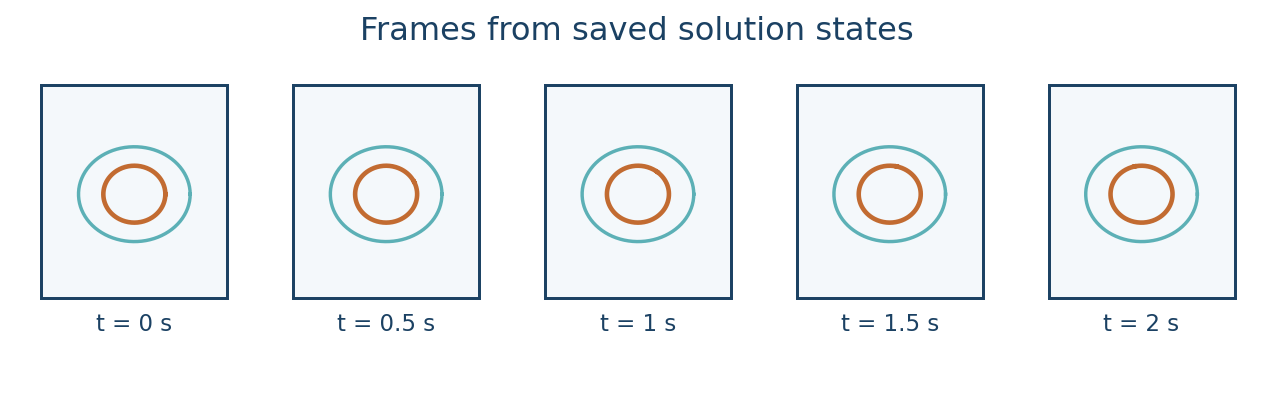
If the reader does not show recent states, refresh it. With pvserver, the bulk data remains on the Linux host and does not need to be transferred wholesale to Windows. For a quantitative side-by-side animation use common times, camera settings, and colour limits.
Deep dive · Reminder of the pvserver connection
# 1) on the Linux server (SSH session, preferably inside tmux)
cd "$HOME/OpenFOAM/guide08_run01/cavity_dt005"
touch cavity_dt005.foam
pvserver --server-port=11111

# 2) on Windows, in PowerShell: SSH tunnel to the server port
ssh -L 11111:localhost:11111 user@server.example.org

# 3) in ParaView on Windows: File → Connect → localhost:11111,
#    then File → Open → cavity_dt005.foam (file on the server)
The Windows client and pvserver must run the same ParaView version: with different versions the connection is refused or behaves unpredictably. The .foam file is empty: it only lets the OpenFOAM reader recognise the folder.
Deep dive · Fixed colour scale, on-screen time and playback modes
- Fixed scale: in the colour map editor use Rescale to Custom Range (for example 0–1 m/s, the lid speed) and set Automatic Rescale Range Mode to Never; otherwise ParaView may re-fit the range during playback;
- on-screen time: the Annotate Time Filter applied to the reader shows the physical time of the data; format it with few digits and the unit, e.g. “t = {time:.2f} s”;
- modes: Snap To TimeSteps shows saved instants only; Sequence generates a chosen number of frames, and if there are more frames than saved instants some frames repeat the same data; Real Time ties duration to wall-clock time and is of no use for analysis.
| Saved instants | FPS | Video length | One second of video equals |
|---|---|---|---|
| 41 | 10 | 4.1 s | 0.5 s of physical time |
| 41 | 5 | 8.2 s | 0.25 s of physical time |
| 41 | 25 | 1.6 s | 1.25 s of physical time |
Deep dive · Reproducible animation with a pvpython script
Settings made with the mouse are easily lost; a script fixes them. Starting template to adapt (property names can vary between versions: the safest way to get the exact ones for yours is Tools → Start Trace, repeat the operations by hand and copy the generated code):
# pvpython anim_cavity.py   (or ParaView's Python Shell)
from paraview.simple import *

case = "cavity_dt005"
r = OpenFOAMReader(FileName=case + "/" + case + ".foam")
r.MeshRegions = ["internalMesh"]
r.CellArrays = ["U"]
r.UpdatePipelineInformation()

v = GetActiveViewOrCreate("RenderView")
d = Show(r, v)
ColorBy(d, ("POINTS", "U", "Magnitude"))
lut = GetColorTransferFunction("U")
lut.AutomaticRescaleRangeMode = "Never"
lut.RescaleTransferFunction(0.0, 1.0)          # fixed 0-1 m/s scale
d.SetScalarBarVisibility(v, True)

t = AnnotateTimeFilter(r)
t.Format = "t = {time:.2f} s"
Show(t, v)

v.ViewSize = [1280, 720]
v.CameraPosition = [0.05, 0.05, 0.3]
v.CameraFocalPoint = [0.05, 0.05, 0.005]
v.CameraViewUp = [0, 1, 0]

scene = GetAnimationScene()
scene.PlayMode = "Snap To TimeSteps"
SaveAnimation("frames/" + case + ".png", v, ImageResolution=[1280, 720])
Using the same script for both cases, changing only case, camera, scale and resolution are identical by construction: the most reliable way to satisfy exercise C. Create the frames folder first and check it holds no images from previous attempts.
Practical tip · From the PNG sequence to a video with ffmpeg
ffmpeg -framerate 10 -i frames/cavity_dt005.%04d.png -c:v libx264 -pix_fmt yuv420p -crf 18 cavity_dt005_10fps.mp4The PNG sequence is the lossless original; the video is a derivative. -framerate sets the FPS, yuv420p ensures compatibility with common players and YouTube, -crf 18 gives visually near-lossless quality. Image dimensions must be even (1280 × 720 is fine). Check the names of the numbered files ParaView produced with ls frames | head and adapt the %04d pattern. Put the FPS in the file name: whoever receives the video will know how to read its time.
11. Progressive exercises
A — Time-step comparison. Run both prepared cases and ensure the saved physical-time interval matches. Compare the snapshots at t = 0.5, 1.0, 1.5, and 2.0 s. Record residuals, peak Courant numbers, run duration, and probe differences. Identify whether time-step changes alter the transient response appreciably.
B — Three-step refinement. Create another fresh case with deltaT = 0.00125 s and writeInterval = 40, preserving mesh and model. Compare all three cases at 0.05 s output intervals. Examine whether apparent differences decrease with refinement. Do not replace the data from exercise A; scientific comparisons require traceable datasets.
C — Flow animation. In ParaView, export a synchronised animation for each run from exercise A using a common viewpoint and a fixed legend. Save both a movie and numbered PNG sequence. Document physical-time range, video FPS, ParaView version, and colour range. Compare what the animation suggests with the actual probe curves.
Deep dive · What to expect from the exercises and how to judge the results
| Exercise | Expected if everything is consistent | Warning sign |
|---|---|---|
| A | maximum Courant roughly halved in the fine case; cost roughly doubled (twice the steps); probe differences larger during start-up and decreasing in time | different saved instants in the two cases; Courant not halved (step did not really change) |
| B | ratio (f₃ − f₂)/(f₂ − f₁) close to 2 and p_obs close to 1 with Euler | alternating signs of the differences or p_obs far from 1: non-asymptotic levels or dominant iterative errors |
| C | two videos of equal length, identical legend, physical time visible | colours that “pulse”: automatic scaling active |
If in exercise B the ratio of differences is far from 2, before drawing conclusions try tightening the linear-solver tolerances in fvSolution in all three cases: if the ratio changes, the iterative error was masking the temporal one.
Practical tip · Creating the exercise B case without touching the existing ones
R="$HOME/OpenFOAM/guide08_run01"
N="$HOME/OpenFOAM/guide08_run02/cavity_dt00125"
if [ -e "$N" ]; then
  echo "Already exists: choose another name"
else
  mkdir -p "$(dirname "$N")"
  cp -r "$FOAM_TUTORIALS/incompressibleFluid/cavity" "$N"
  cp "$R/cavity_dt0025/system/controlDict" "$N/system/controlDict"   # includes the probe
  foamDictionary "$N/system/controlDict" -entry deltaT -set 0.00125
  foamDictionary "$N/system/controlDict" -entry writeInterval -set 40
  foamDictionary "$N/system/controlDict" -entry deltaT -value
  foamDictionary "$N/system/controlDict" -entry writeInterval -value
  printf "Source: tutorial cavity + controlDict of cavity_dt0025\ndeltaT: 0.00125 s\nwriteInterval: 40 steps (=0.05 s)\n" > "$N/GUIDE08_METADATA.txt"
fi

# run with the same steps as the runner
( cd "$N" && blockMesh > log.blockMesh 2>&1 && checkMesh > log.checkMesh 2>&1 && foamRun > log.foamRun 2>&1 )
You start from the official tutorial copy and take the already prepared controlDict, which contains the probe: the configuration thus differs from the other cases only in the two edited entries. A separate folder (guide08_run02) keeps the new campaign distinct from that of exercise A.
Practical tip · The card to attach to every video
Case:            cavity_dt005 (OpenFOAM Foundation 14, tutorial incompressibleFluid/cavity)
Quantity:        |U| [m/s], fixed scale 0–1
Physical time:   0–2 s, instants every 0.05 s (41 frames)
Video:           10 FPS → 1 s of video = 0.5 s of physical time
Camera:          front view, plane z = 0.005 m
ParaView:        5.13.2 (client and pvserver)
State:           anim_cavity.pvsm
Notes:           probe data in cavity_coarse.csv
A video without this card is an evocative picture; with the card it becomes a technical document a colleague can reproduce and check.
12. Common errors and final checklist
| Symptom | Possible cause | Check |
|---|---|---|
| Physical time advances but few snapshots exist | writeInterval counts time steps | Count steps rather than seconds |
| Movies have different durations | Different frame counts or FPS | Use equal time range and FPS |
| Probe output is missing | Point outside mesh, disabled writes, wrong path | Check location and postProcessing |
| High Courant values in the log | Step too large for local velocity/mesh | Reduce deltaT and recheck |
| Dramatic changing colours in the movie | Auto-rescale at every frame | Lock the colour scale |
| Final fields still differ | Temporal, iterative, spatial, or model errors | Refine and validate separately |
Checklist: record the OpenFOAM version, tutorial origin, mesh, model, schemes, physical-time span, step size, write schedule, Courant evolution, quantities of interest, comparison error, ParaView state, and complete logs. Retain the unmodified original; never automate deletion of prior work.
Deep dive · Other frequent problems in transient runs
| Symptom | Likely cause | Check and remedy |
|---|---|---|
run stops with Floating point exception | Courant grown out of control or inconsistent initial condition | look at Courant and continuity in the last steps; reduce deltaT in a fresh copy |
| warning about time precision | timePrecision too low for the chosen step | raise timePrecision; check folder names with foamListTimes |
| ParaView shows only time 0 | decomposed case read as reconstructed, reader not refreshed, or nothing written yet | reader Case Type, Reload Files button, foamListTimes |
pvserver connection refused | different versions, tunnel down, port in use | same version on both sides; tunnel open; another port, e.g. 11112 |
Unsupported probe record | several probes or a scalar field in the file | adapted script under a new name (section 8) |
| numbers turned into dates in Excel | locale with decimal comma | guided text/CSV import (section 9) |
Practical tip · A notes file for every run
The checklist becomes practical if you fill it in while working, not afterwards. A template to copy into every case folder as RUN_NOTES.txt:
OpenFOAM:         (output of foamVersion)
Tutorial:         $FOAM_TUTORIALS/incompressibleFluid/cavity
Mesh:             20 x 20 x 1, checkMesh: (result)
Model:            RAS kEpsilon, nu = 1e-05 m2/s
Schemes:          ddt Euler; (other changes: none)
Time:             0-2 s, deltaT = ..., writeInterval = ...
Courant:          max ... at t = ... (log_summary.py)
Probe:            (0.05 0.05 0.005), file postProcessing/centreVelocity/0/U
Comparison:       RMSE = ... m/s, final difference = ... m/s
ParaView:         5.13.2, state ....pvsm
Changes during the run: ...
Date and author:  ...
13. References, boundaries, and reproducibility
This guide targets OpenFOAM Foundation 14 and ParaView 5.13.2. All figures are schematic and any sample CSV in the package is synthetic, not computed CFD data. The scripts are designed for the official tutorial.
References: OpenFOAM v14 — controlDict; OpenFOAM v14 — monitoring; Official cavity tutorial; ParaView 5.13.2 — animation; ParaView — saving results.
Scripts licensed under GNU GPL v3 or later. Independent, unofficial documentation.
Deep dive · Archiving a campaign verifiably
# from the folder containing guide08_run01 (no file is removed)
foamVersion > guide08_run01/OPENFOAM_VERSION.txt 2>&1
tar czf guide08_run01_$(date +%Y%m%d).tar.gz guide08_run01
sha256sum guide08_run01_*.tar.gz > guide08_run01_SHA256.txt
tar tzf guide08_run01_*.tar.gz | head
The compressed archive keeps logs, probes, fields and metadata in one file; the SHA-256 fingerprint lets you prove, months later, that the data have not changed. For a shareable archive, logs, postProcessing, system, constant (without polyMesh, which blockMesh can regenerate), the ParaView state and the CSV files are often enough: whoever receives it can regenerate everything else.
Practical tip · Where to study time integration further
- the OpenFOAM user guide on CFD Direct, cited in the references, for the
controlDictand function-object syntax of your version; - J. H. Ferziger, M. Perić, R. L. Street, Computational Methods for Fluid Dynamics, Springer: chapters on time integration and pressure–velocity algorithms;
- P. J. Roache, Verification and Validation in Computational Science and Engineering: methodological basis for observed order, Richardson and GCI, used in Guide 4;
- the ParaView 5.13 documentation on animation, cited in the references, for the Save Animation options of the installed version.
Related guides: Linux server from Windows, monitoring and convergence, ParaView for quantitative analysis, verification and validation, parameter sweeps, mesh generation and quality checks, boundary conditions and physical models and the Learning OpenFOAM 14 path.